At home I think my model M is pretty quiet and its certainly not disruptive but my entire family is not required so spend ten hours per day within an arms reach of me as though we're on a small rowboat together. Also textile floors and textile drapes and my office has acoustic foam ceiling tiles makes an extremely quiet environment whereas a hipster office of steel glass and concrete might reflect and echo all sounds.
Yep. I had my second Model M shipped to the office and kept it there for a few days, but thanks to it being feng shui certified (wtf?) it was an open floor office, with the company meeting room only separated by a thin glass wall.
Sudden 140wpm bursts on a Model M under that conditions surprised quite a few visitors, even with the door closed, and was compared to "machine gun fire" when I was asked to finally take it home.
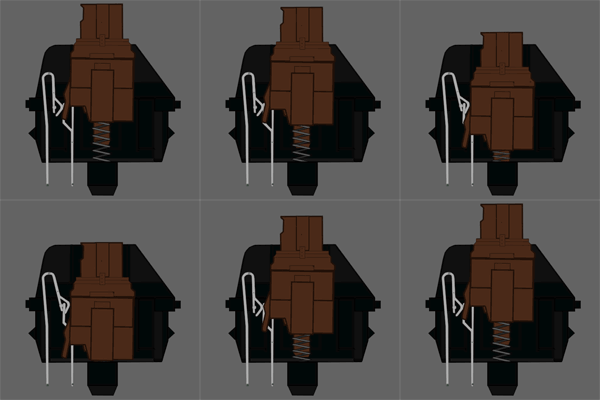
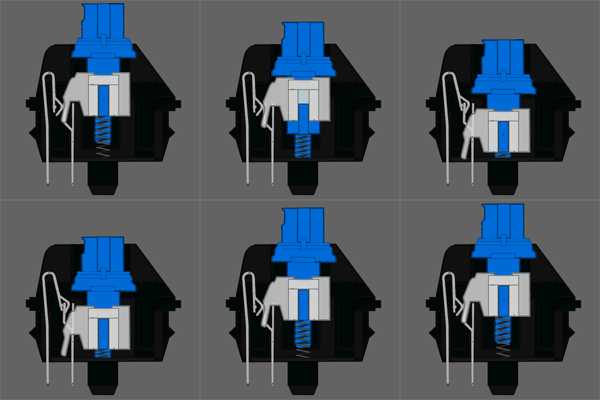
edit: they include the sound of the switches here. I don't hear a difference between blue and brown though http://www.daskeyboard.com/switches/
While I do very much like my cmStorm for many tasks, when it comes down to just typing (writing documents, writing code, etc.), I very much prefer both the feel and the sound of the Model-M. The solid steel plate backing makes it into a suitable weapon, too -- I could probably cudgel an intruder to death with it and the thing would still work for another 30 years. Nice and heavy, it won't slide around or anything even during intense sessions.
Another thing that's great about the Model-M is that the keys actuate at precisely the moment the spring buckles and you hear the "clack!". This means that the keys need to fully reset before they will actuate again. I've noticed on my cmStorm that the Cherry MX switches click just a tad before the keys actually activate. As a side-effect, with some practice, you can actuate a key multiple times without letting it reset, and thus bypassing the click and a good amount of initiation energy.
In terms of feel, the Model-M has a bit more travel, and perhaps a tiny bit less resistance than the green switches (but still far more than blue switches).
Added bonus: the Model-M's circuitry is completely sealed within a membrane, while the actuators are sealed within the plastic housing, and it's got drainage built-in. Like, it has some shallow little canals between the keys, complete with drain holes on the bottom. Did you spill coffee on your Model-M? Whoops! No big deal. Maybe rinse it off with some water and wipe up your desk. No harm done!
Unicomp, the current holders of the buckling-spring patents and the Model-M IP, sell PS/2 and USB variants of the classic Model-M (though rebranded). They're even manufactured on the same equipment. Furthermore, they run considerably cheaper than most of the Cherry MX boards I've seen. Mine was, I think, $90 USD including shipping, compared to $130 for my cmStorm. And, yeah, despite the fact I got it in different colors than the original Model-M, it feels just the same as my Model-M. 10/10, would buy Unicomp again.
One potential drawback to the Model-M, though, is because of its matrix activation, only 2 or 3 keys will register at one time when multiple keys are held. This is true even for the USB model, because the connector is not the limiting factor, but rather the way all the keys are wired. For typical typing tasks, this is not a problem, but if you're a gamer you may want to consider sticking with the Cherries.
Another potential drawback is its size. The thing is huge compared to modern keyboards. To compensate, it's got a handy "pencil tray" up top.
Anyway, hope this helps!
I also totally understand the feeling that we're overcrowded, and that may be true in a lot of cases. However, products do take developers, and to be responsible citizens we can't use a too much space. So it's kind of a necessary evil.
One way this can be assuaged is with a stronger commitment to remote work or flexible hours.
At my last job, being unhappy with the keyboard I had, I brought the Model M to work one day (it was just gathering dust at home). While typing was much more pleasant, I quickly discovered I had to stop typing whenever my coworker's phone rang. This, in turn, quickly became annoying for me, so at the end of the day, I packed it up and took it back home.
The Model M is one of the best keyboards I ever had the pleasure of using, but I would not like to inflict that level of noise to coworkers at the office.
(The best keyboard I ever used, interestingly, was a Natural Ergonomic Keyboard 4000 made by Microsoft. I am not a big fan of Microsoft, but they really know how to build a great keyboard. Unfortunately, this was the only keyboard I ever managed to spill tea on... and on its identical replacement. I took that as a hint that some higher power might not want me to use Microsoft keyboards.)
Elitism and fetichism aside, the sound and key travel is just a matter of preference and at the end of the day they won't make you type faster or help with RSI (the ones with high required actuation force can actually worsen it).
I wouldn't trade my current Microsoft Sculpt for any of my previous keyboards. Both my colleagues and my wrists are glad I switched.
My recommendation is that if you are going to pay a premium for a keyboard, at least focus on ergonomic features rather than gimmicks.
I'm such a fool.
It was so terrible the first time. I wanted to cut off my hands. It went away and I got back to work. Eventually I had to stop work every hour from the pain.
It can't be the keyboard! My precious PS/2 buckling spring model M! I've been using it for fifteen years without trouble! THIS IS THE BEST KEYBOARD IN THE WORLD! I am such a fool.
No more model M, no more pain.
The Atari 800 also had some fun event sounds it made whenever it read or wrote a floppy disk sector or had an I/O error. People got used to those audible feedbacks, just like the physical drive crunching noises and other "side-channel" outputs.
Does anyone know of another keyboard that's as comfortable and all-round wonderful to use as the Model M, but quiet?
This is really frustrating. Because Windows is so foreign, free hackers worked hard to make it palatable and created mingw32, which allows wonderful things such as being able to build for Windows without having Windows. Because macOS is "Unix" and, look! it has a few scraps of "open source" in it, nobody ever felt the need to reimplement its API for free hackers and thus allow cross-compiling.
And no, homebrew is not the answer. People seem unaware that there's much more to Unix than a passing familiarity in the CLI. The different audio and graphics and lack of X, and many other differences in macOS make it a very foreign OS for free development. Porting Octave to macOS has been a tremendous effort of many years that has never really yielded completely satisfactory results.
Anything else isn't easier just because a system is UNIX.
The same porting issues would arise when porting to anything else that isn't GNU/Linux.
These are ripoffs. You can get a Model M from Unicomp for between $80 and $100, which is significantly cheaper, and feels way better than most of the MX keys.
High hat backspace!
----------------------
Let's see here. Let's make our workplace into more of a "Startup."
Modern office environment with no privacy. Check!
Loud noisy stuff and people in cramped conditions. Check!
"Agile" methodologies to heap requirements on Devs the night before they deploy. DOUBLE Check!
After hours work required? Oh you betcha!
Telecommuting as often as you like? Oh hecks naw we don't trust you shifty eyed developers.
Ability to work on side projects for short time. NOPE! Only approved projects thank you.
Good equipment that isn't bogged down my corporate spyware. Now you're kidding me!
Listen to input on prioritizing projects. What do developers know about project planning bah!
Not using this at work since we are in an open landscape. HHKB is a much better choice here.
All the caps everywhere are for modern switches.
Edit: Sorry I'm new to sharing .zip files - uploaded to another site - link updated.
If you work for a company that bought any IBM servers in the last 20 years, there is a chance you'll find something similar (probably not actual model M's, but still damn good keyboards!) in the server room spares boxes.
Speak to your friendly SysAdmin and see if you can strike a deal :-)
Are they programmers? If they are, check for face masks or holoprojectors: they may be dangerous aliens.
Or maybe they're just really strange.
They are quite labor intensive to build. He was never able to find someone with both the manual dexterity, electronics knowledge, and willingness to scrape by on a pittance to be able to live an independent life to bring on as help.
One does not realize how truly annoying the sound is until one sits in a room and has to listen to someone typing on it with reckless abandon. That's how she convinced me to stop using it.
(I'm not sure its use of a global hook stored in an EXE is safe anyway. I think you have to have these things in DLLs, because the hook runs in each process's context, so each process needs its own copy of the code. Obviously it must work for at least some people though... I wonder how? Will have to try building it when I get a moment.)
If it were not for video surveillance, I would've already covered them in construction-foamed them shut. They are obnoxiously loud.
I used to work in a semi-open office with cubicles with people using protein shake mixers and a goddamn espresso machine. The building piped in white noise because it wasn't annoying enough already.
Then I realized I could just leave.
It's a lovely keyboard. It feels like silk under my fingers. Lovely, clicky, noisy silk. It was actually left in the company by a former employee, and I nabbed it at once.
They are being socially polite. See if their productivity dropped, they are out of the office more, they exclude you from events, or if they quit.
Personally, I use Microsoft Sculpt Ergonomic Desktop[0]. Very comfortable, silent, ergonomic and all that.
[0]: https://www.microsoft.com/accessories/ru-ru/products/keyboar...
But cool project!
/tmp/bucklespring/main.c:255: undefined reference to `alSourcePlay'
/tmp/bucklespring/main.c:256: undefined reference to `alGetError'
etc.
http://www.ebay.com/itm/SDL-to-USB-SOARERS-CONVERTER-Clicky-...
If you have a real office, anything short of blasting Slayer won't disturb anyone else.
With a decent amount of enthusiasm, a Model M can disrupt phonecalls being made in another room entirely.
Best keyboard ever, but I also don't take mine to work any more, out of consideration for my coworkers. Also it's really big and heavy...
Seriously though, these keyboards are LOUD. Most of the folks at my office use very loud keyboards, but we don't mind. We all know that we type faster with them, and we all have noise canceling headphones.
Another method is to put a piece of dental floss down inside each spring. Supposedly that reduces the sound quite a bit.
IBM themselves went with regular rubber domes for their "quiet touch" Model M variants, which are unpopular due to not being mechnical.
FWIW, mechanical switches have helped with my own finger/wrist pain significantly, for one major reason: I don't have to bottom out the keys to make them register. The lack of a sudden stop reduces the stress put on my fingers by a significant amount over 8 hours. I can't make it through 8 hours typing on a mac chicklet keyboard, but I can with any of my mechanical keyboards (red, brown, topre, etc).
The durability of a mechanical keyboard also helps make up their up-front cost - where a rubber dome keyboard tends to only last me 6-8 months, I've yet to replace a mechanical keyboard due to key failure.
I also wouldn't underestimate the value of "personal preference" for something you use for well over 40 hours a week.
I have used the previous Microsoft ergonomic keyboard, and I think that a real ergonomic should be totally split, not just angled.
The perfect keyboard would be something like this: https://www.youtube.com/watch?v=u896xlgMpH4
An UltraErgo Wireless Split Keyboard, and set it on the arm rests of a nice chair, something like the chair of the captain in the Original Star Trek Enterprise.
http://technabob.com/blog/wp-content/uploads/2009/05/star_tr...
That is a fantastic keyboard. I was starting to have wrist pains and got the Sculpt. The pain went away within days.
I would like it to have the angle between the two sides be a bit larger, so that my wrists would be completely straight. On the other hand I'm sure Microsoft have a good reason for it being at the angle it's at.
It's a very pleasant keyboard.
Also, auto-hot-key script so that Win+[,],\ is volume-down,up,mute respectively.
Strictly those aren't exactly "keyboard" recommendations, but as well as selling keyboards Matias also sell the switches separately, so you can get a keyboard base to your preferences and solder keyswitches of your choice to it yourself, typically on a group-buy site like Massdrop. Eg I'm currently waiting for the Ergodox infinity drop[1] (split, non-staggered, open-source hardware and firmware, reprogrammable), but there are a bunch of more conventional keyboards available with a choice of keyswitches as well.
-MX Cherry Blues: Their action has the same feel of a Model M (kind of) they only require ~1/2 the force to switch as a Model M. Their sound is also quieter (then a model M) they're still much louder then a rubber dome. It has a higher pitch clip/clop rather then the Model M's thunk.
-MX Cherry Greens: A stiffer blue (commonly used for space bars).
-MX Cherry Browns: Same action as a blue, but rubber dampened to be quieter actually inline with a rubber dome. They still provide the physical feedback of a Blue.
-MX Cherry Clear: A stiffer brown.
-MX Cherry Whites: Somewhere between a Brown and a Blue in sound and force. They still provide feedback.
[1]http://www.keyboardco.com/blog/wp-content/uploads/2012/10/Br...
[2]http://www.keyboardco.com/blog/wp-content/uploads/2012/10/Bl...
Unfortunately I've found that I hit the key rollover limit while typing certain words. For the past year I've been using one of these: https://elitekeyboards.com/products.php?sub=keyed_up_labs,te... — and while not perfect, I really do enjoy it.
I wonder if I could find a USB adapter for one. Microchip actually has an application note on talking ADB with a PIC, and there's probably an Inside Macintosh book on the subject, so if it came to it I think I could make one.
Then I moved to the Model M, and the AEK2s gathered dust in the garage after that.
(At one point, I had a Dell monitor, Microsoft Mouse, and IBM keyboard connected to a Graphite G4 tower.)
I've seen those quiet Cherry MX switches: they just go all the way down, no force feedback at all. Honestly, I'd say they're worse than dome keyboards.
Comparison between the switches:
That said, nothing (silent) quite replicates the action of a buckling spring. MX Blues come close (since they have a piece that "gives" under pressure), but they are not precisely silent (since they have a piece that "gives" under pressure).
They look prety good and I'd like to try a topre keyboard, but they cost the sort of cash you put down when you know you want them for sure. Will look out for one in a physical shop to try out.
I have my own office so I don't care how loud it is.
I sourced and built my own, but I think the Infinity ErgoDox kit ends up being cheaper than that.
It's lovely and noisy. The clicks augment the joy.
While I've scoffed at some that are well over $200, there are certainly more modern conveniences that come with these more expensive ones:
- You (often) can choose the type of switch in the keyboard
- Media/macro keys
- USB hub/ports
- Backlit (if you like that kind of thing)
If you know what you're getting for the price, it's not a ripoff, a price premium, sure. I've had my Das for, I think, 6 years now and it's been flawless. If they're all constructed as well as the Model M and enjoy nearly the same lifespans the price difference is effectively not even a factor in my decision.
As for the rest of what you mentioned, the hub's nice, but macros are what the function keys are for, and I never really got the point of backlighting. But that's just a personal preference.
As for the switches, I haven't tried all the MX switches, but I really like the Model M feel, and the quiet MXs provide no feedback... yuck.
I prefer the buckling spring click/feel over most of the keyswitch keyboards I've tried... if I went that way, would lean towards cherry browns, but that's just me.
I believe it has generic Cherry MX clones, but the regular 4 Professional has genuine Cherry MX keys, but costs $170, which is kind of steep. Then again, the front panel is aluminum, which is kind of nice. I personally have this keyboard and it seems like a quality unit. It's very heavy. The only thing that sucks is that the keys aren't back lit.
You'll find a lot of "Original IBM" keyboards that were built by Unicomp in license. I have a Model M4 from 2000 that was already built by Unicomp, sold by IBM with their own branding.
Also, I just realised my keyboard isn't quite as noisy as a model M. I don't think it has quite the same spring mechanism. It's clicky, but apparently tolerable.
He sells the kits at a much more reasonable price. But if you want him to build you one, you definitely pay a premium.
Love the keyboards though... despite some QC issues.
Eventually I moved away to USB keyboards and hated the mush feel and looked around for options but balked at the price. Finally I ran into a couple of guys who'd made the jump (not to Das though) and I started looking around. I found the DKs to be really good looking and I really like how they feel (I've got the clickiest switches they offer for the Mac).
I think over $200 for a keyboard is crazy as well, especially if it's because people are getting conned into thinking they're getting more than they really are, but I won't begrudge someone's decision if it came down to, "I know what I'm getting and I'm fine paying this premium because of [insert deciding factor]"
I wouldn't do it, but 10 years ago I wouldn't have spent $120-150 on a keyboard either.
If you can find a typewriter of your own, he sells kits for much, much less. They don't require any soldering and the logic board comes pre-programmed, you just have to pay attention to the instructions.
Having nothing better to do this evening I wrote my own version, which should run fine on Windows 10: https://github.com/tom-seddon/GfyKeys
It's very possible this isn't quite the same as the original, which I've still yet to actually experience - however you do get a click each time you press and release a key, so it's presumably not a million miles off.
Those would be Topre switches. Which makes the keyboard worth more than $200. ;)
They are good switches, and do rely on a spring, but they are quieter. And more expensive.
While I can type without looking at the keyboard 99% of the time, sometimes I still need to look down to get my bearings when pressing some of the lesser used keys like the optional media keys, etc...
Of course, that's a double-edged sword, since I've also activated them while just resting my fingers on the keyboard just a bit too hard.
That is where I learned what actually means "portable" UNIX software, specially if it needs resources like audio, external hardware or GUIs.
There isn't the extra chunk of free riding plastic that helps generate a lower sound tho. I was purely wrong the rubber wrapping, that was just me being ill-informed.
Mind you, if you're in a noise sensitive environment then browns are definitely what you want.
Buckling Springs is the only switch where the break, sound, and switch engage all happen in the same instant ,by the same mechanism (the spring buckling).
Often the "lost productivity" isn't factored into the cost of open plan offices, mostly because it's to complex I think. Interestingly the gain from better communication is always factored in as a positive.
I do know people that prefer open plan offices. They all have headphone on for a large part of the day though. People that prefer an eerie silence, like myself, aren't normally not considered when planning office building.
>> It's extremely cheap to built and operate.
Peter Drucker is often attributed the quote "Culture eats strategy for breakfast". For some reason many organizations seem to believe that in the modern office, furniture will eat culture and turn it into an Aeron chair clone.
They might hate having to pay a lot of money, but they'll find a way to get even.
However, if people have to make or take phone calls, it can become really annoying quickly. Try to focus with two or three people sitting around you talking on the phone. Especially if one or more of these people talk to people who are on construction sites or inside industrial plants, so you have to talk rather loudly so they can understand you... On a few occasions (rarely, though), I have just put on headphones and listened to white noise to drown out their talking.