Why doesn’t the clock in the taskbar display seconds? (2003)(blogs.msdn.microsoft.com) |
Why doesn’t the clock in the taskbar display seconds? (2003)(blogs.msdn.microsoft.com) |
for timing things.
For example, it's super easy to check a heart rate if you don't need to provide timing or rhythm.
Or waiting on ramen , or steeping tea. Lots of reasons.
As a MacOS user for seven years I can't say I've ever had that issue. Certainly not enough to need the seconds to be an indicator. I've had my system completely lock up maybe four times and those times my mouse refusing to move was enough of an indicator.
Heck, right now it's been two and a half months since I've rebooted... and probably a year since I've rebooted because it froze.
I'm not an Apple fan boy either. In fact my next computer will probably be Linux. But I have to admin the last three Macs I have owned have been great computers.
I understand that everyone might not want to see them, but this isn't a great argument for leaving off a feature that is surely useful in other circumstances. The article is interesting, but I don't think these sort of technical explanations Chen gets into should be accepted as valid reasons to leave out a feature. They're interesting in context, but we should all be able to recognize that showing seconds is a good feature for a clock. Even the team in question would have left the feature in if it had performed OK at the time, which indicates they agreed with its utility.
* Timing things, such as software execution
* Starting a phone interview on time
* Timing a trade just before the market closes
Down to the second?
1: https://developer.apple.com/videos/play/wwdc2013/712/ (I think the relatively short graphics section mentions this. Can't seem to find the talk that goes into it in more detail...)
Obviously real programmers learned all this decades ago - same for the "NoSQL" followers who after years of struggling with piles of cr.p finally (re)discover what a true ACID-capable database is...
I'm just waiting for the JS world to rediscover threads and proper multitasking, but given the track record I don't expect that in the next decade.
Seriously, the JS world is a hellhole of disasters, and many of them easily preventable if the people acting as "evangelists" actually had a bit of clue about what they're talking. And to top it off, a JS-only implementation will never be nearly as fast as well-written C or even C++ code, no matter how hard "evangelists" push it.
Another story from the time is that I went to CompUSA (as a 'spectator') on the night of the Windows95 release. (It was a midnight release and the stores were open late.) There was a line out the door that snaked around through the store past the Windows 95 boxes, the Plus Pack, boxes, MS Office, and then the memory upgrade desk...
This led me to a few other videos: https://www.youtube.com/watch?v=2owaKucyU1Y
Sigh. The 90s.
Even given that i can't help think computing was less complicated back then.
We worked on optimizing it but couldn't find much to optimize. Then the founder took out the code that updated the progress bar as it compiled and compiles finished 10x faster.
This was on Mac Plus.
The 68k in the Plus is an 8MHz 32 bit processor with 16 bit data bus, 4 clock cycles per bus access if there are no wait states, and most instructions are more than one word long. There's not a whole lot of time to do useful work!
I also, personally, can't stand to have distractions like that on my screen away from where I want to focus.
Good luck with that with quadrillion services chugging away in the background including file indexing service and all the spying bullshit.
In Windows 7 they've finally given up and the UI lets you easily scroll up and down through months after clicking on the clock. (Edit: sorry I meant Windows 10)
You mean seen sense? How often do you change the date or time on your computer? Probably never since it's automatic these days.
How often do you want to know the date, or what day of the week a day is? I'm guessing a lot more than never.
The old UI was stupid.
You may think it is far fetched, but try a minimalist XFCE or LXDE desktop, run powertop updating every 5 seconds (so that screen refresh from powertop do not alter your measures) and see for yourself.
For that same reason, you may want to disable the blinking cursor, and conky, and other gizmos that blink things on the screen.
I mean, the article describes why in versions of Windows from an era that was much more memory-constrained. Even in 2003, Windows 95 was as old as Android 2.2 is now. I configured my task bar to display seconds and can't say Cinnamon is hogging that much more memory or CPU because of it.
http://3.bp.blogspot.com/-9pDonc_uipU/UEoMOdhA-eI/AAAAAAAABw...
...and invented their own:
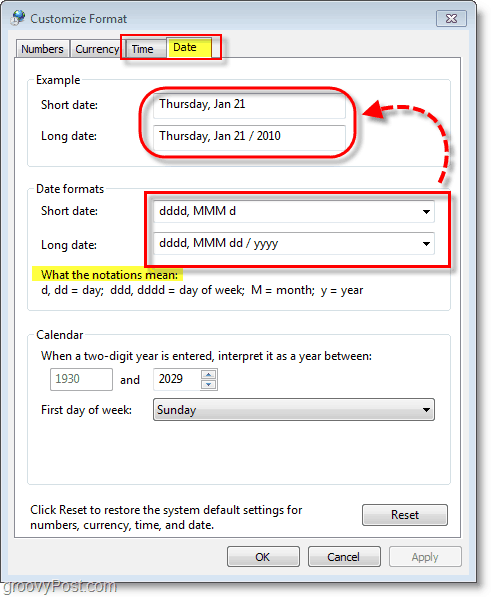
https://www.groovypost.com/wp-content/uploads/2010/01/image_...
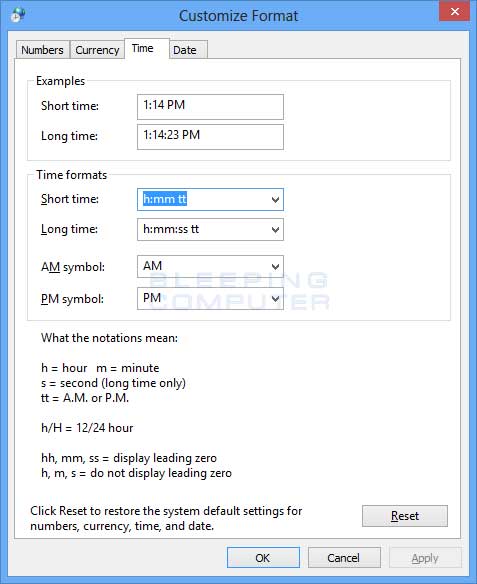
Actually it is possible to write your own format string, since those are comboboxes:
https://www.bleepstatic.com/tutorials/windows/customize-wind...
Also, I would agree that the Windows UI is better since it provides a short description of the format letters; but they could've just as easily done that for the commonly-used strftime() specifiers too, with perhaps a link that opens a popup with all of them. The live preview at the top also helps.
Do you start staring at it at around 17:20 (or even earlier?) and wait for it to hit 17:28:15, or is your internal clock so good that you only have to start staring at it at 17:28:00?
Either way, why spend time staring at an on-screen clock if you also could spend that time walking to the train station, or even walking on the platform?
I would find some tool that allows me to set daily alarms at around 17:15 (as an early warning to finish whatever I am doing) and 17:28:15 (as a sign to leave now), so that I wouldn't have to waste time staring at that clock.
Like Visual Studio Code uses 12% CPU in idle due to cursor blinking? https://news.ycombinator.com/item?id=13940014
In comparison the Windows Shell (up to Win7) is a lot more efficient and coded in C/C++.
I wonder if there's a parallel universe out there where Windows 95 never happened and Microsoft went out of business somehow. That would be the universe where the 90s were a truly wondrous age.
Both work well with JavaScript based implementations of HLS, such as VideoJS's HLS plugin:
http://www.mpegla.com/main/programs/MPEG-DASH/Pages/Intro.as...
Otherwise, include a js player with HLS support for other browsers.
Besides that, I would rather complain that Apple is using an obscure format than complain that Mozilla and Google don't support an obscure format.
EDIT: sorry, it seems mobile Chrome is supposed to work, but it just... doesn't. Still don't see any reference for firefox, though.
I actually feel what's going to happen is the JS community will start implementing WebASM and other very low-level mechanism to improve the speed of slow software components and, given enough time, will eventually just have entire binary applications being delivered through the browser (automatically installed, without asking you.)
We'll go from `yum install software-suite` to `https://www.software-suite.com/` and the results will be the same. We'll have gone full circle.
We need to just skip all this JS and other web standards nonsense and skip straight to the writing Golang, Rust, C, whatever, that is delivered (as a binary) through the browser and into a nice little sandbox that exposes system level APIs (notification, temp file storage - everything we can already kinda do in JA now) so we can get on with a faster, better web.
(Kind of makes me think we have this now: Docker/containers. Hmm... hit an HTTPS endpoint and a Docker container is downloaded and the application is launched...)
Holy crap the superiority complex is just gushing out of you. Sometimes it's just incredible seeing how much shit "real programmers" will throw at the "fake programmers."
The Electron platform is popular because it's easy to work with when building portable GUIs. It's especially easier for webdevs who use the same languages all the time. They can accessibly hack on the editor, create plugins, etc. Just like Java devs use Eclipse and IntelliJ, and C# devs use Visual Studio, and Obj-C / Swift devs use XCode.
If it's so easy to build portable GUIs the "right way", why are Slack, WhatsApp, Google, game producers, hardware vendors, browsers, etc all using this technology?
Also, I don't understand why you keep complaining about all of these Electron apps. Do you work on desktop GUIs yourself? Have you built GUIs that hook into mainly CLI programs like many of these Electron apps?
Do customers really want to trade performance for actual money? Are people still browsing the fatweb?
Well, browsers didn't have proper vertical centering for UI elements for ages, too. Not to mention it's between a PITA and impossible to do "simple" things like styling a file upload button (only works via pseudo CSS on Chrome) or cross-browser styling of a scrollbar (usually people tend to handroll JS stuff, which is expectedly slow and unintuitive).
> You're best bet is to pay a consulting company tons of money to make a GUI, which you will struggle to keep updated.
It's the same in the Web sphere, with the added difference of clients not simply accepting "you cannot style a file upload button/input element cross-browser-like", they will usually answer you something along "it's the Web and HTML5 after all!!!". You will always need specialized engineers, designers and UX designers for a well-working app, no matter if native or web.
(But yes I agree with you that C++ GUI toolkits are a desaster, especially when cross-platform! And especially the build tooling coughs at autotools)
A faulty update from one of our security software vendors caused a once-per-hour kernel panic and forced reboot for a day or two. It was really nice.
(Obviously none of this is the fault of OSX or Apple but I would kill for 2.5m of uptime on my work laptop).
Ordinarily I wouldn't do this and just punch out on a gig (because seriously, it's that annoying and that effectively-useless), but we were a recently-acquired startup subsidiary, so we were also our own IT shop--the CTO actively approved.
Worst case, sometimes the layout of my windows gets messed up and I have to move them around to get back where I want them to be.
The only major issue I've had is sometimes bluetooth gets confused and it takes me a few minutes to get my track pad connected when I switch between home and work. (by a few I mean almost half an hour :( )
My workaround has been to just open the Bluetooth panel via Alfred and so long as Bluetooth has not totally shit the bed (Bluetooth has turned itself off and the Turn On button does nothing) my mouse is connected in less than 30 seconds, often times under 10.
Hyperswitch combined with SizeUp works wonders in this case (you use Hyperswitch to directly target individual windows and SizeUp to properly full-screen them).
Why Apple still doesn't have proper keyboard-only management for windows (Cmd-tab only allows to select the foreground app, not individual windows of it, and what Apple calls "fullscreen" is an abomination) is way beyond my understanding.
What mac do you use? Some of them have issues.
Also many mysterious crashes can be RAM problems.
As to the "cool kids", they exist in every corner of things that get done by people. I think WebASM will open up to higher-level tools once it's widely available, and signalling between the UI layer and WebASM code becomes easier to deal with.
Only "lowest common denominator" comes to mind.
But to the point of this thread, what bothers me is the transcendence of web tech outside of browsers, where a technology known historically for terrible practices with a very low barrier to entry is now considered the "assembly" of all these platforms, such as mobile and desktop, and the developers, that until yesterday could only make a web page that loads 20MB of dependencies to show a few paragraphs of text, now call themselves "mobile developers" or "full-stack developers".
As to being able to target mobile/desktop, why not? I mean with Cordova and Electron you can target 4+ platforms with minimal code variance. And in most cases the performance is good enough, until you need more. And React-Native can go even further towards native/compiled language performance, with slightly more variance.
Yes, there is more memory and cpu use than alternatives, but there's also a real cost in developer time, and time to launch. In many cases it's the difference between having platform X, or not... the alternative is nothing, not something better in most cases.
So in order to create demand for consultants the ecosystem repeats history and willfully messes up... and we all know where the consultantocracy finally ended up goes looking at Enterprise FizzBuzz
False. Cmd-~ will switch windows within an app. Control-<Left> and Control-<Right> will move left and right between spaces (including fullscreen apps). I use these hundreds of times a day.
I do wish we had more robust features, like keyboard-based window placement/resize. As far as I can tell, third-party tools are the only way to enable that. But I find the above perfectly adequate for 90% of what I do.
(I usually have multiple browser, terminal, and/or editor windows open, but I'm usually only using one of each at a time. Dragging the entire app to the foreground almost invariably means that some window that I'm not using and don't care about ends up on top of a window from a different app that I do care about. That is, me indicating that I care about a particular window of an app doesn't imply that I care about all of them, but OS X thinks it does.)
Ew.
I just checked, I read about this at http://rachelbythebay.com/w/2016/04/17/unprotected/.
I must admit that I am very curious why "git and 64 other files in /usr/bin are all the same size (18176 bytes on my machine)", why dtruss and strings fail, and what behavior changes when you turn rootless off.