From Markdown to remote code execution in Atom(statuscode.ch) |
From Markdown to remote code execution in Atom(statuscode.ch) |
- The potential impact of an XSS or other security exploits is much higher. You can limit the impact of most of these with additional layers of security, such as running untrusted html in isolated environments with node integration disabled. However, also remember that...
- Many security features are opt-in. Content security policies (CSP) are a good example. Pages without a CPS default to allowing anything, which sort of makes sense in browser world for backwards compatibility, but is not a good idea for desktop apps.
Not only will this be more secure, it'll also be 10s or 100s of times more performant.
There have also been plenty of exploits in applications written entirely with native code.
However, to say that browsers are secure is pure nonsense. Browsers get exploited all of the time, I'd argue that this is not as big of an issue as it could be because browser vendors respond to new vulnerabilities very quickly. WebGL, for instance, is still a massive mess in terms of security.
This has lead to some pretty bad hacks. I'm not sure what more you could want really, a vulnerability where people can be punched in the face over the internet?
Great idea! Now show me an application that can be extended in the same way Atom can, that didn't have 30-40 development behind it...
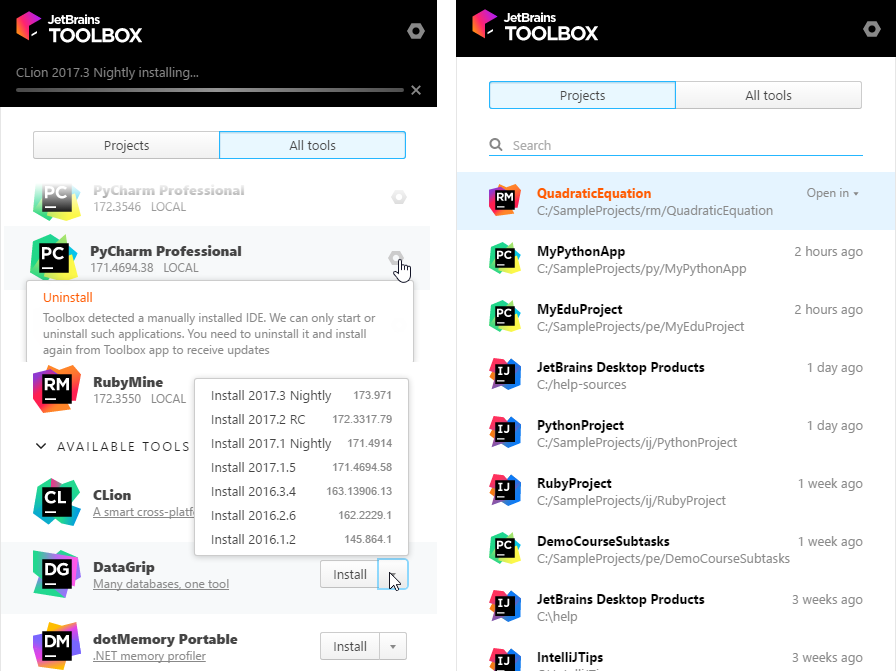
You couldn't be further from the truth. Have you seen the Blizzard app (Qt) [0]? The JetBrains Toolbox app(Qt) [1]?
Also, here's a small app I wrote in kotlin and swing for my GF who wanted to download music from youtube without installing crapware downloaders [2]. You'll notice it has a custom window frame, support for drag and drop, and fully customized table and buttons. I spent about 5 hours styling the UI, and half a weekend writing the entire app.
Yes, I agree, dowloading music from youtube is immoral and illegal, but I'm showcasing the UI so please ignore the underlying purpose of the app.
[0] http://l3.yimg.com/ny/api/res/1.2/v.xvnI7eUsLskyHopY6Kkg--/Y...
[1] https://www.jetbrains.com/help/img/idea/2017.2/rm_py_toolbox...
WxWidgets [0], bindings in: Python, Perl, Ruby, Lua, C++, C#, and others.
Qt [1], bindings in: JS, Python, C++, and others. Also has QML to make things easier.
Tk [2], bindings in just about everything. Included in most Python distributions.
Kivy [3], Python only.
Java/FX [4] Java and other JVM languages.
If your main problem is the duplication effort between the web and an application: Qt is the simple path. Qt includes WebKit. Everything Electron can do, Qt can do, but faster and smaller.
[4] https://docs.oracle.com/javafx/2/overview/jfxpub-overview.ht...
It shits me that it is a research task with all the attendant uncertainty about whether or not I did in fact make it secure.
I do appreciate that security is complex and even such a document would not guarantee security, or that you had not somehow created your own security hole, but I just want to do the very best possible effort at security and currently that is too hard with Electron.
UPDATE: this post has led me to attempt to redesign my application to not use Electron. I just can't afford some misconfiguration or coding error leading to user machines being cracked.
The way I'm using electron for my pet projects is only passing untrusted HTML to DOMParser and then sanitizing with strict whitelist of attributes/html elements. Only then will any HTML code get interpreted by the browser engine.
Feels somewhat safe, but I haven't read the bug list. :)
Image format decoding and HTTP/TLS/request processing layer bugs may be other source of issues in any case. But hopefully that runs in some restricted environment.
Because end users are soooo good at that?
https://chromereleases.googleblog.com/2017/07/stable-channel... https://chromereleases.googleblog.com/2017/09/stable-channel... https://chromereleases.googleblog.com/2017/10/stable-channel...
That means I'm stuck with the web browser version of Slack, Skype, Signal (going away), and so forth, which is a shame. But it's better than the security nightmare that is Electron.
I wish developers wanting to make cross platform GUI applications would look instead at Qt. It's extremely easy to use, really fast, and generates great GUIs. It's been around for ages and continually sees updates. Usually people who see the Qt light are pretty satisfied. It can also be used from a wide variety of languages, in case you're not into writing C++.
I sort of suspect that Electron's popularity is due to it being accessible to the hordes of JavaScript developers who otherwise wouldn't have had any clue how to make desktop/native applications. However, do I really want to be running unsandboxed xss==>rce code written by clueless devs? No, no I do not. So, in the end, refusing to run Electron apps turns out to be a somewhat reasonable security posture.
Wonderful :)
I guess whitelisting only the things they are absolutely sure are harmless is way more work.
Basically the experience of a web developer every day, no matter how experienced you are.
But it's hard to restrain yourself from doing: allow any (possibly except some) at any stage of whitelisting.
Even to a point of not allowing string of any characters as attribute value.
But if the user is already downloading your package, why bother with an exploit? You’ve got all the permissions allocated to packages (which I imagine are most permissions). You can just execute the malicious code directly from the package.
Edit: nvm
> So a malicious attacker would just have to register a bunch of malicious packages for every letter or offer a few packages with similar names to existing ones. As soon as someone clicked on the name to see the full entry (not installing it!), the malicious code would already be executed.
The challenge in language design is to erect the right number of boundaries and barriers, in the right places. Too many, and you get people complaining that they can't write Rust because of the borrow checker. Too few, and you get people vaporising multi-million-dollar Etherum contracts by mistake.
This is disingenuous; the whole browser infrastructure is present to run an application. This shouldn't be surprising because that is exactly what a browser is: an application execution environment.
http://blog.llvm.org/2011/05/what-every-c-programmer-should-...
http://blog.llvm.org/2011/05/what-every-c-programmer-should-...
http://blog.llvm.org/2011/05/what-every-c-programmer-should-...
But the rise of web apps, and Electron along with it, have turned the Linux desktop from a "you need to dual boot or use wine" machine into one where all my tools and apps are Linux compatible and have feature parity with Windows and macOS.
I also wish Qt would see more use, I also wish more people would write desktop apps using desktop frameworks when it's meant to be a desktop app, and I really wish people would start writing tiny CLI apps in nodejs and include 70 dependencies. But truth be told, I'm happy to live in a world where I can do 100% of what I do on Linux without feeling like a second class citizen.
I think the "Web on desktop" paradigm is the future, even if it's currently a bleak one. Ten years ago, it was becoming pretty clear that Javascript would be the future, and at the time that was a bleak prospect -- but tooling improved and today, things like Typescript, React, the plethora of incredible development tooling and excellent cross-platform compatibility have turned what used to be bleak into an excellent environment.
There's a lot of improvements that can happen with Electron, if rather than fight it we actually embrace it. Running 10 different web browser engines for 10 different apps may be silly, but what if Electron was global to the desktop instead of included in every fat app?
You'll note that Google has been dipping their toe in that water for years with ChromeOS; Mozilla also tried their version of it with FirefoxOS, which failed for a plethora of reasons that don't undermine the concept at its core.
Basically, JS on the desktop is in the same uncanny valley as it was on the web a decade ago. It's ugly, slow, overwhelming and changing too fast. But there's an end goal there, which doesn't have to suck.
The adoration of Electron apps among Linux users will be the final nail on the year of desktop Linux.
did you mean /s/start/stop/ above?
There really is no competition and any claim to the contrary would need to offer more than a cross platform desktop app.
In fact none can be applied except ease of use and it's about the same, until the app grows and one realizes that the typical JS architecture is as easy to structure as a pile of mush.
Electron supporters are really taking the piss in this thread. Slapping together a bunch of statements which can be easily disproved doesn't qualify as an argument.
Look, let's not kid ourselves, we all hate JavaScript like it's the plague, but no other framework comes even close to the ease of CSS/HTML and a drop of JavaScript for interactivity (transpiled from a sensible language), when it comes to GUI development. It's such a fucking embarrassment working with Gtk, Qt, Tk whatever have you, it's not even funny. Even native mobile dev (Swift/Java) is easier through a web interface, because nobody wants to have to remember that you had to "drag click from here to your source code" or "add this to your xml file to make it accessible".
Honestly, Electron is a shitty resource hog, but it is a trillion miles better than what the current offerings are.
C#/F# would be a great candidate for this kind of thing too.
On the other hand you have JS with a document markup language combined with style sheets.
And the first one is embarassing you say. And declaring UIs in HTML and CSS is easier than in QML.
Why do you even post this. I mean... it's trivial to disprove it. Do you subscribe to the idea that if one makes enough noise their arguments will win out?
Is this a joke? I can't use either of those for more than 5 minutes without wanting to commit self-harm.
it is a very known fact for all unix grey beards (insert more inclusive analogy if you can think any) that containers and fat binaries lead to way more code rot than anything else. and consequently more bugs and security bugs.
I blame this fad coming back on apple. linux and even Microsoft were happy with shared libraries, until osx adopted the bait and switch tactics of Microsoft and got the whole industry by playing the "but I am unix" tune. and with it the whole (webdev) industry was back to fat binaries.
then people started to realize they dont have to find out the source code to patch that old application just because they have to patch openssl or something. they can just release an entire image! and they have no idea they will make it even harder to have a legacy build when that other openssl bug hit. but for now, everyone can be agile and live serverless! and users now have to update the OS, the few shared libraries, and every and each one of their fat binary applications and container images!
good luck with that
The co-inventor of Unix, Ken Thompson, and the Unix team engineer and author of The Unix Programming Environment, Rob Pike, are both big advocates of static linking. They designed Go and made a big point of emphasising static linking. Pike: "Shared libraries are obviously a good idea until you've actually used them. Whether it's obvious or not that they're a bad idea is mostly a matter of how close you are to trying to get them to work." He wrote the first windowing system for Unix, which surely qualifies him as a greybeard.
It doesn't get more "unix greybeard" than Ken Thompson, the original bearded creator of Unix. And his latest project suggests he is pro static linking.
The solution, is to bump the version in the dockerfile, rebuild, and deploy.
This is especially useful when you want to test the latest version before deployment or when you need to deploy to many machines.
Conversely, using a VM and trying to patch it means the updates are not part of the normal development process so you would need to spin up a new VM to test before patching production VMs.
Now sysadmins and developers think differently so this is purely subjective (note I’m a dev), so surely there are merits to the other approach, but I prefer the container approach.
That sounds like a mild form of swatting, which is already a thing.
If the developer uses Electron only to open the application's own html files and doesn't render user-provided HTML anywhere, then there won't be any XSS vulnerabilities.
You have your unshakable opinions and I’ll leave you alone with them.
Using cargo always makes me feel at ease when writing Rust. Haven't dabbled with linkers though.
It is neither! Enjoy your music :)
That's true, but the argument was never about how complex applications are. It was about how they look. If you want an `idea` how well a swing look and feel scales with the complexity of the application, look at the IntelliJ IDEs.
Not to mention the irony of complaining about performance, when the promoted alternative is electron...
If you go back a few decades, you're competing against vi/vim and emacs, and there's no way you can say VS Code (and atom) can go against the "usefulness" or even productivity of either of those editors and their development environments.
containers: update the lib, rebuild.
sane software: update the lib.
now, to the complicated case which containers claim to solve, when the lib update breaks compatibility.
container: update lib, application dont compile, leave like that because we think we are not vulnerable anyways.
sane sotware: update lib, application break, have to fix application because shared lib will be updated no matter what.
I would argue that container orchestration infrastructure is objectively more secure than plain old servers; I get where you are coming from, but this tech is solving real problems, the cool aid is good
1) Most users don't actually give a crap about "UX guidelines". I promise.
2) "UX guidelines" are, in my opinion, why our user interfaces continue to suck.
For example, IFileDialog maps to a Cocoa dialog on macOS, file picker on UWP, open dialog on Win32, document selector on Android and so on.
Yes, it takes some initial effort, but it only needs to be done once.
Do you need to design 5 designs that include 5 different buttons, 5 ways of navigating through the app, 5 different sets of icons, 5 different styles of animation, etc...
Hell even with a file picker, what happens when you use it on a platform that doesn't really have the concept of "files" like iOS or up to recently Android (at least in what is normally exposed to the user)
Roll in various versions of each OS and you are up to needing 10+ ways of doing most things. How are you supposed to create anything even remotely complicated?
It needs to be redone for each platform every few years as apis and visual styles change. Cross platform libraries are notoriously hard and usually end up in the uncanny valley (qt, swing etc).
Platform vendors of course any devs to buy into just one platform, they want and need the lock-in. Using web UI is a way to sidestep that.
Most applications are really crude in their design, and do not target large international hip demographics.
If you didn’t even take the effort to get your interface with your user (read: customer) right, how lazy did you get with the parts of the app I can’t see ?
A bad UI is a huge smell. In my experience there is a 1:1 relationship between the quality of the UI and the quality of the software as a whole.
Well, it wasn't about being "better", it was about not looking like shit.
> The Blizzard app does not look good and its performance is vastly worse than most Electron apps I've tried, so the irony eludes me.
Well, Visual Studio Code used to drain battery life for blinking the cursor in the background. But again, it was never about performance. My original argument was that newer 'native' applications written using Qt or swing can look just as good as web based UIs
* clojurescript
* f# via fable
* c# via different means(even an MSIL compiler)
* Golang
* etc
I mean, clojurescript and F# are bomber if you want functional. Typescript may give the best interop with existing packages, but I've read good things about F#'s .d.ts file support for creating type providers. In any case, if the lang you pick creates a bit of extra work that's probably small beans compared to the work required to get all of what parent described with completely separate languages and platforms.
[0] https://github.com/jashkenas/coffeescript/wiki/list-of-langu...
Naturally there are limits to how well you can retrofit something into a language compared to having that feature there from the start...
Nowadays you don't even have to use JS/TS, there are many languages that target JS and have decent bindings to its ecosystem, such as Scala, Purescript, Clojure. This doesn't seem to be the case with Qt which lacks decent bindings to languages other than Python.
You might wanna read that back to yourself. Now replace it with any language you hate, and then tell me how that statement makes any form of argument at all (it doesn't...).
It's like saying "I loathe Linux!!" and knowing nothing about it; sure, but in this industry, you're going to have a tough time :)
What you did say is that Qt or Swing apps looking bad cannot be further from the truth. If that were the case, you should be able to rattle off dozens of beloved, beautiful, complex Qt or Swing apps. Most cross-platform UIs (including those based on Electron) look and behaves poopily. The few that don't are the result of exceptional effort and focus.
Unless someone puts in the extra effort to style the application, nothing will look consistent cross platform.
And if you want "native, consistent, desktop applications" (for the current platform), Qt has that out of the box and Swing had a native look and feel that looked pretty consistent on Windows 7 at least.
To be fair, I did change it a bit later to use Open Sans .
https://books.google.co.uk/books?id=vPvhzDqZlaAC&pg=PA174&lp... (Spolsky)
See the Office related talks at CppCon 2015 about how to write portable code using what Microsoft calls the hamburger model, as part of their migration to a common codebase.
Basic a shim layer for low level OS APIs, the middle layer with the majority of code and another shim layer for UI APIs.
Microsoft calls it hamburger design, and has held three talks at CppCon 2015 presenting how they unified their codebase across all platforms. They are available on YouTube.
Not sure I agree here. There are a great many browser features (e.g. web speech api for recognition and tts, webrtc, etc) that are just not lowest common denominator. Even if we stick with UI only, features like cross platform vector graphics are not trivial. Of course some libs like qt abstract it, but you're back to your same complaint except it's qml, css, and js (or often times worse, c++ if using widgets)
Cursors and styluses are accurate, but fingers are not. So, if you make buttons sized for fingers, they feel awkwardly large (takes large hand movements to change between UI components, and the spacing means more scrolling or pages of UI), but if you size them for cursors/styluses, they are frustratingly small targets for touchscreens.
You can probably assume that most devices in portrait orientation are that way so they can be held in one hand leaving the other free to work a touchscreen, so you only need to handle three of the four combinations for a comfortable user experience in those regards.
However, there's more to it than that. Desktop users often run apps windowed, while phones tend to omit that option entirely. Mac puts the menu bar at the screen edge regardless of the window size/position, but other desktop/laptop OSs usually put the menu bar within the window border. You can remove the menu bar entirely and draw a hamburger button into your UI, but desktop users have the expectation of a menu bar and the change in convention will make the app feel like an outsider.
A desktop/laptop user will never try a long press and don't have a menu button, both of which have been used to hide extra functionality on phones, but they often do have a keyboard, and there is a massive list of keyboard shortcuts that they will automatically use. Desktop UIs have a logical tab order and that selection can be moved with the arrow keys. Cut, copy, and paste function as expected. On windows, F2 almost always means "rename selected item", F1 for help, alt-enter to toggle full screen, and so on. What about the multitude of multi-finger phone/tablet gestures? You have two very different modes on input, and users' muscle memory expects your app to fully support whichever one they are using. As an anecdote, I tried writing something in an Electron app's text box, then went for ctrl-left to jump back a word, but instead it caused a page navigation and lost the entire message I was typing. That was a frustrating "this app is an outsider on desktop" experience to me.
Your decision is effectively mediocre everywhere or customized to fit the conventions for each platform.
Most of it actually written in Assembly.
If you must run on every platform for whatever reason, there is Rust, C, C# (Xamarin), etc.