Xi: an editor for the next 20 years [video](recurse.com) |
Xi: an editor for the next 20 years [video](recurse.com) |
Solution in search of a problem.
I haven't run into an editor performance issue in more than twenty years.
I will gladly trade a hundred text editor performance fixes for one web browser performance fix.
If the issue is the claim that Eclipse/Atom/PyCharm/JetBrains products are fast enough for you, I couldn't disagree more.
If you'd follow either chrome's or firefox's changelog you'd also read about constant progress in optimizing their browser engine and dev tools.
Can you provide an example? Because I've worked on > 1MM line projects in IntelliJ with no performance issues, or at least none related to text editing.
I certainly wouldn't consider any of those toys to be more modern than vim, sublime, emacs, etc. Newer maybe, but not more modern.
So first I have to create a problem for myself by using a "modern" editor, and then instead of fixing the problem in the obvious way (going back to the normal editor that works efficiently) I should wait around for something like this.
> If you'd follow either chrome's or firefox's changelog you'd also read about constant progress in optimizing their browser engine and dev tools.
I.e. it's not obvious from the unchangingly crappy browser experience itself, so we have to convince ourselves by believing the changelog.
I'd love to see this project continue and be a success. I think there is plenty of room for yet another text editor.
Here's where I'm going to be a bit of a party pooper.
Pragmatically speaking all of the great stuff Raph is talking about doesn't really matter. What Raph cares about are the kind of things people who build text editors like to geek out on and again that's all great.
Imma let you finish but VSCode and Atom and the entire Electron ecosystem have once again proven that a sub-optimal but powerful platforms with low barriers to entry win most of the time.
I'm rarely impressed by software projects (close or open) and I'm even less often impressed by Microsoft but what they've been able to do with VSCode in such a short amount of time, and the VELOCITY with which they are continuing to move means that for all practical purposes I will probably be in an Electron based editor for the foreseeable future.
I'm not saying I don't want Xi to continue to grow and be as great as it can be, I'm just being pragmatic.
Unfortunately that's not true. If only MORE people that build text editors actually DID geek out on such things. Alas, we have 30+ years of editors that got all those wrong.
>Imma let you finish but VSCode and Atom and the entire Electron ecosystem have once again proven that a sub-optimal but powerful platforms with low barriers to entry win most of the time
Well, they don't win with me. But even if so, I don't see why you can't have an optimal platform AND a big ecosystem. Or how json-rpc (which is what the plugins will need to talk to) is a high "barrier to entry".
The momentum there eclipses... Eclipse, as well as many other closed and open source editors.
If you don't see the Electron ecosystem as a winner today would you say they'll have won if all editors stay at their current momentum of new features and bug fixes?
In the 1980s and 1990s the i386 ISA had tremendous velocity, which is why it still exists whereas DEC Alpha does not. In contrast, to the situation with microprocessor ISAs, it is practical to use a text editor without a lot of velocity -- or at least it is practical for me because of the way I use my text editor: basically, I just want something with a clean internal architecture that is as easy for me to learn how to modify as Emacs currently is.
Modifying or customizing vscode has a low barrier to entry only if you already know web technologies. if you do not, then it has a very high barrier to entry compared to most other text editors.
Based on this video, I feel I'll almost certainly be using Xi for most of my editing in the future.
At least according to HackerRank's "2018 Developer Skills Report"[1] 67% of developers used VIM with only 4% and 2% using VS or Atom.
Stack Overflow in last year's "Developer Survey Results"[2] does align with your opinion however. Sooo... \_(ツ)_/¯
[1] http://research.hackerrank.com/developer-skills/2018/#insigh... [2] https://insights.stackoverflow.com/survey/2017#technology-mo...
But for extremely large files, I use EditPad Lite.
What looks nice about Xi is that the next cool editor can be built on top of it and leverage it's stability.
I've been working on LA*P based systems for almost 20 years. Been the head cheerleader of the Unix is the IDE camp and thought I'd never need any editor other than vim. Up until about 6 months ago.
The sad truth is because of the way modern software is engineered and this even includes web sites written in PHP (try magento 2) some modern code bases are really difficult to traverse without a decent IDE and a couple of plugins specific to the stack. Other kinds of development (android, iOS) there are IDEs (principally text editors with a few developer centric features) that add so much convenience it would be pretty dumb to sit there suffering away on the command line and vi for three weeks to accomplish poorly what I could do a lot better in a day with xcode.
Sure its doable by a talented developer but we're talking about an order of magnitude loss of efficiency and I question the brilliance of any developer who makes that call based on their religious notions about text editors.
The point is without an i7 and about 16 gigs of ram most modern IDEs are close to unusable so yeah a light, extensible text editor with some modern features is something a lot of serious software developers get pretty wet about
While I'm sympathetic to arguments that these software projects are poorly architected in violation of UNIX principles right now that doesn't pay the bills.
> I.e. it's not obvious from the unchangingly crappy browser experience itself
Unfortunately web developers's unceasing efforts to slow the web down (with massive frameworks that require custom built software and special IDEs to make and in turn leverage dozens of other such frameworks) outpace browser developers' efforts to speed it up ;)
Of course there are browsers which refuse to support all teh silliness that makes the web slow. They're not very popular though.
Which is a great argument for Xi's architectural choice to disentangle syntax highlighting and display out into separate processes.
I can definitely say that atom has performance issues. I get lockups and stutters working on small and medium sized files (hundreds to thousands of lines) and it is infuriating. It is unfortunate because there are a lot of great new plugins for these platforms but they consistently cause me all kinds of trouble.
Old school editors(like vim or emacs) or modern IDEs perform much better as text editors nowadays compared to plain modern text editors.
... aside from the fact that I can compile some projects faster than it takes just to start up.
If IntelliJ were a car, it'd be gas guzzling SUV with a hole in the gas tank.
One of my worst IDE experiences was working on a Scala project in Eclipse, with a whole ton of plugins installed. Latency was incredibly high. It was like working on a lagged 300 baud terminal.
I get what you're saying, but I think you worry too much about social proof and momentum. It's also grossly unfair to Xi, a project in its infancy. As you mentioned earlier, there is room for another great editor. If the same logic had been applied towards the Electron based editors a few years ago, you'd be arguing against them based on 'pragmatism' because Emacs/vim exists.
What I'm trying to say is, people remember when you try to improve on things, even if you don't quite make it. Nobody remembers the guy commenting on a thread shooting it down. Decide which one you want to be.
Editor holy wars [0] are not exactly new eh
[0] https://www.techfak.uni-bielefeld.de/~joern/jargon/holywars....
When I write code in a language I don't find the best language plugin for language X in "my editor". Instead I search for "which editor has the best plugin for language X". And in most of the cases, the difference between different editors is much smaller than the difference in quality between language plugins.
So basically, unless an editor "wins" (say becomes one of the top 5 most used) then there will be very few plugins for that text editor for the next thing that you need a plugin for.
(And let's hope a non-electron editor is the next to gain that momentum.)
Based upon momentum Nicky Minaj is better than John Coltrane. So there's that.
That’s where Xi fits. It’s saying “these things we don’t get from other editors are important”. Users are free to decide which feature or attributes are most important to them. At the end of the day, users win!
Today those same engineers still use emacs or vi.
Did I miss something?
That Eclipse is now pretty much gone only strengthens that position.
I disagree it’s worth sticking to on text editor for programming tasks. The productivity boost of a good complex plugin is huge, way bigger than anything one gets from productivity in the text editing itself that comes from familitarity with the editor I think.
Look at the state of e.g Rust dev in Atom/VSCode/.. today. It will get there but it might be years for the one in spot #3 to reach the #1
My point was that if you want the best plugin (not good enough) then the editor must vary.
And secondly, if you do stick with one editor it’s surely one of those biggest ones as otherwise the chance is slim of even finding half decent plugins.
The design documents (https://github.com/google/xi-editor/tree/master/doc/rope_sci...) explaining the concepts and implementation details is a must for those who want to understand its core.
But I still have my regards regarding input latency being accredited only to the text editor. I recently switched back to Linux (nvim running on alacritty with tmux) and the latency issues magically disapeared. During my iterm2 (and even terminal) period on OSX I felt horrible lag during operations which I don't even have time to blink with my current setup.
The last straw was once I found out iterm2 consuming 10% of my CPU in idle, the issue only happened when any non builtin font (menlo, monaco or courier) was used.
I must say however that things are looking a bit better in iTerm2 when switching the Metal renderer on. It's just a shame that an Nvidia GPU on OSX is necessary to compete with my $1000 Lenovo with its crappy Intel chip on OpenBSD when it comes to text editing latency.
As for using CPU when idle, there was a bug where a background thread was doing the equivalent of running `ps` over and over. That's been fixed in the last few versions, but please file issues for such things and I'll get to them as soon as I'm able.
I also recall finding Terminal.app to have lower CPU consumption, matching postit's experience.
Well, if your requirements are low and the defaults are OK, sure, Terminal.app can do it. But iTerm2 does so many more things it's not even funny.
As Ralph and others have pointed out, their rope is fundamentally a persistent data structure.
I think that one of the fundamental differences between how Rust and C++ deal with value and reference semantics make the two approaches look more different than they are. The C++ API is allowed to look a bit more "immutable", where one can always use the same functional looking API even though sometimes the performance of an operation is gonna depend on the category of the reference you are operating on (l-value, r-value). Rust forces the user to be explicit about everything all the time, making it very explicit when intend to "branch" or "snapshot" the persistent data structure and where do we wanna allow "in place" updates.
I am still undecided about which approach I like most, and I do think that there merits to each approach. But maybe just because I never really wrote anything serious in Rust. The C++ approach has the problem that it becomes unsafe once you introduce `std::move` (but if the C++ type system was not a crazy evolutionary monster one could imagine a similar approach with moves being inserted automatically and safely by the compiler.)
There is also a plan[1] for making Alacritty's latency best-in-class.
> When people measure actual end-to-end latency for games on normal computer setups, they usually find latencies in the 100ms range.
And in that very sentence link to a latency test for a game that is notorious for being laggy, and even then it reaches 59.4ms latency. The same video they link, even says (at 1:32) that Overwatch has a button-to-pixel-change latency of about 15 ms! So where is this "usually 100ms" coming from?
Just because of this I don't really trust the rest of the article.
I've actually been using nvim as my terminal multiplexer instead of using tmux.
Also thanks to the awesome Recurse Center for inviting me to speak and making the recording, and the audience for their great questions.
That above needs some reliable proof to be honest.
I am testing this claim with Sciter (https://sciter.com)... On Windows Sciter uses Direct2D/DirectWrite (with an option to render on DirectX device directly) and/or Skia/OpenGL. On Mac it uses Skia/OpenGL with an option to use CoreGraphics. On Linux Cairo or Skia/OpenGL.
Here is full screen text rendering on DirectX surface using Direct2D/DirectWrite primitives. Display is 192 ppi - 3840x2160:
https://sciter.com/temp/plain-text-syntax.png
On window caption you see real FPS that is around 500 frames per second for the whole screen for the sample. CPU consumption is 6% as it constantly does rendering in a "game event loop" style. In reality (render on demand as in sciter.exe) CPU consumption is 3% on kinetic scroll (120 FPS).
As you see platform text rendering is quite capable of drawing texts on modern hardware.
As of problems of text layouts ... Not that CPU and memory consuming too to be honest.
Sciter uses custom ::mark(name) pseudo-elements that allow to style arbitrary text runs/ranges without the need of creating artificial DOM elements (like <span> for each "string" in MS Visual Code), see: https://sciter.com/tokenizer-mark-syntax-colorizer/
To try this by yourself: get https://github.com/c-smile/sciter-sdk/blob/master/bin/32/sci... (sciter on DirectX) and sciter.dll nearby. Download https://github.com/c-smile/sciter-sdk/blob/master/samples/%2... and open it with the sciter-dx.exe.
Xi sounds like an editor I'd love to use. Latency while typing is a jarring experience.
I have tried tons of editors, and I always come back to vim. Heck, I have even moved my .vimrc to be the simplest possible with the smallest number of plugins.
For instance, notepad is default on windows, and I'll use that when needed on vanilla windows machines, but for the 99% of my editor needs I install and customize a number of enviroments (including Vim). I don't mind whether it's installed by default or not.
I know this is an issue where I work. We have 40 thousand plus servers, and we aren't going to have everyone install their editor of choice on all those machines. If I have an issue I need to check on a server that requires some text editing, I have to use one of the default editors.
Bui if it's because the world needs yet another editor, just because it can be written in Rust, I'm not so sure.
Edit: So I built Xi-Mac and the file opens in a fraction vs ST3 but once it's open performance is just as bad or maybe even worse.
It's painfully slow, moving the cursor 1 character to the right takes like 10 seconds.
Do you want me to file a bug?
That solves a lot of the Emacs trouble iiuc. (Same for the Async first design).
> The xi editor will communicate with plugins through pipes, letting them be written in any language,
That's caused a lot of trouble for vi/vim, has it not? I get the separation of concerns, but intermingling the concerns has helped emacs in a certain way.
> That solves a lot of the Emacs trouble iiuc.
True enough. Despite the fact that it's IMNSHO the best editor out there, emacs is not without its problems. It has a lot of historical baggage.
> I get the separation of concerns, but intermingling the concerns has helped emacs in a certain way.
I agree. One of the huge features of emacs is that (above a very low level) everything is implemented in a fairly decent Lisp, and everything is available to Lisp code. How much will plugins be able to dig into one anothers' internals in order to get work done? Yes, monkey-patching is bad — but it's better than not being able to monkey-patch. Relying on plugin authors to expose extension points is probably not going to work in the long run: it really helps being able to define advice on functions, wrap functions, replace functions, mutate internal variables when one knows what one's doing &c.
Sounds as if it should be easy to port those apps to the browser world (WebGL + Web Assembly)? Does anybody know of any plans to do just that?
This feels more correct. So the GUI authors can work on the chrome and polish, while the editor team focus on performance and all the nitty-gritty memory operations.
Also, I don't thin we need another editor with a pluggable focus. It's not true that you need plugins to a text editor. It is plugged into an environment that also contains all the other things you need. It interacts via "open file", "read file", "write file" and "close file" with the other tools. It basically _IS_ the plugin for editing files.
And if you really want an editor containing plugins, then there's a load of it out there. You can start with all the IDEs, you can start with Emacs, you can start even with Neovim or Atom. This is not a feature that needs another project.
"zigh" as a pronunciation seems natural to me.
I always say "ksenon", "ksülofown" (ü is a sound between -e and -u and funnily exists in German and Chinese but not English), "ksifoid".
Anyway each hint is helpful. I'll google for that.
Question re: json communication though: is there a space for something like protocol buffers here, or is that a case of YAGNI, or simply ill-suited?
Text editors running on the desktop that are based on web browsers was a big step backwards. It encouraged features/plugins but now my text editor and my chat client each take gigabytes to run!
would you support plugins in a scripting language like python?
error: could not find `Cargo.toml` in `/home/xyz/Downloads/xi-editor-0.2.0` or any parent directory
I’m in the process of learning Kakoune (1) which happens to have JSON-RPC API as well (2). Kak is fully terminal app which doesn’t give it any edge on latency (doing low latency terminals and shells seems to be a hard task). Hopefully Kak’s take on Vi’s commands as selection oriented language can be leveraged from within Xi editing framework in some capacity.
(1)[http://kakoune.org] (2)[https://github.com/mawww/kakoune/wiki/JSON-RPC]
How soon do you think it will be before more product-level thinking can be brought into the mix?
(Edit: I see I'm not the only one to ask a question along these lines.)
Thanks!
Monolithic machine executable that fits into under a meg of RAM and comes up in a fraction of a second from a cold invocation.
Hardware rendering routinely breaks in Ubuntu (and probably other distros) because NVIDIA's driver still isn't packaged well enough to survive a kernel update, and doesn't work over ssh or on an many embedded systems anyway.
I have successfully integrated several interpreters/event loops into the same process (C++/Boost, Python, Tcl/Tk, Qt). It was a real pain to implement and felt very hacky but worked.
Using processes you can achieve something like a micro-service architecture. An example of where I've seen this kind of coupling is the custom transfer agents in Git LFS.
https://github.com/git-lfs/git-lfs/blob/master/docs/custom-t...
They use processes and line delimited JSON for communication.
I wonder, in the talk you say that you took some ideas from the design of Chrome; do you think that --in turn-- browsers could learn from the concepts in Xi?
And another question: you are using multiple languages. Doesn't that make it needlessly difficult to express the same operations in different (concurrent) parts of the system? E.g. a character update is rendered on the screen (in Swift), and simultaneously the operation is sent to the core (in Rust) to reconcile the change in the core data structures; both operations are essentially the same, but now they have to be written in a different language, which means more development work and increased likelihood of mistakes/inconsistencies (?)
PS: I'm not sure if this makes sense; I couldn't finish watching the talk but will watch the rest later!
I'd consider a different serialization format, but it doesn't seem to be on the critical path for either performance or functionality, so I feel there are a lot of other things ahead of it.
I found https://github.com/google/xi-editor/blob/master/doc/plugin.m... , but it doesn't have anything technical (or a tutorial).
Would you mind elaborating on this?
(IE it's not an experimental product, it's not a product at all. It's just raphlinus releasing some code)
(FWIW, I tried compiling Xi on OSx & opening a large file in it. To its credit, it worked, but there are issues; e.g. horizontal scrollbar is wrong, word wrapping is not working etc)
I'm curious about your reasoning for JSON, as compared to protocol buffers, flat-buffers, etc. I would imagine that accessibility and ease of use would be the main reason for choosing JSON, is that in fact the case?
Are there any other reasons you chose JSON over other wire formats/protocols?
I agree with your assertion in the video that this is not much overhead, but I struggle with this debate as I work to scrape every ounce of performance out of the architecture.
Edit: Asked and answered elsewhere https://news.ycombinator.com/item?id=16268332
I particularly like the "No change of state" meaning in "Z notation", apparently a formal language for specifying and modeling computer systems.
Edit: never mind, author beat me and debunked my overly-complicated analysis
Skia is definitely capable of good performance, as it resolves down to OpenGL draw calls, pretty much the same as Alacritty, WebRender, and now xi-mac. One thing though is that it doesn't do fully gamma-corrected alpha compositing, so it's not anywhere near pixel-accurate to CoreText rendering.
Doing proper measurement is not easy, but seems worth doing.
If to consider more complex DOM cases then you can try https://notes.sciter.com/ application. Or to run it from SDK directly: https://github.com/c-smile/sciter-sdk/blob/master/bin/32/not...
Notes window layout resembles IDE layout pretty close. And Notes works on Window, Mac and Linux so you can compare different native text rendering implementations (I mean without conventional browsers overhead).
This claim is a bit surprising to me. I was under the impression Skia is an immediate mode renderer which ends up issuing a lot GL calls that could be avoided with a retained mode renderer.
Sure, 500 fps, but that's not the important part. Latency would be. So at 500 fps with how much output latency to the display?
Editor keeps each line in separate <text> DOM elements (like <p> but no margins and only text inside).
So we just need to relayout one particular line in order to show typed character.
This is so true.
I grew up on the Commodore 64. The machine was usually pretty responsive, but when I typed too quickly in my word processor it sometimes got stuck and ate a few characters. I used to think: "If computers were only fast enough so I could type without interruption...". If you'd asked me back then for a top ten list what I wished computers could do, this would certainly have been on the list.
Now, 30 years later, whenever my cursor gets stuck I like to think:
"If computers were only fast enough so I could type without interruption..."
I'm talking 100-800ms. I was so off-put, even after changing a few settings, that I returned to Notepad++ for a while.
I'd never been so disgusted at a piece of software. It's the 21st century and we're dealing with input latency in a text editor???
Eventually they seemed to fix things and it started running better, and now on Linux it runs buttery smooth and is a joy to use, but clearly they were not finished with their work by the time this article was published.
Fuschia front-end client for Xi: https://fuchsia.googlesource.com/topaz/+/master/app/xi/
I glanced over much of the presentation, and none of it was about the editor itself as a user would see it. I'm impressed and glad for the technical investment, but to be even a consideration for a replacement, I need a focus on how it's supposed to be an improvement, not just a substitute, for vim.
Textmate can bind shell scripts to shortcuts, but letter keys always insert letters, and the editor always shows the file's content.
Emacs can execute arbitrary code on arbitrary keys, which enables you to implement vim-style key bindings. Also, Emacs can display stuff that is not a file, which enables mail clients, git clients, and terminal emulators.
(I'm not sure how much practice there is behind that theory, currently, but that's the plan.)
I for one am glad they didn't go towards custom protocols with single complex implementations, towards something that can be assembled easily from standard components.
That's very impressive, if so. On Windows 7 with DWM (GPU display compositor) switched off?
How did you validate and measure latency?
Someone correct me if I'm wrong, but I'm under impression Windows 10 DWM adds additional latency making 16 ms latency unachievable.
If that's about CPU rasterizers then Direct2D/WARP and Skia rasterizers are pretty good.
Problem is that if you have two monitors of the same size but one of "standard" 96ppi and another is, say, Retina grade (300+ ppi) then GPU rendering is the only reasonable option. Number of pixels to rasterize is 9 times more in Retina case. We do not have CPU performance increased 9 times...
It's not clear to me how this relates to the question. Emacs and vim are native apps.
> In the most common case, both of these editors use the cross-platform "VT-100 UI Toolkit" (e.g. ansi escape codes in your terminal emulator), regardless of platform.
I daresay that the single most common way to deploy emacs is as an X11 editor, followed by a macOS editor, followed by a vt100 console editor. Emacs is a fully GUI programme, and has been for decades at this point.
Thumbs up!
That said a "lot of GL calls" for a 2D UI is actually a trivially insignificant number of GL calls to the actual GPU/driver for most cases. That's basically never the bottleneck unless you've done something insanely wrong.
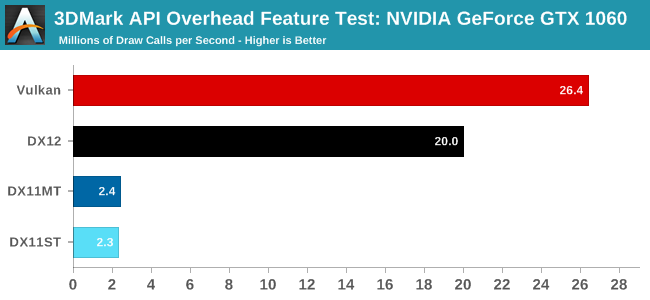
For example: https://images.anandtech.com/graphs/graph11223/86100.png
Granted that's a 1060 but since we're looking at driver CPU overhead that shouldn't matter much. So 2.3 million draw calls per second in DX11 single threaded.
It's not until you start getting into the 10k+ draw calls a frame that you are putting your 60fps at risk.
It's often worth the work to avoid this anyway, after all faster is better if you're an engine/renderer, but it takes a lot for it to be an actual _problem_
I normally just use TRAMP. For those who've not used it, it's an incredible little emacs package which gives one a very Plan-9-esque feeling, in the sense that all the different systems one connects to feel like one whole.
As an example, when one is editing a remote file shell-command runs commands on the remote system, and of course find-file and friends work exactly like normal — only looking at files on the remote system.
For completeness, the vowel is the dipthong 'aɪ', pronounced like the 'i' in the word 'price', discussed on the same wiki page.
In Chinese the "x" would be pronounced like that: https://en.wikipedia.org/wiki/Voiceless_alveolo-palatal_fric...
So not really a "sh-" either, but English doesn't have that sound at all I believe.
With tmux control mode it's already very good and now with faster rendering coming...
I'm a heavy iTerm2 user and always been curious about tmux. Is there any reason to try out tmux integration if I'm already comfortable with iTerm2's features and panelling? I kind of got the impression tmux integration was largely for people who love tmux and are migrating to iTerm2, so it just makes it more familiar. Or is it something I should take another look at?
Short version: iTerm with tmux control mode (tmux -CC flag) is still iTerm, only now with tmux benefits like persistent shell sessions. iTerm translates regular commands like new window and split pane into tmux commands and acts otherwise like regular iTerm. Mac might crash or SSH get disconnected and tmux stays running to save you from losing anything (well, if it's running on a server..).
In addition you tmux gives you shell sharing and allows using different devices alltogether. I sometimes use iPad or iPhone with Blink.app to connect to my always running sessions. You can connect to existing tmux session attaching with CC mode and iTerm will open windows and panes to accommodate.
One caveat if you require Mosh for network issues: it and tmux control mode aren't compatible. Also, I'd like to open tmux windows as tabs instead of separate iTerm windows, but that's a minor thing.
This page on iTerm's wiki explains things in detail: https://gitlab.com/gnachman/iterm2/wikis/TmuxIntegration
I don't think there's much benefit to using tmux integration for a local shell, other than possibly long-lasting sessions that will survive iTerm itself crashing (and maybe you logging out? I'm not sure), which isn't enough of a problem for me to have to work around.
The awesome benefit for me is when using a remote tmux. Tmux integration works over SSH, so thanks to this I can have native-looking tabs and windows that are actually terminals on a remote machine. And if I get disconnected (frequent, with a laptop, as I'm moving around), I can reconnect and get all the remote windows just fine.
Gone are all the usual tmux C-b prefixes to managing windows, non-integrated scrolling, etc. Everything behaves like a normal iTerm window. I can even split/move panes like normal iTerm panes (though that crashed iTerm until about a year ago).
I have the following alias defined:
ssh -t elf.example.com /opt/local/bin/tmux -u -CC attach
I'm specifying the /opt/local/bin version of tmux, because that's an updated one I've installed from MacPorts. Unfortunately Apple continues to bundle old versions of tmux in macOS, and last I checked the one that was bundled didn't actually support the Control Channel required by iTerm integration.
-u is a tmux option to force it in Unicode mode, required by iTerm's Tmux integration
-CC tells tmux to start a control channel and disable echo (required by iTerm's tmux integration)
`attach` attaches to the default session that I created prior.
I’ve tried out the integration mode a few times but it just doesn’t fit my workflow (often switching sessions, highly customized tmux configuration, etc).
The question begged is Why does Google own the code?
To have Google give you (the Google employee) full copyright of projects you work on while at Google, you need to go through a committee[1] that reviews the project to make sure it doesn't collide with some other project Google already is working on. As this is really hard to do for many projects, it's easier to just let Google keep copyright ownership of it and have it opensource under them.
It's actually a remarkably painless process, which is good because there's actually quite a bit of neat stuff in that neighbourhood of github as a result.
There is actually this neat hack you can use(if you use VIM) with rsync.
https://github.com/IvRRimum/rsync-vim
I know it's kind of Hacky, but the performance improvement is worth it IMO.
This is an area where Rust ends up feeling different than many languages: xi's rope uses https://doc.rust-lang.org/stable/std/rc/struct.Rc.html#metho... like this: https://github.com/google/xi-editor/blob/422948d62688dcc2ee0... , which gives you both options. This code uses Rc, not Arc, so it's not currently sharable between threads, but Arc has the same API.
Rust cares about sharing more than immutability.
Unfortunately Xi was quite laggy in the scrolling department. Slower than VSCode for example.
1. Stability. I'm writing my own editor at the moment, and the text buffers are kept in a server process. Last time I updated the server process it'd been running continuously for a month despite extensive reworking of the frontend. The backed is trivially simple (~300 lines), and easy to keep stable. If the frontend crashes it doesn't take my open buffers with it.
2. Coming up in a fraction of a second with state most of the time. Most of the time I have a ton of buffers in RAM; rather than reloading a ton of files, most of the time when I bring up the frontend, the files I'm working on are already there. Re-establishing an IPC connection to the backend is not noticeable.
3. Faster starts over slow network connections - I can run the backend remotely and not have to transfer a big file other than what is needed to view the bits I care about.
4. Simplicity: I don't need to implement tabs or multiple windows - I got that for free from my window manager. Instead if I want to split the current buffer, I just spawn a new frontend that re-attaches to the same buffer from another process. There should be no need for an editor to re-implement its own window management.
A client-server design makes very little difference to memory usage and doesn't require a separate executable.
Lets look at firefox as an example. The fact that a vertical tabbar is more useful in this case due to screen shape and size and it being useful to be able to read a bit more of the text when you have a lot of tabs. This could in theory by done by your wm even though I've not seen one that does. Further tree style tabs shows a visual hierarchy of sorts that can't be replicated by your wm because it doesn't know what link was opened from what. Further you can perform operations on groups of tabs, like closing them, bookmarking them, reloading them. Its difficult to see how your wm could infer this hierarchy and how it could allow application specific operations like bookmarking even if it could. Further its useful to sometimes open a number of links in the background before switching to any of the above. This is trivially effected within the browser but challenging outside of it because the action of opening a link happens inside the browser.
Within my irc client various channels are arranged according to network and color coded according to activity. Right clicking on individual channels or networks allows specific actions regarding those networks or channels. None of the above would work with a bunch of stacked/tabbed windows.
I could make a list for emacs but the complaint is the same wm ends up being an unfixably poorer alternative to dealing with multiple documents in the app.
I use i3wm not because its awesome at managing multiple documents but because its simple and straightforward and 90% of workspaces, which span only a single monitor, have only 1-2 windows on them. Rarely 3 or 4 and never more.
Window managers are just unfixably mediocre in this respect because the UI doesn't have access to context and can't differ based on use.
When it comes to emacs, I don't agree - the multi-window support I added to my editor was something I added explicitly to mimic my Emacs usage with i3wm. It's very possible that it's down to how I use emacs - I tend to prefer to split with ^X+2 and ^X+3, and that pattern lends itself perfectly to doing window splits with a window manager. If anything, i3wm's support for tabs etc., selectively for any window, is more advanced than the buffer/frame management emacs offers.
> Window managers are just unfixably mediocre in this respect because the UI doesn't have access to context and can't differ based on use.
That's just not the case when you 1) have the source, and 2) are able to control the wm via an API that can provide additional context. To be clear: My current support for this is 100% tied to i3wm, and relies on i3-msg to let me choose which orientation to do the split and exec another instance, and my needs in that respect are simple.
It would be harder to get the same flexibility with a wm that lacks an equally trivial API to control placement. Again, a benefit of being able to fully control my own editor (I am slowly packaging up less opinionated parts of it as separate projects - my goal is that "my" personal part of the editor should be reduced to nothing more than instantiating various generic components) - because of the client-server approach, the grand total of my "multi window support" boils down to this ("term" in this case is a local alias for whatever my current preferred terminal is) :
    182│     def split_vertical◂
    183│        system("i3-msg 'split vertical; exec term e --buffer #{@buffer.buffer_id}'")◂
    184│     end◂
    185│
    186│     def split_horizontal◂
    187│        system("i3-msg 'split horizontal; exec term e --buffer #{@buffer.buffer_id}'")◂
188│ end◂Quickly scanning Emacs "NEWS" files, the first mention I found of emacsclient dates back to between '86 and '92. I'm pretty sure it's older. This was added as an option exactly because it is more efficient and leaner to start a separate UI than starting a separate editor instance each time, and adds very little bloat (on my system, emacsclient is a 23KB binary), and it adds so little latency as to not be noticeable.
The “classic example” of this would be Quake — a single binary implements both a server and a client, which communicate over a simple binary protocol.
$ defaults write org.vim.MacVim MMUseCGLayerAlways -bool YES
This was the developers' suggestion and it solved my issue. There's an informative discussion of the root causes here: https://github.com/macvim-dev/macvim/issues/557.
Considering how protective most companies are of IP, I'm shocked Google even has a mechanism by which a person can take back things they've worked on in office at Google.
Somehow got accustomed to to pretty much vanilla Sublime, mostly because I can't seem to get the language "intelligence" plugins to work correctly.
What did you find bad about it? If it was just input latency, that's fixed.
I think that alone marks you as an unusual emacs user; the standard pattern for using emacs is to leave it running all the time (either in a window, or as a dæmon), not to launch new instances. But yes, it would be interesting to have numbers.
> Being useful in a terminal is a critical requirement for me.
Oh, certainly; in fact, I have 'vi' aliased to 'emacsclient -t' these days for just that reason. It's awesome to have a powerful, extensible editor available in the terminal.
I have EDITOR set to emacsclient (and some other aliases) and I find it far more convenient than an in-terminal editor, especially when combined with sudoedit.
I only use it for quick edits to files, when I don't want to turn my head from my terminal to my emacs window. Yeah, it's just a bit lazy …
    ~ % exit

    [Process completed]
3. Comes with terrible defaults like the screen color.
1. Settings > Profiles > Shell > When the shell exits: [Close the window|Close if the shell exited early|Don’t close the window]
2. macOS standard for all applications is the following.
  - next tab: ⌃⇥ or ⌘⇧]
  - previous tab: ⌃⇧⇥ or ⌘⇧[
3. Settings > New window with profile: Pro
I prefer to open a new Terminal only when I need it instead of keeping one open all day (even if that sometimes happens) and I’ve never noticed an increase in CPU usage that’d made me want to check.
Panes.
- Cmd-W closes the window, not the pane. (I get why they do this. I feel that it is wrong.)
- I can't send input to all panes, which is a pretty useful feature I probably use once a week.
- iTerm2 happily maps my panes to tmux. This is by itself perhaps a killer feature.