Ubuntu 18.04 LTS Bionic Beaver Released(wiki.ubuntu.com) |
Ubuntu 18.04 LTS Bionic Beaver Released(wiki.ubuntu.com) |
I wonder how my applications will fare. I would like to have the latest version of Firefox, emacs, git, and so on. It's the desktop environment and OS itself I want to be as stable as possible. I'd also like to get the most recent kernel, I think, since the kernel is pretty darn stable and rarely has regressions, at least in my experience.
I also learned that there's an official plan for 18.04.1, to be released July 26th. This is the release that will prompt 16.04 LTS for an upgrade. In other words, the official upgrade path for an LTS is to wait for the first patch release, and not upgrade immediately. So I'm considering waiting to update from 17.10 until 18.04.1 is out.
Don't forget to remove the preinstalled – and soon outdated – .deb-package version of LibreOffice :)
This seems to be much easier these days. Around 10.x / 12.x releases being on recent versions of everything made a lot of sense. Especially with browsers not updating separately from the main repo. There were actual, big improvements with drivers, power management, hi-res support, and other things. These days, I don't see that many reasons to keep current. All the tools I use are stable and almost old - vscode may be the only new one in 5 years. That's my anecdata anyway.
I've been eyeing this setup with Guix but I have some concerns. If I install a newer version of GCC through Nix/Guix, can I run update-alternatives on it?
As a seasoned LTS user, would you recommend waiting for 18.04.1?
The real advantage of staying on a LTS has been no big updates and no changes in the GUI. I'm on Gnome Flashback which I tweaked to be as closed as possible to Gnome 2. It seems that Gnome Shell eventually got enough extensions to also make it look like Gnome 2. I'll give it a try again after those memory leaks will go away. I can probably stick to 16.04 for another year before developers start skipping it in their builds.
Edit: I checked and I have git 2.17.0, which is the latest version. I keep it up to date with ppa.launchpad.net/git-core/ppa/ubuntu
The main thing is latest browser versions and they still ship with the LTS release.
The stability of LTS far, far outweighs every new feature I've found so far. It's a no-brainer when you are trying to get stuff actually done and don't appreciate having to regularly waste cycles on your toolbox.
I hoped hard the communitheme would be the official theme of this release, but no.
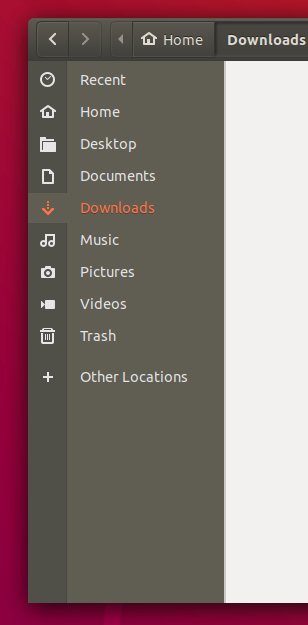
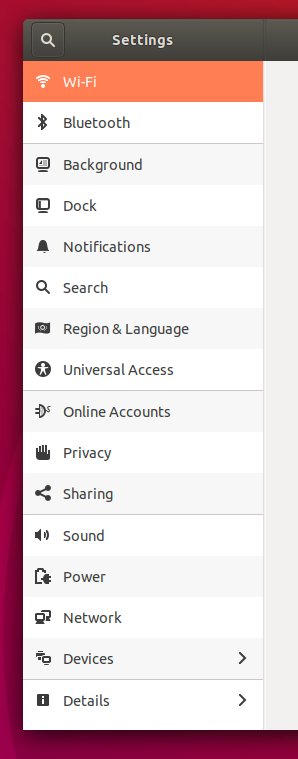
Examples:
- The active directory effect in Nautilus's sidebar makes me thing there were two sidebars with different purpose [1]
- Changing the background of every other rows in the settings look weird. The fact they are splitting settings by group do not help. I thought it was a theme glitch, and found out it was an actual feature [2]
I understand why people are interested in more serious theme (arc-theme) or even other Ubuntu-based distros (elementary...).
EDIT: Found the answer in another comment:
> I also learned that there's an official plan for 18.04.1, to be released July 26th. This is the release that will prompt 16.04 LTS for an upgrade. In other words, the official upgrade path for an LTS is to wait for the first patch release, and not upgrade immediately. So I'm considering waiting to update from 17.10 until 18.04.1 is out.
(I don't really know what I'm talking about here.)
For now its still in development according to them.
Ref: https://linuxconfig.org/how-to-upgrade-to-ubuntu-18-04-lts-b...
Does anyone have a list of how this has evolved? Are we getting more or less stable on this, the ultimate bikeshedding issue?
THE FAMOUS BIONIC BEAVER Our Signature Drink for Sharing! Seagrams Vodka / Gin / Rum / Triple Sec / Peach Schnapps / Light Beer / Grenadine / Splash Cranberry
https://www.omgubuntu.co.uk/2017/09/enable-fractional-scalin...
I am praying to the open source gods for it to happen.
There's an ppa for the latest emacs and fish shell anyway. Maybe I can find a ppa for git. My other editor, IntelliJ, updates itself. Spotify also has its own repo.
Programs are not supposed to update themselves, but some like Telegram or Steam annoyingly do.
One example: when Firefox decides to integrade a keylogger it is very unlikely you will find that release on your Ubuntu installation.
But in my experience Firefox is updated very soon after official releases.
In fact across the board Linux machines in many enterprises are more likely to run outdated and possibly vulnerable software.
Most distros have different update channels so that you can install security updates without feature updates. Tools like unattended-upgrades make it trivial to automatically install daily security updates. You can then manually install other updates at a later time if you're concerned with breakage.
* Snap Apps => centralized, the snap-system updates the apps on a regular schedule
Traditionally on Linux there was only the system-package-manager to update the system and applications. Snaps are confined (unless declared --classic) and allow to have a stable base-system and up-to-date applications.
PS: Can't say much about how snaps compare to macOS.
There are five ways to have update software on Ubuntu Linux these days:
* Ubuntu Store (snap).
* Via Flathub (flatpak).
* Official deb repository pool (apt-get).
* Community maintained PPAs (apt-get).
* Other, tools like appimage, nix, linuxbrew etc. etc.
If you are not fan of terminal tools, sometimes "Software Updates" popup will appear to ask you if you would like to install new updates.
By default there isn't any self-update enabled (please correct me if I am wrong), though it is recommended to configure automatic updates of unattended-upgrades [1]. In my experience 17.10 were asking about installing updates when you were shutting down or restarting OS.
[1]: https://help.ubuntu.com/lts/serverguide/automatic-updates.ht...
The threat model is simply not valid for the security model that users who use a package manager follow.
Don't get me wrong supply chain based threat models including the source and intermediates are a valid concern.
But you already accept those risk by using a package manager and a managed repo which contains the source code and or binaries for the applications you want.
Not providing automatic updates to protect me from Mozilla won't reduce the risk when the risk from the package manager and the managed repo is just as high if not higher it just increases the overall risk as now I need to ensure that I follow their release cycle closely to make sure that my browser is always up to date.
For Linux Desktops it is especially hard since many of the solutions are not oriented for desktop users and when the package manager is not used there are gaps in software enumeration.
The best solutions I've seen so far are essentially block access to all online repos and manage your own but many organizations don't want to go that route, with ubuntu you can even use the "appstore" UI for displaying only your repo.
Your thinking is also too narrow while I gave examples from a managed environment there are plenty of Linux users running on unmanaged machines. Most users even "technically savvy" ones are not going to be reading release notes and reviewing CVEs daily via RSS.
Having a reliable way to ensure automated updates for Linux especially for commonly used and exploited software is an important tool to have and I wish more repos would implement something like Windows Update than say "what if Firefox puts in a keylogger" because that isn't a good argument as you can argue to them back "what if you put in a keylogger?" if you already pull your updates from your distro's managed repo you already accept that risk as such the risk of having no automatic updates at that point makes you less secure not more.
If you want to use a different repo or build everything from source locally that's fine but that is a completely different security model.
Also neither shifting the blame or claiming FUD are good arguments. Firstly there was no blame associated with the end user, at any point where there is a security system failure the end user isn't the "causal factor" doesn't matter if it's an unpatched system or did clicked on a phishing link they are do not own any of the causal blame.
As for FUD, calling something FUD is generally intellectually lazy and is used to end an argument by moving the goal post and changing the subject.