AWS Outperforms GCP in the 2018 Cloud Report(cockroachlabs.com) |
AWS Outperforms GCP in the 2018 Cloud Report(cockroachlabs.com) |
Thank you to the authors who worked on this report. These types of reports help us better understand the ways in which our customers and partners utilize our platform. Our team is reviewing the report and will provide a response as we conduct our own benchmarks.
Varying factors impact these types of benchmark analyses, many of which are difficult to isolate and control. As an example, I refer to some of the benchmarks others have posted in this very thread.
As a technical practitioner, I'm positive there are areas in which cloud A outperforms cloud B and vice versa, giving users choice and flexibility. As an employee of Google, I can assure you that we are committed to providing best in class performance and availability on our platform.
Thank you for your patience as we review these findings and craft our responses.
Dude, I sure hope they deserve having you on board. I am not at all convinced that they are capable of understanding just how much you bring to the table.
My opinion of them has definitely gone up a few notches.
To put that in context of the blog post, it means your setup can drastically affect your results. Using local NVMe disk, for example, yields excellent results at the expense of increased risk. Also, AWS's io1 disk is very expensive—after my first io1 bill from AWS, I never used that disk type again.
- Pricing on GCP is much easier, no need to purchase reserved instances, figure out all the details and buried AWS billing rules. Run your GCP instances and automatically get discounts. AWS reserved instances requires knowing your instance types, knowing that you can purchase the smallest type of an instance class and combine, knowing that you can only purchase 20 reserved instances per zone/per region in an account. So many gotchas.
- GCP projects by default span all regions. It is much easier if you run multiple regions, all services can communicate with all regions. Multi-region in AWS is sort of a nightmare, setting up VPC peering, can't reference security groups across regions, etc..
- Custom machine types. With GCE, you simply select the number of cores you need and memory. No trying to decipher the crazy amount of AWS instance types T2, T3, M5, M5a, R5, R5a, C5, C5n, I3...
- Instance attached block storage is easier to grok and in my experience is much faster than EBS. The bigger the disk on GCE, the more IOPS. No provisioned IOPS madness.
The GCP instance has 8 Gbps vs 10 Gbps for AWS. I don't really know without seeing the graphs from the instances, if you hit a cap, but this could make a difference in both transfer speeds and latency #'s for GCP. Also, for your local disk test, on GCP, disk size makes a difference to get the best performance. The larger the disk, the better the performance. PD disk read/write performance also comes out of the available network bandwidth! So, the instance you picked on GCP was at a disadvantage right from the start [3]. This likely explains the I/O Experiment graph and the "67x difference in throughput" as you're likely hitting caps, both in terms of network bandwidth, and disk performance compared to AWS. Seeing anything where it is x67 difference is a pretty big red flag that something strange is going on and needs further investigation.
GCP's n1-standard-16 = 8 Gbps max [1]
AWS's c5d.4xlarge = 10 Gbps max [2]
I guess the problem with comparing clouds, it is never apples vs apples, and I don't fault you for picking what do you (as it is not obvious). GCP typically gives you (core count / 2) = # Gbps network bandwidth. A good followup to your comparison might be to investigate why they #'s are different. Does adding more cpus, memory, network bandwidth increase performance?
[1] https://cloud.google.com/blog/products/gcp/5-steps-to-better... (see section #3).
[2] https://aws.amazon.com/blogs/aws/ec2-instance-update-c5-inst...
[3] https://cloud.google.com/compute/docs/disks/performance#size... (see the table re: disk size to bandwidth)
I wrote about this last year if you're curious: https://medium.com/@robaboukhalil/a-tale-of-two-clouds-amazo...
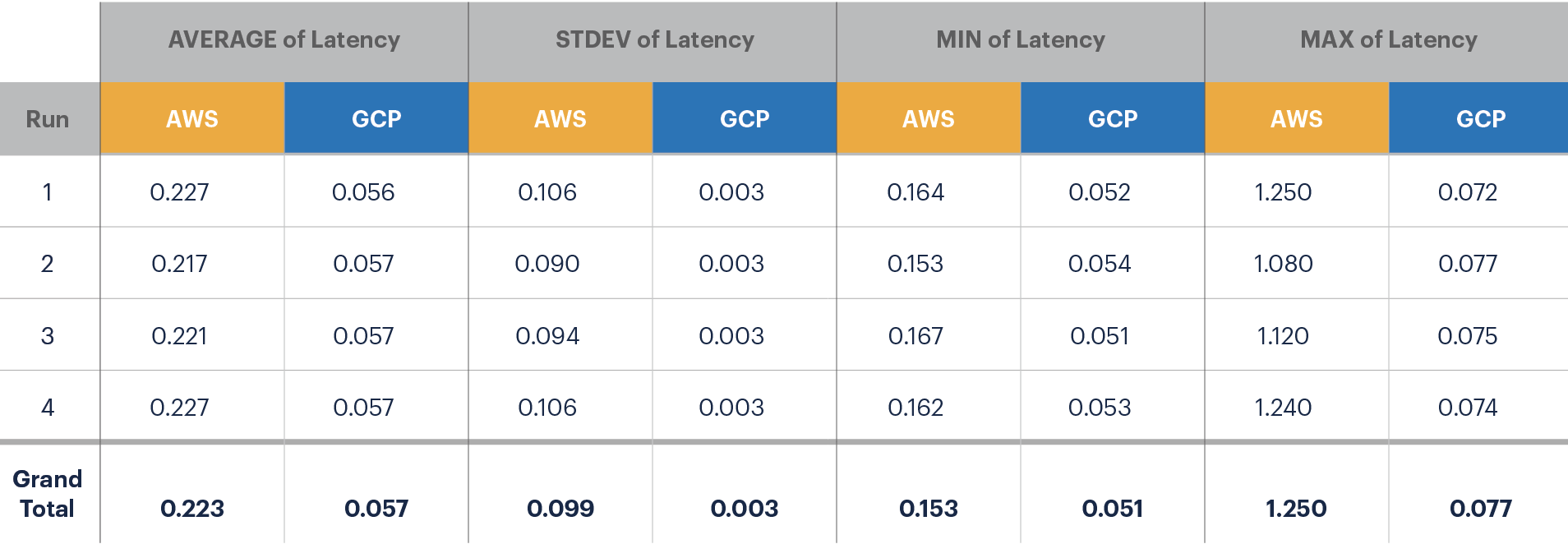
Comparing a distribution of two completely different metrics is not particularly meaningful. You can change the histogram buckets to a different size and it will look just as spread out. When I first read it, I thought it was saying GCP has a tighter spread than AWS. This was confusing, especially since the chart immediately above that seems to have AWS and GCP numbers flipped.
TPC-C https://www.cockroachlabs.com/docs/stable/performance-benchm... Sysbench https://github.com/akopytov/sysbench Stress-ng https://kernel.ubuntu.com/~cking/stress-ng/ iPerf https://github.com/esnet/iperf PING https://linux.die.net/man/8/ping
https://d33wubrfki0l68.cloudfront.net/f61cd6683f5c13f8d2b506...
All the text around it says GCP is worse, but the table shows GCP is better.
What would cause this particular effect? It's very interesting.
Is it, perhaps, that with GCP you're hitting the capacity of the network, while with AWS you're being artificially capped at that speed on a network that could theoretically go faster?
Or maybe it's just different strategies for bandwidth-limiting instances employed by AWS's SDN layer vs. GCP's? Probabilistic packet-drop (to force TCP window scaling) vs. artificially-induced nanosecond-scale egress latencies?
AWS Nitro/ENA is hardware network virtualization which is faster and more consistent.
Because CockroachDB has the explicit inspiration of being Google's Spanner without the special hardware, so... why not just use Spanner with the special hardware instead?
edit: I missed that 95th percentile latency for read and write was included. That is helpful; I also typically look at p99.99 and p100.
For example, you could have two copies of your data in the block store, and issue reads to both simultaneously, and use whichever returns first. Suddenly, your 99% latency becomes your 99.99% latency...
You can do the same for writes (albeit a bit more complex).
https://docs.aws.amazon.com/AWSEC2/latest/UserGuide/EBSVolum...
You will never get more than ~3,000 iops on a 256GB gp2 disk because the IOP cap for gp2 type disks of this size is 768 or 3,000 iops. Yes, "or". If you ran the test above for longer, you'd find that the iops will eventually drop to the baseline of 768 (which is the size of your disk multiplied times 3). Or, if you test a much larger gp2 volume you'll see higher numbers as well. Check out the description of the "burst bucket" in the link above.
GCE offered committed use discounts for quite some time (note: completely different from sustained use discount that is automatic), by ignoring this discount tier, the results from this post look significantly worse
The idea that "developer experience" is paramount is the entire reason why there is an entire sub-industry of vendors dedicated to cost optimization, following in the wake of choices made with completely the wrong business priorities in mind
Serverless lambdas on AWS are more functional. Google does not have comparable functionality yet.
Auth and IAM permissions are far more configurable on AWS. Google's ACL does not have the same depth of tools there. Making the ACL do the same thing as AWS's IAM generally feels cludgy and a pain.
Working with AWS there is a deep ecosystem of tools there and I only use maybe 30%. Working with Google, there often are tools and logging missing that I took for granted in AWS.
Never used lambdas but the fact that gcloud functions allow python imports make them pretty versatile from what I can tell
This is true on AWS, too. Common advice for AWS is to just make your disk bigger instead of paying for provisioned IOPS.
On the "enterprise" end of cloud computing, the only truly good options are GCP & Azure
AWS is very much the IBM of yesteryear - it's expensive, but "no one ever got fired for buying AWS" ... except AWS is about to have (even starting already) their own IBM moment - question is, will they fail to pivot the way IBM did?
Do you have a source for local SSD performance coming out of the available network bandwidth? According to GCP docs [1], this only applies to persistent disks. Local SSD perf depends only on disk size and choice of SCSI/NVMe interface.
According to another GCP doc [2], local SSDs are all 375 GB in size. For comparison, c5d.4xlarge has 400 GB, which is very close. So I don't see anything wrong in the benchmark unless they messed up and ran it against the persistent root disk instead of the local SSD.
[1] https://cloud.google.com/compute/docs/disks/performance#type...
  Size      Random IOPS                Throughput limit (MB/s)
  375GB     169,987 (r)  90,000 (w)      663 (r)   352 (w)
  750GB     339,975 (r) 180,000 (w)    1,327 (r)   705 (w)
  1125GB    509,962 (r) 270,000 (w)    1,991 (r) 1,057 (w)
  1500GB    679,950 (r) 360,000 (w)    2,650 (r) 1,400 (w)
I don't don't know of any instances offering that kind of throughput.
I've personally validated GCP's statement that they offer 2gbps/core up to 16gbps. I can get 16gbps consistently between any two n1-standard-8 using iperf.
This generally makes network IO in GCP much cheaper.
And then there's "iPerf" and "PING"...
https://cloud.google.com/vpc/docs/advanced-vpc#measurenetwor...
GCP is 2 gigabits/second per core up to a max of 16 gigabits/second for a single VM. Persistent disks other than local SSDs also eat into this network traffic as well.
These results are, to my mind, quite questionable. They certainly don't line up with my personal experience and the measurements I've done in the last year.
AWS is much harder to use correctly right now, to me.
I know someone might argue that aws and amazon.com are sharing the same account, I guess they "can" but its easy to make a new aws account with just an email - I think we manage about 12-15 different aws accounts. We tend to isolate major clients or projects by making entirely new accounts. I don't feel like I'm working uphill to keep multiple aws accounts from merging or somehow binding to my personal shopping account for amazon.com. With msft and google it feels like I am always almost "tricked" in to binding multiple accounts and login states together.
I would argue that once you have an account up and running most of these guys are similar with differences. The ui on aws isn't glamorous but I find its utilitarian simplicity pretty easy to deal with and get most things done.
For owned accounts, I prefer GCP and Azure because the logins are seamlessly integrated into GSuite and Office 365 so we can manage IAM on an individual basis in one place.
I think Google's AppEngine is easier for starting, but AWS Lambda + API Gateway is pretty close IMO.
In my experience, most folks choose GCP for the Kubernetes offerings which is vastly superior in terms of scaling and maintenance than EKS. Specifically, there are actually upgrades that actually work. There's also autoscaling nodepools which work pretty well.
It's not a big thing but little stuff like makes it more cumbersome to use.
If they did merge... it would be "gcloud bq..." or "gcloud storage...", my fingers protest :)
There's also the i3.metal which has no hypervisor. I'm curious how the performance of one of those compares to a traditional i3.
I figure they can't. [Economically, I mean.]
I always figured the "local per-instance storage" on most instance-types was actually not literally local, but rather a set of disks allocated from a per-rack iSCSI disk server. (The host "wastage" if this wasn't true would be quite large.) The "i" instance-type hosts—especially the ones for the large instance-types—were likely just making a claim for the entire disk-server of their rack (leaving the rest of the rack to be schedulable only by instances that need no instance disks.)
Since iSCSI and "bare metal" don't go together, on Nitro, you'd actually need to build instances with real physical reserved disk pools that the hardware can see. That may even mean putting the disks inside the computer (shock horror!) and thus needing complex 2Us that need to be "recycled" (= having the still-good stuff fished out of them when they die) and may need to be opened up by ops folks for more than one reason, rather than just having "throwaway" compute blades + equally "throwaway" hotswap disk pools. In such a 1990s-reminiscent setup, i3.metal seems like a sensible upper bound for how big such an instance could get, economically.
Maybe you don't need the 2Us; maybe you can build the disk pool as something like a disk server (i.e. a dedicated PCIe backplane leading to RAID-controller daughterboards? something something Thunderbolt?) That'd lower the TCO of these host machines a bit, but it'd still be questionable how much usage such instances would get—and when they're unscheduled, despite the disks being a separate physical box, those disks would still be unavailable for any other instance to use, even ones scheduled to machines in the same rack.
(Or maybe they could get really fancy, and have a disk-server rack that can present itself as a RAID controller over PCIe, such that, most of the time, it can just be a disk server, but when it gets reserved by a Nitro-i-instance, it can switch off its Infiniband cards and switch on its PCIe client interface cards, and moonlight as a RAID array. If AWS does get bigger i-type instances, I'd wager that this is what they would have built to achieve that. That or custom RAID controller cards that present Infiniband-rDMA targets as if they were local NVMe devices, and don't allow host configuration, only BMC configuration.)
https://docs.aws.amazon.com/AWSEC2/latest/UserGuide/Instance... >This storage is located on disks that are physically attached to the host computer.
If you picked a r5d, and either gave it a larger piece of the local SSD pie or replaced the local SSDs with larger capacity ones, you would essentially get the i4 that I've been calling for. I'm sure it's more complicated than that, but I would be surprised if technical roadblocks were the main reason why this hasn't happened yet, rather than e.g. lack of customer demand.
this works reliably, native speed, not too expensive and is well tested.
I actually did not even want to reply and this make zero sense but felt invested. Whoever told you this doesn't know what they are talking about.
"Heroku’s physical infrastructure is hosted and managed within Amazon’s secure data centers and utilize the Amazon Web Service (AWS) technology. Amazon continually manages risk and undergoes recurring assessments to ensure compliance with industry standards." See https://www.heroku.com/policy/security.
This is the type of disclose I was talking about.
I would question the people who told you this rumor as they either have no clue how things work or are blatantly lying to you.