Backblaze 7.0 – Version History and Beyond(backblaze.com) |
Backblaze 7.0 – Version History and Beyond(backblaze.com) |
Here goes : a few days ago the Backblaze Mac client started prompting me to upgrade urgently to the latest version (6.1.0.370). I went ahead and did that but got "Installation could not complete, please contact support" each time. Support advised me to wipe /Library/Backblaze* , reinstall, then inherit the existing backup.
Well, we never managed to get the inherit process to complete : it failed with "ERR_error_unknown" every time. And I started freaking out.
That's where things get interesting : I became frustrated with the canned responses from support and decided to delve into the client logs myself. I quickly found a potential smoking gun (in bzbmenu.log) : a spelling mismatch in an XML attribute name between the server response (support_inherit="true") and what the client was expecting ("ERROR could not read attribute named supports_inherit"). Notice the extra "s" ? Pretty obvious typo and one that could definitely explain the failure (client can't confirm that the selected backup is eligible for inheritance, bails out)
I was rather happy with my findings and shared them in plenty of details with support (including log excerpts), but instead of a "thank you and here's some free months of service !" response, I got "meh, this log file is irrelevant", and worse: no promise to escalate the issue (until I insisted a second time). They suggested updating to the 6.1.0.372 beta, which turned out to have the exact same bug.
Now, I'm left wondering if should try upgrading to 7.0 and inheriting my 6.1 backup from there. But the point of this message is to share my disappointment with this support experience. I went out of my way as a customer and spent a couple of hours researching and finding something potentially useful to the company, but had no appropriate way to report it. I even tried security contacts, but was (rightfully) told it wasn't a security issue. No word on whether they were going to pass it on to the relevant team.
EDIT: I've just confirmed that the same issue is present in 7.0.0.386. Still can't inherit my existing backup.
I would update to v7.0 - it does have a lot of minor fixes in there as well (not sure if inherit is addressed, but worth trying).
But now reading what renaudg mentioned I took a look at the log files and I see the same error:
20191008161659 - ERROR could not read attribute named supports_inherit
The XML is also shown in the log and the attribute is called "support_inherit".
+1 vote for a few free months for renaudg. :)
No hard feelings at all against the support guy, who probably has to deal with dubious customer claims all day. But it was pretty frustrating when he told me the log file I looked at couldn't possibly have anything relevant in it, when I had in fact just showed him plenty of relevant things from it :)
First, the whole annoying “Backups are broken! You must manually update” pop up every 30 mins. Any time an update requires some special procedure beyond clicking “Install now”, I view it as likely a dev failure. And providing zero context about WHY makes it worse.
Then, the stupid installer fails repeatedly. Just says “installation failed, contact support”. I do and they tell me to delve into /Library and delete the backblaze files there. Feels kludgy. Are they telling thousands of customers to do this? Or is something fucked with my install? Who knows?
Then, the stupid “inherit backup” thing stalls at 50% repeatedly for hours and uses 99% of my CPU. I finally just killed it and resolved to tackle all this mess later.
Honestly, it’s making me rethink using Backblaze at all. Who knows if my backup will even be there when I need it if this is how they run things? (And yes, I know I need to test my backups. I don’t.) I went looking for alternatives today...
Weirdest is that updates are normally automatic but now it told my dad to download the new DMG on your website, why?
Yes/No?
Source: https://help.backblaze.com/hc/en-us/articles/217664898-What-...
This is malice.
If you are still doing this to your users - your service is a non-starter. Backup service that deletes user's valuable files under some TOS excuse should not exist.
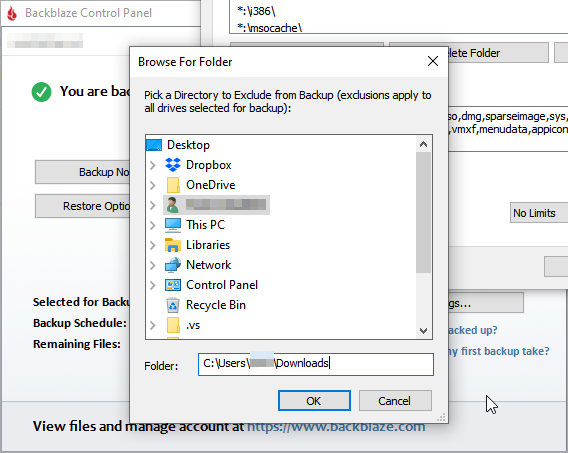
The problem: The UI for excluding directories is horrific. It uses the Windows "Browse for Folder" *SHBrowseForFolder) dialog, which requires you click down through each and every level of your directory structure to get to the directory you want to exclude. You can't cut and paste, it doesn't start from the directory you added your last exclusion in, it's just lots and lots and lots and lots of clicking.
This doesn't seem like it would be hard to fix, so I'm guessing they don't consider it broken?
If the Backblaze folks are still reading: Could you please, pretty please, with sugar on top, for the love of god, fix your fucking exclusions interface? Please?
Is there a saving grace for that browse folder interface? A certain use case where it's really good?
But it's not entirely true. You can paste full path to needed folder in input below directory tree. I've used this many many times
https://dl.dropboxusercontent.com/s/58tncadu2z7ix29/bzbui_20...
I am baffled at why Backblaze clings so tightly to the existing dialog box.
it's up there (again, for me) as one of the annual software subscriptions that's worth every penny, if not more.
I ended up buying a Synology NAS (which does offer the same computer backup features + revisioning and all that), and then syncing the backup out to B2. It's not an ideal solution by any means, and I would get rid of my NAS in a heartbeat if there were a real solution for Linux desktops.
It really sucks to have had to go through all of that setup (+ have another machine to maintain) when I just wanted to get things done and know my data was safe.
Would you consider working with the community to find a better solution? Maybe offer a closed source library (a la libspotify, but for Backblaze) for the storage bits + get the community pointed in the right direction for an open source frontend for Linux or something?
I'm using Restic to B2 on Linux, Win and Mac desktops and a Synology NAS (linux based). No problems.
For my purposes, especially with Restic dedupe, plain B2 works out much cheaper than $6/pc/month would. I currently spend around $7/month total for all these.
Such a great service and I still always look forward to the emails, stuff like the drive failure rates is always a neat read!
I’ve been burnt badly by this, I wish there was a better way. I was in the habit of doing this and when I fired the drive up for some reason it failed to be backed up and the backup was deleted at their end. 1TB had to be re-uploaded on a 4Mbps connection. I know I shouldn’t have done the backup on the last day (no data had changed) but wow was that irritating.
I would archive podcasts I liked, download YT videos I found worthy of it, I had 100gb or so of 9/11 news coverage from the day of the attacks and the next few days, insane amounts of exes for pretty much every revision of every scrap of software I used in case I ever wanted to go back to an old version, insane amounts of images from where I'd rip entire tumblr accounts based around different fandoms/topics, I had half a century of Lodge meeting minutes for one of my Lodges scanned as high-resolution OCRd pdfs, entire websites I'd wget for offline (why?!) viewing etc. It's all presumably still there but I haven't turned that box on in about a year now.
Man, switching to a Chromebox was so freeing.
Anyway, okay, I'll test your trial again. :)
It's 6 months - and you receive notifications after 14, 21, 28, 60 and 90 days. It should be possible for the backup machine to connect to the backblaze server twice a year. I think it's reasonable.
Or should I pay for service AND do some time critical technology acrobatics to comply with confusing fine-printed TOS to keep my data safe?
With all due - I'd argue with the statement: "Computer Backup service is a backup, not an archive".
It's like saying that banking is a process of sending money to the bank but there is no guarantee that money will be there unless "customer is in good standing".
Computer backup is a process (backup) AND storage (archive). Without BOTH of these components in place the customers will be facing a big surprise down the road when their valuable data is not there.
If the computer you are backing up isn't online for 6 months, it clearly isn't that important. If it is, you can use B2 to store files indefinitely.
Internet connectivity in some parts is particularly terrible.
My grandmother's ADSL 12/1Mbit connection was never particularly reliable and would go down any time it rained for days at a time. Every 6-12 months it would go down hard and not come back requiring a visit - the techs would fiddle around, find a different working copper pair and get it going again.
Finally, about two years ago it died completely, and the Telco threw up their hands and said they couldn't fix it, there just wern't any working pairs. There will be, at some point, a FTTC rollout, but in the mean time we're getting her limping along with an overly expensive and even less reliable 4G connection. The data limits are absurdly low, so I can't afford to let Backblaze actually run backups.
But the data that was backed up prior to the DSL outage we want to keep - I'm paying the license for it, they should keep it.
In late 2016 my laptop's drive died suddenly. I tried to restore everything via a shipped drive. I'm not sure if it was because of copy on their website (at the time) pointing out that they overnight USB drives or me just expecting that's the fastest way to get my data, but I was disappointed at the turnaround. Because it was a relatively large amount of data (a few hundred gigs?) there was a "staging" process that took a day or two. It got interrupted and had to start again (a server reboot on their side?). After receiving the drive everything went smoothly; I believe the data had been encrypted in transit, but wasn't onerous to restore from. I even think I was outside of their 30-day return and it wasn't an issue (the problem wasn't my hard drive, but a cable...with no hot spares and a special cable it took longer to resolve). At work I had a similarly annoying experience with Amazon Snowball where physically locating it and "testing" it took a few days longer than expected when expecting tight turnaround...maybe I need to adjust my expectations for physical logistics.
Many years previous I noticed my music files were showing up as 0-size--my hard drive was failing. Thankfully I could pull my collection from 30 days previous and I chose a download option. It was a bit annoying that they had created a series of zip files (which makes sense), but I believe I was restricted to the web interface for downloading them which made managing it difficult.
I attempted to restore about 1TB of data (on macOS). Since I have 500mbit internet I assumed I'd be able to download it through the app, but that didn't prove easy. Even when split into smaller zip archives, the download would go terribly slow. Often, the archives would be corrupted and I'd have to re-download them.
In the end I had to order a drive to Europe (and pay the tariffs), which is a pain in the ass. (But they did return the deposit even though I missed the 30 day window.)
Edit:
Oh yea, and when you loose your data you have only 30 days to get it back before Backblaze deletes it as well! That's what happened to me right before a multi-week trip, so I was pretty unhappy that I wasn't able to download my backup in the 5-or-so days I had at my disposal, thus having to order the physical drive.
I have a pretty thorough and redundant on-site backup system these days. But I still really appreciate having a totally independent off-site backup system. Nothing makes you suddenly wonder if your backup system is really all in order as when you lose your primary disk.
It's definitely a subscription that a lot of people should have if they don't.
What would be an interesting solution, is to run a simple gigabit ethernet line to a neighbor or even the backyard shed. And set up a backup endpoint there. It's not totally off-site but sure beats the alternative.
If you live in the outback and your network connection is literally provided by pigeons, maybe an online backup service isn't the correct solution.
External drives and TimeMachine/Windows Backup should be sufficient.
Will reach out to support.
> It required re-uploading more than 300GB of data.
What should occur is that it must READ all of the files to make sure it has transmitted them already, which can take hours sometimes, but only a tiny, tiny amount of data is actually transmitted to the datacenter. The client basically shows endless streams of files flowing through it and saying "Currently Backup Up: puppy.jpg" but it isn't really transmitting the files, just verifying the contents haven't changed.
One way to realize it is doing this is watch a network monitor of some kind. Another is if it is going "impossibly fast", like you only have a 10 Mbit/sec upload pipe and it appears to be uploading at 100 Mbits/sec.
Support is basically telling me that the inherit process on the server can’t handle my "too large backup state’s indexes", and that I’m gonna have to start afresh and reupload 2TB or so from scratch. Not only that, but in order to even be allowed to do this, I’m gonna have to free up my license first by deleting my existing backup, and accept being left without one during the weeks this will take. You’ve gotta be kidding me ?
And I’m this situation in the first place not even because I have a new computer I want to inherit the backup, but because support themselves suggested that I nuke my local backup state and restore it using the inherit feature, to work around the installer being unable to upgrade me to the latest 6.1 release. That’s how it all started.
No apologies given either, no offer to investigate further to avoid that very inconvenient outcome. I’ve been a customer for 7 years but honestly, if I can’t trust your systems to handle the "too large" 2-3TB backup of my MacBook and a couple of external HDDs and I’m supposed to accept that, that suddenly makes me less confident in everything else you do. I hope I misunderstood something here, but I don’t think I did.
EDIT: Ok, reading the email again I may have misunderstood the part where I need to delete my existing backup first. It looks like I can use the 14 days trial to start a new backup, then transfer the license over before the end of the trial. It’s still pretty bad because there’s no way I‘ll have those 2-3TBs reuploaded within 2 weeks, and of course it’s still a massive inconvenience to do so.
> inherit process on the server can’t handle my "too large backup state’s indexes"
Yeah, I'm sorry about that and it is on my plate to fix it. The issue is that Backblaze uses a ZIP library that only handles up to 4 GByte zip files. We zip up your "backup state" (the list of files that were backed up) and download it to the client that is "Inheriting". Your "backup state" has exceeded 4 GBytes, which is unusual, but not unheard of (maybe 2% of our customers right now). And it is "on the rise" as more and more customers have more data, plus backup for longer and longer with Backblaze.
The fix is to either link with a new zip library, or sub-divide your "backup state" into 2 or 3 or 4 zip files. Easy enough, but it doesn't help you this week.
> No apologies given either
I am sorry about this. In our support tech's defense, they were CRUSHED this past week by our attempts to get everybody auto-updated in anticipation of the Macintosh OS X 10.15 Catalina release which came out yesterday. So if they were terse it wasn't out of disrespect, it was out of sheer load they were dealing with.
The issue was that if we didn't get everybody to upgrade, anybody that chose to install Macintosh OS X 10.15 Catalina then it would break Backblaze and popup a completely random error dialog that wasn't helpful and didn't solve the problem. By getting people upgraded before Catalina, there are no issues at all and they won't have to contact support.
> It’s still pretty bad because there’s no way I‘ll have those 2-3TBs reuploaded within 2 weeks
To maximize your chances, make sure you turn off all power savings modes on your computer (like don't even let the monitor go to sleep) and make sure Backblaze is set to use 30 threads, and give it LONG periods of time (overnight 8 hours is ideal). You should be able to backup 1 TByte every 24 hours or so, but it can go slower if you don't have an SSD drive, or if your bandwidth is limited. One idea is to take your computer to a location with faster bandwidth, like a school or your work place and leave it there for two or three days, then carry it back home for the incrementals. By the way, Comcast has announced that it literally intends to offer full 1 Gbit/sec service to every last customer in the United States, so another way to go is upgrade your internet for 1 month, then downgrade it later.
> can’t trust your systems to handle the "too large" 2-3TB backup
We can handle the backups, just not the "Inherit" feature for long running backups with large amounts of data. And it's a fairly straight-forward fix for me to fix that, I just need to get to it. I'm sorry you got bitten by this short-coming, I will get it fixed.
Support should give you more details but it is indeed the case that some of the logs we have aren't tied to every process - so the transmit logs are paramount for debugging inherit backup state issues, but other log files wouldn't be. That said, we should totally fix the typo in the other log files, I've let the devs know about that!
> when you loose your data you have only 30 days to get it back before Backblaze deletes it as well!
Not anymore! As of this morning's 7.0 release, you can always switch your backup to one year retention EVEN FOR JUST ONE OR TWO MONTHS and for an extra couple of dollars you can keep the data around for a year (or forever). You can switch it back to "30 day retention" at any moment, all through the website.
Also, you can always do a "Restore to B2" to make a complete copy/snapshot of all your files entirely on the server side, and we'll keep those as long as you don't delete them. This will cost you $5/month to store 1 that entire duplicate 1 TByte copy in B2 (in addition to your original $6/month bill), but it's an option available to customers.
Uhhh... this one could be a significant issue for me right now. I've got a laptop that's been offline for about 2 months now due to a motherboard failure due to liquid damage. I haven't bothered dumping the drive yet because I figured even if it's got issues Backblaze has a copy.
You're telling me that if I login to my account right now, the data is gone? If so, they really need to make that one more obvious.
EDIT: Just checked Backblaze, still looks like the data is there after 70+ days. Has this policy changed at some point?
> Has this policy changed at some point?
It is more complicated than just "after 30 days" (and always has been). If your laptop is entirely offline (or you simply uninstall the client from your laptop), then the policy is ACTUALLY that we keep your backup for 6 months as long as you keep paying your bill. But to be honest, it's more like a year or two. The 6 month policy is we guarantee the backup will be preserved, not that we will immediately go out and delete it at exactly 6 months and 1 day.
This is a completely different situation than files you delete but the backup continues. For cost reasons, Backblaze purges the files that you deleted from your local drive after 30 days. HOWEVER, with this new 7.0 release you can pay a little more and increase that retention time to one year, or forever. This was a highly requested feature for the situation you ran into.
Or, if you have a hard drive that you disconnect and aren't willing to reconnect for more than 30 days. Since your backup is continuing, Backblaze assumes the drive will never come back, so the files are then deleted to save money in the datacenter. Of course, this changes with the 1 year retention policy, you can unplug the drive for up to 1 year and still dial back time and restore all your files.
But yeah, since I kept the computer online and Backblaze app running _after_ I lost the files, Backblaze marked them up for deletion in those 30 days. To be fair, I didn't try to contact them and ask to help me, maybe they would.
I spent several days trying to download the backup and then I gave up and ordered the drive.
Good to see that you have a new retention policy since then.
I'm glad to hear that Backblaze has finally made such an option available. However:
> For cost reasons, Backblaze purges the files that you deleted from your local drive after 30 days.
As someone who once almost lost his PGP key and had to recover it from old physical backup media, I'd like to point out that that is not a "backup" service. It's sort of like a lazily expiring mirror, but it's definitely not a backup service.
Do you look at all of your files every 30 days? How long would it take you to notice that a random file had disappeared from the filesystem 7 layers deep? Have you ever needed to restore a years-old file?
(You need not explain why you do it; I understand about users who could use it as a cloud storage service by deleting files after they're backed up. The point remains that it's not a backup.)
I think it's harder to detect network mounts in a way that wouldn't have a bunch of false positives on Linux.
Crashplan doesn’t support backing up NAS on Windows but does for Windows and Linux. Interesting....
That being said, I think if I had a NAS, I would want a solution that runs directly on the NAS instead of depending on a host computer.
Yeah, you could totally do that using a VM on the NAS. The only downside is that it'd be charged as an additional device, assuming you still wanted to back up your main workstation.
Crashplan supports NAS backups on Macs and Linux.
Did you ever have to restore a significant amount of data with CrashPlan? Its been more than a month since a 3tb drive died on me and I'v only got 1/3 of it restored so far. I don't see any local bottlenecks. Its restore-or-upload, so recent data in unsecured as well. :(
CrashPlan does supports client side encryption, making Blackblaze not really an option for me.
> supports client side encryption, making Blackblaze not really an option for me
Just to be clear, Backblaze Personal Backup encrypts all files on the client side, period. Now by default, Backblaze has the ability to decrypt those files, but you can set a "Private Encryption Key" and then if you forget that private encryption key nobody (including you, any Backblaze employees, the NSA) will EVER read those files, they are gone.
Some people point out that you have to supply your private encryption key in order to prepare a restore, and at that moment you have to hand it over to Backblaze (for 10 seconds). But look at the work flow and think about it:
1) If you never prepare a restore, your files are uncrackable by the NSA or Backblaze, period, end of story.
2) If Backblaze's datacenter is hacked for the 3 years before you prepare a restore, nobody can read your files because it simply isn't possible, you have never provided the private encryption key to Backblaze. This is most evident for any "zero day security breach" where the world goes haywire for 24 hours and hackers gain entry into all systems everywhere. If you avoid preparing a restore in those 24 hours, your data was safe before the hack, safe during the hack, and safe after it is all cleaned up and the systems are locked down again.
3) Ok, the day comes that you need a restore -> you hand over your private encryption keys, and our servers NEVER write that to disk! They keep it in RAM, which is pretty dang hard to hack. The restore is prepared, you download it, then you can manually delete the restore! Yes, technically this opened up a 10 second or more window of vulnerability where you were only protected by our hardened systems and all of our OTHER security measures. No human ever looked at your files. The systems are all automated and billions of files are flowing around. Honestly, you're pretty safe.
4) If you have something on your computer that you will go DIRECTLY TO JAIL if it is ever discovered, then I'd highly encourage you to encrypt that in a little encrypted file at rest on your computer anyway (regardless whether or not you use Backblaze). I mean, the FBI caught that guy that ran "The Silk Road" by distracting him in the library and sliding his laptop away from him before he could close it. As long as your file is pre-encrypted "at rest" on your laptop, Backblaze can back it up and no matter what even if you prepare a restore safely. Meanwhile we can keep all your photos and music and not illegal or overly private stuff backed up conveniently for you.
Seems like my memory was reduced to "have to give you the key". I'll be more precise in the future.
I used to have my drives encrypted back when TrueCrypt was still a thing. From what I understand I'd lose a bunch of features, like de-duplication or the ability to restore individual files without having to download the entire state of the encrypted container. But maybe my knowledge is outdated... I'd love to read how to set up good local encryption that doesn't conflict with the backup.
Only having to trust Backblaze in the moment of restore is better than no encryption. But when that drive died a month ago I certainly wasn't in the state of mind to make optimal decisions. Setting myself up for such a situation doesn't seem that great, though more routine might have helped. Actually, routine would mean sending my key to Backblaze more often as well.
I'd entrust you to pretty much "archive" my entire digital live. Getting jailed now is less of an issue, but I do worry about two or three regime changes down the line. Especially with demagogues and dictators on the rise seemingly everywhere. People with other backgrounds likely worry less about something like that. But here in germany, especially east germany, we kind of have a messy past in that regard. Right now I do not trust US intelligence to ignore an as awesome treasure trove as countless personal backups. I also do not expect individuals at Backblaze to risk their freedom/livelihood by violating NSL's, if received. I certainly would not.
But yes, at the same time I'd highly value a company taking the extra effort to require me to only trust in what is running on my hardware. And thus I could theoretically audit. Bonus points for making an audit as easy as possible, by e.g. choosing open source or an easy to reverse engineer tech without relying on obfuscation. Though I'd understand this not fitting into / being part of Backblaze's businesses plan.
May I ask why Backblaze doesn't offer client-side decryption? Is it just the design you've chosen and a change not worth the effort? Maybe to somehow prevent abuse? Or it saves a bit of traffic, like in case the encrypted blocks contain additional data that don't need to be restored?
> The reason latency is a factor is that it affects how quickly data leaves your computer and gets to our data center, so if you're far away, it can play a factor!
Not to be an ass.. but.. uh, there does exist ways to defeat latencies in order to bring up throughput. But Backblaze isn't aware of them after more than a decade in the business?
> Is there any way to test the speed to the EU data center?
Create a free Backblaze account in the EU datacenter region. Then upload/download some data! The first 10 GBytes of B2 is 100% free, you don't even need to give us a credit card so you can try it all utterly risk free with no way we could mess with you.
If you run the Backblaze Personal Backup, make sure you manually configure it to use 30 threads, then let it rip and watch your bandwidth meter to see what it can use. The first 14 days are completely free, again no Credit Card required! Personally I get about 100 Mbits/sec from my home in California to the European datacenter (capped by my ISP), but if you are in Europe you should be able to hit 500 Mbits/sec using the Personal Backup Client with 30 threads if you are close enough to Amsterdam (where the datacenter is). Oh, one hint -> don't judge Backblaze Personal Backup until you have been backing up for at least 12 hours. Backblaze backs up small files first, and the latency to push 1 byte files murders performance. But after we get through all your small files, it should rip.
In the end, everybody has enough bandwidth to reach everywhere in the world now, and you really shouldn't pick a service based on total throughput. I think you should pick it based on cost, comfort with the security model and how sensitive your data is, ease of use, etc. Unless you have a Petabyte or more of data, you can backup hundreds of TBytes to anywhere in the world nowadays. Easily. No problem.
Comcast is promising 1GB download speeds. Their maximum upload speed is still an abysmal 35Mbps.
Well, I have Comcast and my upload speed is 100 Mbits/sec.
But even at 35 Mbits/sec you can upload 378 GBytes PER DAY. That means that within the Backblaze free trial of 14 days you can upload 5.2 Terabytes. Within Backblaze's recommended "fully backed up" period of 30 days you can upload 11.3 TBytes!! And we'll look the other way if it takes you 60 days and you get 22.6 TBytes uploaded.
Consumers really can have "online backup" with 35 Mbits/sec upload speed. They really can, and they can be comfortable doing it.
That seems like a huge amount of customers, no? The income from 2% of customers is enough to pay for several employees' salaries, I bet.
Thanks for your reply, this is what makes HN awesome !
> Your "backup state" has exceeded 4 GBytes, which is unusual, but not unheard of (maybe 2% of our customers right now)
Not to put any extra pressure on you, but given the raw numbers, 2% of your user base affected by this issue sounds like a pretty big deal to me !
> And it is "on the rise" as more and more customers have more data, plus backup for longer and longer with Backblaze.
That's interesting : given that up until now there was no revision history or deleted files retention beyond 30 days, why would my backup state be larger as a customer of many years than if I signed up now, given the same set of files ? Do you keep metadata for all historical file activity even after the files themselves are gone ? Sounds to me more like a backup log than "state" then !
> By the way, Comcast has announced that it literally intends to offer full 1 Gbit/sec service to every last customer in the United States, so another way to go is upgrade your internet for 1 month, then downgrade it later.
I'm not in the US, but I do have pretty good symmetric 5G. Thanks for the advice, 2 weeks might be enough after all (I'll reinstall to reset the clock, for one thing). It's still a significant nuisance in terms of hogging bandwidth and leaving my laptop running 24/7 for days with fans probably going full speed. I just wonder what Backblaze would say to a customer on metered Internet (still common in many places) or simply with a slower uplink (a large part of Europe is still on ADSL/ADSL2 with 25M down / 1M up)
> And it's a fairly straight-forward fix for me to fix that, I just need to get to it. I'm sorry you got bitten by this short-coming, I will get it fixed.
Again, thanks for responding in person, I couldn't have hoped for much better in terms of a technical explanation.
I think I have 21 days left in the backup I want to inherit before the first external disks in it get deleted. I'm actually tempted now to wait a few more days, in case you manage to get this released quickly (especially if it's a server-side fix) :)
Something that could really be improved in situations like these, is that support should have discretion to help out the customer to make up for an issue that's on your side.
For example, putting backup expiration on hold until the bug is fixed (should be really easy actually now that your new offering is implemented : why did they not offer to move me to 1 year retention temporarily ?), issue an additional license so I didn't have to rely on the trial... anything that helps mitigate a problem that's not my fault. Not to mention, throwing in some free months of service for the inconvenience :)
> Can you abuse Backblaze on Windows or Macintosh?
Backblaze lives on the "averages", and so far the averages for Windows and Macintosh have worked out for us. We don't have any deep pockets (no VC funding) so we have to stay profitable or die. If you are curious what the distribution of customer sizes is, here is a histogram (you will need to zoom in, then use the scrollbar): https://i.imgur.com/iVEuwUT.jpg
Backblaze does not allow running the "Personal Backup Client" on Windows "Server" OS flavors to help the averages. Macintosh are really super successful in the laptop category, but very very few people or businesses run them as servers so again, the averages work out for us (so far).
However, in all of our market research, the Linux users averages would quickly drive us out of business. By definition, Linux is pretty much dedicated to almost exclusively servers, and exclusively dedicated to SUPER technical people who understand exactly how much data they have. We built "Backblaze B2" expressly for these technical customers running Linux. If you know how much data you have, and you have less than average, you will literally save money with Backblaze B2.
I also appreciate your focus on providing the value you know you can to your core audience. Compromising that attention which, as you noted, would possibly jeopardize your ability to exist at all. A ton of companies get this completely backwards.
Also: money isn't everything. I want to pay for a product that makes my life easier, and B2 ain't it.
> manually call out the outliers
We have never (yet) ejected anybody or asked them to leave for having too much data. What we do request (politely) is that customers with a large amount of data recommend Backblaze Personal Backup to their friends and family with less data to help bring our averages back down.
Kind of a historical accident mostly.
When we built the very first product, we just thought we would build a web based restore process, and the ability to view your files online with a web browser, which means you have to hand us the private key ONLY FOR the web session to view your files, and it is only stored in RAM.
What followed (12 years ago) was that we immediately found out the maximum download size of many web browsers was only 2 GBytes (which was a complete shock to me personally). So I had to VERY QUICKLY write this hacky "bzdownloader" which could download arbitrarily large restores -> but again, I was just dealing with what we had built already so we never got around to decrypting on the client side.
After a while, it became clear that we only lose like 1% - 2% of our business to people who wanted the other model (download the encrypted file and decrypt it on the client side), and so we kept prioritizing other features ahead of that. :-) For example, businesses had a very particular problem that prevented 20% of our sales from occurring. Businesses wanted to pay for many backups at once, but not necessarily have access to do the "restore", just pay for all their employees backups in a kind of "site license". So we created "Backblaze Groups" which allows you to pay for other people's backups, and our sales jumped up 20% after that. Then businesses wanted "Single Sign On" so that when they revoked their employee's ability to sign into their email account, it would automatically revoke the employee's ability to prepare a restore. Sales jumped up again, yay! :-)
It is absolutely a requested feature to add "client side restore" which combines several features - get rid of the clunky "zip" format which can cause some issues, and decrypt on the client side. I fully expect it will percolate up to the top of the requested features list and get done in 2020.
One of the fun, but challenging aspects of never raising any Venture Capital is we can only hire more software engineers when our sales rise to support their salaries. Currently the only voting board members at Backblaze are all 100% employees, and employees own 95% of the company. (We did raise a very small friends and family round more than a decade ago, which is where the other shares reside.) But sometimes our slow progress is frustrating to customers who are more used to massive software shops with millions or billions of dollars of funding. :-)
I'm not surprised. Disappointed after getting certainty, but not surprised. Hope you'll get around to it non the less. Will keep an eye out.
Again, much thanks for such a detailed response.
When I think about a backup, I'm thinking in terms of recovering last good state after a drive failure or catastrophic filesystem corruption. I don't tend to think of a backup as implying a deep history unless that part is explicitly stated. That distinction was easier to notice back in the days of backing up to tape or optical discs - you don't expect each tape/disc to contain a version history, just a single snapshot, and you don't expect your collection to retain long-gone files unless it's an ever-growing pile of tapes/discs.
In that mindset, it's not reasonable to expect that a backup service necessarily provides the full historical archive.
Rule number whatever of backups: Don't discard old backups. Bitrot occurs, and people make mistakes, and newer backups can have flaws that older ones don't, which will go undiscovered until it's too late.
We're not talking about piles of tapes, we're talking about virtually unlimited disk space. State-of-the-art backup software chunks and deduplicates data and stores snapshots of directory trees. For most cases, there's no reason not to keep a subset of old snapshots, and many reasons to keep them.
The only consumer-facing system I've used with multi-year retention is Time Machine. Every few years it has trouble "verifying" the backup and I have to start over (it also deletes old backups when you run out of space). Right now my backup only goes to August.
I'd love to see BackBlaze offer the option to select "mission critical" folders that have super-long-life (Time Machine-like) version retention. Give everyone a few gigabytes of this for free, charge a premium to increase that space.
Something like Attic, Borg, CrashPlan, Restic, etc, that allow snapshot retention periods, like "1 per year for the last X years, 1 per month for the last X months, one per day for the last X days".
> I completely agree that something like RAID is not backup, but 30-60 days seems comparable to other backup services and covers most scenarios.
That doesn't protect against bitrot. e.g.
1. File is backed up (snapshot A).
2. File is slightly corrupted by bitrot, cosmic ray, etc.
3. File is modified by user, corruption is unnoticed.
4. File is backed up again (snapshot B).
5. "Backup" service deletes snapshot A.
6. User discovers corruption.
7. User looks to restore earlier versions until an uncorrupted one is found.
8. User discovers that all available snapshots were made after corruption happened.
Or replace "file" with "directory" and "bitrot" with "accidental file deletion" and the user still suffers from data loss.
Mirrors are not backups, and a few revolving snapshot slots is effectively a mirror.
Having a connection that's more asymmetrical than 5:1 is dumb, but those numbers are still good enough for online backup.
The point of making it a UI is, first and foremost, to get people thinking about this question. And it gives people the option to acheive what you just described without stumbling upon a post like yours on Hacker News.