16-inch MacBook Pro(apple.com) |
16-inch MacBook Pro(apple.com) |
Just a huge bit.
Apple do take your current model back for credit but given I’ll only get 900 pounds for it (presumably much more in the USA!) I guess I’ll stick to it for now. I’d be happy to pay a few hundreds for the upgrade; it’s unjustifiable to upgrade for full price minus a 900 pound discount.
I'll be sticking with my 13" 2015 MBP for the foreseeable future. I'll just build up a home machine that I can log into and do some heavier workloads on.
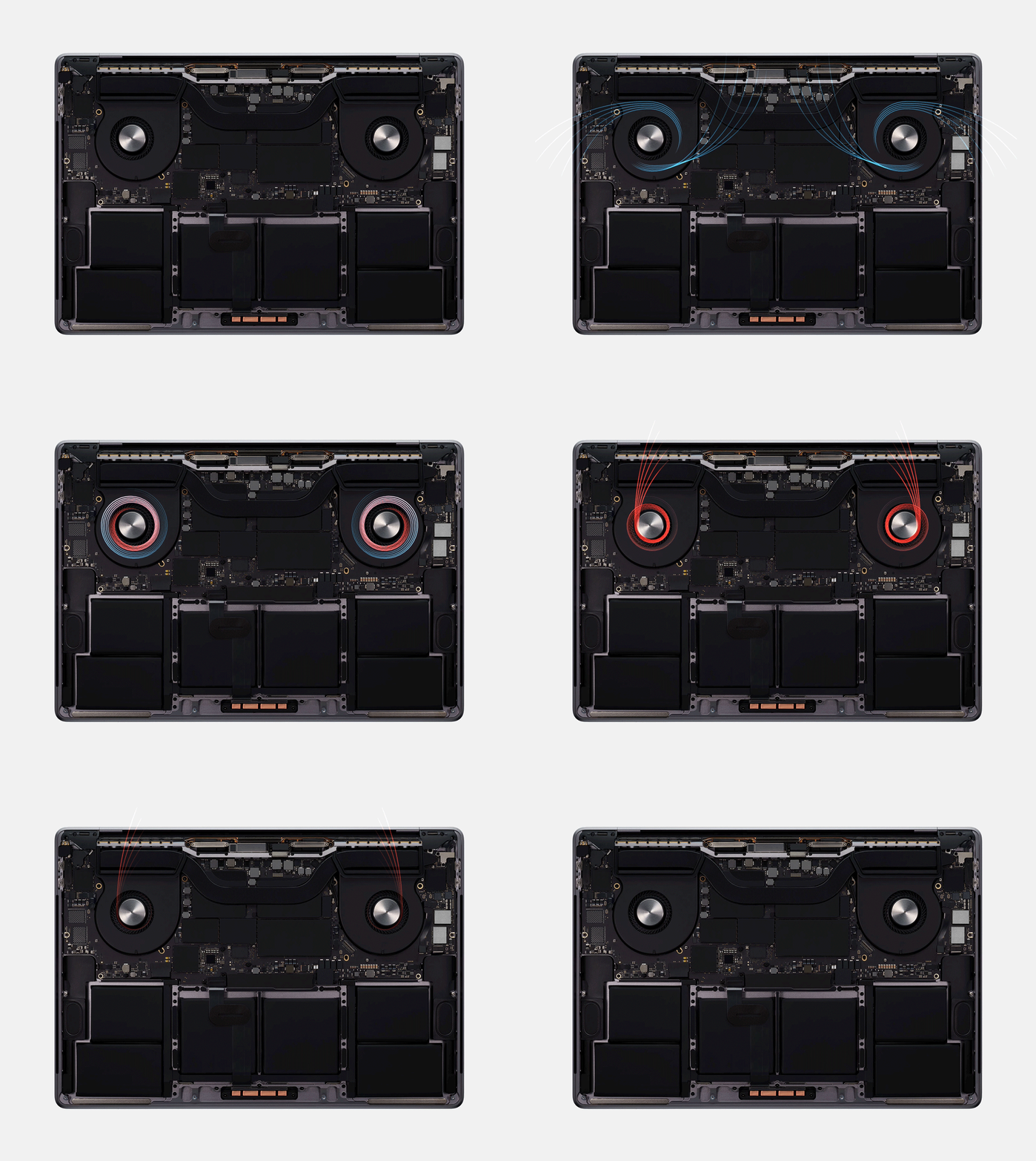
The thermal design updates are welcome, that was seriously crippling previous Macbook Pros.
I'd love to know how long and what clock rate the 8-core 16" MBP can sustain multi-core workloads running at 100% core utilisation. My guess is for a minute or so at 3.5ghz+.
I was scared away from Apple by the keyboards and found a new dev home in Windows. I've tried to go back for personal projects, but it's just too much conversion for very little compensation.
I think I'm done with Apple macs
But is it strange to anyone else that a company that prides itself on being innovative and motto is "think different" is parading around a screen size change and a keyboard regression as the biggest selling points for a product launch?
They work. There's no need for needless new gimmicks. It's fine to have a reliable, consistent tool available for purchase. Just like Thinkpads, hammers and multimeters. It's ok to be conservative on new things in some market segments.
Not hating - I am getting this laptop.
So you can see this as an improvement to the current gen MBP.. or you can see this as a selling item to those who skipped the 2016 and still have a 2015 (or who had a 2016 and got burned). When you are drowning your goals are not to get on a ship or to go someplace, they are to get air.
Apple states that it also scales to
  •  1920x1200 (3:5)

  •  1680x1050 (48:25)

  •  1280x800  (12:5)
The 16" display has a 16:10 aspect ratio.
I just wish they would allow Linux to be installed natively on it (with supported touchbar drivers, etc.).
And a small part of me secretly wants Apple to release a MBP with a TrackPoint, just to see people's reactions ;-)
> Today, Apple also announced that the all-new Mac Pro... will be available in December
def test_apple_is_back_for_pros():
    16_mbp = 16MBP()

    16_mbp_specs = 16_mbp.specs

    self.assertTrue(16_mbp_specs.thicker)

    self.assertTrue(16_mbp_specs.escape_key)

    self.assertTrue(16_mbp_specs.larger_battery)

    self.assertTrue(16_mbp_specs.better_kb)
Apple could do well to dust off that design, toss in an updated processor, and put whatever price tag they wanted on it.
Hopefully the new keyboard is reliable.
The Touch Bar is forgettable and a row of physical function keys would be an improvement. I don't know any "pro" user who likes the Touch Bar or who wants to look down at the keys when typing or interact with a microscopic touch screen.
Still puzzled by the lack of ports for a pro laptop. It's 16" with a huge body, not particularly thin or light, and they couldn't add two USB-A, SD slot, HDMI? The age of a dozen dongles continues.
64GB RAM option is a big plus, though the prices are 2x-3x market.
Presumably the SSD is still soldered onboard, which basically makes these unrepairable and disposable premium priced laptops.
Overall far better than what it replaced, but still missing some key features from the 2015 MBP line which remains the best Mac laptop ever made.
Will be interesting to see if they ditch the 13" and move to a 14" with similar specs.
Is there some technical reason why Face ID isn't a good fit? I can't see cost being an issue, nor physical space for the sensor.
Overpriced soldered RAM?
AMD GPU that's basicaly useless for ML instead of NVidia?
None of these are good selling points.
That's a big deal for everyone. I do not know why it's not 100W but I will take what I can get. You see, Apple landing on 87W for their USB C adapter led to a lot of third party chargers also being 87W (or if multiple ports then one maxing out there) which is very frustrating to those who need more oomph. There's something to be said about education in the US when you need to explain to people a higher wattage charger doesn't damage their equipment...
I guess LED screen is left for the next iteration of innovation.
Sass aside, thank you. I'm very pleased!
I like the changes. I wish they would target weight next. 2kg is nearly twice as heavy as the same size LG Gram and 33% heavier than then 17" LG Geam.
No, I don't want an LG Gram but I would love a lighter 16" MacBook Pro.
I'll be taking the 2017 to the Apple store and get them to fix it up under their keyboard (and hopefully battery) replacement program.
I realize i don't even look at other laptop makers just because i need to build iOS apps (which in theory shouldn't have any kind of relation) That's probably the textbook definition of monopolistic abuse.
Thank god for the return to sanity
"Look, we give you your Esc and arrow keys back"
it's a scam.
What the hell! I'm going to try getting a replacement from Apple. The 15" upgrade that I got was just announced too when I got it.
Oh, but you trust every word of the press releases issued by other companies? C'mon, it's a press release, not a canonical religious document.
It appears that the Qualcomm license problems are the only impediment to Apple putting an LTE modem into a bigger device.
That mobile carriers have not caught up with a better pricing model is not as important to me as having fewer failure points when traveling.
Please tell me how I do proper GPU compute on a Mac.
Also keep in mind that warranty and repairs on Mac products are a complete ripoff.
Probably one of the most important features, even if mentioned in passing, given the problems of the butterfly mechanism.
It's four USB-C/thunderbolt ports, two on each side, and a head-phone jack.
BTW, magsafe is an optimization from a bygone era when you had to keep your laptop plugged in while using it. You can now (generally) leave your laptop unplugged as you use it and stow it somewhere out-of-the way to charge when you aren't. Like your phone or tablet. Magsafe is nice, but probably not worth it now that you don't need to routinely charge your laptop in a vulnerable position. And, of course, USB-C is very easy to plug in.
we all want that, but apparently its not coming back
Me, because I ditched that monopolistic machine, which you can't fully enjoy if you are not in Apple's ecosystem. The only Apple machine I have is macbook. Even my desktop was a hackintosh. As a developer Linux gave me extreme freedom. The only thing I miss, is the touchpad but I learned to live without it.
My girl because I gave her my Macbook Pro 2015 and moved away from windows, win-win situation, the machine will just "work"
Too bad I bought a ThinkPad back in June after THREE YEARS of ESC'less computing. This after almost two decades of not even looking at non-Mac machines.
I can't be the only software engineer who refuses to buy it on this one major issue.
Real talk, if I could easily do my own repairs, and HW replacements on it, I would get it.
Typed on the flawless keyboard of my insanely awesome, truly immersive, MBP 17" Mid 2010.
I just clicked through to the purchasing page, and at the top there is this:
"Get a refund of up to $2530 when you trade in an eligible computer, or recycle it for free.*"
If you click it, it asks you to choose if your trade in was made by Apple, or "Other" - if you select "Other", it says:
"Based on what you’ve told us, your computer is ready to recycle"
Beneath, not so hilariously, there was:
"It’s a big win for the planet. Recycling your device helps replenish resources and drive innovation."
Come on, this is marketing spin at it's worst, and not the kind of thing I'd expect a "hipster" company like Apple to say!
They believe the answer is going to be Bluetooth.
(Disclosure: My 2017 MBP has been repaired 8x and replaced 1x. My iPhone repaired 1x and replaced 1x.)
Would it really hurt their octibajillion dollar valuation too much to just make things right for the customers who got shafted by their broken keyboard design?
Easily the best tradeoff for me between screensize and carry-ability.
More pixels in the 15.6 Xeon chip 5ghz 128GB ECC memory
I guess I’m wondering what metric singles this one out as being best?
Apple have probably decided that it is the best because it has the best hardware that is running OSX. I think they consider any other OS inferior, no matter what hardware it is running on.
Hallelujah!!
1) Ryzen Options; Icelake Options 2) Regular USB 3 Ports and 3.5mm Jack 3) Make the Touchbar Optional. 4) Do not solder stuff to the Board.
it's == (it is | it has)
It's my responsibility to correct grammar. it's been tough for the Lions this year.
its == (the thing belonging to it) You should always judge a book by its cover.
“Hey Siri, wake me up next year.”
For me personally think this could work, not having an esc button was a deal breaker for me but this might just convince me to finally upgrade my old mbp retina
My Late 2013 MBP has been serving me well for the last 5 or so years, but I've been wanting to upgrade it ever since 2016 (the battery life is quite poor & the GPU is showing its age). I refused once I saw the changes in the 2016 MBP, and was glad I never bought in after seeing more and more complaints about the machines roll in every subsequent year. I spent the next two years hoping for a redesign & started to give up. As much as I didn't want to, I've been spending the past few months looking at ThinkPads and Dells and mapping out my transition from OS X to Linux.
As much as I love OS X (and I do -- I've been dreading having to leave it), I just could not spend $2000+ dollars on a computer that I was going to have to fight with to make it work like my old one. This is going to be a daily driver, not a novelty or a toy. Yes, I could've remapped my escape key to caps lock. Yes, I could've bought a bigger laptop bag that could fit a small external keyboard. Yes, I could have learned to live with the new key travel. This is all beside the point if you ask me: I shouldn't have to do that.
Frankly, I'd be okay if Apple kept the old model around, as some people (including many commenters above me) have grown to prefer the butterfly keyboard. Maybe some people prefer the extra touch bar space? (I don't see why it has to be one or the other; I remember how many MBP variations/SKUs Apple carried when I started buying MBPs back in 2010.)
Just give me the option to opt out of these things -- even most of these things -- and I'll keep writing you checks. I'm looking forward to doing this in a couple months assuming the reviews on this machine are good.
Here is a nickel kid: buy yourself a real computer -Dilbert
In my eyes, that makes it a non-starter for an alleged "Pro" laptop. For the professional work I do, an SD card reader (for photos and video), HDMI/DisplayPort (for presentations, either in the boardroom or better viewing of photos and videos), USB A (because thumb drives), and for my specific work, an ethernet jack, are all required to do my job. Also magsafe power is a lifesaver.
I'll be holding onto my 2014 15" until it's cold and dead. And if Apple still doesn't have a suitable replacement, Lenovo likely will still have great pro laptops.
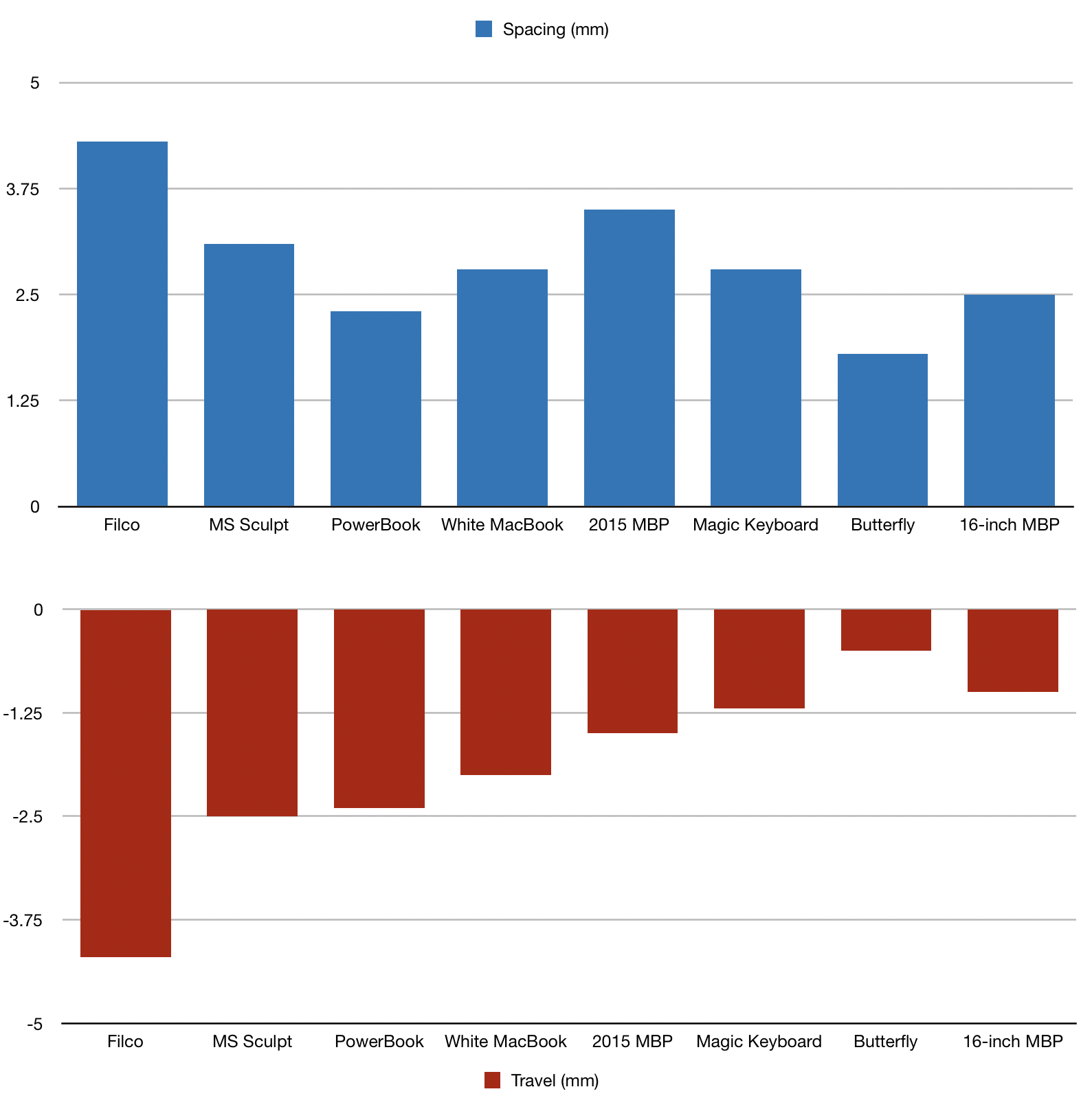
• The keyboard uses scissor switches (and thus hopefully won't completely die), but still only has 1mm of key travel.
• They added back an escape key to the top row, but the touch bar is still there—and there's still no function keys as a result.
The keyboard, okay, maybe Apple really needs those thinness metrics for marketing purposes—but would it really have killed them to up the travel to 2mm? And, why the heck are they so dug in on the touchbar? While I admittedly only have anecdotal evidence, I think it's relatively clear at this point that neither users nor developers have taken to it in any significant way. Just kill it already. It's been three years—if people haven't discovered how amazing it is by now, they aren't going to have a sudden awakening.
Surely the thinness of the keyboards hasn't been relevant in marketing in a while? what kind of consumer does this excite? Surprised Apple are still shouting about it.
I legitimately don't understand why you wouldn't add just a tiny bit more key travel. Typing is one of the primary functions of a laptop.
But, like, people listen to music and watch videos on their laptops, and it would be absurd to force them to use bluetooth headphones for no good reason.
- It's got no number pad, so the screen, the keyboard and the touch pad are aligned with the nose of the user, which doesn't have to shift the laptop to the right to work and have 2/3 of the screen to his/her right.
- It's got a slightly larger screen than my HP ZBook but it's narrower and lighter: 14.09 inches (35.79 cm) and 4.3 pounds (2.0 kg)
- It can go up to 8 TB of storage and 64 GB of RAM (but there are laptops with 128 GB in 2019).
I didn't investigate if it can be upgraded (RAM and SSD) or if everything is soldered.
I’m surprised to not see people talking about it in the comments. 3900 US without Apple care? Holy god. I bought the max spec or close to it in 2015 for 800+$ less. The differences are negligible, and then I spent an additional 200$ on dongles I don’t want. I’m probably not done. When all was said and done I spent 4600$ on this machine. I make my living on a computer and I need the pro part of the MacBook Pro, but it is still a really jaw dropping price for what it is.
Screen in touchpad: https://www.microsoft.com/en-ca/p/asus-zenbook-14-ux434fl-ub...
Screen above keyboard: https://www.microsoft.com/en-ca/p/asus-zenbook-pro-duo-lapto...
I put 16GB in my 2013 Mac Book Pro. The extra RAM is key to getting a few more years of use.
An external SSD would be fine but Mac laptops never have enough ports.
For anyone who is going to use this as their primary computer, the real price is 2800$.
That's a lot... Who is the end consumer here? Folks who are computer illiterate and want 'the best' laptop apple has to offer?
Laptops promote poor posture, can't match desktop speeds and are expensive! Their use-case to me is limited to business people who hop from meeting to meeting all day, but then you don't need the horsepower and will be fine with a 500$ option.
There is always this lurking sense that if my existing MB Pro dies, that I would have to transition to something with a defect.
This new model has piqued my interest. I am excited to see that it has a bump in memory. That has always been something that has not sat well with me. Newer software demanding more and more memory while models of the MB Pro has been released with no increases in RAM.
While I'm immensely happy with my new OS - a lot more could be said about the hardware ( especially when running larger screens on pc that just can't keep up battery wise ).
This is a phenomenal step in the right direction, but one that comes too late for me. At this point I can't begin to consider jumping back until macOS sees some substantial improvements.
https://news.ycombinator.com/item?id=21526058 has few comments but points to a long interview with Phil Schiller that has some interesting things but (brace yourself) says basically nothing about the touch bar.
I was stunned that no one at Apple heard that ridiculously obnoxious CLACK CLACK CLACKING and didn't think we would do something about that.
Does anyone inside Apple know how that disaster of a keyboard came to be? How did logic and rationality not see it turfed the moment it was trialled?
(This new keyboard claims to be quieter. Although calling it "magic" is just so pretentious and so.. Apple)
The real issue here is the intel chip. New vulnerabilities have just been found and the company isn’t addressing them so I’m starting to question the platform.
What about an AMD machine. It would be cooler, slower yet un-throttled so about the same performance. But it wouldn’t be a sitting duck.
> Cupertino, California — Apple today unveiled an all-new 16-inch MacBook Pro — the world’s best pro notebook
It’s on apple.com for fuck’s sake and if you don’t know that Apple is based in California, do you really care? Why do they write this stuff as if it’s some other entity writing about Apple as opposed to “today we are pleased to announce...”?
Edit: You can do this natively since Mojave(?) in the keyboard settings without having to resort to something like Karabiner.
Particularly annoying when you're a vim user :D
It honestly astounds me that the device that has traditionally been adopted most by developers has lost so much of what developers need in favour of gimmicks.
You can easily use a tool like https://pqrs.org/osx/karabiner/ or `brew cask install karabiner-elements` to remap fn + number keyrow to be the function keys.
Offtopic: Typing this on a Redox Wireless keyboard, it's great for developing on. It's a split ergonomic columnly staggered ortholinear keyboard, the [] keys are in the middle of the split parts. And you have thumb clusters.
Look, people, Apple high-end laptops generally cost $3-4K. And if you think that's high, you're forgetting that (in many of our cases) you're running your whole business on that.
$3-4K every couple of years should be in the noise. Cost relative to other laptops has little meaning, if you want high-end Apple gear.
I'd like to see the touchbar disappear completely, and the function keys return - but the real escape key and no butterfly keyboard is enough of a change that I think I can finally buy another MacBook!!
It was definitely off the cards for a few years there, and I was starting to wonder what I was going to do!
Especially for a 16" laptop, I'd like something without a mess of dongles and adapters. The 2015 15" Macbook was pretty good in this department, but Apple is on a port-cutting rampage.
4 USB-C ports and a headphone jack. Same as before.
Still, the important thing is that Apple seemingly listened to feedback. Too many double down on bad decisions regardless of feedback.
That said, the only cool use for the TouchBar that I've noted is with iTerm2. Changing terminal colors on the fly from the TouchBar is actually kinda nifty.
64GB of RAM in a laptop... yowza.
While I've liked some elements of the design, it's not (to me) a Pro piece of kit, and I've sine replaced it with a 2016 15" MBP which is much better built and doesn't need extra dongles to connect to everyday devices (and has magsafe, which is the best piece of design I've seen in many years).
Given this performance, I'll never buy a new Macbook again - particularly given all the issues about thermal throttling, battery life and indeed the way that macOS seems now to be going.
Don't get me wrong, there are elements of the 2017 MBP that I love - it looks amazing, the screen is fantastic and it's just so precisely made. But the lack of ports, the lack of ruggedness, the keyboard and the performance outweigh any 'look, shiny!' feeling I have about it - so much so that I've not sold it because I feel like I'm stitching the buyer up - even though they've not held their price compared to previous models, which shows that people know this to be the case, and the keyboard still has the 4 year warranty in place.
It feels like Apple is losing the spirit of doing things itself, whether other people dislikes it. Apple is more and more becoming a usual company that just does what consumers demands. And I'm sad with that.
We have basically a computer which will never allow you to install what you want except if that software is signed by apple in a process taking 1 minute and said to garantee an extra level of security (how this process is able to check on any security issue in 1 minute is beyond my understanding) to user.
So they simply lose the ability to install anhthing not signed by apple. Old programs, a ton of open source programs. If Apple decide tomorrow to stop its signin program (and it will happen soon or later), user will be basically stuck with a computer limited to install Mac Appstore Software.
This is as significant as the fact there was a nodejs issue regarding the inability of the team behind it to distribute new release of nodejs because apple server simply refused to sign the package that contained the binary.
Apple computers are destined to become giant iPhone once apple decide to ditch apple notarization program, and the user will be leftwith absolutelly no control of what's happen in their computer like what is the case in ios device.
How someone with technical education can be satisfied with such scenario is beyond me. AApple computer are simply becoming Grandma computer.
But I've always preferred the "6-key" layout, as seen on ThinkPads. Half-height arrow keys, but then an additional key on top of both Left and Right.
Commonly marked as Page Up / Page Down, but easily reconfigurable to 2 additional arbitrary hotkeys.
Looks nice and symmetrical enough for Apple. Wish they would use it.
Problems I currently have that are annoying:
- I miss the 13” air form factor a lot. I knew it would be a trade off for the performance, but using this beast anywhere but on a desk is pretty tough. On a plane you need a first class seat to open it. It gets super super hot with most workloads.
- there is an obnoxious electrical whine coming from the mainboard and it might be the SSD. Lots of videos on YouTube show that the ssd actually makes a lot of noise and almost sounds like it’s a physical disk. Poor manufacturing from Toshiba.
I guess that’s really it. I just wish I could use it on the couch without burning my thighs. I don’t have any qualms with the keyboard or touchbar. I have caps lock remapped to escape so that doesn’t bug me. Also the touchbar is in “old school mode” or whatever so it looks like a regular function key bar on a non touchbar Mac.
I also have press-and-release option/alt for esc, but sometimes get lazy and try to hit the tiny touchbar icon for esc.
A physical escape key will be nice to have, and inverted T arrows will be really nice to have.
I wish they'd added haptic feedback to the rest of the touchbar, but I'll take it.
It always surprised me how broken the palm rejection was on the recent MacBook Pro since previous models (2012-2015) running the same macOS version had no such issues; moreover, palm rejection also works fine on the iPad and iPhone.
First heard about it back in March, when all OEMs were scrambling to make lookalike products before Apple's release.
Would be interesting to know if they went back to Samsung panels from LG. I remember Samsung salesmen were pushing hard their new 500 and 600 nit panels a year ago.
The second was the move away from the 17 MBP I know they are not popular and I know the reasons for killing it, but I develop on the road a lot and the extra screen space helps when a second monitor is not practical.
Had this been out 6 months ago I may have reconsidered my switch to a PC. That being said I am happy with my switch.
Is this the first time we got a starting price on the Mac Pro?
(if I won the lottery)
Looks like Apple will be getting another $3K or so of my money 6 months from now after other people beta test the new MBP for bugs.
2019 16-inch, per https://www.apple.com/macbook-pro-16/specs/ :
Height: 0.64 inch (1.62 cm), Width: 14.09 inches (35.79 cm), Depth: 9.68 inches (24.59 cm), Weight: 4.3 pounds (2.0 kg)
2015 15-inch, per https://support.apple.com/kb/SP719?locale=en_US :
Height: 0.71 inch (1.8 cm), Width: 14.13 inches (35.89 cm), Depth: 9.73 inches (24.71 cm), Weight: 4.49 pounds (2.04 kg)
Wow, that is a lot of computer. Even the base model is 16gb and 512gb.
Wow..
In November 2019.
OK.
"Mac Pro starts at $5,999 and Pro Display XDR starts at $4,999. Both will be available to order in December through apple.com."
They keep announcing it, yet you still can't buy it. I wonder why.
There's some custom parts involved, so maybe it just required getting new manufacturing processes up to speed and it took longer than expected? I think the Mac Pro is not manufactured or assembled in China, which might be part of that additional time, too.
Which is still quite poor - Thinkpads offer between 1.3 to 1.9mm of travel depending on the model. It is surprising that a $1Trillion computer hardware company cannot design the best keyboard in the world while tiny Lenovo seems to have done much better.
Why would a "pro" user care more thinness and form than the usability of the primary input mechanism?
Add: It's not merely the travel. Lenovo keyboards are so slightly concave which offer perceivably better support for finger tips. The key surface also has a rougher texture instead of being flat, smooth and glossy, which I hope more manufacturers will emulate.
This might be in part because I'm a tall man, with large hands and long fingers, and also Esc normally has more of a separation from adjacent keys than capslock does.
But another reason I don't want to remap caps lock is that when I am typing on a coworker's computer, odds are high they don't have things remapped the same way. Imagine looking like an idiot in front of your peers, because your muscle memory makes you not know how to type :)
(Also, I'm not sure if people who do that remapping swap caps lock with a different key? Personally, I fully utilize the caps lock key - it wouldn't be much of an improvement to put it in an unusual location, and getting rid of it is not something I'd consider.)
tl;dr - Different people have diverse habits, preferences and needs. Apple's challenge is to design a keyboard layout that works well for as many as possible.
I have no idea if this new laptop's keyboard is any good, but it would have to take several steps back before you get to lenovo. One arrow key pops on and off as I use it. (This lappy is 4 months old and I've rarely done anything but remote into it so the keyboard should be pristine.) The escape key needs to be pressed extra hard -- beyond the "click" -- to register sometimes. Also, the right-click area on the trackpad expands and contracts mysteriously (best just to turn that off.)
Of course, my issue is that they have some sort of internal catastrophic process failure if they were able to release a keyboard that fails so consistently. It wasn't just bad design, it was a process that seemingly did zero testing behind some Apple employees typing "hello world" on a ground floor clean room and going "yep, seems good."
I look forward to see how the 16" MBP shakes out. I can believe that they redesigned the keys, but not that they fixed a gaping hole in their fundamental processes responsible for a dud keyboard that they had no idea how to fix.
Now that Apple has alternative hardware what they do next is very important - will they replace the lemons or spend the next decade claiming they're not responsible in court? Will the four year keyboard program be extended or are the 2016 MBPs almost junk already?
And you are correct. Just got back from the Genius Bar, they have to replace the entire top case because the R key tends to stick or misfire. 2 week repair because they don't have the parts. Sounds like an expensive repair for a single key.
The person sitting next to me had the exact same issue (but different keys)!
I guess you're blaming Dave the IT guy who gave it to me.
Years ago, I switched to a Surface Book, and while I'm tempted to go back for this MBP I reckon that a Surface Book update would be enough to kill any desire for the Mac range. While Apple stagnated, many of the high-end manufacturers caught up.
Windows is fine for day to day casual use, but the moment you attempt to peek under the hood you encounter a hostile and alien landscape.
Linux is usually consistent, well organized, and highly configurable when you are under the hood, but is a pain in the ass for day to day use. Edit: Illustrator and Photoshop still aren't available for Linux as I just discovered.
MacOS is Unix under the hood, but it has software support near that of Windows, and it also adds a layer of convenience and thoughtfulness on top that isn't matched elsewhere. Ffs, It is still the only OS that recovers basically flawlessly from running out of batteries.
I find I enjoy my Linux laptop a lot (the i3 Window Manager is amazing). However, there are two things I really miss from MacOS: iMessage and AirDrop.
In terms of overall quality, I'd say that MBP is now behind some of the other high-end devices. The Surface Book knocks the latest MBP versions out of the water in every department, except for the track pad. It's not difficult to argue that the keyboard, screen, durability, or even the OS is superior to Apple's (current) offering.
Apple build quality isn't even close to being good. Hardware failures are common, they had the shitty keyboards in previous gens that started failing after dust got stuck in them, e.t.c.
For example, Amazon gives most of the devs Macs. However, they still use Amazon Linux (RHEL based) VMs for building and testing services, because the EC2s that run these services in prod are all RHEL based. Half of my time is spent in an ssh shell, because either half the shit doesn't work on Mac because of some native dependency, or because I don't want to run into some weird bug like I had due to the case insesitivity of the MacOs system where the code reads a file, but the same code doesn't work when its deployed to EC2.
And as such, there are issues galore with the computers. External display over usbc for presentations sometimes don't work and require a restart of the laptops, which takes 2 minutes for some reason even with ssds. Some USBc hubs fuck up SMC controllers, which then requires a reset, and others straight up fry computers. Copy and Paste on websites often doesn't work as intended. Wifi randomly drops out.
I dunno how the old Macbooks held up, but modern ones are a complete ripoff for what you get if you are spending your own money on one.None of these issues are present on my personal $300 laptop running Linux Mint with minimal customization.
The biggest group that I've seen move away from the MBP range aren't developers, but are creatives - either in design or in sound/music. I know a few DJ's in my local area that have largely switched to Windows laptops because they feel tools like Ableton work better, and because they feel that for the price they're paying they're not getting value for money from the MBP range.
It's also huge, which I kinda like now...but that huge comes with the ability to have 3 disks, a huge replaceable battery, 8 cores and 64gb of RAM.
There's a slight learning curve to using Linux as your daily driver but it's hard to go back once you figure it out.
Even just little things like being able to charge USB devices while the laptop is closed make a real difference in my life.
Although I'm in the market for a new laptop this isn't an instant buy for me, starting to feel I should move all my computing away from Apple because although this is a step in the right direction, we've had years of them not caring about computers.
I use a laptop with a reader, the card is flush (not sticking out) and it's a great way of expanding storage. It's also the best way of getting photos out of digital cameras. Wireless is so much slower.
When I don't need the extra power, I think I'd rather travel with an easy to replace $900 laptop than a $3,000 one for ease of mind.
Which, of course, makes me wonder whether they will ever abandon their hubris with software. There really ought to be a Rosetta-style compatibility layer for 32-bit and GC apps in macOS. Sadly, I don't think that will ever happen. Anyone know whether it's possible to install Mojave on one of these?
I've been a Mac user for thirteen years this month. I'm not sure I can buy another one.
I think the pricing is very competitive, given that the ThinkPad is a giant box. So even if Lenovo lowers its price in the next iteration of its ThinkPad, the MacbookPro will quite match up.
Kudos for Apple for doing this!
My bugbear was hitting the siri button by mistake, I swapped that for a 'do not disturb' button which is harmless when pressed.
I’m so over Apple hardware. Just let me hackintosh it.
Doesnt speak to the quality of the NAND, probably 3D/QLC though. For density.
I decided after some testing that I prefer the keyboard on my calculator.
Then I had to ask what the point was of making a laptop so thin that it can't have any real ports, then having to carry a bag full of adapters?
I'll stick with my Thinkpad T480
That said, I'm glad they bumped up the base to 512GB and the keyboard is improved.
Wow! A physical escape key?!? A scissor mechanism?!? Will the innovation ever cease?!!?!
But more seriously, kudos to them for the full 180 fix.
(Well, I know some hate the existence of the Touch Bar, but I think it has very interesting potential which perhaps could be realized with its major fatal flaw finally fixed.)
I ran the gamut looking for comparable laptops recently in an effort to figure out what I'd do if they didn't get it together, and the options really vary and nothing feels as nice.
Some phones and tablets have varied bezel width because they are touch-screen devices that need to be held by their screens.
In my experience, most TVs and laptops have uniform bezel widths. Especially TVs since they are so commonly treated as furniture, and therefore receive a great deal of design attention. On laptops, an exception is often the bottom bezel, where you often will see some additional surface material.
I agree with GP that laptops should have uniform bezel widths to look their best. It's not a must-have, but a uniform narrow bezel is optimal for laptop aesthetics.
I love the Esc key is back though and hopefully it doesn’t throttle as much as my current 2017 MBP.
https://www.apple.com/uk/shop/go/macbook_pro/select this 404s for me.
Edit: Replaced the _ with a - and it works
It's not the typing experience that was the main problem with the previous keyboard, it was that you couldn't use the laptop outdoors...
You don't need to look far to see Apples failures
https://arstechnica.com/gadgets/2019/03/apple-apologizes-for...
Keep in mind that on something like a Lenovo, if a keyboard fails, it takes 2 days to order a new one from amazon for a very cheap price, and 10 minutes to swap it.
You’ll see the CEO and other PowerPoint-users have Macs, but not developers.
What are the browser and operating stats for HN?
As for CD drives, the world moved on to bluray and that has a licensing cost as well as not fitting with the iTunes strategy of rent-and-never-own. Apple led, others followed. I'd still use it if it was built-in but not as an external: too much hassle to balance it on my lap and not drop the drive ruining the disk.
The lack of physical function keys remains regrettable, and the Touch Bar is still no worthy substitute, but perhaps this is a sign that Apple is finally interested in listening to feedback from its long-term customer base, even if that feedback conflicts with the design team's desires.
I'd concluded that Apple didn't really think much of laptops anymore, and had simply moved on to caring more about other form factors: it seemed a logical conclusion if one assumed that people at Apple were in fact competent.
This shows some real care regarding laptops as a form factor and puts them back in the running for a lot of buyers, including me. But there's still one major issue that I don't see people talking much about -- the way that Apple's decisions regarding storage (namely soldering it to the board AND making it so that there's no way to access it in the event of a logic board failure) increases consumer risk as well as decreasing consumer choice:
https://www.notebookcheck.net/Apple-removes-the-Customer-Dat...
It increases risk of data loss. That's a choice that impacts the day-to-day experience much less than the keyboard, which explains why the keyboard has gotten much more attention, and it really is nice that a company arguably built on attention to experience returned to that aspect of it. But this kind of choice makes a huge difference in a moment of failure, and it's at least equally user-hostile, especially in a product bearing the name "pro" where data recovery can be a matter of business continuity.
I suppose that one can argue a responsible professional will be using network and external backups (and of course all responsible professionals worth considering or selling anything to will do this, right?), and so this isn't necessary, and Apple's thing (wise or unwise) is that they frequently reconsider and eliminate things that aren't crucial. But redundancy in some areas is wise, and I can't see what they think eliminating both removability AND emergency direct access when it come to storage actually buys them. Even if one assumes it's a lock-in action for service, it makes the actual service more difficult and costly.
I'm liking the keyboard correction. I just bought a 2014 MBP to replace an older failing MBP, so I'm not in the market for something else for a year or two, but when that comes up, I'll be seriously looking at the 16" as an option. And this will be what I'm thinking about.
I realize that this is idealistic of me but data loss should never be an issue. This is 2019 and backups have been drilled into everyone's heads for years and years and years. You can still access the drives in these via Target Disk mode (and I've had to do a few recoveries through that so I know it works) and it's likely that the pros outweigh the cons.
It has a very good mechanical feel, and it reduces latency perhaps due to shallow action point and/or firmware tweaks [1]. Also, it's really easy to source ANSI layouts outside the US.
I do in fact prefer it to my blue ALPS keyboard for long typing sessions.
Sure enough all data is lost. I ask them why they removed such a feature. They said they replaced it will a special port on logic board for accessing the SSD the same way. They tried that though and it failed. LOL at the nonsensical design decisions.
If Apple does a removable SSD again, it would go a long way to restoring faith in them.
I prefer this, considering how encryption works with the T2 chip. I'm probably in a minority of general users, but probably in the majority of HN users when I say that nothing on my laptop is important. I don't even have backups per-se. Code is in git and mirrored to multiple remote backups. Documents and similar exist solely in the cloud. If for some reason my laptop was stolen I want there to be an as close to 0% chance of an enemy retrieving data from my laptop as possible.
(Yes, I know SSD encryption exists, I think the T2 thing takes things a step further)
The Function Key MBPs have a problem with their flash storage where they may randomly and unpredictably die, taking all the data with them. The fix is a firmware update, which also takes all the data with it. Fantastic, Apple, we bought six of those machines, and because the users are actively, y'know, using the damned things, it's not really convenient to tell them they'll be without their machine for a week while the service centre gets around to it, and then multiple hours of restoring their Time Machine backups. On the plus side, the SSDs in those machines are not soldered. Yes, they're proprietary, but it's something - if those machines suffer failure, I could grab an SSD on eBay and get them running again. It's almost worth the risk.
Anecdotally, it does work on some boards that are otherwise hosed, but may be less frequently successful than with the prior data connector, as there's more pieces that do have to be still functional for it to work.
Counterpoint, I love the new keyboards and hate using anything else. Amazing how far people go in assuming their opinion is correct, and then just keep going from there.
I'd rather have FDE on a removable drive, but perhaps the typical user doesn't really have a clear mental picture of what's going on.
The "butterfly mechanism" keyboards are awful, unreliable, and get worse with time, so I'm very glad to see them go. Likewise, the return of the physical Escape key is very welcome.
But honestly, the design of the arrow keys has never bothered me in the slightest. If anything, the present configuration is slightly better because it's aesthetically cleaner and gives you a larger surface to hit the left and right arrows.
But honestly, the design of the arrow keys is super important. With the full-height left/right keys it's hard to quickly find the arrow keys by feel. The new (old) arrow key design is honestly what I'm most interested in with this computer after the 16" screen.
Hopefully this trend continues and they can iterate on this model even further.
She specifically mentioned vim users as one of the reasons for bringing back the escape key
Not only is [ always in the same spot, but you don't have to move your fingers off the normal keys or stretch. I was fortunate that a friend told me about that early on, otherwise I couldn't have handled VI, the stretching is so inconvenient (especially so on those old IBM PS/2 keyboards with cubic keys).
map! jj <Esc>
:imap <tab> <esc>However, there is always the option of an external keyboard. But then you end up carrying even more peripherals that you end up with a really thin light laptop and a second bag with all the adapters to enable to you to use the laptop in the way you want. For some it does feel like you got sold an electric sports car, yet end up having to tow a caravan about to carry all the spare batteries and other accessories you had in your previous car.
But certainly an opportunity to embrace modular design and allow the end user to customize in a way that has benefits and would win over pundits.
EDIT [spelling and fat finger W's]
The catch is that all that modularity makes the thing massive-- the thing's a good 2-3 inches thick (with lid closed) and weighs nearly 8 pounds. It looks like what you'd get if you took a '90s-era laptop chassis, stretched it to modern screen proportions, and stuck modern innards inside. It's just not practical unless it's going to spend all its time sitting on a desk, and that begs the question of why you wouldn't just buy a desktop in the first place.
Yeah, I used function keys all the time back in the DOS days. These days, it's mostly to change sound volume.
To your broader point though, modularity can be tough. It inherently adds bulk and cost. And, now, you have connectors that can/will fail.
By nature, touchbar is a partial display and partial input device, blend it in with keyboard(a purely input) on the same flat surface angle, doesn't feel right. Currently, the only time I look at touchbar is when I need to click on touchbar, 50% of functionality just wasted in this sense.
If Apple kept the hinge design in pre butterfly keyboard macbook pro, that would be good place for touchbar. The location is more close to display, touchbar can act properly as a small assist display, also kept the keyboard part a pure mechanical input. The 45 degree elevation angle is also nicer.
If you still have pre butterfly retina macbook pro, just touch that hinge part, you may like what I said.
I did a quick low res mockup here: https://twitter.com/lostylogic/status/1194875389165760512/ph...
Pretty hard, I'd think. It would probably make the computer thicker and/or clunkier.
From very early on, the one on mine has been very flakey, often going blank until a reboot. A few of my colleagues have had the same problem.
Now six people isn't statistically significant, but if that trend mirrors a wider one it could be costing Apple a measurable amount. The real question is will this be enough to satisfy e.g. programmers that actually want to bind the F keys to build/clean/run/step over/etc?
Apple still hasn't walked back on mandatory notarization on Catalina.
In January 2020, they're removing the option to run software that isn't locally compiled or notarized[1].
To say Apple has lost its way would be an understatement. Apple is actively detrimenting those who have stayed in its ecosystem for decades. As a professional audio engineer, I refuse to lose several of my plugins to a quote-unquote 'upgrade.'
If I lose access to my software, you are not 'upgrading' my OS, you are removing access to what worked perfectly before.
I also refuse to lose Adobe CS6, by which I've paid a full license for. No, I have no interest in updates. I had no interest in updates post-CS3, to be honest.
There is no benefit to the lack of 32-bit support that could be worth losing it. If they did this because they're moving to ARM, fuck them. Don't let your behind the scenes process fuck with my day-to-day ability to work.
I'm literally going to have to leave behind my career as an iOS developer - I refuse by principle to purchase new Apple products ('vote with your money') - and I certainly refuse to accept an 'upgrade' that annihilates the usability of some of my most important software, in the name of...what? What possible benefit does removing 32-bit support lend to the customer? None. It's literally just a fuck you to me for supporting them for years. What a damn shame.
https://www.howtogeek.com/443611/how-macos-catalinas-new-sec... (middle of page)
Seems that if you scream hard enough AAPL listens:
> What Apple emphasized is simply that they listened to the complaints from professional MacBook users. They recognized how important the Escape key is to developers — they even mentioned Vim by name during a developer tool demo.
* https://daringfireball.net/2019/11/16-inch_macbook_pro_first...
They have been forced to add it to just about every model to keep people from downgrading to avoid the thing. Which ok saved me money, but I would expect this to get the point across.
I also would be much happier if it was just easier to turn it off or if it at least made each touch action take 200ms or so so that I don't accidentally hit it all the time.
What makes you think they stopped? You know it takes a couple years to design and ship hardware at this level (as well as to design the production lines to be able to build a few million more copies), yes?
It’s not like a web app where they can change, test, PR, and deploy in a few days or weeks or months. There is a lot of preproduction work that goes into building the kind of objects Apple is now famous for and are almost taken for granted.
Apple please for the love of usability: please give me back USB. I AM the pro that you want to feature in every one of your marketing videos. I have a music studio in my house, I build interactive lighting installations for the biggest music festivals in the world, I build custom hardware controllers for fire effects that travel all over the country, I travel around the world teaching people how to build hardware devices, and when home I spend the majority of my time teaching and building software that people love; I use my laptop for over 10 hours a day.
All of this stuff uses USB. ALL OF IT. Having to carry around stupid dongles all the time is the biggest pain in my ass when I'm trying to do all of this stuff. PLEASE give me back USB, you can even call it the "stupid loser old crappy loser lame macbook for loser non pros". I don't care. This nonsense minimalist sleek design stuff is actually harming my productivity.
The last iPhone that had this FaceTime camera was the 6S, released in 2015. Since the iPhone 7 (2016) the phones have had at least a 1080p FaceTime camera. Given that FaceTime / Skype calls are such a common use case and rarely anyones uses external webcams anymore, why doesn't Apple use the existing camera system of the iPhone 11 for the MacBook?
Seriously, if I pay north of $4000 dollars for a laptop, why do I get an obsolete camera?
Would it also harm them to make a version that didn't have soldered memory/NVMe drive?
Ultimately, this is why I switched to a Dell Latitude. Being user hostile to basic memory/disk replacement doesn't fly with me when spending $1500+ on a machine.
And if replacing either breaks the crypto chain - I don't need a black box T2 chip, I'll do my own disk encryption.
- Thickness: 1.55cm to 1.62cm (+0.7mm, +4.5%)
- Width: 34.93cm to 35.79cm (+0.86cm, +2.5%)
- Depth: 24.07cm to 24.59cm (+0.52cm, +2.2%)
- Weight: 1.83kg to 2.0kg (+170gr, +9.3%)
The display alone is ~1.3cm wider (and ~0.7cm higher), so there was a small reduction in bezel sizes, allowing the screen to grow more than the rest of the hardware.
This could be the one a lot of people have been waiting for if the new switches/design pans out.
PS - Although I might be an unusual demographic as I touch type and wouldn't use the touchbar regardless (since I look at the screen, not the backs of my hands while I interact with a Mac).
The 2015 model was the best MacBook Pro. Perhaps the best laptop yet.
Edit: I may be overly snarky, but I find it hard to imagine that recent mbp models were not influenced by the social clout that the iphone brought to the apple brand.
Apple created a twentieth anniversary Mac (TAM) that cost $7,500 in 1998 and was delivered to your house by a Limo. The driver wore white gloves and hand delivered the TAM.
The fact that this review didn't even once mention the fact that this machine is now thicker & bigger and yet they didn't add any useful ports back in is amazing.
I still hate that the 2017 one I have has only USB-C + Headphone jack. I appreciate that it still has the headphone jack.
But at our office we all got OWC Thunderbolt 3 Docks @ $300/desk and the whole experience sucks.
The display is fantastic all around, 64 GB of ram, 8 GB of DDR6 VRAM, 8 cores, biggest battery FAA will allow on planes, 8 TB SSD, etc.
This will also be able to connect to Apple's upcoming 6K 32-inch display.
This is a very impressive update all around and it shows Apple putting a lot of space between their pro laptops and the MBA and iPad Pro now. The lineup is starting to make a lot of sense again.
Only when flattening the design for the 2016 year did they reduce it to 76Wh.
Then Apple turned the battleship and since 2014 (iPhone 6) we've gotten a thicker phone with improved battery life in every redesign.
I'm pretty happy about this new direction.
Have they fixed the damned keyboard? My early 2019 is still squishy.
"Pro" has basically been sapped of all meaning as a term.
Will there be some "pro" users (really: power users, people who run stuff that maxes out this new model's capabilities)? Yep. Will they be a minority, while most users will buy it because of its luxury status, keeping up with the times, or ecosystem familiarity/lock-in? Also yep.
In 2008, it cost $2,400. The new 16” released today costs... $2,400.
"I would buy a dell xps but only if it had a touchbar"
things no one ever said.
Is Apple afraid to offer this because it clearly would show that almost no one is ready to pay for it?
Even from this audience, who of you would be willing to pay the premium for the TouchBar?
And before everyone accuses him of being an Apple fanboy and biased, there is no disputing that he is very much a keyboard snob. He hated the last generation keyboard and he called it out during his initial review. He also famously still prefers an old ADB Apple Keyboard and he never bought a laptop with the old one.
He’s also linked to a lot of articles criticizing it.
If he praises it, I think you can trust him.
Edit:
And Marco Arment’s review. He’s never pulled punches when it comes to Apple’s hardware, their development tools, or the quality of the OS frameworks. He’s gushing over the review unit.
I thought the previous macbook pro felt great for a week out of the box. Then switches started breaking and keycaps started coming off within the first three months.
In fact, the issue seemed to be that it feeling good out of the box was the only testing Apple did on it.
But neither Gruber nor Marco Arment [1] liked it out of the box. Marco did buy one - he buys everything. You can listen to his review on the latest Accidental Tech Podcast.
[1] just for those who don’t know, Arment is probably one of the best known indie IOS developers and the creator of Instapaper and the first developer for Tumblr.
I admit, a 16" screen in a 15" body sounds really nice. But most of this is stuff other brands already had.
For work, I have this display: LG 5K2k (https://www.lg.com/us/monitors/lg-34WK95U-W-ultrawide-monito...)
For a cheaper setup at home: LG 27inch USB C Monitor(https://www.lg.com/us/monitors/lg-27UK850-W-4k-uhd-led-monit...)
- cannot even begin to understand why these things lack an important usability feature like MegSafe: there is really absolutely no reason why it cannot coexist with the ThunderBolt I/O (4 TB ports, one MegSafe: charge it however the heck you want).
- find the presence of the castrated TouchBar an offense to users. It seems they just want to shove it down our throats whether we want it or not. Just make it optional: I'm sure that there are certain users out there that love it but every single peer of mine [1] hates the sole idea of something like that.
[1] I'm a software guy in the Valley
https://www.amazon.com/Magnetic-Adapter-Connector-Quick-Char...
I'm very tired of having to settle for serious shortcomings in what used to be such a great product.
IMO, those are completely different.
The sscape key provides access to a fundamental concept, "go back, undo, I didn't mean it, no!". This even goes beyond humans. E.g, my dogs have the same concept.
Function keys are abstract in a distended way... they mean, generally, some function specific to a certain context that doesn't fit into the general patterns, but is maybe pretty commonly needed in that context.
IMO, the Touch Bar, with text and graphical cues, is better suited. Of course, various software has been written to the F1-12 abstraction, and physical keys are nicer to type on, so it's not all good. But I think this is a case of one step back, two steps forward.
For me I'd actually pay to have a model without TouchBar (but with TouchID, which actually is really useful).
While I don't know if we should be applauding Apple so heavily, it's good to see that they "listened" to customer feedback and made these changes. I know that I'll be looking forward to getting one after my 2015 MBP gives out.
* 2.4GHz 8‑core 9th‑generation Intel Core i9 processor, Turbo Boost up to 5.0GHz
* 64GB 2666MHz DDR4 memory
* AMD Radeon Pro 5500M with 8GB of GDDR6 memory
* 8TB SSD storage
for $6099USD. I wonder how it will handle the thermals.
https://github.com/ROCmSoftwarePlatform/pytorch/issues
I don't think you'll be doing much local ML work on this laptop
That is quite respectable! As large battery as possible, instead of saving the few grams or cubic millimeters.
I'm comparing this to for example Lenovo, which seems to like coming up with imaginary battery life promises ("The T490 delivers up to 16.1 hours of battery life") and then cutting the actual battery to minimum.
Feels like they claim "best typing experience" every time they release a new laptop.
I was half expecting them to use haptics on the touch bar. Still no luck there.
What I really miss is upgradeable RAM and SSD. Still using a 2010 MBP because I was able to upgrade it; that's no longer possible.
The keyboard was fully E-ink, so it changed based on the app or orientation of your phone. It was pretty awesome!
The problem with both of these is they'd just be expensive, period. And solving a problem I don't often have.
Getting a physical escape key back and going with a more reliable keyboard design are big wins.
- Mute/unmute on skype
- Preview and switcher for a number of slides at a time in powerpoint
- Mirror displays / extend desktop when connected to an external display
C-[ is the same thing in Unix. I haven't tried it on a Mac though. But if you're using vim (mostly where I hear this complaint) use C-[ (actually just use it in vim anyways because who wants to lift their hand up to do such a common movement?)
If the Touch Bar had been introduced above physical function keys, we'd consider it yet another Apple UI breakthrough, and other companies would imitate it the way every notebook today looks like the 2001 TiBook.
>perhaps this is a sign that Apple is finally interested in listening to feedback from its long-term customer base, even if that feedback conflicts with the design team's desires
I don't think the fact that Jony Ive left the company a few months ago is a coincidence. Basically, Apple finally got notebook keyboards right ... after three years of worldwide embarrassment, and the departure of the company's chief designer!
Apple has a long and storied history of removing drives and ports that it considers obsolete. No one should be surprised at this point.
Having to deal with dongles for a couple years while the rest of the market catches up isn't a reason to push against the best port standard in decades.
There is no such thing as a USB-C hub. The protocol doesn't support it. That's one really concrete way that USB-C is inferior. I think I heard rumors that the proposed replacement fixes that, but Thunderbolt 3+USB-C is inferior that way.
It's also easier to snap off. That's two. Yes, it's better in a lot of objective ways, but there are also non-imaginary ways in which it's a pretty substantial compromise.
Maybe we should do a longbet on whether you're willing to talk smack about T3 once T4 hardware comes out. Because I bet you will.
They should at a minumum have included a few choice dongles with the system. (usb-c to usb-a, and maybe usb-c to HDMI)
Additionally, they should have completed the ecosystem too. a mac-to-mac upgrade requires a dizzying variety of dongles, where one firewire cable was all that was required in previous systems.
As Steve Jobs says, you should start from the user experience and work backwards. Dongle hell is not a good user experience, especially when Apple's obsession with slimness is in part due to portability.
But why do I have to be the hostage here? I don't want to wait for "the rest of the market catches up", I want to get my work done, and my work requires plugging in lots of USB-A peripherals. The move to USB-C only was premature and trying to force the market using users as hostages shows incredible hubris.
I'm about 70-30 on it being satire
- Run a display
- Charge my laptop
- Charge a phone
- Connect a drive
I can even use a single port to both charge the laptop and run a screen with multiple USB devices attached to it.
I now need to daisy chain converters to use my PS/2 mouse on my MacBook Pro though, so that's a bit of a hassle.
Also, I can use the same charger and dongles for my work notebook, which is Windows based. I wish every new thing was USB-C, because I love it.
(This is a copy of a previous comment, because I feel it is relevant again.)
Music professionals, video professionals, photographic professionals, and plenty of other professionals all have collections of USB peripherals which aren't going to be updated any time soon - either because there are no USB-C replacements, or because a complete replacement program might easily run to four figures, edging up to five for some users, and in extreme cases will be as high as six.
Some of these people tour or travel a lot. Having to rely on dongles - which can be lost, or stolen, or which may stop working for random reasons - is very much not a good idea.
Telling these professionals to "deal with it" is unhelpfully obtuse.
Things do change, but change for the sake of change isn't a good thing.
Meanwhile, I can use all 4 ports to: - Run a display With a dongle
- Charge my laptop Did you need 4 ports to do this? How is this better than a magsafe connector?
- Charge a phone Existing USB ports do this fine, and most charger cables have USB-A on one end. USB-C-USB-C cables are extremely limited in their use and are more expensive.
- Connect a drive Again, no advantage over USB-A
Apple has "solved" non-existent problems and in exchange they've created a whole new slew of problems. Why should I have to replace all my existing cables to work with a computer? It's because Apple is designing for slim cases above all else. (So slim and delicate that resting my hand on the case while typing causes random keypresses).
I broke an early macbook screen by tripping over the charging cable. When they made the switch to magsafe cables it was to explicitly prevent this very common occurrence. They traded trip-proof laptops for the ability to plug your charger into 4 different ports. What possible advantage could that offer?
Other companies have dealt with change better than Apple. For example, I can buy a professional tier laptop from Microsoft or Lenovo with plenty of USB ports, while Apple's reaction to change has been to ignore their professional users' use-cases.
Being able to come to work and plug in a single cord and have it drive my mechanical keyboard, headphone amp, monitor, and power is pretty amazing IMO.
What I didn’t like was that over three or four of the Apple USB-C to hdmi/usb-a/whatever the last one was (thunderbolt?) and one third party adapter I never found one that wasn’t super choppy with my input.
So my Webcam would stutter, and my keyboard would suddenly repeating the same key 12 times (admittedly making for a pretty exciting experience with ViM).
Very frustrating. It may have been my computer. Don’t think I’d heard of others with the same issues in my workplace. But really made working a PITA sometimes for me.
Meanwhile my 2015 MBP did just fine with the same hub through switch setup, so it was most likely the USB C hardware driver in the Apple Laptop.
If you have 1 or 2 USB-C ports odds are you'll need a dongle. Since the only USB-C dongles don't multiply ports, it'll have multiple USB ports. If you had a lot of USB-C ports, you'd likely get adapters and switch to USB-C as you upgraded things. Now, unless you can switch to wireless, you basically have to replace it with a USB device.
Out of curiosity, what PS/2 mouse do you use?
That argument can be used to explain away any problem.
4 usb ports are massively redundant. Even if someone loves usb-C having a usb-A port will add a lot of usability without compromising on anything else.
If you haven't used a USB-C/Thunderbolt-3 notebook, being able to go from portable to charging, full size monitor, peripherals, external storage, etc. with one cable is a welcome change.
Apple's commitment to supporting legacy ports (albeit through adapters) is pretty good, in my experience. As an anecdote, I needed to get some data off of an old Firewire 400 hard drive and linked Thunderbolt 3 to Thunderbolt 2, Thunderbolt 2 to Firewire 800, Firewire 800 to 400 cable into the drive and it mounts like it would on a direct connection.
[1] https://www.amazon.com/Syntech-Adapter-Thunderbolt-Compatibl...
I tried to plug my firewire into my USB-C port and it didn't work. Help!
I mean, why stop there? Apple could just go to zero ports and force everyone to use Wi-Fi peripherals. They could sell a wi-fi peripheral hub for backwards compatibility. Then they could get rid of the power port and use inductive charging. That would make for an insanely sleek machine, even if it were insanely painful to use.
It was a bad decision 2 years ago when they introduced this generation of Macbook Pros, and it's still a bad decision.
Where do you see that?
https://satechi.net/collections/usb-type-c/products/type-c-m...
Basically my background is software (like everybody else here), but around 2009 or so that started bleeding into hardware via arduino/hackerspaces.
And then that bled into doing some consulting work on large advertising installations (building motor control software for robots, building interfaces etc. Some of the stuff I've worked on has been for SXSW,comic con, and the super bowl).
I got lucky in meeting some really cool people doing really cool stuff at burning man, and they eventually let me help on some lighting and fire effects control stuff. That group then eventually morphed into a group that is also building things for music festivals, and when custom stuff needed to get built for it, I was somebody who could help, and so I got to.
As far as the travelling stuff: that was something a friend of mine was doing, but when she wasn't able to go on a trip, she connected me with her employer, which then led to more jobs etc.
But yeah, basically show up and be nice to people. Offer to help a lot.
Also while you are at it include the Apple Power Cable extension cable too. Crazy that is not included.
I too connect a bunch of devices via USB to my laptop (minus the brag). The problem was that there were so many devices, I never had enough ports so I had to use a hub anyway. Then graduated to a docking station and carried my hub around with me in my electronics bag.
So I just bought an USB-C hub (as the docking station already had USB-C). I stopped using flash drives years ago, I have USB-C YubiKeys now so as a proficient user of multiple devices, I really don't feel any pain because of this..
So, no, I don’t consider this in any way to be a dealbreaker.
And youtube videos.
I agree that 4K can be considered excessive, but 1080p would be the appropriate resolution in 2019 for a high end machine.
In these situations, a higher resolution camera wouldn't hurt. A better mic is higher priority though, so I'm happy to see that in the specs.
Exactly. I would prefer a 200p camera.
Fair enough. But for some people it might be.
It is much more comfortable to perform video calls via laptop than via phone because a phone typically needs to be held in position manually. Therefore, I believe that most people would, if given a choice, prefer to use a laptop for video calls.
Also, people might actually want their video to have high resolution. For whatever reason. Even to show their facial flaws. Not providing them an option to do that, despite the fact that the required hardware is cheap and available, is an unnecessary restriction.
Finally, if a high resolution camera was included and someone would not want to use that high resolution, they can simply switch the camera to a lower resolution mode.
There are plenty of premium and luxury laptops at that price point that have HD cameras, and they don't prevent you from running unauthorized software[1].
Even the Surface has better cameras.
In fact, if a phone really wanted to take good pictures (and not just market 'megapixels') they'd have focus, light balance, shutter speed controls. About all they can do is take still portraits.
For what it's worth, the front and rear cameras on Microsoft's Surface products are both high-quality and it's generally a pleasure to do video conferences with Surface users. As some others here have pointed out, it's not necessary to have a high-quality video stream—it's not necessary to have video at all—but it's a better user experience to have a more life-like image of the people you're speaking with. In a group conference in particular, the oddball with the low-resolution 720 web-cam does stick out, looking like a relic from 10 years ago. Especially with a high-fashion status symbol such as an Apple laptop, that's an awkward position to be in.
Imagine buying the top of the class Mercedes S-Class only to find out that the steering wheel is far worse than the ones that Mercedes uses in other models - you'd somehow feel cheated.
Because the marginal cost of a better camera doesn't yield a sufficient increase in marginal revenue.
There's value in a better camera, even in laptops.
(I apologize for this sounding snarky - I am genuinely curious)
[1] https://www.ifixit.com/Teardown/iPhone+11+Pro+Max+Teardown/1... BBC’s
Facetime on iPhones is a lot better than Facetime on Macbooks
My iphone6's bluetooth antennae lets me walk all over the house while listening to something with my headphones (an essential modern experience!) while my $2000+ macbook pro will barely let me leave the room without losing connection.
Wifi antennae too. On bad internet, my laptop cannot even connect to a wap that my phone can, so I'll tether my phone to get internet.
I want my laptop to be a portable powerhouse of connectivity too!
Perhaps better cameras would be thicker than screen currently has room for? I don’t really know how thick they would be.
I do agree that they have slipped in this area, though I think it's an inevitable consequence of being a trillion dollar company. Apple was only able to become a trillion dollar company because their marketing and operations were easier to manage, and companies in a market-leading position typically grow until the point their size overwhelms their ability to steer the ship.
Maybe the experience in USA with Apple Stores is different, but when forced to buy a Mac by work recently I had to deal with some ridiculous wait times just for asking for 32G ram.
One way. The other is, if your computer breaks you either upgrade or spend a lot to have it repaired by Apple. There's no downside in using non soldered down ram and storage, it's just the nth lock in strategy.
Quality problems? You mean like the over-engineered keyboard they've had issues with for three years?
Some decades longer design patterns are battle tested/aren't broken, yet Apple continually tries to break them - thinness to the extent that they now solder memory/disk to the board, putting out a keyboard design that isn't sufficiently tested, and all sorts of Catalina issues that people have documented online.
https://twitter.com/axi0mX/status/1194621631856967688
Edit: Tweet deleted, info is most likely wrong.
Really annoying they continue to do this, especially given they charge excessive markup on memory upgrades (2x32GB DDR4 SODIMMS average $250-300, Apple charges you $800 for 64GB of memory).
So yeah, Apple is not even on my radar if they don't offer a 14" form factor. I also don't use other Apple products, so there's little reason for me to compromise.
bonus: add the magsafe port back to achieve god tier
\s
For the Lenovo I'm using I'd say about 5 years because I break things so easily...it's reaching retirement.
Sure, I know plenty of people who've had the same Lenovo/HP/whatever laptop for 5, even 10 years but every single time I personally used their laptop I was embarassed at how bad the experience was. Sluggish, ugly, with fans spinning like they needed to put out a fire.
After almost 5 years the 13" 2015 Macbook Pro I'm currently writing on hasn't lost one beat. It's as snappy and as usable as the very first day. I haven't formatted once, I've easily kept it up to date, I only replaced the battery because it was lasting 4 hours instead of the original 6-7. I can still edit videos, run VMs, play not-too-demanding games, do Photoshop, like the first day I bought it. And everything makes me think I'll be able to do so for the next 2-3 years, at least.
I've travelled with it to 10 countries and dropped it 5 or 6 times. There are multiple dents on the corners but, damn, this thing is tough!
The thing is a rock. The keyboard still looks (and works) like new with no visible wear on the trackpad. There are a few scuffs and tiny dents on the outer case but nothing noticeable from any distance. One of the rubber feet on the base has fallen off in the last few months but that doesn't bother me too much.
One problem that has developed is that the glass at the top of the bezel has what looks like air behind it. This is cosmetic except that it interferes with the camera, which now is permanently blurry. I replaced the original battery ($49) recently - it lasted almost 6 years and still held 60 minutes of charge.
I figure I can get at least another 12 months out of this thing since it runs Catalina just fine. My next laptop will also be a Mac.
I'm at a different job now and have a 2018 MBP (usb-c only, 15" base model), less than a year old, that is used on a daily car commute (much gentler than the old bike commute) and the keyboard is giving me lots of grief. I will happily turn this one back into the company.
* Used it under direct sunlight (and I live in Singapore so it's both hot and humid) multiple times
* Took it out to sea on boats multiple times for testing robotics
* Dropped it on concrete accidentally
* Left it in dusty labs etc
It's display finally died after being splashed with rain water but the machine itself still boots to this day. Apple made them really well but I can't say the same about the newer models.
This replaced a 2010 MBP which caught fire after I spilled a drink next to it. The case sucks spilled liquids up like a straw!
I use a T470 thinkpad now. It cost less than a replacement screen for a 15” rMBP did! I have literally beaten the shit out of it for months and it just shrugs it off. I also had a T440 which was abused heavily and shrugged it off.
I had an X220 I poured a coffee in and nothing interesting happened too.
Stay with the thinkpads if you’re an idiot like me.
I wonder if Apple would bring back the 17in chunky boi? That thing was a beast to carry around, albeit somewhat more feasible than it's competition
I'm happy we VIM users have been loud enough to get the most important key back. :-)
I know there's Ctrl-[ but it's 20 years of muscle memory to retrain, and I don't want to do that.
Amazing how this can be the first comment. What would be next? USB ports? Even jack ports on the iPhone?! /s
yeah, considering the massive 16" size, there's definitely room for another row of keys. I could see if a diminuitive air came out with touchbar, you want both weight and space savings so nuke it. but with 16" and six speakers just add the damn keys!
This gave me a chuckle since nearly every person I know (90% at least) is a touch typer.
You're joking. You realize this forum is filled with programmers and other digital creative professionals, right?
When they started removing ports I use I switched to a Thinkpad T-series. It's been the perfect laptop for my use.
Apple probably has better data on how it gets used than I do, but that's almost exclusively what I'd use it for if I had it.
I'm secretly hoping that my 2015 model dies so I can upgrade to a newer sexier one, but the damn beast keeps on working great.
A quick search reveals the Razer costs around $500 USD more in NZ than in the US (converted prices to USD). The MBP 16" is $400 more. Wouldn't part of the reason it costs more be because of this legislation?
I'm sure that would go to one of the old Thinkpads; e.g. X220 still has a massive cult following to the point where it's being moded with modern parts just so people could still use it. You have a very valid point though - seems like 2010-2015 was the golden age of modern laptops then innovation was replaced by gimmick all of a sudden.
It turned out to be docker plus Firefox (current version/Quantum yada yada) that was too much - I can't stop using all this docker stuff but I switched to Safari and haven't had any problems at all
The mac only need to be powerful enough to run the IDE.
I think my next Mac will be whatever laptop still has all of its keys and I’ll just keep building machines to run linux with a one-step Kubernetes solution for development clusters. Many people don’t want to assemble machines and that makes a beefy laptop running Minikube the easiest solution to dodge cloud costs outside of production.
Ethernet
(micro-)SD card
Keyboard
Mouse
Displays
Flashing microcontrollers (technically could be done over BT but it is a pain in the ass)
Gamepad
I've bought dongles/docking stations for all of these devices but it is a huge hassle when traveling, which is a use case a laptop should be able to excel at. Adding just a single USB-A port and HDMI would be a complete gamechanger for me. Apple wouldn't be able to sell as many of their $70 dongles though.
Ethernet, 1-2 USB Type A, SD Card, 3.5mm audio, DisplayPort, (while charging too).
As we can see, Apple's 'Pro' products simply do not work me.
That is just what is plugged in to my computer right now, (all USB type A)
How about iPhones, as a great example? :P
This has the largest battery possible under TSA regulations.
You can easily upgrade to 128 gb on these models.
TV got much much cheaper in the last 10 years too and that's not because manufacturer cut their margins, mass production + mature tech + price/perf going down = price stagnates or drops.
I agree, though. My old 2011 MBP was fantastic. A few months ago the video card finally died, otherwise I'd still be using it. Modern macbooks barely seem to have any keyboard keys anymore.
You are very fortunate; mine got hit with the EM209 issue twice. An AASP told me that it almost inevitably affects the 2008 and 2009 models.
Apple did improve the model, though. The mid-2012 non-Retina model I'm typing on is seven years old and going strong, albeit with one keyboard repair (something that also affected my 2008 model twice).
Sometimes I like to look at the price of Apple stock in 2008 and wonder how much money I would have today if I had instead bought 2.5k USD worth of shares in 2008 instead of the laptop - it’s depressing.
A couple of years later and I'm a convert. If I had to buy a new MBP today I would definitely make sure it has a touchbar. It turns out app makers have found some nifty uses for it, like the ability to quickly mute/unmute when in conference calls, quickly changing volume/brightness, stepping through code while debugging etc etc. These are seemingly insignificant quality of life improvements, but I definitely miss them when on a machine without a touchbar. Conversely I haven't missed the Fn-keys, not even once.
That hardware esc key looks tasty though, I hope they bring that to the 13" model.
I think what the touchbar brings is always active tutorial/reminder as to what's possible with the touchbar. Due to it's very nature you don't have to be taught what's on there, you can see, you then don't have to remember/rely on building up muscle memory.
I imagine it sucks for accessibility. I'd still want one before my faculties faulter, I imagine I'd get some use out of it with my IDE.
If the external keyboard had a TouchBar and I would start incorporating it into my workflow I can see it's use-fullness.
Maybe I've just had a limited, poor experience with it, but from the apps I've used these functions are only available on the touchbar when the app is focused... which has the controls anyway.
I was using Skype for Business and it had the audio controls in the touch bar, and also on the screen about 1.5" inches above the touchbar. I wanted to mute and unmute when I had the app in the background, but I couldn't. Useless.
Most apps don't use it very well though - I actually quite dislike Safari's overcomplicated tab buttons - I can't make out anything so it's basically useless, and I use cmd left arrow to go back not the touchbar button.
I would love to have a hardware escape key. But despite the shitty butterfly keyboard issues I'm currently going through I want to keep this Macbook as long as possible.
Well, these have physical buttons pre-touchbar, so the touchbar is definitely slower since it requires two clicks (one to summon the slider) and you have to look at it instead of just feeling it.
But in all fairness, the F-keys on a mac never really worked like function keys, they've always been more of a row of OSX-keys. I can understand why Apple felt a need to innovate that space, but I am not impressed.
It's a solution looking for a problem. It's garbage.
i never type with capslock on, and find using it for escape helps my vim workflow
I'm so glad this model has a Touch Bar.
I have seen numerous people who have a MBP 2016 or later which just can't use computers without the Touch Bar experience.
If somebody doesn't find it useful, that's OK, but please, there are a lot of people (who doesn't loudly complain at HN) that finds the Touch Bar useful & incorporates it in one's workflow.
I for myself uses my Touch Bar extensively, from when I'm using Emacs (with a bit of scripting & BTT), Terminal.app, Safari, MS Office Suite, and on and on and on.
I really won't care if Apple would release a MBP without one, but I'm worried Apple will remove the (IMO very useful) concept altogether just because of the loud complainers on the net (like the butterfly mechanism).
The touchbar is a flawed design concept imho. The entire reason I touch type is so that I don't have to look down from my screen. My eyes remain on the screen for 99% of the time I am working. It's jarring and discontinuous for me to have to look down to use the touchbar. That's why I personally never liked it. I think the tactile feedback of a real physical button is essential.
I think Apple realizes this already to some extent because they went and added a physical escape key.
Wait, that might not work for me -- I use emacs in a terminal.
about butterfly switches... garbage
The first got a full replacement of mainboard, keyboard and battery after short circuiting.
The second came with a broken hinge cover out of the box and there still seems to be a driver problem I haven't figured out (random lags up to 5 seconds or so but usually less multiple times a week if not multiple times a day).
Just my experience though. Have good experience with Latitude though, so this is not to say you should avoid Dell entirely.
I have heard the XPS 15s tend to have more "issues."
I don't know about the battery but the hinge was certainly a problem with the line in general, since it was a flimsy plastic thing unable to hold the weight of the 4k screen it came with...I'd be a bit surprised if that hasn't been fixed in the around 2.5 years since I bought it though.
I saw companies repeating the same mistake times and times again. I'd call it a "Mercedes disease." Mercedes 600 series used to be a supercar of the time, but the moment Mercedes management saw that Americans are OK with it being a regular consumer level car, they made Mercedes the reputation it has in US now "expensive and disposable."
S classe is still a luxury car, but under the skin there is nothing really special about it, and it could've easily sold for half the price if not for Mercedes logo on it. Most of clientele for S600 are the people who are just fine with paying extra $50k for the badge, and there are a whack a lot of them in the US.
I'd say the overoptimisation and product management are the issue. Quoting myself:
> See, a first reduction from ~64Wh to 62Wh might've not been even visible and been a valid "product management" decision, and not impacted the sales.
> A second cut from 62 to 56 might've only deterred few power users, and could also be validated from the same standpoint, if evaluated without knowledge of the context.
> But the third cut from 56 to 52 will blow up, despite the rest of the product getting the biggest year on year improvement ever.
A decision to cut the battery a tiny little bit to save some pennies might've made sense business-wise every single time, but it did cut deep into the positive image of the product.
Lack of touchbar is not one of those good reasons.
Intellij, Outlook and Apple's own programs integrate it very well.
Phyisical keys are great but 12 buttons labelled F1 to F12 with different functions depending on the program also isn't he pinnacle of UX.
>Phyisical keys are great but 12 buttons labelled F1 to F12 with different functions depending on the program also isn't he pinnacle of UX
x1000. Function keys have almost always been useless to me. Once in a while I will remember what one is mapped to and use it, but for the most part they go unused.
Pretty much everyone I know and every workplace I've seen has proper monitors and keyboards for everyone (developers included). A laptop has terrible ergonomics. That makes the touchbar a bit pointless, except when working on a train or plane, or at a meeting or conference.
On previous MBPs you still had to touch the fn key to use F1 etc... I do the same on my newer Mac. Press FN and you get what you need back.
Personally I don’t see why they get all the hate. It’s a little gimmicky but I don’t dislike it. The keyboard was my biggest gripe but Apple replaced it for free in a couple days.
It's just a showstopper for a lot of us that it's another screen you have to look at. I don't want my eyes to leave the main screen. It's like if they tried to turn the trackpad into a screen: no matter how much functionality it might have, it's still somewhere I don't want to have to look when I'm using a computer.
I also was amazed at how unused it was. You probably named the only apps that use the touchbar because nothing on her computer did. And if they did, it was just cloned UI of UI that the main screen already had. I think the only useful usecase I've noticed is that the touchbar will show the url of the current video when you fullscreen it, if I want to damn it with faint praise.
If I wanted a super-sexy fn experience, I'd have function keys with leds for changeable icons, and a bigger touchbar above it for app-specific bling.
And I'd drop the size of the touchpad. That thing is too big, the retina one was more than adequate.
And there's no option to get legacy ports, but it's Apple, ports are a religious jihad not a customer convenience.\.
things every pro user said, since the invention of laptops, for every brand.
Yes it's a little gimmicky, main feature being that you can swap between customized buttons and ad-hoc sliders when adjusting things. But still nice that they didn't throw everything aboard and manage to compromise between reintroducing ESC and keeping innovation.
People were annoyed because they don't want to run a different OS. Yes, you could get cheaper/powerful hardware somewhere else... but it's not macOS. Hackintoshes need not apply here.
Thing is, Mac OS isn't as great as it used to be either. They used to be brilliant developer laptops, but Apple seems to want everybody in their walled garden.
My summarized conclusion is that: OS X isn't that great. It's not "bad," don't get me wrong, but it's nothing marvelous. Perhaps at one point in time there was some advantage over a Windows or linux environment but at this point in time, unless you're tied to some package tied to a specific environment for some reason, just work with the environment you're most comfortable with. I don't know how much time I've had to waste adjusting to the OS X environment (especially muscle memory keyboard shortcuts I'm accustomed to), finding replacement niche applications that were environment specific, figuring out how to do basic tasks that are simply different.
On that note, avoid committing to a specific environment unless your application really needs to squeeze out every cycle of performance. It's 2019 and we have portable options now for most application demands.
There were other things (good-enough port selection complementing the high battery life and good trackpad to mean I could just grab my laptop and go for nearly any situation, without taking anything else, being high among them) but they're gone now. It's basically the software and the trackpad keeping me around. I'd rather use a "worse" Macbook specs-wise than a Win10 or Linux laptop that's much better on paper, because the experience will still suck far less. Design, "thinness", trendiness, all that, don't give a shit. Give me a brick of a Thinkpad with an Apple trackpad, official macOS support, and a 20% lower price than a MBP at same specs, and I'll take that option in a heartbeat.
would you agree with this change to your description?:
"Yes, you could get [better] hardware somewhere else..."
If it's just about running MacOS, they absolutely apply.
There are nothing else making the macbook lines worth it. If Linux with hardware manufacturer come up with a standard for greater touchbar control, the mac will be out of circulation in no time.
It's like a global monte carlo letter frequency measurement experiment
https://www.gamerevolution.com/news/612924-five-years-ago-ca...
I bought a thinkpad since at least the keyboard is as good as my mbp 2012 but the trackpad is horrible.
45W is easily doable, gaming notebook vendors can easily get up to 100W in a mobile package.
Apple and other "major brands" had a string of borderline laughable engineering mistakes over the past 5 years.
For example, in their latest 12 inch Macbook, they simply put a blower to work as an exhaust fan, but then forgot that the keyboard membrane has no sealing just above it.
“When we changed the key travel from 1.0mm to 0.5mm, it was so much better that it became the best keyboard in the world. And now, with the change from 0.5mm to 1.0mm, we’ve made it even better than ever: Welcome to the world’s best typing experience.”
Meanwhile, every time I take out my 6 years old Thinkpad T440s the keyboard feels nice instantly.
Because logically you improve everytime, primarily why Cook comes onto stage every year saying:
"This is our best iPhone yet"
or insert whatever apple product you want.
Now, it's just pure marketing speak
Now they have nobody to make new words.
When you write software presumably you think each release is the best experience each time?
I REALLY loved the short travel distance of .55mm :( I could type so much faster, bordering on 160wpm
What do you expect them to say?
I'm typing on a 2014-era Macbook Pro right now and I doubt any new scissor keys are gonna feel better than this. All of the newer Macbook Pros I've typed on have been terrible.
But, sure, let's kneejerk yell about their engineering decisions.
Is it one or both of these?
- https://www.apple.com/shop/product/MRMH2LL/A/magic-keyboard-...
- https://www.apple.com/shop/product/MLA22LL/A/magic-keyboard-...
They will also present as a USB HID when plugged in via USB/lightning, so they can be used with any workstation even without Bluetooth.
The version with number pad is my go-to.
Only if it's the same keyboard layout. For instance, on the US layout, [ is immediately to the right of P, while on the ABNT-2 layout, it's two keys to the right of P. Meanwhile, ESC is on the same place (top left of the keyboard) in both.
Okay, but then they’d lose money by not selling their proprietary parts.
It would seem, there is demand.
That sort of creative also gets much more benefit from the four Thunderbolt ports than developers do (we mostly use them as inconvenient USB and/or display ports, and AFAICT Thunderbolt is borderline irrelevant. Same as with Firewire back in the day). As much as I enjoy using my iMac 5k for programming, it's when I use it for Lightroom that I really get a real benefit from it. Most of my development work doesn't benefit that much from an SSD (when I wrote C++ professionally, that was a different story...), but by gods it makes a difference when I try to edit 4k video.
And if you want extended remapping I'd recommend https://pqrs.org/osx/karabiner/ especially if you're missing the function keys, you can remap that to be fn + number row. So you will have easy access to those as well.
I used Better Touch Tool[1] to add the buttons that execute the scripts.
Something that seems to satisfy users _and_ is less costly seems to be a no-brainer business decision.
For personal use I use it on my lap in a chair or on the couch. The extra time it takes to look down is not a show stopper. Switching tabs is nice in Safari because you get a slight preview and it’s also great for media controls.
Do you work on your MPB and do you use external monitors? What apps do you use the function keys for?
If you think it’s unused then take a look at these 3rd party apps.[1] Pock looks pretty cool.
[1] https://www.digitaltrends.com/computing/best-touch-bar-apps-...
(For what it's worth, I have one external monitor at work and run my MBP closed, with an external keyboard -- up until last week a Matias "Laptop Pro" mechanical, but ironically, the Matias developed a seriously malfunctioning key before the butterfly keyboard did. Currently I'm using a "full-sized" Magic keyboard there.)
I have a computer room / office as well that's a really nice setup, but I prefer sitting in the recliner.
If you are looking at using Colab for prototyping, you can also try TPUs which are now supported for PyTorch. Here is the link some additional info including some Colab NBs: https://github.com/pytorch/xla
Then they changed so the default was glossy and anti-glare was more expensive (but, IIRC, had more resolution).
The retina display is the first one I remember where the anti-glare option was not available.
I picked up a grey market anti-glare display assembly (upper clamshell) for my 2011 model back in 2012 or so and it dutifully served another few years.
Edit: Before anyone mentions that ‘now you need to bring cables’...When I DJ I always bring a bunch of spare cables anyway, because I don't what to rely on the location for providing me what I need. So I did this with my old mac too. Nothing changed except the type of cable.
https://www.apple.com/shop/product/MUF82AM/A/usb-c-digital-a...
What more do you need?
I suppose you could also repair the computer if the full logic board hasn't died, but that may not be worth it if the laptop was purchased a while ago, especially given how unrepairable these devices are. And depending on how Apple decides to go about the repair, they may end up not retaining your anyway, even if they could have.
This does not change the fact that removable storage (or even storage that's accessible post board-failure) provides an additional margin of risk mitigation against hardware failure. AND a convenient way of making bootable backups you can swap in the event of storage failure rather than taking the entire machine out. AND upgradability.
What's the advantage of soldering the SSD to the board?
(And personally, I've experienced boot failure hardware issues on two laptops, theft zero times.)
How much additional margin? If you have backups, you're covered against both failure modes; the only marginal benefit would be to recover the x hours of data since your last backup.
I would wager that for 90% of people, that would be all of the data since initial power on.
Or just spend years sitting unused in a box in an attic somewhere!
I've noted this in a few other comments here but there's more to it than just the base computing system. Apple products as an ecosystem dwarf whatever you'd cobble together in some homegrown Linux-based setup, and Windows in general just feels... really messy, like there's no clear consensus on how the ecosystem should work.
So no, I don't consider it the same. It's a great hack if you want a ton of power for a build machine, but otherwise... I'd rather pay the financial cost up front and just be done with it.
For example, I needed my logic board + keyboard replaced and it landed on my doorstep 24 hours later.
Definitely a different experience everywhere else I've been when dealing with Apple whether it's Mexico City or Lisbon. Most places are even lucky to have an actual Apple Store rather than some sort of certified 3rd party with questionable liability.
You mean a new unit? I highly doubt the repair happened in 24 hours.
My interpretation was that Apple does not build and hold inventory of every SKU, certain configurations are built at the time of purchase and it took 2 weeks for the factory to process our order.
Especially if I know people are going to ask ‘wtf, why 720p’?
A friend claims I can temporarily fix my video card by 'baking' it, whatever that is.
is a pretty good exlanation.
Software is purely personal choice. Some people prefer windows, others mac, others linux. Modern Linux does everything you want, including support for a good portion of popular games through Proton under Steam
Apple support is a joke, they will upcharge quite a bit for replacing whole boards when its a matter of a simple repair. Watch any of Louis Rossmanns videos. Not to mention that for any of the other manufacturers, you can order and replace parts yourself with relative ease - all it takes is a screwdriver.
Pretty sure its impossible to upgrade the Air unfortunately.
The bigger issue for me is lack of physical volume controls. I think it's extremely important for any device which produces sound to have a physical mute button. This would be less of an issue if the touch-bar were more reliable, but it often doesn't respond immediately, or else gets frozen and unresponsive, for instance with the volume slider up.
1. Put my right hand in approximately the correct location.
2. With my middle finger, find the space between the up/down keys.
3. Now my right hand's index finger is above the "left" key, and my right hand's ring finger is above the "right" key.
I bought the last half height model when I upgraded my MBP 13”.
It's just fancy PR talking points.
"It's our best yet" or "It's made for pros"
I mean, as you pointed out, it's fancy PR/textbook examples of good PR.
4 different types of iPods - Shuffle, Nano, Classic, Touch
3 iPhones: gen, gen-1, gen-2
3 laptops: Air, MacBook, Macbook Pro,
4 desktops: Mini, iMac, Mac Pro, XServe.
It was only the "Jobs way" when they were about to go bankrupt.
Anyway, You listed 14 unique devices. In the late 90s Apple probably had that many Performas alone, never mind everything else.
Now Apple has
iPod - 1
Watch - 4
Laptops - 3
Desktops - 3
Phones - 6
iPads - 4 (I left off the iPad before)
20 SKUs. Before they had 15.
But, the iPhone was crippled during the Jobs era because iOS had no frameworks to have multiple screen sizes.
This is exactly why they solder it on - so they can charge those prices. They've created a monopoly on hardware upgrades and repairs for their machines. This is why a lot of people refuse to buy Apple laptops these days.
And the reason why they solder it is because it reduces the thickness of the laptops. Those clips/connectors don't come for free.
I'm making due with one dongle right now because I have a Thunderbolt adapter and I've daisy chained all my peripherals off of my old Cinema display.
But it's started glitching out with USB devices.
I've found the opposite to be true, with my MX Master 3 using the receiver resulted in some odd "bald spots" on the mat that made no sense, switching to bluetooth fixed it.
There's something weird about the way my brain handles the key being the same size as the option key next to it, and the fact that the tops of all those keys are exactly the same.
Any high-end smartphone can manually control the focus, white balance, shutter speed and shoot RAW. On the iPhone you need a third-party app to access it, but plenty of Android devices include that in their default camera.
FaceID, swipe interactions over a button and IMO the removed chin makes it all into a big user experience jump.
My 2008 13" MacBook Aluminum Unibody had 2 x USB-A ports, and 1 x mini-DisplayPort.
My 2014 15" MacBook Pro has 2 x USB-A, 2 x mini-DisplayPort-style Thunderbolt ports, and 1 x HDMI.
If you want a massive amount of built-in ports, then a MBP has never been your go-to device ...
Pretty sure Apple employees are locked into heavy NDAs (like many others in tech).
The episode was released this morning, after the embargo lifted.
Didn't copy or didn't paste. Or both.
I expect that their laptops won't have any working keys at 1 year of use.
(Of course that particular problem would be less of an issue if the keyboard had home/end/pgUp/pgDn, which I'm still sore about, years after they got rid of them).
Arrow keys are so important I might almost want them all full size, in a "+" configuration.
It's a good 1.5" from the right arrow key to the edge.
https://daringfireball.net/2019/11/16-inch_macbook_pro_first...
If so, the next Air with the new keyboard and quad core Ice/Tiger Lake gets my money.
edit: or ideally a 14" Pro
If they keyboard has actually been fixed, they might keep me as a user.
TL;DR: Yes, it's a completely new keyboard design, with scissor switches, not butterfly, more key travel, slightly more key separation, more offset for the Touch Bar, and a physical escape key and separate Touch ID sensor.
The reaction is going to be, "Yeah, I know they said they fixed the keyboard, but really, did they fix the keyboard?" from quite a lot of people.
I admit that maybe #6 is a little Luddite-like but there will be too many leads around which are usb-a which I'll need to use an adapter on. Right now, this is genuinely annoying that I need to carry around all these adapters which all cost quite a lot each.
Talking to one of my colleagues who has one of the 13" macbooks. He said that you just changed to be more careful about the lack of magsafe. Maybe I'll learn?
For HDMI. This is dumb for everyone who will ever have to do a presentation.
For SD. Tre-annoying, since my camera is usb-a. So I have to be $30 for an sd card reader. Yet another adapter.
Maybe someone should do some photos of a laptop with all the leads hanging off?! Then the designers might appreciate that it looks crap and do something about it....
Conclusion: you buy the MacBook Pro with max memory; upgrade the graphics card (why not... it isn't that much); up the disk size; buy a usb c adapter; buy a hdmi adapter; buy a sd card reader; buy a lightning cable converter too. That totals $5000. Ouch.
Having magsafe on my retina MacBook, with little kids in the house, may have been the best leisure hack I've ever enjoyed. The hack came from lack of anxiety about the kids tripping over the cord and bringing the laptop crashing to the floor, enabling me to simply set the machine down, walk away, and play with the kids instead. Now I would have to put the laptop somewhere out-of-sight in order for it to charge.
Being able to charge on either side is really, really nice. I miss MagSafe, sure, but this mostly makes up for it. I can also run my laptop off the ubiquitous USB-C battery packs now, which is glorious.
USB-C-USB-C are going to be much more ubiquitous too, especially when the iPhone switches next cycle.
I've been using my mid 2015 Macbook Pro and hopefully waiting for them to release a new MBP ideally without the touch or move the trackpad down/make it smaller, and have the Touchbar PLUS physical function keys (which I use for programming).
So yeah... "Pro" users at least in my case (and some friends) are moving away from Apple.
Apple for once listened to feedback and made corresponding changes; what's wrong with saying k, thanks, great?
There was a replacement program for a bit, so there was a possibility to change the screen, though after some time changed screens are peeling off too.
I know even an anecdote where almost brand new 2016 rmbp after working outside, had a spots of peeled off coating, because apparently light dust have scratched it. Thankfully Apple replaced the screen.
Also not correlated to putting pressure on the lid with it closed, I've lugged mine around in a backpack full of stuff for years and have no peeling issues.
Can you even fast-switch between applications on a buttoned iPhone? It's probably my number one used interaction on the phone.
(Edit: In case anyone else is wondering the same things, the main answers seem to be (1) on manual typewriters, both the shift and capslock needed to physically lift the entire carriage, and so required more force and was for some users a two-finger operation; and (2) all the buttons on the sides of the letters simply fill space to the edges, if we shorten the capslock, we'd need to put something else there or we'd move the A.)
It is not working well: the very limited travel on the keys is not giving my fingers the feedback that I actually hit the "esc" key (capslock). It introduces errors.
I'd probably have to live with this laptop for a while though. I don't think the startup I work for is going to buy a new MBP for me anytime soon.
Being able to go to 32 GB will be nice though. Up until this 2019 MBP, I had seriously looked into switching back to a Linux laptop.
Nowadays that I am working with Elixir, multi-core is much more appreciated :-D
One might accuse me of being the “apologist” you speak of (IDGAF), but if you’re correct we live in bubbles even here on HN, it’s much better and more honest if we don’t pretend the other doesn’t exist.
Learn keyboard shortcuts, and no one needs a touch bar.
The touch bar works best for things accessed sufficiently infrequently that muscle memory won't be a thing.
I think the touchbar is a cool idea and I loved that Apple explored it innovated. But I also think that ultimately it's not a good idea and good design. Particularly for the power users.
Then again, I hardly ever use the touchbar either.
I tried to give this a good go. I remembered when I was the young kid thinking about all those old fogies who could not adapt to changing technologies, and now, I am the one yelling "get off the lawn!"
I can find out, sure, but my experience tells me I won’t, so for me the Touch bar is a win, simply from a discoverability standpoint.
Which is honestly interesting; it seems almost like they’re suggesting that this could grow into a larger feature, where Sidecar is really a kind of “Remote Touch Bar.app”, and you could add larger Touch Bar controls to your app that are only visible through Sidecar. (So you could have OS-level support for e.g. DAWs to display their VSTs onto your iPad for direct manipulation, without needing their own iPad OS app.)
———
I should note, as an aside, that Sidecar lets you keyboard on the Mac host through an iPad’s attached keyboard-case, but doesn’t really treat finger-gestures done on the iPad screen in the Sidecar app as being equivalent to mouse touchpad gestures on the host.
I’m wondering if that’s a conscious design choice, and whether someone at Apple is thinking that the “new HCI paradigm” for desktops will involve still having an external Bluetooth trackpad, but no external Bluetooth keyboard, with that role instead being served by an iPad with a keyboard-case attached to it.
That’d kind of fit—it enables all five(!) interaction methodologies Apple currently has: mouse gestures, keyboard commands, touch inputs, pencil inputs, and touch-bar controls.
But, importantly, it does so while entirely avoiding “gorilla arm” (unlike the huge Microsoft Surface Studio), because your touch surface is small and on the table in front of you, rather than “being” the display. (For most Sidecar iPad gestures, even with a full-sized iPad Pro, you never really have to lift your arm off the table.)
In Apple’s envisioned desktop paradigm, touch is seemingly an input method that you get from a separate input device—one that happens to have a screen—rather than touch being just a “way to do” mousing.
I usually put my laptop in front of me with an external screen above it. That way I get used to the laptop keyboard and can feel right at home in a conference room or wherever.
If you're talking about using a keyboard and mouse while mobile, I have no idea why you'd be using wired instead of bluetooth...
https://images-na.ssl-images-amazon.com/images/I/71jtrs-Na%2...
That's what I do with the cable I use with my ancient Garmin cycling GPS.
Again, I don't understand how the bump on the F key works but somehow the giant dip in between the two up/down keys is the problem...?
I’d bet money Apple will move to USB C iPhones at some point. HN would go crazy considering all the negativity around any Apple announcement.
Things change. I still have FireWire cables and external drive enclosures.
Programmers and creative professionals don't unilaterally love or need the ESC key like you're suggesting.
Like "Save As" dialog / rename file / Purchase SublimeText License / etc. In macOS you can hide many types of dialogs with ESC
And having the hyper key is awesome (command+control+option+shift). Makes it super handy for shortcuts to open commonly used program shortcuts like calendar etc
That's straight up nonsense. You can still do everything you could do with a USB-A port. I'm also in the full USB-C camp and any of my old USB-A devices just use a USB-C to USB-A cable. I am in no way hindered from doing actual work.
Apple has been going down this path of making thinness such a high priority that utility has become a second class citizen. So yeah I can carry around dongles for everything, but why? So the side of my MacBook Pro can have pleasing congruity in it's ports?
It is good that Apple has moved towards a standard port rather than just slapping 4 Thunderbolts on there. But the loss of HDMI, USB a, and sd card slots makes for more hassle with little upside, not to mention they did away with magsafe.
At least they fixed the keyboard and upgraded memory in a bug way, so maybe things are headed in the right direction now.
That is not true either. Although it cost me some money, I much prefer having 1 type of port to worry about instead of a million types and it has tremendously improved some of my workflows by being able to daisy-chain devices together. I can sit down at my desk, plug in 1 cable and have access to everything I need. Although I had a similar setup with a dock, I was limited to the number of ports. With the current system, I can keep extending and daisy-chaining to my heart's desire.
Just because it doesn't work for you doesn't mean it doesn't work for anyone just like my use case doesn't work for everyone either. To say that there's no discernible benefit is just silly. There are pros and cons just like with anything.
>carry around dongles for everything
That's a straw man. I don't carry any dongles with me whatsoever except for a multi-purpose video adapter because I still, unfortunately, have to present in a few rooms that have VGA outputs.
And even that's optional. I never plug my iPhone into my MacBook, because everything syncs seamlessly via "the cloud"; only use Lightning cable for charging, and I'm looking forward to dumping even that when I upgrade to a Qi-enabled iPhone in a couple months. Yes, I look forward to "zero ports".
The only need for cables at this point is high-power/high-bandwidth/high-security applications. Qi doesn't deliver 60 watts, and my employer overloaded the security so I have to use a Lightning/USB-C cable for debugging ... so I'm happy to have 4 tiny identical ports that do the job.
The newest gen of iPhones come with C to Lightning rather than A to Lightning now. Because that's also the requirement for USB-PD fast charging for the iPhone and Macbook. They've also sold the cables separately for the last two years for the USB-PD fast charging.
There is no real need to plug an iPhone or iPad into your MacBook though.
$10/mo (for 2TB) and the photos are promptly backed up, and transferred to your Mac. Full-res, backed up remotely, stored locally. Deliberate transfer becomes "already there".
But in many other cases, due to latency issues and such (like displays), USB serves really well.
Developers with a new MBP manage by changing Caps Lock Key to Escape. Less pinky travel too.
If you need caps, you can download Karabiner and move caps to something else. I changed mine to pressing both Shift buttons.
I disagree. If you are a even modestly decent programmer you know to configure autoindentation so that you never need the tab key for anything. I cannot imagine a scenario where I would need the tab key in insert mode (except a very fringe case where I need to enter a tab character in a literal string and for some reason there are no escapes like \t. But then again you can still ^V^I)
I use Caps less than I use Tab like for switching programs.
Whatever works for you.
Really? Which button do I click on Zoom or Hangouts or Skype to make that happen?
Don’t know about the other two.
So now I have a touchbar that I can't do anything with that I couldn't already do before it.
I didn't believe you, then I went and checked.
https://www.cnet.com/news/usb-4-will-resurrect-those-useful-...
Apparently all the hubs that have multiple USB-C ports are running USB 2 over them, or you can just use them for power delivery.
I am suddenly very happy that none of my other devices except for my USB-C hub, actually uses USB-C, I'd be limited to the ports that came on the computer!
Thunderbolt docks can do it, they just run multiple USB controllers on board, one for each port, but indeed, it USB-C 3.1 as it stands today doesn't support hubs.
After listening to the same track for a few hours it really stuck.
I think this sentiment holds true for function keys in general. I the vast majority of people never used them.
Absolutely, and Apple put function keys in that category. Yeah, maybe you touch-type those keys way up there at the top, but I'd bet a paycheck that the vast majority of MacBook users will look down before hitting a function key. I've touched typed since I learned on manual typewriters, and I still can't reliably hit the one I want blindly.
Doesn't matter anyway, as soon as I Cmd-Tab to annother app, the key functions all change anyway. But those handy "Fx" labels stay exactly the same despite the function change. But since it's always been this way, it is therefore a superior design and should not be changed.
The touchbar for sure is lacking something, not sure what though. I agree with apple that the fn row could be utilised better so I applaud them for trying something, not sure if the touchbar is the right way though but should apple stick with it and keep going in the right direction again I will for sure customise the hell out of the touchbar.
Yeah, and I believe that the fn-keys are the exact symptom. I haven't encountered anyone that uses fn-keys to it's full potential (or at least, more than the Touch Bar can provide).
> The touchbar is a flawed design concept imho. The entire reason I touch type is so that I don't have to look down from my screen.
For simple actions, gaining muscle-memory on Touch Bar virtual buttons are possible. (I myself don't look the Touch Bar when performing simple & repetitive actions like open new Tab, or when pressing the escape key.)
> It's jarring and discontinuous for me to have to look down to use the touchbar.
Well, isn't it something like saying that it's discontinuous to move my hands from the keyboard to the trackpad to operate some GUI app? It's a glance away, and mostly the Touch Bar's actions are predictable & you know when you use it (for example, editing the formatting of some text in the MS Office Suite, or opening the emoji selector, or selecting autocomplete, etc...).
> That's why I personally never liked it.
Yeah, the feature has a variety of tastes. I think I can understand why some people just don't like it, but...
> I think the tactile feedback of a real physical button is essential.
I personally use HapticKey[0] for that.
I use Vimium for browsing, liberally use keyboard shortcuts and use Vim/vim extensions in other IDE's. So my trackpad use is very limited indeed because I find it discontinuous. But I think the trackpad is much better than the touchbar at least because it's huge, you don't have to precisely touch it in any particular spot, unlike the touchbar.
On my personal lenovo laptop I don't use the trackpad at all and use the trackpoint because it's an easier/faster transition than using the touchpad.
1. it cancels any modifiers on the insert command
2. it won't trigger any abbreviations
3. it doesn't work with visual-block insert
4. it bypasses InsertLeave autocommands
Counterpoint: modal editing is a poor substitute for several reasons ;)
It’s honestly not something that I ever really noticed with a 13”.
But the bigger problem is that I like being able to use friends' mice if I find myself without one, jack HDMI into my laptop for random conference room projectors (my MBP has HDMI out, it is frequently used), etc. I can carry around adapters/dongles, but I have multiple bags, and adapters don't always come with when I'm throwing my laptop into the bag I'm using that day. So the chances that I'll have something I want to use and can't because I just don't have the adapter on me are pretty high. This is a problem I never have on my 2013 13" MBP because of the port selection, but that I will if I don't change behavior if I get this 16" MBP (which I'm seriously considering).
A quick google search returns https://satechi.net/collections/usb-type-c/products/type-c-m... which isn't what I have, but it's more of the same.
My complaint about usb-c hubs, when I was looking for one a year ago is I couldn't find one that did 4k60, gigabit ethernet, and 2 or more usb 3.0 plugs. This has led me to plugging in two cables instead of one for years. If my monitor had a gigabit ethernet plug, I'd be set, because it outputs a bunch of usb (2) ports.
A USB hub is just one USB port in and N out. There is no such thing for USB-c.
You can't even chain those adapters. The USB-c 'in' port that you plug power into? No data on that line. Just power.
And some of those adapters send the wrong voltage to USB-2 devices. Had a hell of a time with my keyboard and mouse until I started plugging the power directly into the computer.
I guess we'll have to wait another few years.
I can see why this all is though, the limitations are going to be insane.
The weirdest one is that I at least expected those 'hubs' that have the port breakouts for everything to at least be able to take data in through both ports, but that doesn't work either. You can only plug a power brick into the USB-c female port.
https://superuser.com/q/1381139/122042
https://mjtsai.com/blog/2017/10/14/the-impossible-dream-of-u...
Did you read the protocol specification? (It's freely available, with no paywall or even login wall.) The protocol does support a USB-C hub. Actually protocols, since there are three separate protocols involved, each on its own set of wires: USB 2.0, USB 3.x, and USB-PD. Each of them has its own support for USB hubs. The hub support for USB 2.0 and USB 3.x is the same as in the older USB hubs with the USB-A and USB-B plugs and sockets; only USB-PD is new (and has long chapters on how power delivery works through hubs in several different scenarios).
The only gotcha is that Thunderbolt 3 does not support a USB 3.x hub (but this is fixed by its successor USB4); this is worked around by including a full PCIe USB 3.x host on the Thunderbolt 3 device, since Thunderbolt 3 can pass through PCIe and Displayport at the same time (USB4 adds USB 3.x to the passthrough).
In situations where I'm excited and messaging my friends to yell, I've typed entire sentences mostly holding down Left Shift. After some experimentation, it looks like even for normal sentence capitalization, I never use Right Shift unless I'm typing one-handed.
More seriously color syntax highlighting works far better than capitalizing almost everything in sight. I’d recommend dropping the caps convention.
Caps for constants is a long standing convention in many style guides and standard libraries.
SQL does not have to be written in uppercase generally. If you care, use an autoformatter.
Have to say I was able to retrain pretty quickly. jj is now my first instinct even on full-sized keyboards. I now think it’s really an improvement. All about staying on that home row as much as possible..
I think there are some software improvement that could maybe make it better, but I'm not sure better enough to be compelling.
People are complaining because 30+ year old keys they rely on to do their professional work were removed to add arguably a gimmick with a worse user experience/no touch feedback.
Spending hours fiddling with a dysfunctional keyboard that breaks after a week of normal use or has a gimmicky non-standard layout is not how I want to spend my finite time and mental energy.
No socketed CPU or externally accessible disk drives, but you do get easily replaceable RAM, drives and battery if you're willing to pop the cover.
Keyboard and other components are replaceable individually as well, although it might be somewhat labor intensive in terms of disassembly.
Micro-USB is still clinging on but those will fade out within the next 2-3 years.
Additionally, four years is a laughably short period of time to measure Type-C's adoption, but even given that, I would love to see actual usage data for, say, American adults.
I'm honestly surprised by this. I have eight different type A devices plugged into my PC right now[1] and I don't own a single type C device (and it's not that I've intentionally avoided it).
As for the rest of my family, I don't think any of them have computers that'd even have a Type C port. Mine has just one, and it's brand new.
[1] Keyboard, mouse, external audio interface, printer, scanner, iLok dongle, external HDD, flash drive.
----
Edit: Valid point made in the replies that 50% of these could have their cables replaced to do USB-C at one end.
Cable could be replaced: External audio interface, printer, scanner, External HDD.
Cable not replaceable: Keyboard, mouse, iLok dongle, flash drive.
I too have an external audio interface, a printer, scanner, and external HDD, and they are all connected via USB cables that have a type-C connector at one end and the relevant B subtype at the other. These are now cheap and ubiquitous. My keyboard is lightning to USB-C, and my mouse is bluetooth. As for flash drives, I buy the double-ended ones these days.
The adapters I still use are for an older U2F dongle that is physically integrated into a type-A connector, which is due for retirement later this year, and a Thunderbolt display.
So the writing isn't just on the wall for USB Type-A connectors in my household, they're basically gone.
As for what happens to all the cables with type-A connectors that shipped by default, those are in my travel kit for device charging off wall-warts or vehicles that often still have type-A sockets.
Sure, some motherboards, peripherals, and displays have type-C ports, but they're still very much the exception.
This might be true for end users, but in my electronics work, I don't see even a single USB-C device around me, and I'm looking at about ~50 devices right now around my desk (dev boards/kits, logic analyzers, interfaces, accessories, microscopes, oscilloscopes, and other equipment).
USB-C only is perhaps fine on consumer laptops, but these are supposedly the more capable "Pro" machines, for, well, pros.
e.g. Ctrl-o to pop out of insert mode for 1 command only.
or
  ctrl-w: delete the last word.

  ctrl-u: delete to the beginning of the line.

  ctrl-d or ctrl-t: change indent level.

  ctrl-h: backspace without leaving the home row.

  ctrl-m: without leaving the home row.
I do use most of those ctrl commands btw. I didn't know about ctrl-o, so thanks for that!
My little finger is much shorter than the rest but moving it a few mm to the left is easier than a large jump to the bottom of the keyboard for me.
For example, I use tmux a lot with ctrl-a.
A small movement of the hand left, jumping my little finger onto control (caps) and using my ring finger on A works really well for me.
Btw the first thing I do on getting a new mac is map the right alt key (or enter key back in the day) to control.
I hate having to press both keys with one hand for Ctrl key combos (ctrl-a being the only exception).
What? Have you tried this feature at all? If you map Esc to Caps Lock in Mac OS, the light indicator never turns on, and you don't enable caps lock when you press that key.
Or do you mean that this is what'll happen if you use a different computer? In my experience that's not a problem at all. Muscle-memory can be made context sensitive. I use two different keyboard layouts (dvorak and qwerty), two different key arrangements (staggered on my laptop, grid on ErgoDox), Esc mapped to Caps-Lock on my home laptop, completely different key mappings on my ErgoDox at work, and still I have very little trouble using a Qwerty keyboard with standard mapping if a use a different laptop. I'm probably a bit slower, but that's not really a problem if it's a computer I don't use that often.
Edit: I do notice that pretty much everyone that does the caps remap is using OSX. Is this because most people are using macs or just because macs have different behavior? Either way, I'd rather use a vanilla command than a remap if efforts are basically the same (my pinky rests on shift anyways and it is easy to contract my finger. I also use ctrl-backspace when typing in HN and other forms).
It's a key that's drastically oversized compared to it's barely measurable amount of regular use.
Every software company I've worked in building websites/webapps (Ruby, Python, Java, HTML/CSS/JS/React/whatever etc.) tends to issue their developers with MBPs. None of them need to do so for Xcode to build Mac/iOS apps. A few people may opt for Lenovos running Linux, but they're a distinct minority who really likes compiling their own tiling window manager from scratch etc.
Why MBP as standard? Because you get a reasonably stable Unix box that also runs commercial business and productivity software (Office, video conference stuff), and the Adobe suite for the front-end/creative folks.
Windows is going after that with WSL. Linux is going after that with, err, GNU/Freedom I guess?
Writing Python/Ruby/JavaScript/Java/Go/Elixir/whatever hot new shiny, in Atom or Vim or VSCode, is about as easy on Linux as it is on Mac (and it is getting better on Windows with WSL). But when you've got to use some awful video conferencing corporate crapware, there's at least some chance it'll work on a Mac in a way it won't on Linux.
As of last year, roughly 10% of all personal computers on the internet are Macs. Do you think a majority of those--say 6% of all PC users worldwide--are iOS devs and other professional MacOS lock-ins?
The laptop is already expensive. You want to make it even more expensive by adding a webcam that will undouactually cares about that kind of thing?
The one with the low resolution, low contrast, washed out, low fps video that makes it hard to read emotion or even detect where his/her attention is?
Or the one with sharp features, pleasant colour rendition, high resolution, and maybe even a pretty bokeh in the background?
Humans love pretty pictures. See OKCupids[1] image analysis vs attractiveness for example. Shallow DOF = More attractive.
See also hanselman's[2] thoughts on the matter of having a high quality setup for remote work.
[1]: https://theblog.okcupid.com/dont-be-ugly-by-accident-b378f26... [2]: https://www.hanselman.com/blog/GoodBetterBestCreatingTheUlti...
In which case, move home or somewhere else more to your liking? There's nothing inherently wrong with the way things work on Mac.
I have nothing against OS X but why switch if there's no justification other than for the sake of doing it (unless it's to satisfy your own interest, in which case: don't complain)?
Using the above analogy: why would I move from... NYC to HK if there's no reason to do so? Why push someone or promote a change from X to Y unless there's a justified rationale for it? Change for the sake of change isn't inherently justifiable in-and-of-itself.
Pushing OS X as being generically inferior (or superior) needs justification because I don't necessarily see it.
2. I've used Windows and macOS concurrently, and was always amazed at how bad the Windows experience was (though, yes, it has improved, and unfortunately, as alluded to by Gruber in his piece on the new MBP [1], Apple has paid too much attention to looks and not enough to functionality in the last half decade).
3. I found most "portable" options (eg Electron, qt, etc.) generally worse than native apps. Exceptions are pure CLI tools - they're great (use homebrew on the Mac to manage those!)
[1] https://daringfireball.net/2019/11/16-inch_macbook_pro_first...
Like they did with the transition from SCSI/ADB to USB, or the transition from Mac OS 9 to Mac OS X, or the transition from PPC to Intel, or the transition from 30 pin to lightning, or...
Apple may or may not have lost its way, but dropping support for old software/hardware is something they've been doing consistently for a long time. There's nothing new about it.
This is extremely disappointing and I'm not even sure what to do next time their hardware dies (which has happened multiple times).
Again I’m not defending Apple, just pointing out that all of this has happened before and all of this will happen again with Apple.
If you value compatibility with old binaries highly, Windows is a much better platform for that than macOS.
With 32 bit support, these exact same CPUs could easily still run 32 bit software as they have for years. The tradeoff I guess is that it makes the OS a bit easier to support from Apple's point of view. The advantage to the user is not clear.
But, anyway, if you want to use decades-old software, why are you so keen on updating to the latest MacOS?
> Now imagine I'd make the switch from macOS to some other OS - I'm quite certain that it would be worse.
My impression of everything Apple has always been "There is one god-given way to do a thing. And it’s wonderful". But as soon as you don’t want to do it that way, things become weird or impossible.
If that’s even close to the truth, it would make a lot of sense that the opposite road is hard as you are trained to do things one certain way only.
Interesting, I find hacking and automating and customising on macOS much easier than on Windows, with the UNIX underpinnings and command line tools and Automator and script support etc.
(iOS - agreed, that's a walled garden)
But focusing the menu bar with Ctrl-F2 does indeed allow me to use Ctrl-f and Ctrl-b. And after hitting Return to open a menu, I can use Ctrl-n and Ctrl-p to navigate down and up.
Interesting.
I will have to try more, but I still think that there are places in macOS where Ctrl-b and Ctrl-f do not work, and I have to use the arrow keys, instead.
I'm not saying that no one will find usb-c useful or that it works for no one's workflow.
I'm saying that going all usb-c doesn't provide much, if any benefit. They could've given you your usb-c ports and included the other ports.
If it works for you, great. The problem is that they could've made it work for a lot more people, but they chose not to in their Don Quixote-like chase for thinness and aesthetics.
you only need to press ENTER (to create a newline) and BACKSPACE (to exit the current block). You never need to press TAB
Such a wonderful slippery slope, but technology is disruptive that way.
Hopefully USB 4 will make it possible.
I also use tmux. I do a remapping to ctrl-s because I use ctrl-a (and ctrl-e) all the time to go to the beginning and end of lines. And let's be real, the normal behavior of ctrl-s (suspending) is not something I'm ever going to use on purpose.
But also I'm not using a mac.
> I hate having to press both keys with one hand for Ctrl key combos (ctrl-a being the only exception).
Do you not use panes? In vim? Because I use those quite a lot.
Going further I’m of the opinion that color syntax highlighting does that job far better thus rendering the capital convention obsolete.
Note: you may have a different opinion than me and if you do the laws of the code formatting holy war demand that I assert that you’d be wrong.
In north america Macbooks seem to be more or less the default hardware (also mainly my personal impressions - since I moved there).
If Apple can’t be bothered, what a strange thing to blame me for.
This is totally disingenuous. We're not comparing a 120p camera to a 1080p camera. We're comparing a sharp camera with great color rendition to a slightly higher resolution of the same camera.
https://www.blackmagicdesign.com/products/blackmagicwebprese...
So theoretically you can get a cheap old T3i + 50mm/1.8 and have a crazy good webcam with near-cinematic quality.
https://www.elgato.com/en/gaming/cam-link-4k (1/5 the price of the blackmagic device above/below)
There's also some software "solutions", but I've no idea how good they are, probably not iPhone portrait mode quality.
There is value, and data, in real world interactions that is lost quickly in video calls. The lower latency, the higher the resolution and quality of the audio, the more you approximate a 'real' meeting.
This is way beyond baseline requirements for e.g. remote work, but it's _nice_, just as a slightly bigger screen is _nice_.
Or put another way, can you find any high-profile Twitch streamers using their integrated webcam/mic?
inoremap jk <Esc>
Why should Apple put a top of the line camera on it? Is the new Mac Pro worth less because it doesn’t have a camera at all?
I can't do the former, but I can absolutely do the latter. I can change the volume and brightness without looking down, and do so all the time.
Maybe I'm unusual, but I don't think I am—it's not that hard to learn by feel which keys are towards the opposite ends of the top row.
What I can't do without looking is access the middle keys, namely F4–F9. If Apple wanted to put a touch-bar there, I'd find that perfectly acceptable—I wouldn't consider it a downgrade, at least. The bar would be pretty small by that point though.
The biggest thing I miss about tactile keyboards (on a phone, anyway) is the no-look interaction without necessitating input. Maybe tactile navigation is the term. RIP HTC Tilt2.
I went with a 13" Air this time around. I still have physical function keys, and the fingerprint reader which I like.
Unfortunately, I'm still subject to the quality problems. I'm four months post-purchase, two weeks out of my first keyboard repair(!), and my caps lock and Q keys are already starting to go. :(
I'm sure the lack of a touchbar is very annoying to people who have taken such a class but I'm skeptical that most people, or even a significant portion of developers, have taken computer typing.
There are plenty of professional users doing just that.
For example, I can get my job done on a Lenovo just as well as on a Macbook, until I need to plug in a USB peripheral. Then, I can do my job better on the Lenovo than the Macbook.
every time apple changes someone people who don’t even use apples come out of the woodwork to complain.
Just because you’re not a fan of it doesn’t mean it isn’t a solid solution for the rest of us. And the rest of us mostly like having change forced on us — it means we’re progressing forward instead of shouting at clouds for being in the way of the sun.
I'm not having a go at you directly, I'm having a go at the idea that it's constructive to even point out how a piece of hardware doesn't solve a problem for you and that there are others options. We know.
Leaving out USB-A ports isn't a solution for you though, it's just a limitation that affects some people but not you.
>And the rest of us mostly like having change forced on us — it means we’re progressing forward instead of shouting at clouds for being in the way of the sun.
This just stinks of fanboyism, any time Apple makes a big hardware change like removing the headphone jack from iPhones, it's mostly negative voices disliking the change. The heat eventually dies down and people adapt, but it's revisionist history to imply people like having the change forced on them at the time.
USB-C is faster than USB-A. Eventually all technology becomes obsolete and it's time to move on. Removing USB-A and forcing me to switch to USB-C is helping me adopt a technology that is popping up everywhere.
I believe modern smart phones now charge via USB-C? A colleague in work also has a power brick that can charge his laptop via USB-C.
USB-C is here and we'll only move over to it if we start implementing it. Use an adapter if you're not in a position to swap out A->C for a while.
> This just stinks of fanboyism ...
And this is just a shallow insult, hence why you've been down voted.
> ... like removing the headphone jack from iPhones ...
Which other manufacturers immediately did too.
> ... but it's revisionist history to imply people like having the change forced on them at the time.
The iceberg is melting. The cheese is being moved. It's time to change and for the better. It's easier to be comfortable and complacent, but that's not how reality works.
I don't want to research and keep up with the latest in IO technologies. I trust Apple to make good choices for me so I can get on with solving problems. That works out for me in a positive way far more than it impacts me negatively.
I'll continue with a (roughly) five year cycle for upgrading my MBP and a two year cycle for my iPhone. And I'll continue to trust that Apple's engineers are smarter than me and are making intelligent choices for me.
You're free to not trust them and do as you wish.
EDIT: In fact I'm actually finding it annoying how most new devices are USB-C and I don't have USB-C on my 2014 MBP. I want USB-C as power bricks, HDDs, pen drives, and more, are switching over (because it's the right then to do). Very soon I will be obsolete and you'll be telling me I need to move on...
Possibly. But they'll be using it for the next 100 if no one ever removes it from anything.
There needs to be a transition period where everyone has USB-C and USB-A so that the peripherals can naturally move to the better technology.
Right now I've never seed a good USB-C to USB-A converter. I work at a lot of conferences, and any time a speaker comes with a new MacBook and a USB adaptor, it's a disaster. They all suck.
This year, it's been smooth sailing at every conference so far.
As the guy who gave up my laptop( MacBook pro 2015) in a meeting to project because the 2 other MacBooks in the meeting only had usb c and the presentation was on a usb a stick.
At least they got the projector using usb c with a dongle now..
Nothing like having choices. Why my new personal machine was a linux based laptop.
Hmm, I think I've never used my ESC key when using Emacs, I bind Ctrl to Caps-Lock and call it a day.
BTW, I also frequently (~3-4 times a day) use vim, and I never found it hard to edit with the Touch Bar Esc key. I can find the Esc location without looking, I'm pretty sure anyone can do that. It's just simple: just press the most left part. The non-display part left on the esc button display also works as the esc key, so no problem with that.
(Yes, and that's why I believe that people who hate the Touch Bar b.c. of the no Esc key have never used the MBP. It's really a non-issue.)
It was the thing that finally got me to rebind my mode switch to `jj`. Which works great, until the keyboard decides that "j" is the key it's going to double that day, then it's very frustrating... Fortunately today the keys it has decided to double are "bb" and "88"
There’s no physical feedback for the escape touchbar area even after you learn to strike it without looking. It sucks.
Ah, I also agree that it's a problem. For now, I use the HapticKey[0] app to mitigate the problem. It's wonderful.
For you. It's a non-issue, for you. That doesn't make other people's experience invalid.
Slightly confused emacs user.
There is no benefit to removal of 32-bit apps. There is no purpose, from the user's end, other than fucking them over, that I can see.
There's not even any reason given.
Rumours of an ARM platform change do not an ARM platform change make. Catalina is worthless and detrimental to me as an upgrade.
You know what else this laptop has? Two ports I don't recognize (thunderbolt and dock?) on the left, and on the right, two USB-A, ethernet, SD card reader, HDMI, and headphone jack. It's a false dichotomy to say that you can only get the one-port connection by throwing away all the other ports you might need.
If you don’t want Apple products cool. I personally have no need for Ethernet, sd card readers, and USB A 24/7. Like I said elsewhere this is a non problem for me.
Obviously if it is for you you can buy a giant dell laptop with 20 ports.
Just imagine having a dock, and not needing to plug any cords :-)
Also, like most things Apple removed (I'm looking at you, 3.5mm), how has the removal enabled your use case?
To put it other way: you could have everything you outlined even if they had magsafe + USB-A
but with removal of those things, we can't have things we want/need/desire, for no appreciable gain to you.
If I did I have two tiny adapters in my drawer... my office has a few of them if anyone needs them but I've never seen them used there either.
Apple never made a machine with both USB-C and USB-A. They never allowed for a transition.
Because of that, people aren’t moving forward because they are holding back upgrades.
At home I bought a 2 pack of USB-C to USB-A the size of a quarter and never had a problem... only because I don't want to buy a new SD-card reader. But now even my external harddrive is USB-C (and incredibly fast/tiny at that) I almost never use them.
https://www.amazon.com/Upgraded-Basesailor-Compatible-Charge...
I really don't get what the big deal is. A $9 purchase which I now use less and less as more products adopt USB-c...
And i'm not a good programmer, a good vim user at most
This is such a non-issue.
1. My keyboard
2. My mouse
3. My webcam
4. My headset
5. My BT Dongle (which my BT headset won't actually pair with, thus #4)
6. Wi-Fi adapter
7. Xbox 360 controller
Now that is my desktop, my laptop is USB-C, with a dock plugged into the port. Said dock only has 2 USB devices plugged in, wireless adapter for my Mouse/Keyboard, and my headset.
None of this counts the many USB-A charging cables. I have USB-A to Lightning, USB-A to Micro, and USB-A to USB-C, all currently in use. I also have a single USB-C to USB-C adapter.
IOW, as updates can go through the MacStore, can you use the permanent License of Office 2019 on the Mac without ever connecting to Microsoft?
Reading through the comments here, it’s amusing to see how many people make assumptions about how things should be just because that’s how they work.
Someone above claimed that not being able to blind type function keys shows severe keyboard incompetence, something all trained computer typists should be able to do.
Well what about us poor souls who are trained mechanical typewriter typists? We didn’t have function keys?
The age discrimination is real!
This works pretty great, especially since eg. ctrl + backspace (I don't know about Macs, does cmd + backspace work?) deletes the entire last word.
Without remapping the capslock you need both hands to execute this shortcut, which makes it much less practical.
It's very useful to switch input layouts.
I have twenty... seven, Jesus. Twenty seven years of muscle memory with VI. The only keyboard I can't 'vote with my feet' on is the built-in one on my laptop. As a result I'm hardly ever using my laptop untethered now. I don't think I've ever owned a keyboard I've typed less on than the touchbar macbook. Which means I'm barely using them as laptops, which is a little depressing.
Other people argue that all real vimmers use ctrl-[ instead of escape.
Edit: This is on a 2015 macbook pro, that still has the physical function keys. I almost never use the physical escape key, just capslock instead.
It's probably largely a relic from typewriters when it was originally something of a mechanical necessity and then made more sense than today in the context of filling out forms etc.
But TBH, I use so many different systems these days that I pretty much just accept that keyboard layouts and keyboard feel are going to differ from machine to machine and there's no point fussing about it.
Personally I'm in the Caps to Ctrl and use Ctrl-[ for escape camp. Works in my shell, REPLs and in my database clients and anywhere else with a readline interface that isn't Vim.
Even with that I still want a physical escape key.
When it finally broke down, I got a Thinkpad.
This new 16" Macbook would be the first in years that I'd consider, but it's just a couple of months too late. I found my replacement.
Same case for me but desktops and laptops are Windows based. Laptops: very old Toshiba which was super nice at the time. After that gaming laptops from Asus and HP. All desktops are built to order from the components I chose.
Hardware problems during last 20 years:
3 hard drives had died (one on desktop, 2 on servers). Does not mean of course that I use the same one for 20 years. Keep upgrading them every once in a while as the amount of stuff I have to keep grows.
1 Video card from nVidia died.
1 Desktop began crashing. Further investigation revealed that thermal paste deteriorated completely and the CPU would shutdown after a very short while. Put new thermal paste and all works again like a charm.
Other then that I kept upgrading things but now it does not happen so often as the hardware became generally good enough for just about anything. Well I am sort of looking at that new 32 Core AMD for server when it comes out.
Chromebooks do offer better hardware per dollar than other computers, but you are (or perhaps were) pretty locked-into the ChromeOS, or at least none of the workarounds seemed palatable. So if you like ChromeOS then there is better value hardware out there, but Mac is it for the rest of us.
"My initial impression of the 500-nit panel on the X1E Gen 2, however, is that it’s a clear and straightforward upgrade in every way."
https://www.ultrabookreview.com/31168-lenovo-thinkpad-x1-ext...
and thats not even the oled option
https://www.techeblog.com/lenovo-x1-extreme-gen-2-laptop-rev...
bonus upgradable parts (ssd x 2, memory)
again its not a hw comparison per se, its a price (1-2k discount on hw) vs os sw. re sturdy its mil spec (810g), re ports its 2 usb-c/tbird plus no dongles (cause you have all the ports, hdmi, usb 3.1a x2, ethernet, sd). agreed re trackpad, but Thinkpad users I've noticed (linux mostly) tend towards the trackpoint/nipple to the point of disabling trackpad.
all that said I'm probably getting the MacBook due to apps, but the walled garden on graphics and ml as well as reasonable linux support gives me pause.
random aside, what did Nvidia do that apple won't talk to them..
And if you think a trackpoint is any kind of substitute for a real trackpad, well, that's a joke.
Of course I already just learned that most of my Steam library would also turn into a pumpkin if I upgraded. Seems like I'm stuck on Mojave forever.
I do blind type but I love the Touch Bar. There are many CAD programs that I use approximately monthly and I can never remember which F keys does what exactly. In my office I have cheat sheets on the wall but when out of office having icons makes using those applications much better.
I did have to remap Caps Lock to ESC, because ESC on the touchbar was nigh unusable.
To answer,
> Do you usually blind type?
Yes.
> If so, what advantage does it bring to you to look down on your keys?
For simple actions (like opening a new tab) there is no need to look down on keys. IMO this is little Apple's fault, whenever I use a tabbable & Touch Bar-usable application I set the new tab button on the right. I usually place the trash button (on Finder, Mail and some other apps) on the middle of the Touch Bar.
For some more complex actions (like selecting an emoji/suggestion, or moving between photos, etc...) it's just as fast/faster to glance over and move your fingers instead of using shortcuts/trackpad.
> Also, in an optimal seating position (elbows at 90 degrees)
I'm not sure if I'm in optimal seating position, but... (If you're meaning if my elbows are on the same height of the display yes)
> do your fingers obscure the visibility of the touch bar?
No, not at all. I can clearly see the Touch Bar whether my fingers are.
I don’t remember ever using a hardware F6 or F4 key in my life, but the touchbar I use all the time.
Even where I use keyboard shortcuts frequently, such as VSCode, the Function keys are not really involved because they are rather far away.
incorporating a display is a perfect middle ground for the thousands of shortcuts you will never use enough to remember.
These actions are also not that important to be able to hit very quickly. Back when I did use function keys, I usually had to look anyway, because they're so far away from home row, and the time between using them is usually quite long. And even though I knew the function keys purpose in an IDE, I would never know them in any other apps, leaving that row useless when not programming. (Well, I use them for volume and brightness control, but again.. it's not a muscle memory action anyway)
I do think fundamentally speaking the Touchbar is the right idea. It's not better for everyone, obviously. But it's probably a bit better for most people. I'm just not convinced it's a big enough improvement to make the added cost worth it. It probably still ends up being mostly unused, which is worse when it's an expensive touch display instead of extra keys.
Personally I'd drop the whole row, maybe but the speakers up there instead, and make the keyboard wider.. put in keys between the two halfs of the keyboard like TypeMatrix or ErgoDox.. but that's never gonna happen
I'm going to have to disagree, the lack of USB ports doesn't solve a problem. It's just a limitation that doesn't affect you, but certainly affects other professionals and their ability to do their jobs efficiently.
Also I really would like a physical mute button. It's often very valuable to be able to mute in a hurry.
Only one of those was an Apple-specific conference.
Sorry your experience is still different. Mine was, too, a year ago.
The biggest downside to jk/kj mapping is that words that end with k are somewhat common. So a few times a week I will type something like "splunk" and want to exit insert mode immediately so I mash jk/kj after the k. 50% of the time the j is first so I end up with "splun" (kj is <esc>) (k moves up since we're in normal mode now).
This is why I use `jj` instead of `jk`/`kj` -- as a native English speaker in a job where everyone primarily speaks English, there are few cases where I'd be writing code with a `jj` naturally in a string.
The advantage I found of jk over jj is that, in normal mode, jk is a no-op, so if I hit jk as Escape when I was already in normal mode, it doesn't matter.
The only problem is that when I'm editing text out of Vim, I end up with the occasional jk at the end of my typing. That almost happened while writing this comment.
- There's the adage in the enterprise space that, if you haven't tested your backups, then you don't really have backups. Most consumers, and even professional users, aren't likely going to be in a position to verify their backups before they actually need them.
- Not even being able to do simple repairs or upgrades massively reduces the ROI. This is especially for high-end, professional equipment.
When I first started my current job, everyone was given the option of a Thinkpad with linux or a Mac. Both units had 16GB of RAM. When it became apparent that 16GB was insufficient for my workloads, it was simple for IT to upgrade my Thinkpad to 32GB. My coworkers with Macs were not so fortunate.
Backups are boring.
Restore from backup is quite exciting.
This is why having more than just one computer is beneficial. Because I jump between multiple laptops, desktops, and other devices, and perform my work and other activities, I bring with me copies of my data between devices by necessity, whenever I need that data.
And I think that is actually the way to do it. Not to focus so much on trying to keep multiple copies of all of your data since forever, because then you get bogged down in details about keeping everything in sync and everything organized, but instead to just focus on the data that you actually need, and being conscious about making copies of data when you use it.
In the past, when I was using fewer computers, I had one computer that was sort of the canonical location of data. And I’d access it over the network and work on my data there. It had great uptime too. On the order of months. Then one day there was a power outage and that was when I realized that I had no idea what I had set as the password for the full disk encryption on said machine. Ooops :^)
I lost a fair bit of data that day. But I learned something too, and that learning has shaped my habits in how I deal with data and I can proudly say that in the years that have passed since then I have been able to hold on to all of the data that is most important to me.
I almost got blindsided by 2FA a couple of years ago, because I didn’t know that the keys for the second factor were intentionally kept device-local. But thankfully I was changing phones with the old one still functional and in my possession and was waiting with performing factory reset until after I’d set up the new phone and seen whether or not I had all that I needed. So because of that all I needed to do was to log in with the 2FA of the old phone on each service I had it on, temporarily disable 2FA and then reenable it with the new phone and when I did that I also saved all of the new 2FA keys so that in the event that I might actually end up having to switch phones because the new one broke in the future I would not end up locked out of my accounts.
But data loss is an issue. Network backups are great, and I use them, but they're bandwidth bound. Local external drive backups are great, and I do them, but less frequently. And I don't test my backups (yet)... do you? Having removable storage -- or even storage that's reliably accessible in the face of other component failure -- provides an extra margin against the risk of loss that can creep in even with a set of responsible backup habits.
What's the pro of soldering storage to the board that outweighs these cons?
That's the problem. Instead of replacing a $200 SSD, you have to replace the entire $2000 machine.
Upgradability is good if you intend to make a lower initial investment and increase capacity at a later point. This laptop is not a toy and, if you are buying one, it's reasonable to expect a return on your investment.
It almost never makes sense to overbuy storage and memory, which tends to be a cyclical market that drops in cost over time. Doubly true with Apple that marks up both commodities dramatically.
Not clear on your meaning here. Are you saying that upgradability increases ROI, and that it is something one should expect in a professional laptop? If so, I agree.
In either case, you're not accessing any stored data from a broken Macbook.
My setup backs up to both local and networked disks (both disks listed in Time Machine, so backups alternate between them). The networked disk is actually a folder in a Debian VM that, from time to time, sends the backup to AWS.
A bit paranoid, but little added effort (figuring out and setting everything up took about an afternoon).
Especially things like Esc : (which is Esc then Shift-;) is surely easier to type than Alt-Shift-;.
Incorrect - it does not have a RJ45 connector, but it does have Ethernet, it just requires a dongle which may or may not come with the machine depending on the region its purchased in.
The benefit of the on board Ethernet is the fact you can PXE boot over it and other enterprise management benefits you don't get with a USB Ethernet adapter.
It does also provide some useful feedback as it can display things, too.
I buy what people say that it's way better for scrubbing video/audio if you do that a lot (lots of people previously bought special-purpose accessories for the same)... and mostly worse otherwise.
I was part of the spell correction team at Google, and we made sure that we aren't overly aggressive even though lots of people mistype their web query.
Nowdays I find it much harder to research rare things on Google, and I have to undo the automatic correction that the spell corrector does all the time (which is OK as long as it's easy to undo).
I'm more ok with the extra step, if it's my fault for misspelling.
Less so if I have to take an extra step to correct Google's inaccurate "correction."
I know at this point it's mostly marketing, but we are talking about a "pro" model.
In any case, it is very non-obvious that removing the function keys used by power user and non-power user alike (often for work) is necessary for the survival of the company.
It is also very non-obvious why the function keys had to be removed for a touchbar to be added to an already relatively expensive piece of hardware. The touch-bar/function keys are already non-reachable from the home row for most people; so what's another row? I think this was a design-oriented decision, not a regular-user-centric one.
Making scrubbers for audio/video (more) physical is nice, since scrubbing video with a mouse usually requires that you first move the mouse to wherever the video player puts its scrubber, and scrubbing with the keyboard usually requires multi-key combos and always has the “wrong” granularity. (It’s also helpful in that you can now combine this scrubbing in a gesture with mouse movement, e.g. picking up a clip from your library in iMovie, scrubbing through the timeline to scroll it to the right position, and then moving the mouse over to the timeline and dropping it. That’s basically an impossible gesture with mouse-movements alone; you’re left to hover the clip over the scroll-edge of the timeline and wait for it to accelerate its scrolling [and then usually overshoot].)
Come to think of it, Sublime Text and other IDEs with a minimap could display it (rotated to horizontal) on the touch-bar, and let you scrub on it, too. Do they?
The basic VLC two-finger scroll scrubbing works way better.
And as TouchBar is a per app custom display, you'd have to look down at your keyboard to see the current status... of anything.
Someone in a related thread said the app-specific keys are only available when the app has focus, so wouldn't you have the status of the app in front of you anyway?
In any case, I found the statement funny, because touch is flakey for me, so I never know what impact pressing a touch key will have.
Essentially a partial fusion of the two things would be physical keys with screens on top for dynamical renaming. but that would have its own problems.
So for me, the Touch Bar makes these contextual commands discoverable, and that’s worth more than the tactility of physical keys. Doesn’t matter if I can touch without looking, if I don’t know what the keys do. Besides, after a couple of years with the Touch Bar I feel like muscle memory seems to work about the same anyway, I never have to look for the mute button in Zoom for instance, I know where it is.
Thanks for challenging my comment, prompting me to (hopefully) clarify!
I do have touchbar envy! I tend not to look at my keyboard too much on desktop, but when on a laptop it's definitely in my peripheral vision and would hopefully encourage me to learn it's shortcuts. There's a lot of UX work involved to make it all work perfectly though. App's especially, shouldn't just use the touchbar, they should make it easier with visual in app reminders about what's down there. They should do this with the standard FN-keys too for us non-touchbar folk. I'm a big fan of having keyboard shortcuts shown on screen UI's.
There's no denying it can do more in than Fn-keys.
Some of the others haven't gotten bad enough to deal with shipping them off for repair, but that doesn't mean they're working acceptably.
But I'll concede it's possible that this all a coincidence and we're a very unlucky sample. There's probably not a good source of hard numbers, since Apple only know about the ones who were able to deal with getting it repaired. I read that they're trying to do next-day turnaround for in-store keyboard replacements now, but not all of us live anywhere near an Apple Store.
For another point of reference, a poll from Basecamp: https://m.signalvnoise.com/the-macbook-keyboard-fiasco-is-su...
Specifically take note of the 2018 numbers. 6 of 13 keyboards having problem, and if every single one of those was purchased the day the 2018 model was released, they're a maximum of 10 months old when the poll was taken. Many of them are likely newer than that. 6 out of 13 in less than a year. Even if there's a biased sample in who responded to this, that's a lot of bad keyboards.
Anyway, I’m glad to see a new keyboard design, and if I seem salty about it that’s because I’m personally annoyed at my 2016’s keyboard and all Apple can do about it is replace it with another of the same keyboard that will probably fail in the same way again.
EDIT - corrected my group figures. One person has a working keyboard. And for what it's worth, another person who works in IT hasn't seen an overwhelming failure rate in their office (knock on wood, he notes). But most them are using external keyboards for data entry (with numpads), so the internal keys aren’t used heavily.
His own MBP is counted among the failed ones though.
It’s half an inch away from the bottom edge of the screen, but a considerably longer distance away from the things a person usually looks at when working.
You can buy an upgradable computer specced to your current needs today and adapt it to your future needs as needed. You will pay less now because it doesn't need to be able to run now the OS that'll be available in 5 years and you probably will pay less for the capacity by then. The cost is the time you'll need to invest to make those upgrades: sourcing the parts, assembly, etc.
Upgradability is, in general, a good thing. In the case of these laptops, you buy them to the specs you'll need at the end of the machine's useful life, at the full current price.
OK, I see what you are saying. The nit I have to pick with that particular sort of reasoning is that now Apple has put their customers in a bit of a bind:
- either you buy the absolute max spec (and hope that it includes the specs you'll need for that time span), or
- you risk buyers remorse as you end up in a situation where the laptop that you already handed over a small fortune for isn't up to the task
This past year I recently considered buying one of Lenovo's premium Thinkpad T-series laptops, but the fact that they had one (of two) RAM slots soldered put me off. I was buying this laptop for personal use, and so I didn't want to spend top dollar on it right then, but I didn't want to end up in a situation where what I had settled for wasn't enough.
I ended up going for one of the "budget" E-series Thinkpads, because (paradoxically) those do have fully upgradable RAM.
If you see these kind of easy-to-correct mistakes, it probably means that the spell corrector wasn't given that big attention in the past 10 years.
I was working on URL corrections part that didn’t need to use segmentation, so I don’t know the details though.
It's expensive, but not absurd. Think of it as paying $1000 a year for a computer.
Apple's attitude to upgrading is to replace the entire machine. It's both expensive and absurd. I bought a 2008 MBP back in uni in 2010. I later upgraded the RAM and disk when I could afford to, and when I had reached the limits of what it had. That machine served me well for 5 years. There's nothing else on the market today I'd trust to be a daily use machine for 5 years straight.
Even then, it's getting more and more difficult to justify the increasing gap between Apple pricing and say - Dell or Lenovo. Almost $1k in it now for equivalently spec'd non-base MBP vs XPS15/X1 Extreme, and the gap just gets higher as you need higher requirements.
Let's have a look at what Apple have done since 2012.
1) Inflate the base prices of the machines and attempt to justify it via non-optional "features" such as the touch bar, wide gamut displays, extra thunderbolt ports, obsessively thin designs, T2 chip.
2) Solder everything, requiring customers to buy the specs they think they'll need in ~3 years' time upfront, when prices are at their highest. Look how expensive 1TB of flash was 3 years ago vs today, for example. Heck, in 2008-2012, several Apple machines could be upgraded to beyond their original BTO capabilities thanks to technology advancements and firmware updates by Apple at the time.
3) Where they didn't solder storage in the 2012-2015 machines, they used several different proprietary form factors for blade card SSDs when standardised form factors have existed the whole time (mSATA, M.2 SATA/PCIe AHCI/NVMe).
4) Removed the ability for customers to restore machines to working state either in the field or in a timely manner, and pushing customers toward Apple service and AppleCare.
5) Literally glue in the one consumable item in the machine (battery) that is almost certainly going to fail before the usable lifespan of the machine, pushing the price of a battery service up dramatically, reducing the economical lifespan of the machines.
6) Reduce serviceability of other components likely to fail or get damaged over time such as the keyboard and trackpad by riveting, glueing, sandwiching etc to ensure older machines are uneconomical to repair as soon as they can be, pushing customers toward buying a new machine.
This is a company that is doing everything to take away your choice as a customer, trying to turn expensive computers into disposable appliances. Don't try to justify this crap - just say no.
All the above, combined with the design flaws almost every 2016+ MacBook has (butterfly keyboard, flexgate, staingate, display connector issues, T2 chip integration issues), the seriously declining quality of Apple's OSs, the removal of useful features (MagSafe!, sleep light, external battery status meter, IR remote, non-type C ports, SD reader), have me now in the position where I not only don't want to buy any of there new MacBooks, I'm actively encouraging others not to as well.
Me, a once huge Apple fan whose personal portable machines have been Apple almost exclusively since the 90s. Whose OS of choice has been OS X/macOS since Jaguar. Who used to go out of his way to explain why Apple machines were worth it.
Nope. No more.
It ran about $4700 before tax but after one of those coupons which Lenovo is constantly running and which knocks 10-30% off the MSRP of the device. Given Apple is now pricing NVME at $300/TB for upgrade, this seems comparably priced for what is largely the same internals.
I’ve been a MacBook Pro aficionado for the last decade. I’ve tried other stuff like the Surface Pro, never kept it.
I guess my point is there’s a myth that Apple is significantly more expensive than others, which doesn’t feel like it’s borne out by the manufacturer configurators when you’re dealing with high-end configurations?
Obviously, and this is highly subjective, I personally ascribe significant value to what Apple does to enhance thermal management (vs. the P1, which has throttling issues), to enhancing security through stuff like T2, Touch ID, FileVault 2 being so seamless, etc.
I’ve got enough nagging concerns about the maxed-out P1 Gen 2 that I’ve just ordered the new 16” MBP to do another compare and contrast — we’ll see how it goes. Extra 4TB of NVME over the P1 certainly doesn’t hurt.
Where I agree is some of the integration/packaging compromises impacting repairability are a pain, AppleCare+ is a subpar experience to Lenovo who’ll have parts and a technician appear next business day to fix your laptop. Also the mistakes Apple made around keyboards were deeply unfortunate, I had to get mine repaired multiple times.
My E495 currently has 8GB (2x4GB for better iGPU performance) and that's all I need for personal uses for now. But I can upgrade to 32GB later if I need to (and for less overall cost).
The question is less whether the cost is lower, but whether it's lower enough to justify the extra work of upgrading.
     "I'm so glad this model has soldered storage"

     "I would buy a dell xps but only if it had soldered storage"

     things no one ever said. [1]
The difference in cost is not that huge. I'm not talking about getting an 8-way Xeon Platinum box with 16 TB of RAM to put under my desk.
Extra work? I upgraded the SSD in my 2015 MBP in 2 hours. And almost all of that was waiting for time machine to restore to the new disk. Is that worth it against the £2k+ I'd have to spend on a whole new MacBook? Of course it is.
I couldn't have afforded the bigger disk when I first purchased the laptop (if you have the ability to always be able to afford to top-of-the-line model, then that's a luxury that not everyone has). And this is Apple, who claim to be environmentally friendly.
For personal users, it means that passing it down to a family member may no longer be an option.
In addition, the lack of upgradability has tanked the resale value of lower end Macs - so lease companies aren't recovering as much value, and consumers machines are depreciating faster than Macs of old.
lol... like you can know this. My 2010 MBPro definitely needed 16GB ram in 2016, and thankfully I was able to put it in there even though apple never supported that much ram in that model.
Your entire perspective on this is entirely warped.
And there are always networked storage servers.
It might take a few tries before the solder balls up correctly under each pad. Use plenty of flux. Maybe give it a ultrasonic bath.
Source: YouTube
Having an actual mini-sata or m.2 connector won't be too taxing. But it will increase tech support costs, and lower profits from sales of new replacement machines at least.
Sad. (That's why my choice is Thinkpad T series, which is built like a tank: heavy, bulky, easy to replace any part, and hard to actually break; also, enough room for a good keyboard.)
I know I am anecdote-land, but I have never in 20 years of using Macs, had one catastrophically fail. Or fail at all for that matter.
That would be System 76 https://system76.com/laptops/adder with their pop OS linux distro https://system76.com/pop
https://old.reddit.com/r/linux/comments/5umefi/system76_refr...
At the end, I went for a Lenovo V330 on sale since I couldn't justify the price of System76 plus shipping outside the US at the time.
Disclaimer: I'm not affiliated with System76 in any way and have never owned a System76 laptop.
Their hardware, though, seems to be meh. Give me this on some high quality hardware.
- Application support for graphics editors that people need in 2019... you can either run macOS or Windows for this
- Built-in cross-device syncing like iCloud/CloudKit
- Smooth integration with peripheral devices (e.g, HandOff)
This list could be extended for quite a ways, as people seemingly want to ignore part of what still makes macOS great - you have very well done product integration across the entire stack. I want it to "just work" in 2019 so I can live my life instead of tinkering with an OS/hardware combo.
The analogy I like to give people is that buying a Macbook is kind of like buying a BMW after years building your own tuner car. I'll always enjoy building my own, but man... if my daily driver breaks, I just wanna pay someone to fix it. Gimme the luxury feel already.
> Thing is, Mac OS isn't as great as it used to be either.
That's 100% true. MacOS gets a little worse with each new release.
But there is still one area where MacOS shines: backup and restore. I've had the same user account on five different machines now, because I just restore from a time machine backup every time I buy a new Mac.
And I cannot think of an easier way to backup my wife's laptop than pointing it at our time machine server and letting it just work.
Time machine is the biggest thing keeping me on MacOS right now. If your fancy Linux distro solved that, I'd be very tempted to switch.
It has plenty of differences from Mac OS, but most of them are positive.
If Google could get Adobe on-board with Linux support, and built a consumer foot-print a la Apple, I'd probably go there.
Dealing with their crappy third-party resellers is just a non-starter. It says that Google doesn't stand behind their own product with their own customer service, and I just can't abide that.
Like what? The lack of all desktop software? It is only even halfway decent if you live out of a web browser.
Google may convince Adobe to make one for Android like in iPad Pro which will function fine on Chromebook, there's no reason for Adobe to start supporting Linux.
That is probably not because Mac developers are inherently more "design affine" but because there is a very clear design standard on MacOS while Linux is basically a complete clusterfuck with 20 different desktops etc. So it's not as much a matter of getting Mac devs to also make stuff for Linux as getting Linux to be more standardized.
What surprise me is on the laptop keyboard layout has dedicated Print Screen and Insert keys but no Home and End keys.
https://www.forbes.com/sites/jasonevangelho/2019/09/12/huawe...
They did, they're Pixelbook from Google. Once you build a competitive 'mass market' laptop with Linux, you'll inevitably end up with something like ChromeOS.
Also, does macOS have a Unix shell that you can just start using for your work out of the box or do you have to use something like Homebrew to bring it up to modern standards first?
Usability is certainly an opinion. I can get a Unix shell on any OS, have been able to for decades. But we don't just want a shell do we? We want a decent desktop environment with a good system for managing application windows... We want updates that don't cause problems. We want a good file browser.
macOS has none of these things, not out of the box and not even with third party utilities to fix things and fill in missing features.
I have no problems with access to working "Unix like" shell either. My laptops and desktop are beastly and have no problem running Ubuntu in VM. WSL works like a charm as well. But I rarely use either since for Linux development work and for running servers I use real Linux computers in headless mode running NoMachine for remote access. Windows being used for developing Windows GUI software duh, and for productivity tools, Video, Photo, CAD, PCB design etc. etc.
The two things that break Windows are spaces-in-filenames, and max-filepath-length. Urgh.
MacOS is broken in a different way: no more 32-bit (so the death of legacy applications) and notarization (need an Apple thumbs-up to run programs).
I see a restart prompt about once every two months on my sole remaining w10 laptop, and it hasn’t forced a reboot on me in the middle of my work in over a year. Ubuntu prompts me to restart more often.
That's like comparing current MacOS with one from years ago which also has some weird UI things going on. In Windows, certainly some of these have been fixed but aside from being visual anomalies everything works.
The kicker for me is Apple hiding / removing the things I use, such as Keychain in the menu bar. OSX / MacOS is slowly getting worse.
I've been debating hackintoshing it (https://github.com/Errrneist/Hackintosh-Thinkpad-X1-Extreme) but it seems like eGPU support isn't there and that's one of the primary use cases I got for this laptop (CAD primarily).
Beyond that, for the desktop at least, I didn't realize how competitive they were on cost -- wow! I'm not sure why, but it looks like I can't configure it in a 4GPU configuration. If I could, while there would be a price premium over what I paid for my devbox, I think it could be worthwhile given the polish.
I'll take a Mac terminal over any Windows one, every time. Speaking as someone who uses all 3 OS's at work. The hoops I've had to jump through on Windows just to do basic things are maddening. Mac's terminal experience is one of the reasons I keep going back to it. I'm truly confused how one prefers a windows terminal.
> We want a decent desktop environment with a good system for managing application windows... We want updates that don't cause problems. We want a good file browser.
Again, you just described Mac. Spaces work amazing and still have better behavior than the windows version that's trying to catch up. Snapping left/right is nice in theory but I don't actually use it that much unless I'm on a huge monitor. And I have no idea what issues you see with Finder, which is generally a super smooth experience for me. Again, I'm just really confused here.
The current shell in macOS is zSh and the Mac wrote the book on window management (other than the windows snapping ideas, which, fair, but it is just one app. On the other hand, macOS is like a wonderful land between windows and Linux with ease of use plus all the power features.
You don't even need Crostini.
(Apple has the ability to forcibly push updates, but they almost never use it.)