Logitech MX Master 3 vs. 2S Teardown(blog.bolt.io) |
Logitech MX Master 3 vs. 2S Teardown(blog.bolt.io) |
Also nice for HN comment threads. :)
Thank you!
There are other software bugs on macOS, such as smooth scrolling and inverted scroll not working sometimes on Bluetooth.
Picked up a 502SE which is perfectly addressing these issues with better button feel and tracking.
No wireless tho, and the wheel kinda sucks
I bought a Razer Naga and mapped some buttons to [enter] and [backspace], plus others.
Having a few keyboard keys on the mouse blows everything else mouse-like out of the water, in my opinion.
Different strokes for different folks - try out different form factors and different switch types, there's a lot to see and try.
they're built like a tank.
Can anyone comment on if this has been fixed with the 3?
The battery still charges over USB if you have the mouse wired, and switches to wireless when that's unplugged.
I like it a lot, if you run the battery down you can just pop a new one in and put the dead one in the charger. But I assume the one they're using here gives them higher capacity, so it's a trade-off.
- battery life of the mx master
- scrollwheel of the mx master
- multi device of the mx master
- bluetooth of the mx master
- gesture button of the mx master
- extra buttons of the g700
- data-over-usb of the g700
- AA battery support of g700
- on-device memory of g700
I use linux... yes it works as a standard 5 mouse buttons, but there is no software for gestures or thumb scroll. Windows has those. Linux will probably never have anything like that
(thumb gesture-button seems to trigger KeyPress Meta+TAB, binding it seems not-so-easy)
Essentially, you open up the mouse and loosen the internal screws on the thumb button a little bit, which moves the board away from the rubber over the button and relieves whatever pressure is keeping it pressed. You need a screwdriver with a T5 Torx bit to open up some of the screws, but overall the procedure is pretty easy and my mouse has been working great ever since.
Now I read your comment, slid a screwdriver under the thumb rubber (didn't bother opening the mouse) and that unfucked it.
Man…
I never liked the thumb button layout on the MX Master 1 and 2, but on the 3 it looks a lot better, so I might give one a try even though it doesn't have the index finger page up/down buttons.
https://plentycom.jp/en/steermouse/download.php
$20 purchase, but the 30 day demo should be enough to see if it works for you. I don’t know whether it will recognize all of the G700s’s buttons.
I’m just using the trackpad on Mac now, but I used SteerMouse back in the day and it was much better than the official drivers.
Would require temporary use of the official software to set this up.
But if battery life was the problem it wouldn’t fix that. I use mine at my desk so I just plug it in and don’t have that issue.
I'm using a G502 at work right now with Logitech Gaming Software and the two completely baffling decisions they made with that software on macOS:
1. It has to be running. If I launch it for configuration and hit ⌘Q it stops working and my mouse reverts to the default. I have to remember to close the window instead, which leaves it in the menubar.
2. I can't unmap buttons and have them act as generic HID mouse buttons. I can map buttons to mouse 1, 2, and 3, but I can't go past that. I can map buttons to various special functions, but it would be a hell of a lot more flexible if I could just have mouse 4 and mouse 5 mapped. For example, I can map the "sniper" button to Mission Control, but I can't change its behavior with keyboard modifiers, whereas if it was just Mouse 5 I could use the system configuration to map that to Mission Control and then use keyboard modifiers to change its behavior.
I share your experience and frustration.
Whenever possible I would only open them for as long as I needed to configure something, then killed the process if it wasn't necessary.
Thankfully on the Mac I haven't encountered a need for those yet.
Fortunately, these mappings are persistent, so reconfiguring the mouse from a Linux VM, once and for all, was, for me at least, a reasonable alternative.
Unfortunately, the mappings are sufficiently persistent that I don't remember the name of the Linux (command-line) utility that I used several years ago to configure my G502, but a quick Google search suggests the Piper[1] GUI app may be up to the task.
Caveat: if you ever plan on using the mouse with Windows, bear in mind that the Windows HID mouse driver only directly supports buttons 1–5 (though I have observed that the remainder do generate events in the underlying driver stack, so you could hypothetically work around this limitation by writing a filter driver to remap the events, assuming no such driver currently exists).
But this might help prevent accidental quits. Use the Keyboard System Settings to reassign the quit shortcut for the Logitech app from cmd-q to cmd-opt-q.
It’s a cheap end G203 which I bought because it has a DPI switch on it so I can jump around easily when doing CAD stuff.
I have considered cracking it open and desoldering the LEDs.
The latest version of the Logitech software (G HUB) doesn't make this feature obvious though, you have to set a local profile then click the gear icon > my gear > click the mouse image > switch on on-board memory mode > click Slot 1 (Default) > click replace with [the profile you just customized, usually Desktop (default.)
The old Logitech Gaming Software was much simpler in this regard.
I'm completely locked into Logitech since I just can't function without a free-scrolling scroll wheel, and they apparently have it patented. I tried some of their other newer mice without free-scrolling, and not having it is just a complete dealbreaker.
I'm very happy with the G903 so far. The worst part was definitely the price. I'm tempted to get the new MX518, but I feel like the G903 is strictly better for my usage right now.
Also locked into Logitech, but for weirder reason. When I’m using other mice for prolonged time (couple weeks), I start feeling pain in the MCP joint of the index finger (the left clicking one). Logitech mice don’t cause any issues.
They managed to improve an already near-perfect mouse. I just love the 3. Probably not worth ditching your 2S for, but nonetheless, a superb upgrade. I always felt the thumb buttons were awkward on the 2S and that has been rectified. The magnetic wheel is also really nice to use.
Only thing that is missing is a wireless charging. Some competitors use Qi charging or a special mousepad, so there's never a need to plug it in.
In 2010, Logitech released a solar-powered keyboard called the K750. Now that batteries and PV cells are improving, and low energy wireless technology is improving, I bet this would be less terrible.
Also in 2010, RCA invented an "Airenergy" device that could harvest ambient wifi signals for use as a power source.
I imagine some combination of the above technologies could eliminate cables from peripherals entirely.
The Qi mousepad makes a lot more sense.
I love my original MX Master, but it really annoys me when I have to deal with that charging cable. USB-C might be a marginal improvement, but I' love to be able to just put the mouse on my Qi pad when I leave the office...
https://www.logitechg.com/en-us/products/gaming-mouse-pads/p...
My 3 thumb buttons on my Logitech G500 are mapped to: Page Up, Page Down, and Back. Clicking and holding the Page Up button can rapidly take me back to the top of a page without moving my right hand to hit the home key on my keyboard. It's pretty useful, in my opinion, to be able to roughly and quickly scroll with Page Up/Down, then fine tune with the scroll wheel.
Looks like with the MX 3, I'd lose the back button though, because I really don't like the "gesture button" they've added.
Is the thumb-wheel on the MX 3 "clickable"?
The AMX 2S is an absolute downgrade: Much cheaper build quality, no more protection for the laser, no user removable battery. The old AMX came with a leather pouch for transportation, the AMX 2S doesn't. On top of that, the Bluetooth connection of the AMX 2S is terrible. I have frequent minute long disconnects from my MBP at 20cm distance. Sometimes it won't connect at all. And the battery doesn't last as long as the rechargeable batteries I put in my AMX 1.
Add to that no place to store the dongle. And no easy way to switch back to the dongle (unifying receiver) once Bluetooth is configured. You have to use the app to do that. I'm on Linux and there is no app (last time I looked.)
Nor do I care for a cable to charge it. I was happy with replaceable batteries.
I get frequent (Bluetooth) disconnects, though I don't know if it is the mouse or Linux' fault.
I returned mine and got a G604, which is a work of art, and you can load settings into on-board memory so you can delete the Logitech software after doing that.
https://blog.bolt.io/wp-content/uploads/2019/10/DSC02786-102...
https://blog.bolt.io/wp-content/uploads/2019/10/DSC02791.jpg
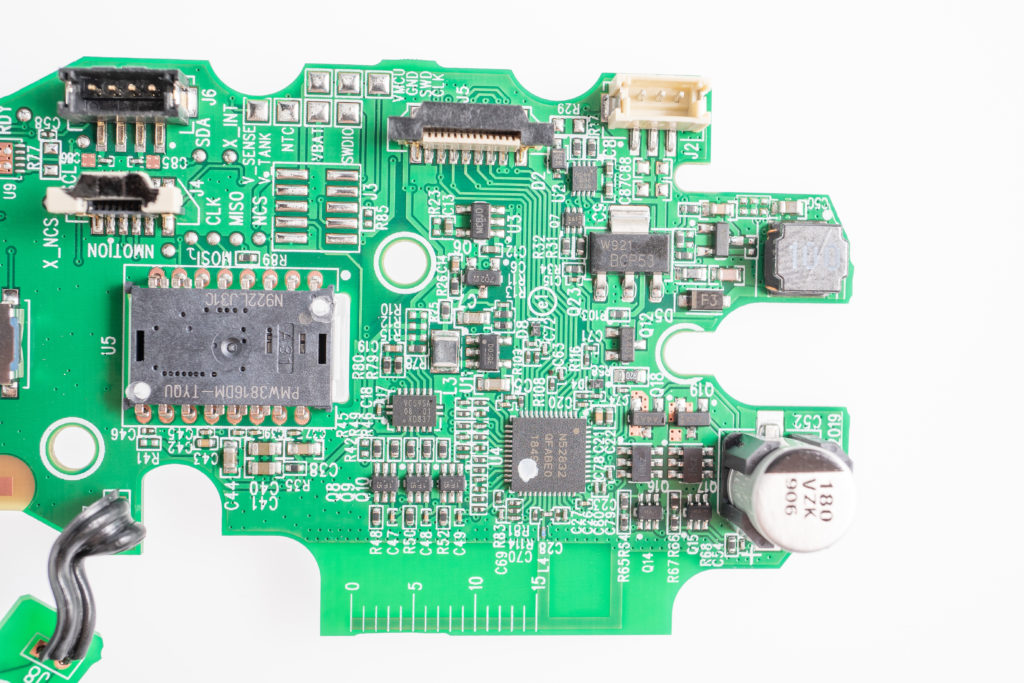
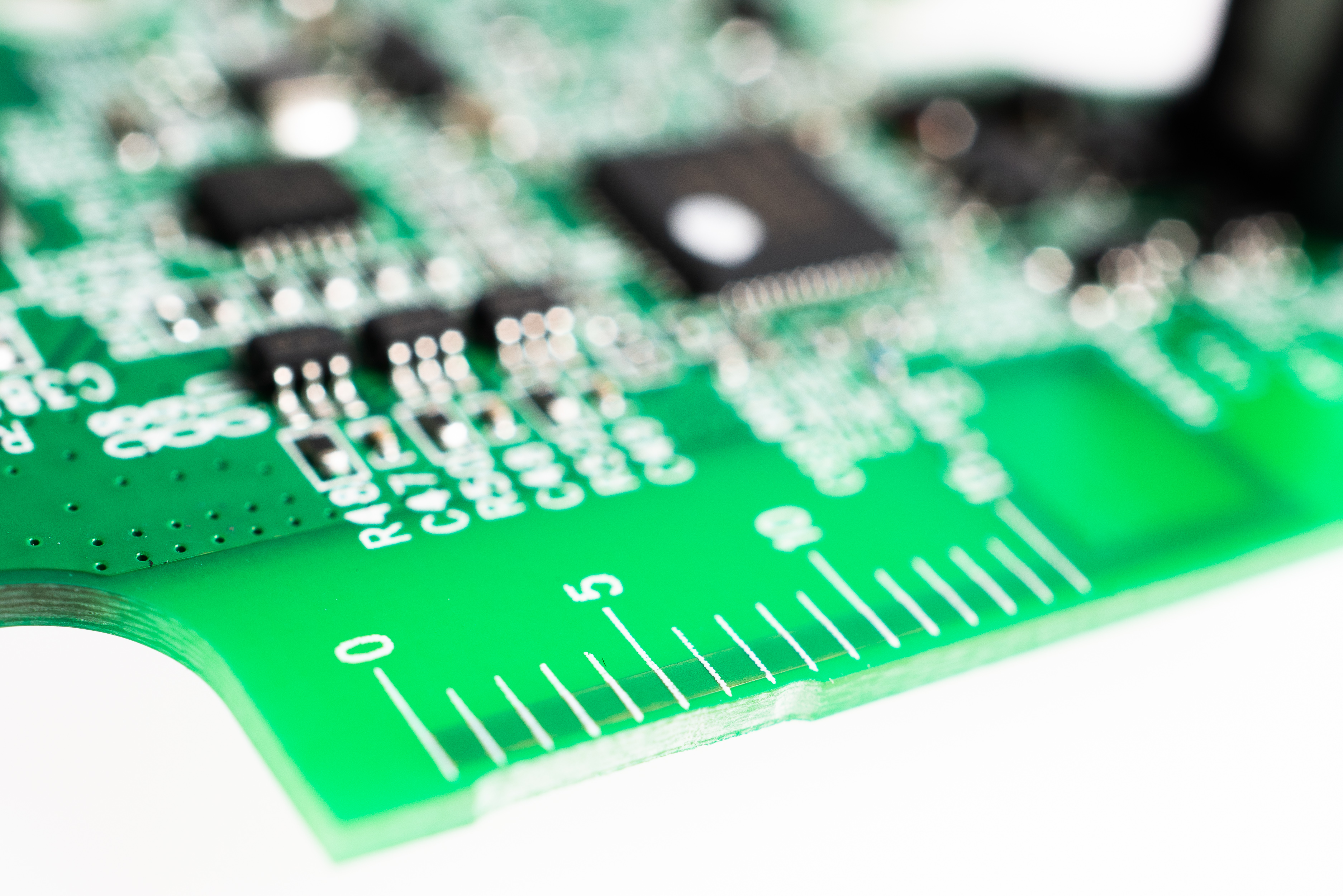
But come to think of it, why is the PCB silk-screened in the first place? I don't think such a cheap board will ever get serviced by the manufacturer, and slikscreening is cheap but not free.
My guess is that it is "just in case". If something goes wrong, the silkscreen is there so that things can be fixed by an assembly line worker. And they identified incorrect antenna dimensions as a potential problem and left a ruler there. Turned out everything worked fine and the ruler wasn't necessary.
It's probably related to tuning but on a production board? Normally if you need it as part of your production process it would just be part of the tuning tool itself.
But honestly I cannot see how it would be used in production since the antenna length is determined by that point.
Here is what it looks like to draw a circle using each protocol: https://imgur.com/a/RP2oLcn
There was a regression in the Linux kernel regarding polling rate negotiation that was fixed not too long ago
I'm always jealous by this type of mouse, while I'm stuck using my cheap sad ambidextrous Microsoft mouse.
I’ve been hunting for a mouse with this kind of scroll wheel that was less than 90g or so forever. 141g would kill my arm in a few hours.
I have never tried an MX Master. I have been curious, but I don't need the second scroll wheel.
I think the software is somewhat convoluted. My actual preference is that Mac OS would support all of the functionality natively. I think it's stupid that we need to use extra programs to get the keyboard/mouse to do what we want.
I remember same thing from the original Performance MX. Everybody said it was a great mouse. I got it, it was terrible. It didn't work on most surfaces. It didn't hold battery long.
Long story short, I will hold off until it stands the test of time for a bit.
For a premium brand I find it completely unacceptable. Even though it is possible to fix the problem (https://www.instructables.com/id/Repair-mouse-with-double-cl...), I gave up on Logitech mouses completely.
FWIW Razer has a new mouse that uses optical switches (Razer Viper). It'll be interesting to see if how their switches hold up a year or two from now. I've heard similar complaints about mouse switch failures with Razer mice as well, so it's great to see them attempt to address the problem.
I've found that I really appreciate the different ergonomics of a vertical mouse, but I do miss my side wheel and unlocking scroll
Why does Logitech need to update the mouse software every so often? Installing fresh Windows 10 on a new computer, a popup automatically appears on the bottom-right to download and install Logitech software - without installing anything. This is built-in ads for Windows essentially. Also, Logitech wants us to connect to the internet to create a profile. It nags you constantly.
We need software engineers to push back on these things that are pushed on to them by marketing execs.
Most people probably just replace mice once they start acting up because they either don't want to bother cleaning it or else don't realise it can be taken apart and cleaned easily which fixes 99% of mice issues.
[0] - On a 15 inch 2017 MacBook Pro, "Logi Options Daemon" sits at 0.3% CPU when the mouse is still and 4% (!!!) while the mouse is moving
The firmware and electronics in these things are fine, but these mice are one size fits none. In my case: way too small. I probably need one that's 2 times the size + preferably vertical.
I was thinking of doing a mod where I convert an MX Master 3 to a much larger MX vertical type thing. Shouldn't be too hard, but if I can think of this someone probably already did it. Right?
I've been using both of them for years and years. Amazing.
You can get cable replacement kits for the MX518/G400/G400s for $9 from eBay that includes new feet and a USB cable. So I'm really not worried about longevity.
P.S. You should take the mouse apart and clean it probably at least once per year. I cleaned my MX518 after about 5 years when the scroll stopped working consistently. I was shocked how much hair was on the inside, blocking the scroll sensor.
but both are discontinued
It sounds like a squeaky wheel or a squealing (real, animal) mouse.
Other mice do not cause this problem. I mask it out with noise canceling headphones but I’d love a nice mouse that doesn’t cause this behavior. I’ve tried ferrite loops but they do nothing.
Other than a cable replacement and a switch cleaning, both of those original G5’s are still perfectly operational after over a decade of regular use.
Ironically I switched to the MX series (multiple mx2 and mx2s, home/work) and I absolutely love them apart from the problems I used to have where they'd stutter on every OSX machine I used them on. I haven't had that problem in maybe a year, though. Logitech or OSX BT update maybe.
I can't go back to a non MX scroll wheel. I love it.
https://www.amazon.com.au/ELECOM-M-DT2URBK-Trackball-Finger-...
Wireless, uses AA batteries. Not as expensive as the latest Logitech trackball.
https://scdn.slashgear.com/wp-content/uploads/2019/09/logite...
When they added the thumb wheel they moved the buttons too far back to be used comfortably. So it went in a drawer and I went back to the old one, found someone with leftover inventory and bought a spare for when the first wore out. When the second finally gave up the ghost I was not really playing those games anymore, but I still miss scanning code with page-up/page-down.
The 3 seems to compromise between the two. I just noticed it was available a couple days ago, so I'll be ordering one soon I expect.
I think on the later mouse, with only two buttons, I retrained myself to use 'back up' to stop autorun, but it was important to me that I could mash the first button to start running and not have to worry about how many times I hit it.
Like OP said, for other apps I had it mapped to page-up/-down and back button and it made it a lot easier to focus on the code or documentation I was reading, instead of on navigating.
How has there not been wireless G600 yey.
It is not, unfortunately.
The only company I know of that makes an actually left handed mouse is Razer. Decent hardware, but if you're on a Mac their drivers are even worse than Logitech's. There's nothing worse than having your mouse stop working because the internet is down.
With that in mind - how hard would it be to make a mouse which had a gel top that would mould to your hand. Could have a gel that is perhaps viscus when an electric current passed thru it and solid when not - allowing you to setup the mouse to fit your hand. As for buttons, well, that has been one of the easier ones to fix and about the only area you can customise a mouse (switch left and right mouse buttons) which is your standard OS configurable.
Though I'm not aware of any material that is viscous when a current is applied and solid when not - the other way around you have https://en.m.wikipedia.org/wiki/Magnetorheological_fluid
All these problems and I fear I'll never see a better left-handed mouse.
I switch between my left and right hand every couple hours. The scroll wheel is great but no free scrolling. The buttons are amazing. I think I charge the mouse once every two weeks.
I had an issue recently with missing drivers for a network card (my fault, I deleted the kernel modules, it had been and now is again working), and it just made me think exactly what you're saying, how glad I am that someone's provided this.
Instead I just stopped buying razer products.
https://www.amazon.com/Digital-Ant-i-Product-Compatible-Micr...
I have those on my wireless mice/keyboards, and game controllers.
I find I need to clean my scroll wheel maybe twice a year. It gets more stuck with gunk over time, and it becomes harder and harder to scroll.
Its not anywhere close.
The Logitech Trackman Marble is my go-to now, but its nowhere near the legendary FX.
I tried the open source drivers on my MS Surface but I never got them to work.
The cable finally wore out on my old Logitech G5 and I was able to order a replacement for a few dollars. I also had to replace the skids since they covered the screw holes. All it took was a screwdriver and five minutes.
Is that new? When I was originally playing with dd-wrt I was under the impression that 100 was the limit, discovered my AP was defaulting to something like 70mW, and would allow you to go higher.
Makes no goddamned sense to me.