It's 2020 and I'm using image maps(videoinu.com) |
It's 2020 and I'm using image maps(videoinu.com) |
If so, why just not use native desktop/mobile video editor app instead?
Many programs that don't need low level access like spreadsheets, pdf readers, word processors, image editors, etc.could be made into single page html files that would both be sandboxed and cross platform.
Interesting. This order is commonly used by libraries like SDL and SFML to declare rectangular shapes.
The way CSS orders border, margin, and padding values is clockwise starting from the top. But these aren't coordinates since they represent sides, not points, so I think the author is confusing things by comparing them.
PS - This brings back my memory of server side image maps which were fun for treasure hunt type images because you couldn't view the page source to figure out where the hotspots in the image were. Good times.
rect: left, top, right, bottom
circle: cx,cy,r
poly: x1,y1,x2,y2,...
WinAPI is much older than 1995, these things were inherited from 16-bit Windows 3.x.
I don't think the need for something very much like imagemaps will ever go away. The lure of arbitrary polygons and paths cut from an image needing to be clickable is high, and I think the ability to join up a bunch of polygonal (or worse) images and have them well-aligned is far off. It's easier to cut up than to re-align.
I get why <map> is (was?) useful in general, but if you're going to do your own annotation rendering on top anyway, it just seems odd. Fun exercise though!
However... image maps also allow for circular and polygonal regions, which can be really handy.
I guess you could also do that with a transparent SVG overlay, but using a map is easier.
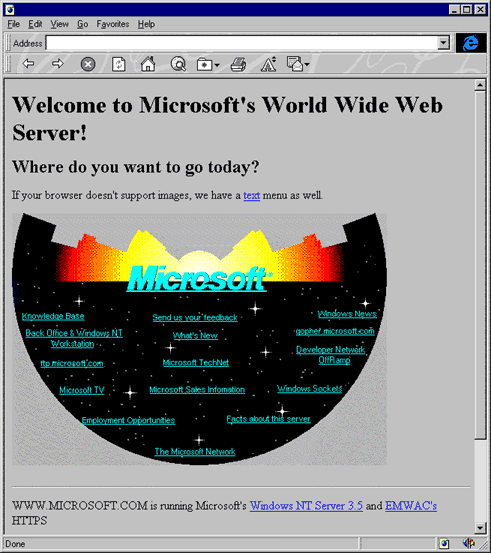
https://www.versionmuseum.com/images/websites/microsoft-webs...
It floored me at the time because it was, in my mind, when Dorothy opened the door to Oz and a huge, beautiful world just appeared before her.
It's very strange to be in an age group that gets to remember being in a world before and after image maps (among ALL the other tech that erupted in the last 30 years).
The best part of it is that as soon as we saw it.... we could reproduce it. I viewed-source and started creating my own image maps on my personal websites immediately. Then showed these to friends and family and they were so impressed :)
.... I find myself trying to recreate this feeling all the time.
Anyway, I just wanted to tell my experience with Image Maps. A friend of mine had a much better CPU, where his father also worked creating websites, and he had Macromedia Dreamweaver. He could create image maps with the cursor, clicking here and there, and it was amazing. Meanwhile, in my house, my CPU only allowed me to run stuff like Notepad++, which meant I had to memorize my friend's code, running back home, start typing it and trying to understand how it worked to modify it at my piacere. The best feeling in the world was when the click did what I expected in the area I wanted. What a feeling.
The client insisted on an actual tree for the landing page, and clickable circles as ‘fruit’ for each of the navigational choices.
But, yes, I remember doing this in the late 90s.
We still have animated GIFs, too.
I think you misspelled Macromedia. ;)
This CSS article[1] goes into details about alternative approaches. It mainly seems to be SVG, or CSS clip paths. I've used (and like) SVG; CSS clip paths are foreign territory to me - has anyone used them in production to replicate image map functionality?
One of the goals I made for myself when developing my canvas library[2] was to bring image-map-like functionality to the <canvas> element - but as responsive and accessible as I could make it. It's still a work-in-progress but I'm getting there!
[1] - https://css-tricks.com/the-many-ways-to-link-up-shapes-and-i...
[1] Scrawl-canvas - https://scrawl-v8.rikweb.org.uk/
Is it accessible-friendly?
You should be able to tab through the pins using the keyboard, and 'click' a pin by pressing the return button (mileage may vary between browsers and devices). The text labels and links themselves also exist inside <div> elements immediately following the <canvas> element (automatically added by the library when it picks up a canvas, and when creating canvas text and links) ... but I don't know how useful/convenient this is for users restricted to screen readers.
The weirdest: MIDI music on autoplay, VRML.
[1] https://css-tricks.com/lodge/svg/31-can-put-raster-images-sv...
Will this ever happen? We won't stop having radically differently sized devices any time soon. Of course I'm sure eventually the "responsive" approach will give way to other techniques but I can't really see the high-level approach disappearing.
[0] https://developers.line.biz/en/reference/messaging-api/#imag...
Does anyone remember it? It was once featured on HN, but I can't find it now.
With a JS animation library if the actual css properties aren't animatable
With more of our traditional desktop services having moved to mobile and now moving back to the browser, I'm more concerned about this creating another wave of accessibility limitations caused by a petty convenience for dev.
I don't want to sound off like an activist, but I'd like to see that someone with limited mobility or sight can equitably access services they, as much as we, will sooner or later have to depend on as current apps and software lose support and phase out. The Net has always been a place where a person's only limitation should be their choice to not commit their time to learning how to use it. Let's stand by that now more than ever, or I fear we'll hand an uncontested victory to the idiots in Silicon Valley who want us to adapt to how they want us to use the Net.
HTML images maps are not responsive. Just use SVG, it works without any scripts and it resizes with the image.
If you use <foreignObject> you can also use a fully responsive <picture> tag
The absolutely ridiculous part of this is that they're using JS to create additional DIVs on top of the image.
Why use the map at all?
Edit: May 20th 2020: the day I learned HN users are retarded
There are plenty gamified learning tutorials like https://cssgridgarden.com/
I like flexbox /grid: Though I've been staying with flexbox since I know it better.
firefox has some really good grid inspection tools built in.
But now IE is gone. Modern HTML Tables are fine as long as you know its limitations or basically dont try to do any fancy thing with it.
For some strange reason I see people keep saying aviod table at all cost. I dont get it. May be someone could explain it better.
PS. Get off my lawn.
Tables are not the correct markup for positioning various items here and there to create a layout on a page.
No, that wasn't it. They didn't suck, and for a bunch of years IE was the best browser.
In the past there were no other options (no CSS positioning etc) so people used tables as a way to control content layout. They were actually pretty good for this, even though that's not what they were intended for.
Then CSS came along. Initially CSS was mostly exciting because it exposed a lot more fine-grained control over display properties like fonts, borders, margins etc than had been available in HTML attributes.
Gradually developers came to appreciate the value of what CSS was intended for - separation of content and presentation. Along with that realisation came the push for "semantic" markup, i.e. use appropriate HTML tags for the content, and stop using tables for layout (unless you are marking up actual tabular data).
For some years this was awkward though because CSS didn't provide good layout tools. So instead of true semantic markup you often ended up with "div soup" - lots of anonymous tags which exist just as containers for sake of achieving some hack with the CSS positioning system. And still a couple of things that had been simple to achieve with tables remained impossible.
But people persevered with the CSS hacks, for all the right reasons, until we get to the present day when I guess modern CSS has all the tools needed to produce any kind of layout, layouts that adapt to screen size, units that cope with Hi-DPI etc etc etc
But I think it's still appropriate to mark up tabular data in HTML with a table, and I would think they do a good job of that?
2. How do you deal with responsiveness? A pretty typical pattern would be "have this set of elements horizontal on large viewports, then have it vertical on small viewports". Trivially easy with flexbox (just set flex-direction at a media query breakpoint) or grid (change the number of columns).
There are so many unpredictable edge cases to the magic of the table layout rendering algorithms that I would be hard pressed to recommend them for layout to anyone. I've seen the dark arts of what people do to make tables responsive and I want no part in it!
But honestly though there is a whole host of simple layouts that are a breeze with Flexbox or Grid that require precise contortions of the mind to produce with tables and the hacky css required to coerce them into order.
I do remember getting to play with Dreamweaver back then, though. It felt so high tech compared to Notepad and FrontPage Express and all that. All the "cool" sites had image maps and as a kid it was tough to understand how they worked. I did something similar to you, but usually copy and pasted from a web site then changed the image out and kept tweaking by trial-and-error until I got the result I wanted.
Nostalgia is a strong drug haha
The real question is why scan top down and not bottom up? (I don't have any idea). Horizontal scan lines makes sense given a wider than tall screen, because it results in fewer scan lines, lowering the frequencies required ( a bit). Wider than tall makes sense for TV given common movie film aspect ratios and computer monitors started as TVs with different control circuits and cases.
If you has access to internet you could also download & install native app. Also native app once installed could be used without internet access.
How you would check that web app, which JavaScript/WebAssembly source/binary should be firstly loaded into your browser from 3rd-party website, would not "install malware or spyware or do anything else malicious"?
Just few examples of "pretty secure modern browsers nowadays".[0,1]
[0] https://bugs.chromium.org/p/chromium/issues/list?can=1&q=lab...
[1] https://techdows.com/2020/05/mozilla-halts-firefox-76-rollou...
By this I meant to include, for example, the Debian team. Of course there can be bugs/oversights, but the same is true of the browser solution. Is there even one instance of malware being distributed through the official channels of a mainstream Linux distro? Not that an in browser JS video editor isn't cool, but I don't see how it would have technical advantages over the various Linux desktop editors.
So many of the projects I see mentioned here are neat hacks, but that's really about it.
People writing a complete operating system for an 8 bit micro made of discrete chips? That's neat, but not really useful, and most people won't ever take the time to boot it once.
An FPGA that runs web assembly code? That's nifty, but if we want high performance we probably won't use web assembly to do it.
You invented a completely new language that has all the features of C but none of the things that are annoying? We'll add it to the list of C-like-but-not-annoying languages.
Found a great new way to estimate how much capital you should try to get when creating a start-up to sell your all-natural soap products in California? That's great for you... a little bit niche for the rest of us.
You re-implemented emacs in python? That's a really impressive technical achievement. No one will ever surpass you in either emacs implementation or python hacks. Also, no one will ever use it.
Same thing with Hackaday... lots and lots of "cool" projects where neither the creator nor the site mods seem to realize something is just a nifty project, and not the salvation of the world.
Pure interest and sublime pointlessness are, of course, two of the classic hacker motivations.
Edit: https://news.ycombinator.com/item?id=23246221 is happily near the top of the front page as we speak.
Sandboxee was released in 2004, and there have been various bits of registry journaing/snapshot software since the late 1990's which combined with NT ACLs could provide at least as much security as your getting out of a browser sandbox.
Browsers have an absolutely huge sandbox surface and lack even the most basic of fine-grained security controls out of the box. Enabling even basic restrictions to avoid fingerprinting has turned out to be difficult. How you do you know (particularly with firefox) that one tab isn't actively picking out data from another tab open to your banking site. Much less the problem with malicious javascript being injected via the ad frameworks.
Browser security is pretty much a joke.
The level of technical know-how necessary to accomplish that is astronomical compared to "here's a link," especially since it's cross-platform out of the box. That's why it's a no-brainer: any sane person is going to prefer that over installing untrusted software. Basically zero users know about the sandboxing solutions available for their system, much less willing put in the effort to Do It Right.