Threadripper 3990X: The Quest To Compile 1B Lines Of C++ On 64 Cores(blogs.embarcadero.com) |
Threadripper 3990X: The Quest To Compile 1B Lines Of C++ On 64 Cores(blogs.embarcadero.com) |
Seems like our code is inflating quite rapidly. I remember when 1M was the biggest project. /snark
This all seems kind of pointless since distributed C++ compilation has been a thing for decades, so they could have used a cluster of Ryzens instead of "zowie look at our huge expensive single box".
  int
  main
  ()
  {
    /*
     _______ _     _       _               _
    |__   __| |   (_)     (_)             | |
       | |  | |__  _ ___   _ ___    __ _  | | ___  _ __   __ _   _ __  _ __ ___   __ _ _ __ __ _ _ __ ___
       | |  | '_ \| / __| | / __|  / _` | | |/ _ \| '_ \ / _` | | '_ \| '__/ _ \ / _` | '__/ _` | '_ ` _ \
       | |  | | | | \__ \ | \__ \ | (_| | | | (_) | | | | (_| | | |_) | | | (_) | (_| | | | (_| | | | | | |
       |_|  |_| |_|_|___/ |_|___/  \__,_| |_|\___/|_| |_|\__, | | .__/|_|  \___/ \__, |_|  \__,_|_| |_| |_|
                                                          __/ | | |               __/ |
                                                         |___/  |_|              |___/
    */
    return 0;
}The more pedestrian 5950X or the now bargain 3950X are great for anyone doing a lot of compiling. With the right motherboard they even have ECC RAM support. Game changer for workstations in the $1000–$2000 range.
The more expensive Threadripper parts really shine when memory bandwidth becomes a bottleneck. In my experience, compiling code hasn’t been very memory bandwidth limited. However, some of my simulation tools don’t benefit much going from 8 to 16 cores with regular Ryzen CPUs because they’re memory constrained. Threadripper has much higher memory bandwidth.
edit: to be clearer, I'm not thinking of dedicated build machines here (hence RAID comment) but over all impact on dev time by getting local builds a lot faster.
Source code files are relatively small and modern OSes are very good at caching. I ran out of SSD on my build server a while ago and had to use a mechanical HDD. To my surprise, it didn’t impact build times as much as I thought it would.
Threadripper can be useful for IO, especially for C++ (which is famously quite IO intensive) owing to its 128 PCIe lanes, you can RAID0 a bunch of drives and have absolutely ridiculous IO.
wait - seems you can get one, just pay 2x list price.
I am trying to build a system for Reinforcement Learning research and seeing many things depend on python, I am not certain how to best optimise the system.
It's much quieter under load as well.
You're claiming this plugin has deeper IDE integration than `make`? I find that really, really difficult to believe. And if it's true, it seems like the solution is to either use a better IDE, or improve IDE support for the de facto standard tools that already exist, as opposed to writing a plugin for the -j flag.
TwineCompile is not a plugin wrapping the -j flag. It is a separate thing entirely unique to C++Builder. It does offer integration with MSBuild though.
The second part of that was the fall off. With the 1 million size files it only ever used half of the cores and each successive round of core compiles it would use even less cores. TwineCompile didn't seem to have that problem but this post was not about TwineCompile vs. MAKE -j so I did not investigate this farther.
I was expecting MAKE/GCC to blow me away and use all 64 cores full bore until complete and it did not do this.
https://www.gnu.org/software/make/manual/html_node/Job-Slots...
Both of those problems seemed solvable if he was willing to chunk up his application into libraries, maybe 1024 files per library then linked to the main application.
MinGW's linker supports passing the list of objects as a file for this reason and CMake will use that by default.
Alas, that was not to be. Modern languages are fun and all, but not Delphi-back-in-the-day level fun :-).
The "mold" linker:
https://github.com/rui314/mold
>"Concretely speaking, I wanted to use the linker to link a Chromium executable with full debug info (~2 GiB in size) just in 1 second. LLVM's lld, the fastest open-source linker which I originally created a few years ago, takes about 12 seconds to link Chromium on my machine. So the goal is 12x performance bump over lld. Compared to GNU gold, it's more than 50x."
Or perhaps the code wasn’t modified to spread the work across all processor core groups (a Windows thing to support more than 64 logical cores).
https://bitsum.com/general/the-64-core-threshold-processor-g...
But alas, I have said for some time that a fast compiler should be able to compile about 1MLOC/S with some basic optimization work.
make -j>3 just locks the process and fails.
Is it the same with g++? I have 4GB so I should be able to compile with 4 cores, but the processes only fill 2-3 cores even when I try make -j8 on a 8 core machine and then locks the entire OS until it craps out?!
Something is fishy...
In fact, if compile times are being limited by storage there should be some quick wins in configuration terms - building intermediates to RAM, cache warming, etc - that can enable better performance than faster storage.
I believe that this makes sense:
In a typical C++ project like that which use template libraries like CGAL, compilation of a single file takes up to 30 seconds of CPU-only time. Even though each file (thanks to lack of sensible module system) churns through 500 MB of raw text includes, that's not a lot over 30 seconds, and the includes are usually from the same files, which means they are in the OS buffer cache anyway so they are read from RAM.
However, if the project uses C++ like C, compilation is a lot faster; e.g. for Linux kernel C builds, files can scroll by faster than a spinning disk seek time would allow.
It's caches all the way down.
Someone should really formalize a standard for declaring dependencies which build systems can share between each other.
You won't be able to buy ECC ram marketed for speeds beyond JEDEC standards but that does not mean that you cannot clock them higher.
They have an online checkin app that they use to order the queue. You see it show up in stock, add yourself to the queue, and get an early enough spot - show up. No need to wait in the cold. (ymmv on weather, but up here... can be cold)
You can also use command files[1] to pass options in instead of using the command line.
[1] https://docs.microsoft.com/en-us/cpp/build/reference/linking... to pass
I don't think many 8-way Xeon Platinum boxes have eMMC storage.
If it's crapping out when you give it -j8, that seems to strongly suggest you're running into limited resources somewhere.
I'm no expert in the intricacies of parallel builds, but as far as I know you can still have dependencies between targets that will limit parallelism.
Also I only have 2GB (in 32-bit though)! Xo
High karma HN users are toxic downers.
source: two days ago I had the exact same problem, so I mounted a 32gb swap file over an NFS drive because my SD card was 2gb (don't ask) and it still failed because ld tried to use more than 4gigs of ram
This is fairly common in larger projects, so you end up having to do some hackery to manually sequence make invocations if you want to use recursive make (which is pretty awful).
Honestly, for large projects, Make is an insane choice, notwithstanding the fact that people who are sufficiently savvy at Make can sometimes make it work. (If your tools are bad, you can make up for it with extra staff time and expertise.)
I’ve never had that issue, and used to heavily use recursive make. I carefully benchmarked those make files, and am sure this wasn’t an issue.
I suggest reading the paper “Recursive Make Considered Harmful” before attempting to use make for a large project. It describes a lot of anti-patterns, and better alternatives.
I’ve found every alternative to make that I’ve used to be inferior, and they almost always advertise a “killer feature” that’s a bad idea, or already handled better by make. It’s surprising how many people reimplemented make because they didn’t want to RTFM.
Anyway, the next build system on my list to check out is bazel. Some people that I’ve seen make good use of make say it’s actually an improvement.
So, you’ve never had two different targets that depend on something in a subdirectory? If you’ve just solved this by building subdirectories in a specific order, or building entire subdirectories rather than the specific targets you need, what you’re really doing is making an incorrect dependency graph in order to work around make’s limitations. These kind of decisions make sense for full builds, but interfere with incremental builds.
Bazel & family (Buck, Pants, Please, etc.) are among the few build systems that solve this problem well. It’s not an accident that they all use package:target syntax for specifying targets, rather than just using a path, because this allows the build system to determine exactly which file contains the relevant build rule without having to probe the filesystem.
I would love to simply recommend Bazel but the fact is there is a bit of a barrier to entry depending on how standard / nonstandard your build rules are and depending on how you think that third-party dependencies should be pulled in. Depending on your project, you could convert to Bazel in an hour just by looking at a couple examples, or you could have to dive deep into Bazel to figure out how to do something (custom toolchains, custom rules, etc.)
As you observed, the alternatives to make are often inferior, and it’s often because they’re solving the wrong problems. For example, sticking a more complex & sophisticated scripting system in front of make.
My experience is that "larger projects" to the investment in their build infrastructure to maximize parallelism in order to reduce build times because it pays dividends in terms of turn around time and thus productivity.
One of the joys of working with someone who has been building large projects for a while, is that they just design the build system from the start to be as parallel as practical.
So, while i'm not a make fan, I'm really tired of people pissing on solutions (c also comes to mind) that have been working for decades because of edge cases or problems of their own creation because they don't understand the tool.
A well understood tool is one where people know where the problems lie and work around them. Most "perfect" tools are just project crashing dragons hiding under pretty marketing of immature tooling.
You would have to be extraordinarily cynical to think that there’s been no progress in making better build software in the past forty years or so.
Yes, there are definitely plenty of build systems out there that were built from scratch to “fix” make without a sufficient understanding of the underlying problem. I’m not going to name any; use your imagination. But make was never that good at handling large projects to begin with, and it was never especially good at ensuring builds are correct. This is not “pissing on make”, for Chris’s sake, make is from 1976 and it’s damn amazing that it’s still useful. This is just recognizing make’s limitations, and one of those limitations is the ability for make to handle large projects well in general, specific cases notwithstanding. Part of that is performance issues, and these are tied to correctness. As projects which use make grow larger, it becomes more likely that they run into problems which either interfere with the ability to run make recursively or the ability to run make incrementally.
The “poor craftsman who blames his tools” aphorism is a nice way to summarize your thoughts about these kind of problems sometimes, and it does apply to using tools like make and C, but it’s also a poor craftsman who chooses tools poorly suited to the task.
It would be an interesting academic exercise to create a setup on Linux that did the same thing but using the extant build tools, and then to do a deep dive into how much of the computer was actually compiling code and how much of it was running the machinery of the OS/IDE/Linkages. A LONG time ago we used to do that at Sun to profile the "efficiency" of a machine in order to maximize the work it did for the user per unit time, vs other things. That sort of activity however became less of a priority as the CPUs literally became 1000x faster.
BTW, the author messed up anyway. Make -j does schedule everything at once. How do I know? Only way I got my private 128GB build host to oom...
I remember playing with TCC-boot back in 2015, and on a relatively beefy machine at the time I could compile the kernel in 5 seconds (or about 37mb/s iirc).
I'll show myself out.
That said, I ported C1 (the client compiler) to Java back in my Maxine VM days, about 2009. At that time on typical x86 processors it was easily hitting 1.8MB/s (of bytecode) compilation time. You can work backward to how many lines of code a second that is (and sure, you aren't paying the cost of the frontend), but yeah, that is in the ballpark for 1MLOC/s I think. And that's with an optimizing compiler with IR and regalloc!
That sounds very low for modern SSDs, even consumer-grade. Have you tried different vendors?
100% utilization and 30x the bandwidth = 30x as many HDD. Alternatively, if HDD’s are an option you’re a long way from 100% utilization.
see: https://www.anandtech.com/show/6459/samsung-ssd-840-testing-...
Pair it with an Optane for L2 cache and it will speed up normal SSD use too ;)
  - It can pre-populate an in-memory disk cache. Not massively useful, but depending on your workload and uptime it might save some time. Nothing I know of does this on Linux.
  - It can act as a level 2 block cache, i.e. caching frequently accessed blocks from slow (HDD) storage on fast (SSD) storage. This is massively useful, especially for e.g. a Steam library.
  - It can force extensive write buffering, using either main memory or SSD.
Its write bufferin increases write speeds massively, inasmuch as it delays actually writing out data. Obviously, doing so with main memory means a crash will lose data; what's not so obvious (but amply explained in the UI) is that, because it's a block-based write buffer, it can also corrupt your filesystem. Primocache does not obey write barriers in this mode.
What's even less obvious, and where it differs from lvmcache / bcache, is that this still happens if you use only an L2 write buffer, not a memory-based one. The data will still be there, on the SSD, but Primocache apparently doesn't restore the write-buffer state on bootup. Possibly it's not even journalled correctly; I don't know, I just got the impression from forums that fixing this would be difficult.
So, overall, bcache / lvmcache / ZFS* are all massively superior. Primocache is your only option on Windows, however, unless you'd like to setup iSCSI or something. I've considered that, but I'd need at least a 10G link to get worthwhile performance.
*: ZFS supports cache-on-SSD, and unlike a year ago that's persisted across reboots, but it doesn't support write-buffer-on-ssd. Except in the form of the SIL, which is of dubious usefulness; that buffer is only used for synchronous writes.
However, ZFS is a transaction-oriented filesystem. It never reorders writes between transaction groups, which means that if you run it with sync=disabled -- which disables fsync & related calls -- it's still impossible to get locally visible corruption. The state of your filesystem at bootup will be some* valid POSIX state, as if the machine was suddenly but cleanly shut down. You still need to tweak the filesystem parameters; by default transaction groups end after 5 seconds, which is unlikely to be optimal.
Alternately, you can run it on top of lvmcache or bcache.
In my experience the SMART data on SSDs is pretty good at pointing to failures.
Either that or the SSD simply disappears from the system. But that happens to HDDs also.
Anyway, the solution to that specific problem is written up in “Recursive make considered harmful”. Make handles it elegantly.
The title is kind of a spoiler, but if you’re using recursive make and care about fine grained dependencies across makefiles, you’re doing something wrong.
As an aside, I wonder if recursive make misuse is why people claim ninja is faster than make. I’ve benchmarked projects before and after, and before, make was generally using < 1% CPU vs 1000%+ for clang.
Afterwards, ninja was exploiting the same underlying parallelism in the dependency graph as make was. Thanks to Amdahl’s Law, there was no measurable speedup. The only thing I can figure is there’s some perceived lack of expressivity in make’s dependency language, or there are an absurd number of dependencies with trivial “build” steps.
If you'd like to learn more the current way this works is described here: https://rustc-dev-guide.rust-lang.org/traits/resolution.html
As it mentions, this is being re-written, and eventually, will use an SLG solver https://rustc-dev-guide.rust-lang.org/traits/chalk.html
Then I can imagine a compiler which takes the DAG from the previous compilation and information about which lines of code have changed, and can figure out which intermediate compilation results need to be recomputed. And the result would be a set of blocks which change - globals and symbol table entries and function definitions. And then you could implement a linker in a sort of similar way - consuming the delta + information about the previous compilation run to figure out where and how to patch the executable from the previous compilation run.
The end result would be a compiler which should only need to do work proportional to how much machine code is effected by a change. So if you're working on chromium and you change one function in a cpp file, the incremental compilation should be instant. (Since it would only need to recompile that function, patch the binary with the change and update some jmp addresses. It would still be slow if you changed a struct thats used all over the place - but it wouldn't need to recompile every line of code that transitively includes that header, like we do right now.
The SMART stats of the drive says it's at 88% health out of 100%, AKA it'll be dead when it reaches 0%. This is the wear and tear on the drive after ~6 years of full time usage on my primary all around dev / video creating / gaming workstation. It's been powered on 112 times for a grand total of 53,152 running hours and I've written 31TB total to it. 53,152 hours is 2,214 days or a little over 6 years. I keep my workstation on all the time short of power outages that drain my UPS or if I leave my place for days.
Here's a screenshot of all of the SMART stats: https://twitter.com/nickjanetakis/status/1357127351772012544
I go out of my way to save large files (videos) and other media (games, etc.) on a HDD but generally most apps are installed on the SSD and I don't really think about the writes.
Also the disk that it's on is over 50% full so that also degrades it faster as there's fewer blocks to wear level with.
You can see this from the warranty for example, which for the Samsung 970 EVO[1] goes linearly from 150TBW for the 250GB model up to 1200TBW for the 2000GB model.
So if you take the 1000GB model with its 600TBW warranty, you can write 50BG of data per day for over 32 years before you're exhausted the drive write warranty.
[1]: https://www.samsung.com/semiconductor/minisite/ssd/product/c... (under "MORE SPECS")
Generally you're looking at hundreds of terabytes, if not more than a petabyte in total write capacity before the drive is unusable.
This is for older drives (~6 years old as I said), and I don't know enough about storage technology and where it's come since then to say, but I imagine things probably have not gotten worse.
[0]: https://techreport.com/review/27909/the-ssd-endurance-experi...
I am afraid they did, consumer SSDs moved from MLC (2 bits per cell) to TLC (3) or QLC (4). Durability changed from multiple petabytes to low hundreds of terabytes. Still a lot, but I suspect the test would be a lot shorter now.
Every build gets fully tested at maximum TRACE logging, so that anyone who looks at the build / test later can search the logs for the bug.
8TBs of storage is a $200 hard drive. Fill it up, save everything. Buy 5 hard drives, copy data across them redundantly with ZFS and stuff.
1TBs of SSD storage is $100 (for 4GBps) to $200 (for 7GBps). Copy data from the hard drive array on the build server to the local workstation as you try to debug what went wrong in some unit test.
Anyway, reasonably available SSDs have up to [1000 x SSD size] total write limit, so doing couple of 400G builds/day would use up the 1TB drive in 3 years. At worst times we had to develop&maintain 5 releases in parallel instead of regular 2-3.
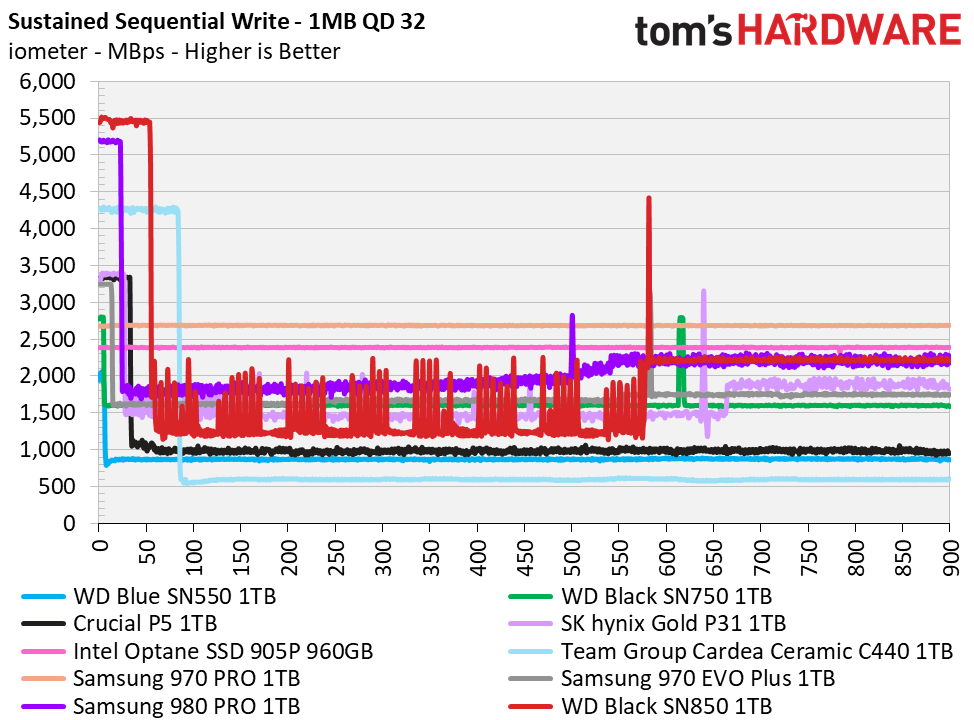
(See e.g. https://cdn.mos.cms.futurecdn.net/Ko5Grx7WzFZAXk6do4SSf8-128..., from Tom's Hardware)
You're best bet for long-term reliability is to buy much more capacity than you need and try not to exceed >50% capacity for high write frequency situations. I keep an empty drive around to use as a temp directory for compiling, logging, temp files, etc.
Also, my understanding is that consumer-grade drive need a "cool down" period to allow them to perform wear leveling. So you don't want to be writing to these drives constantly.
I plan on using a couple of those as ZFS metadata and small block caches for my home NAS, we'll see how it goes but people generally and universally praise the SLC SSDs for their durability.
> You're best bet for long-term reliability is to buy much more capacity than you need and try not to exceed >50% capacity for high write frequency situations. I keep an empty drive around to use as a temp directory for compiling, logging, temp files, etc.
That's likely true. I am pondering buying one external NVMe SSD for that purpose exactly.
Which brand/spec?
Anyway, my point is that SSD drive reliability varies wildly
For the failures I've seen, once the SSD goes to do a write operation and there's no free blocks left, it will lock into read-only mode. And at that point it is dead. Time to get a new one.
Vtran / eVtran. They have favourable reviews, too.
They only really slow down in usage patterns that trash traditional HDD’s, which have much worse disk fragmentation issues.
Imagine if we treated batteries like SSDs, not allowing the use of a set amount of capacity so that it can be added back later, when the battery's "real" capacity begins to fall. And then making the battery fail catastrophically when it ran out of "reserve" capacity, instead of letting the customer use what diminished capacity was still available.
And SSDs already have all the infrastructure for fully virtualizing the mapping between LBAs and physical addresses, because that's fundamental to their ordinary operation. They also don't all start out with the same capacity; a brand-new SSD already starts out with a non-empty list of bad blocks, usually a few per die.
Even if it were practical to dynamically shrink block devices, it wouldn't be worth the trouble. SSD wear leveling is generally effective. When the drive starts retiring worn out blocks en masse, you can expect most of the "good" blocks to end up in the "bad" column pretty soon. So trying to continue using the drive would mean you'd see the usable capacity rapidly diminish until it reached the inevitable catastrophe of deleting critical data. It makes a lot more sense to stop before that point and make the drive read-only while all the data is still intact and recoverable.
[1] Technically, ATA TRIM/NVMe Deallocate commands mean the host can inform the drive about what LBAs are not currently in use, but that always comes with the expectation that they are still available to be used in the future. NVMe 1.4 added commands like Verify and Get LBA Status that allow the host to query about damaged LBAs, but when the drive indicates data has been unrecoverably corrupted, the host expects to be able to write fresh data to those LBAs and have it stored on media that's still usable. The closest we can get to the kind of mechanism you want is with NVMe Zoned Namespaces, where the drive can mark individual zones as permanently read-only or offline. But that's pretty coarse-grained, and handling it gracefully on the software side is still a challenge.
What if a moment ago my OS has still 64G and then all of the sudden it only has 63G. Where would the data go? I think something has to make up for the loss.
For me it makes sense to report logically 64G and internally you do the remapping magic.
I wonder, how some OSes deal with a hot-swap of RAM. You have a big virtual address space and all of the sudden there is no physical memory behind it.
Hm.