What they don’t tell you when you translate your app(ericwbailey.design) |
What they don’t tell you when you translate your app(ericwbailey.design) |
There are capabilities built into the programming languages, which allow to format numbers, currencies, etc. with a specific locale. There are also great resources [1] out there that provide all kinds of formats and localized names for countries, currencies, etc.
[1] Unicode CLDR: https://github.com/unicode-org/cldr
Looking at after the fact attempts at internationalization, there are lots of pitfalls and it's something that needs to be done intentionally. (I'm still thinking about how to best implement the equivalent of LaTeX's \cref for finl. What works for English, doesn't work for other languages (e.g., in Czech, “in sections 3 and 4“ would be renderered “v sekcich 3 a 4” while “see sections 3 and 4” would be “viz sekce 3 a 4” although “see sections 3–10” should be “viz sekci 3–10”.
It would also be nice to have more context besides, say, just a comment. For example, things in toolbars ought to be short (ideally one word), things in menu items might be medium (a few words tops), things in notifications might be medium-to-long, and stuff in a window might have no restrictions at all. When you start from just a string, you do not necessarily know how much space you have and even if your UI can auto-resize, that doesn’t mean you’d want it to in every case.
I speak four languages fluently, and 'OK', 'Abort', 'Retry' and 'Load' are some of the hardest things to translate.
> Words may have radically different lengths in other languages
Sometimes the UI gets completely screwed, and I know it'll just look better in English, if the design was originally done with English text
I commonly do it with Wikipedia
* People don't always speak the language of the country they are in
* There are significant regional differences for a given language. As a French Canadian, I couldn't translate a website to French because it would sound wrong to someone in France. For example, we have vastly different sets of English loanwords.
* The order of things can be different. For instance, German addresses put the door number after the street name. This can break your layout or even your UX in subtle ways.
* You must choose formal or informal pronouns (tu/vous, du/Sie) and use them consistently.
* Labels can make no sense if you don't know what the UI is like. Context is important for translators.
- eno pivo (one beer)
- dve pivi (two beers)
- tri piva (three beers)
- štiri piva (four beers)
- pet piv (five (or more) beers)
How the hell do you put this into strings.xml?!
https://unicode-org.github.io/cldr-staging/charts/37/supplem...
For example, Fluent (https://projectfluent.org/, used by Firefox), or MediaWiki's localisation system (https://www.mediawiki.org/wiki/Localisation#Message_paramete...).
At CERN, in Switzerland?
As an Italian, I can relate so much to this, because translated apps will happily treat verbs as adjectives and vice versa. A couple example:
* Flixbus' app translates "Open ticket" to "Biglietto aperto" (treating "open" as an adjective, not as an imperative verb). Correct translation should be "Apri biglietto". Nothing bad, just unnecessarily confusing (what is an "open ticket"? As opposed to a "closed" one?)
* EasyJet's app does the reverse and makes it much worse. The English version likely says something like "Gate close: xx:xx (am|pm)". They mis-translated this as "Gate chiuso: xx:xx", which actually means "Gate has closed", even though the gate is still open. So you get a small heart attack, notice the actual closing time, curse the translators, and go on with your life.
The actual identifier should be something like “Open a ticket (imperative, button)” and then that phrase has translations, including the English “Open ticket”.
For example, it took me a while to figure out why Word 2007 in its German version used the word »Gliederung« for the stroke of a shape. But translating »outline« in a word processor to mean »document outline« instead of »shape outline« is actually quite understandable.
Back then I tried thinking about automatic or semi-automatic solutions to get a bit more context for the translator. The trouble is that most UI toolkits make it very hard to impossible to solve this, unless the developer actually knows enough about the problem to always include context and a description. Qt has (had? That was pre-QML, I think) a nice mode in its translator UI where the XML UI description could be used to show the string in its UI context. Windows Forms had a way of changing the form's language and simply replacing all strings directly in the designer (which has the problem that the translator might accidentally destroy all layout). Most things that are used just from source code have no visual way of relating strings to UI at all.
Things like Open Ticket used as a verb to create a bug report, or open a bug report, or as an adjective to indicate a bug report is still active. Or similar when ticket means a transportation or entertainment event. If your key is the English text, you can't translate those three usages differently which is not good.
But also, minor edits to the English text are hard to manage for the translations, some systems have a way to suggest an existing translation, but it requires a translator to affirmatively select it. If the key doesn't change, you can still use the existing translations until the translators review the English change and decide if they want to also make a similar change or not.
Of course, the worst thing that people try to do is numbers; there are tools for that, but trying to do Open Ticket vs Open Tickets as singular vs plural falls over with languages that have a form for one, two, three, or more, or even more forms.
And then you get people trying to do string math. Delete this ticket vs Delete this image need to be translated as whole units, you can't add 'delete this' to the type name, gendered verbs and objects and sometimes even more complex stuff makes it not work.
Or even better: "ui.ticket.actions.open" — trying to shoehorn linguistic categories into translation files is a painful experience, but dumb specific IDs work great and make untranslated captions apparent.
If you just hand someone a list of strings to translate, there's no way you'll get sensible results.
Also, you should test you translations. Some of the translations that I've seen (even from reputable companies) are so bad that it's pretty obvious no native speaker has ever looked them over.
Personally I think it is better to use a “surrogate key” that isn’t the English text itself.
The usage of "discover" and "find out" in english and portuguese comes to mind.
words from the "discover" family, in the english language are generally used when talking about discovering something that nobody or few people knew (somebody discovers a cure for some disease), while "find out" is generally used at a more personal level (somebody finds out that someone else bumped his car)
in portuguese you can only "find" (encontrar) physical things. you can't "find out" information
This makes me thing that in some instances it might be necessary some sort of descriptive context on the meaning
let buttonStr = NSLocalizedString("Open ticket", comment: "For user to open a ticket")
Yes, we improved on this somewhat. In the last rounds they got access to the software in English beforehand, and there are now also access keys to press to see the string id for any label in the app. It is still a very time consuming process, and I love it when a rollout is done to a country where we can just say, consumer facing texts get translated, our employees all speak English well enough to use this as is.
The identifier should be a GUID with an option for tagging and comments for developers and translators. Other languages depend on other contexts which are not represented here, like multiple forms of "present" tense, or the current time of day. Keying translations on English-language concepts is a bad idea, as a lot of languages are unlike English. Treating English as one of the translations (and not the reference) is a good idea that will prevent problems with future translations and avoid re-architecting your whole localization pipeline (and code base).
This is something overlooked by devs and PMs sitting comfortably in their chairs.
People using apps in the modern world, especially mobile apps, are tired, stressed, busy, unfocused, and on the move. Small things like that added to the mix can induce a lot of stress.
For many devs/PMs it's just a piece of text. For the user it's much more.
The translations are somehow unappreciated part of the app dev by many people. I know several languages and I checked all new translations in our app each time but few people cared as much.
Aliexpress (straight up wrong translations), Discord (anglicism, adjective ordering and weird sentence/tone structures) and plenty of others I don't remember, the list is pretty long. Size doesn't really seem play an effect aswell.
Another big issue are potential bugs you encounter. If you just get a translated error message without any error number or something similar it's a very frustrating experience to troubleshoot it. I've spend quite some time retranslating error messages to solve issues. Add to it that often knowledge bases are outdated in the translated languages.
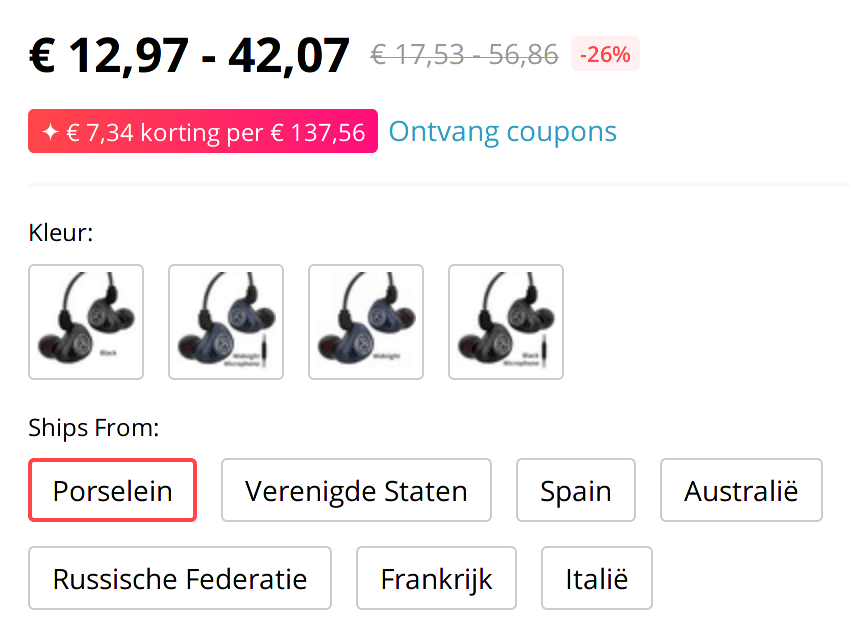
Plenty of items on Aliexpress can be shipped from multiple locations. "China" is almost always one of the options. Well, in Dutch they've translated that to "Porselein". That is a valid translation, if you are talking about plates and dishes made from porcelain)
I wonder how actively harmful this bad translation is to their business.
https://en.wikipedia.org/wiki/China_(material)
screenshot: https://fransdejonge.com/wp-content/uploads/2019/11/Screensh...
This holds true in all areas of software development—nay, in business in general. To the point where I’m not really sure why people do expect large players to do a good job, because they just about never do.
Large organisations are very close to incapable of producing good results—their software will be clunky and slow, their translations present but bad, their customer support painful. Small organisations are more likely to be able to produce good results. Notwithstanding this, small enterprises are often unable to match large for certain resource availability (including time!), which acts as a balancing factor so that small is not often uniformly superior to large, though it’s much more likely to be superior in a certain subset of fields; and this is the case with i18n/l10n.
I think this actually stands to very simple reason when examined numerically: have enough mass and you’ll produce average results (regression to the mean); be small and you’re more likely to deviate from the mean, whether for good or for bad, and if for bad you’re more likely to fail, so you’ll tend to end up with more above-average small players.
As there isn't an easy way to set this per app, it makes more sense to me to just switch the phone entirely to English.
I'm not saying this to bash open source translations (let alone translators) or anything. A good translation takes a lot of work. That's just how things seemed to be last time I tried, and I don't really have the energy to contribute myself nowadays.
Of course there are other reasons for not using a localised desktop especially if you're a technical person, such as better web searchability in case of problems. But the inconsistent quality of translations is probably one of the top reasons for me.
In the Netherlands, almost anyone who has about any device he owns configured in Dutch is almost certainly technically illiterate. People keep everything English not even because the Dutch translation is inferior but because any online documentation one will find is based on the English version. This is so entrenched that any notes I even keep to myself on my computer are in English rather than my native language without even giving it any second thought.
It is honestly somewhat strange and awkward to read technical documentation in Dutch. Many of the translated words they use take a moment for me to figure out since I never heard them in Dutch.
I have a good example. I won't name names. I saw an Italian localization on a "like" count in social posts that localized "N people like this" as "N persone come questa" [N people like this one]
We're doing a translation now into Japanese and the translator is actually taking the time to look at screenshots and use the app to see the text in context. It makes a huge difference.
As you've pointed out, it's one thing to see the string "open" in a XLF file, it's quite another to realize it's intent. This requires setting up demo environments for each translator though.
Well even Apple has a wrong translation on the iOS keyboard in French. The "Return" key is translated as "Retour" (generally meaning "Back" rather than "Carriage return") instead of "Entrée".
It might have changed in the last years though, I don't know.
Not only will there be tons of small mistakes with nouns/verbs as you mentioned, but maybe worst, there is often "overtranslation".
Some words are well established as technical jargon in English, and should _not_ be translated.
- "cloud" -> "infonuagique"
- "email" -> "courriel"
- "freeware" -> "gatuiciel"
...
My personal favourite is illectronisme, a combination of illettrisme (illiteracy) and électronique (electronic), to refer to people who are not good with computers.
Flux bus is German, I suspect the translation was from German and not English in this case?
It's common to talk about "opening" files to view them, so I assume that's why the developer chose that term, even tough "view" would have been better.
So it's pretty easy to get from Open ticket to Papers Please.
I have a different complaint than most others here and that is that most UIs require me to mentally translate from software developers English to real English. It's no surprise then that translating to a completely different language is difficult and error prone.
Edit: mismatched asterisks.
There are multiple comments here about how it usually is inferior.
But even when it's not, there can still be reasons to stick to English.
I've done a lot of work with Brazilian graphic designers, and they all use Photoshop/Illustrator in English -- the Portuguese version is essentially "unusable". Not because the translations are necessarily bad, but because Photoshop has its own bespoke vocabulary.
E.g. what's the difference between "image" size and "canvas" size, between auto "tone" and auto "color", between "crop" and "trim", or between "vibrance" and "saturation"?
In layperson English these are essentially synonyms, but mean different things in Photoshop. And if you want to follow any Photoshop tutorial, or communicate with any designer, you need to know these "English" terms, just like every programmer needs to know "if" and "then".
Translating adds yet another layer of confusion that hinders more than it helps.
Of course, this is specific to professional tools that require training -- it doesn't really apply to consumer software intended for a general audience.
No, it is not about expectations. In +95% of cases[1] the localized[2] version is objectively worse, to the point where it often only is possible for me to understand by first translating it back to English.
If you give me a localized version first, and don’t give me an obvious way to permanently choose English, I’m likely gone.
[1] Mostly excluding the big ones (MS, Apple, etc), but quite often they fail too
[2] My first language is one of the smaller European languages (<20M speakers), perhaps bigger languages have higher quality.
On the other way, Chromium devtools doesn't even have translations so it doesn't have this problem. And the new Edge (Chromium) translates the devtool by default, but there is an option allowing you to switch back to English in devtool only.
“Planning ahead helps, but nothing will prepare you for German,” [Joe Mirabello] said. “German destroys your best laid plans. German will defeat you. That text field you thought would only ever need a single 10-20 character word? Nope. German has a unique word for that and it’s a hundred and twelve characters long. We even have a native German developer on our team and he refuses to translate our games into German. This is all said tongue-in-cheek, of course, just to illustrate a point, and that is; whatever scaling flexibility you think you’ve planned for in your UI to account for localization? It’s not enough. It’s never enough.”
Even more, bilingual people exist!
A translated version is always worse. With a good human-made translation, it may just be a matter of making things un-Google-able or misrepresenting certain concepts. With an automatic translation, it's usually completely unusable.
I'm a native speaker of Dutch. I'm a near-native speaker of English. Having a page with both languages interspersed is completely acceptable! Don't "helpfully" translate everything which isn't in the configured language - you're only making things worse.
I really don't understand why this is so popular (google being a major offender). The browser already sends the preferred language(s) as a http header.
Google really sucks at this; I can set it to English or Dutch all I want, but I still get suggestions and results in Indonesian. Funny enough, the date format is always in the confusingly reverse "month/day/year" in spite of their ham-fisted forcing of everything else.
Not that I'd know where to complain to, but Google employees have friends so it would reach them in some modicum anyhow if others experience this problem as well. And everyone who ever went to a country whose language they're not very comfortable in will be having this problem.
(Don’t ask why I use my OS in French but want English results; it’s not that interesting) :-)
I have some sites showing in, say, Chinese, where even the current language is a Chinese glyph. Nothing on such a page is readable for a non-Chinese speaker. So you get to click around randomly until some menu opens where you see the word 'English' which brings you to a page you can read enough to get to your own language.
PS. I have 10+ years experience with open source localization and tried to make it my job at some point. I escaped industry very quickly.
Modern UI design tooling allows for integrations with Localization Management Systems, which will perform automated translation or pseudolocalization in order to allow the designer to preview how their text looks like in another language or length.
We get many requests from users of Ardour (a crossplatform digital audio workstation) to disable automatic translation based on their system language setting, because the terms used in the original/English version are the ones they are used to.
It also leads to some hilarious discussions among translators (at least for those of us watching from the outside). The funniest one I recall was the Portugese and Brasilian Portugese translators discussing how to translate the word "Roll" in the context of a DAW's "transport control" (i.e. the "play" button)
PNG/SVG available. Under Apache 2.0 [0]
[0] https://github.com/google/material-design-icons/blob/master/...
Use the localized name of a language to indicate the language (e.g. English, Español, Svenska, 中文). It's unambiguous and takes very little effort to implement.
I've also been caught out by choosing culturally-biased icons and visual elements.
I've used ibabbleon.com, in the past, and I'm told they do a good job. Not too expensive, fast, and technically correct.
Nothing beats having the end-users do the translations, though. I have been able to do this, with some of the open-source stuff that I've done. It can be an ... iterative ... process, though, as they can do things like send you translations with illegal characters, or in formats like UTF-8(BOM).
If you speak several languages, try setting your device to use one _language_ and keep your locale to US.
Now you can spot which developer understands the difference between a language and a locale and which one doesn't (hint: on large enough apps you'll land on pages using the wrong one, ie determines the language using locale). Or the opposite (watch the UI quote you prices in Euro despite your locale being USD).
My understanding would be that locale should dictate numerical formatting. But one could argue the opposite and also be right.
If you really, really, really need a thousands separator, use spaces.
When I switched my phone to French language but left the region and formatting as English (New Zealand), it was clear the app developers didn’t know the difference between language and locale because suddenly I couldn’t deposit amounts with a decimal point; they didn’t account for the fact ‘,’ would show up on the number pad rather than ‘.’.
It meant that they detected my phone’s language rather than locale. It used French’s locale settings for the decimal separator despite the fact I had specifically set my locale settings to remain in English (New Zealand).
I complained and it was later fixed to detect locale instead — but seriously, language vs locale, not rocket science.
For a long time in my open source application I had an ODF spreadsheet with all the translations, people could download it and send back to me. But that caused edit conflicts and was a pain to maintain. I've since moved to Weblate, which is basically what you describe, a third party website where users have to register and figure how it works, and I've got a lot more translations in and it is way easier to manage for me.
99% of the time though, it's a word or two that I wish to correct in a site I might never visit again (just like I might correct a typo in a Wikipedia article that I'll never see again), and the overhead is many times more work than the actual translation. If I was able to (for eg.) hover on the vertical Feedback button that many sites now have, see a Translation Feedback option, and paste in the offending phrase with some context, and the correct translation, I'd be much more likely to do it. That can perhaps then automatically go into the third party website as from some common guest user, maybe even given lower priority since they likely require more processing - you can even warn me with "Register here to ensure your translation is seen" to manage expectations. But this way, the long tail of users that are put off by the friction can still together contribute - many eyes, shallow mistakes, etc.
> my open source application
My gripe is with the many large (for- and non-profit) organizations that do this though, to be clear. If it's something from a solo developer or a small team, it's understandable that the overhead of processing these might be more than they can bear (though that can be reduced by some categorization on the feedback form).
Why is the font so big?
I realize that viewing websites on computers is much less the norm than it used to be, but such large text feels really strange.
IMO, it's poor design for a page to handle accessibility issues that are already built into the browser. (It's trivial to shrink and zoom in a browser.)
Surely it depends on your audience and/or those you wish to attract.
I would also add collaboration efforts, how to make localisation work with continuous integration and not go waterfall, where you make a release, and you have to wait 4-6 days to localise half a dozen strings
I do this over Facebook Messenger at least once per fortnight.
But why people don’t use JAN / FEB / MAR … DD YYYY, IDK, seems low friction and no one gets confused even if they would rather see 7 JAN 2022
If you have a fan base, you can leverage it to get some amount of translation done. A lot of users are happy to help the product they like get better. Granted, the quality will not be as good as the quality you get with professional translators.
The article also did not talk about the actual the translation process, which in the case of a product that is released but keeps getting updates is not trivial.
There are tools that exists, but I personally decided to build a workflow around git, with a python scripts that generates a status of all the translations: https://github.com/jyaif/ppl-i18n#status
The downside is that contributors need to figure out how to use github to contribute. The upside is that it's free, you get auditability, versioning, and the barrier of entry may actually increase the quality of translations.
In fact, I used to play all my games in english for the same reason: items, places, starts... When you want to know more, the only good wikis and tutorials are in english.
I used to write a blog in french, it became super popular. Yet, it's a shadow of what you can achieve woth an english audience.
So, for example, in Dutch you would write sciencefictiontelevisieserie instead of "science fiction television series"; it's not an "unique word", just four words strung together. There are some examples that can be quite long; the longest in the dictionary is meervoudigepersoonlijkheidsstoornissen, or "multiple personality disorders", although you can easily make it longer by adding more words: meervoudigepersoonlijkheidsstoornisbehandeling ("multiple personality disorder treatment") or meervoudigepersoonlijkheidsstoornisbehandelaaropleiding ("multiple personality disorder treatment education"). I miss this in English by the way; you can get creative with it and form new compound words quite easily.
Sometimes the addition or lack of a space can change something quite a lot, so you can't just insert them because it's convenient.
It sure can be annoying fitting these things in boxes at times though.
[1]: https://twitter.com/spatiegebruik/status/1434538804883427330
The Twitter link shows a picture taken at a race event, where it says on the door: wedstrijd secretariaat, meaning secretariat competition in English. It's two words, so the first modifies the second (adjective) rather than forming a compound noun, thus some wedstrijd (competition) of the secretariat seems to be held there. Writing wedstrijdsecretariaat as one word makes it a compound noun and translates as competition secretariat which is (presumably? :D) what was meant. Ha-ha! Germanic humor, I guess. (I really enjoy them at least, since it really is what people wrote and they don't even realize it. Probably ties into pentesting, where I also exploit what people incorrectly wrote?)
> Sometimes the addition or lack of a space can change something quite a lot, so you can't just insert them because it's convenient.
Correct, but note that hyphens between the parts are always legal if you think it's more readable.
For example meervoudigepersoonlijkheidsstoornisbehandeling was not hard to get for me but then the ...behandelaarsopleiding variant is really stretching the possibilities and I'd definitely start to hyphenate there, also because it's a bit of a false start (it's an education, but you're starting off with a disorder and then segueing into treatment and then again veering off into it being an education that you're describing -- it's a bit like "The old man the boat." in English: a garden-path sentence or an intuinzin which starts off making you think it's one thing and then continues in a way that forces you to reevaluate it).
Also, if you have a reason why you didn't put an "s" between behandelaar and opleiding I'd be interested! It feels to me like there should be one but I don't know the rule.
https://docs.microsoft.com/en-us/windows/win32/intl/pseudo-l...
I'm fluent in multiple languages (as most European devs) and I've never really heard or thought about this concept so I'm intrigued. What kind of software are you referring to that could have this feature?
My parents are software translators. They've been in the business since before I was born; back when software was just starting to be translated. You have no idea how much prices and quality have fallen. It's really, really sad.
Software localization used to involve the localizers working together with the developers, making UI changes, testing the real software, and using translation memory tools as an aid to ensure consistency.
These days people just get a pile of strings to translate with no context, machine translation is used by default (and agencies pay less because they give you a garbage MT version to start off with, as if it doesn't take as much time to fix it as it would to transalate from scratch), and translation memories are used with no cross checks, often translating things wrong due to entirely different context.
Further, localization is often treated as an afterthought, with developers having no idea of what the technical requirements for good localization are. Plural forms, placeholder reordering, etc.
If you want a good translation, you need to pay for it, but nobody wants to do that these days; they just want the bare minimum so they can claim to have their software available in such and such language.
What's wrong with using national flags? It's so easy for the user, don't designers care about us?
And that can be "close enough", until you for example serve English speaking people in Ireland the Union Jack. Both languages and flags can be sensitive topics in certain parts of the world.
I'm a bilingual Japanese/English speaker. Searching Google's search languages to English and Japanese causes the following:
- Random Japanese words show up in things such as Google Maps, even though my display language is set to English.
- Japanese results will be prioritized over English ones. For example, If I search for "the beatles", it will show the Japanese Wikipedia page as the top result before the English version. For some sites (like Discogs) only the Japanese version of the site will show up.
If just set English as my search language, searching in Japanese can bring up results that are entirely in Chinese, even though I've set my preferred languages as English and Japanese (in that order).
A trick that often works: add ?hl=en to the URL.
I don't know there is a good solution. Checking my iPhone it's 設定ー>一般ー>言語と地域ー>iPhoneの使用言語 so fairly buried in language not useful for someone who doesn't know Japanese. Checking apple.jp, the place to switch is at the bottom right and it just says 日本, no indication that if you click it you'll get a list of countries and if you don't know Japanese you'd likely not know that means "Japan".
Settings - https://materialdesignicons.com/icon/cog
Language - https://materialdesignicons.com/icon/translate
Example: https://user-images.githubusercontent.com/62114487/94086518-...
I really like this approach because it makes the code and especially templates much more readable. You usually don't care about the verbose form of the text that should be displayed and those type of keys give you just enough information to understand what it is.
Problem is, it makes it harder to outsource the translations, and well, as it is known, naming things is hard.
Many translation tools give the locations in the code where a string is used. It's a first step, though translators are not always able to read code.
When Windows 10 just came out, many of apps in start menu had a label next to them, which in Russian version said "Создать" (~Create). It took me some time to figure out that it's a poor translation of "New" (~Recently added). Proper Russian translation would be "Новое".
Amazing Microsoft can sell a whole other version of Windows and mess something like that up.
Everything that impacts the user experience needs to be tested.
AliExpress translations are totally incomprehensible though anyway. I really don't think they should show the translated versions by default.
(By the way, your second link doesn't respond for me)
meervoudigepersoonlijkheidsstoornisbehandelaaropleiding is a bit of a contrived example, it's just an example of how you can "invent" compound words on the spot and how you can have quite a lot of words in a compound word.
> Also, if you have a reason why you didn't put an "s" between behandelaar and opleiding I'd be interested! It feels to me like there should be one but I don't know the rule.
No reason; there probably should be an "s" (I think?) The previous comment went through quite a few revision before the final version that I posted; I just missed it.
Tools that show translators the application context are really helpful, too. Bulk translation in a spreadsheet is an OK place to start when there are a lot of new translations to do, but everything needs to be checked where it's used as well. Especially for languages that tend to result in layout issues when added to formerly English only apps, like German (lots of very long compound words) and LTR languages like Arabic.
I work on this sort of thing for airline ticketing pages. fr-gb would mean the customer wants the page text to be in French, but they want to buy a ticket using the UK system (i.e. Using GBP instead of EUR as the currency if possible, and all the formatting differences that would be specific to "gb").
Quick edit: technically I guess your locale doesn't have to determine your store region, that's just how we do it. As far as I know there's nothing except development effort preventing us from allowing someone to book a flight in French, using GB locale, and with preference for the Japanese point-of-sale system.
(And this recommendation is designed for desktop-sized displays; on mobile displays, just use 16px, and certainly don’t go above 18px.)
I am emphatically not assuming designing for younger people; quite the contrary. You will find me saying “don’t go below 16px, you make things harder for many people”. But once you’re in the range 16–18px, going larger just doesn’t help—the people that want to go larger will (or should) already be used to going larger by zooming in, and you’re making life harder for everyone else by preventing the screen from fitting much content at once.
The mean is decided by those designing sites and they are overwhelmingly younger people - in fact, usually they're among the youngest of all adult workers - and it shows. If sites were designed for the mean amongst society then the move would be to larger fonts.
Personally, I welcome sites that use larger font sizes, I'm not sure why I need to strain my eyes one iota for text in a virtually infinite space. I know I'm not alone (though perhaps for different reasons). Deviating from the mean would work for a substantial part of the population who are currently treated like second class citizens on the web.
> But once you’re in the range 16–18px, going larger just doesn’t help—the people that want to go larger will (or should) already be used to going larger by zooming in,
I've had to show several oldies how to zoom. They do get used to it because they have to.
> and you’re making life harder for everyone else by preventing the screen from fitting much content at once.
Do the people who need this not know how to zoom out?
The translators also likely did not understand which words were key app terms which should stay constant. For example "benefit" is a key term which can not ever be substituted out with something like "improvement" even if it seems like it makes more sense in the particular string. But without knowing the app well, you wouldn't know this.
Seems like it would be better just convincing everyone to use the English versions of everything since those are perfect and the majority of the world knows it now.
There are lots of e.g. elderly and less educated people in non-English speaking countries who don't speak or understand much English, at least not enough to be comfortable. You don't even have to go further than Europe for that. The aging might not be a key target audience for many apps and it might make business sense to not bother with translation, but there's a significant number of people who might be excluded by that, and it would be difficult to accept that as a solution at least for the most commonly needed apps.
It also seems a little presumptuous that English should be pushed as a general solution to everyone in the first place, but you don't even have to go there before you get into practical problems.
A wider banner with more intense background color would go a long way.
I thought it was going to be an example of a problematical translation
Though even there your point still stands - they can be easily distinguished from the perfect form ('opened' (geöffnet) vs 'to open' (öffnen) ). So I guess I'm nit-picking a bit.
Have no clue about UI conventions nor grammar, but I'd expect either "Öffne Ticket" or "Ticket öffnen". "Öffnen Ticket" is wrong, just as "Ticket öffne".
I suppose the Flixbus app was made by native German speakers coding in English language. That would explain why they chose "open ticket" rather than "view ticket" or similar. As some of the parent posts said, you also "open files" here, so they probably just did what they assumed is right.
Denglish (Deutsch-Englisch) is full of this.
Happened to me as well; for most of my life I used "eventually" incorrect, thinking it means "maybe".
  * German "eventuell" = English "maybe"
* German "schlussendlich" = Englisch "eventually", "at last"It annoyed me more than it should that Word for Mac for years had a menu command "Beenden Word" (Quit Word) where the order of the words was obviously hard coded...
Or how Siri says "In 50 Meter Sie haben Ihr Ziel erreicht." (it should be "In 50 Meter haben Sie Ihr Ziel erreicht")
In English you can just take the sentence "You have arrived at your destination" and prefix it with something like "In 50 yards", and it's a perfectly valid sentence: "In 50 yards you have arrived at our destination". It might sound a bit mechanical, but it's not wrong.
If you do the same in German, it just sounds very confusing and wrong.
In all of those cases it’s still obvious what the person means. And to be clear I don’t mean to pick on anyone here, I just find the language differences interesting. Far be it from me to judge - I can barely speak one language, let alone two.
Is that correct? If it's even remotely close to being correct, it definitely makes sense pedagogically to avoid the ambiguity.
I just thought that it was unlikely that the verb/adjective confusion comes from German->Italian translation, it's more likely from English->Italian.
It's a common mistake that I've already seen in software translated from English to German as well, it's just what happens when you translate English strings without context.
Not having time zones means that everybody except the privileged minority living near wherever the new meridian ends up will have the calendar date change during their waking hours, which will be rather confusing.
Plus how are things that are currently specified at the granularity of calendar dates supposed to work? Do public holidays and suchlike suddenly start and end at something like for example 3 o'clock (solar time) in the afternoon, because that's when the new midnight (global time) happens at your location? Or does everything now need to specify starting and ending hours, too? Or do you decouple the change of calendar date from midnight (global time), which basically means reintroducing time zones through the back door…
For so much of what we do, we have to do it on Europe and North America’s time. Being able to say “if we want to join that 9am conference call in New York, we have to be up at 1am”.
Taking out time zones and saying “oh good, the meeting is at 9am” doesn’t help me to know what time in the middle of the night I have to be up — other than that it’s 9am, which isn’t helpful.
On the contrary, if you just use the name of the language then it's not at all clear to a user who's using the "wrong" language where the language selector is.
For example, I'm on macOS. I want the OS GUI to be in English and to use the US keyboard layout, because I'm used to that and buttons/labels aren't a big deal anyway.
However, most of my communication with my coworkers (for example, MS Teams) happens in Italian, so I'd prefer those programs to display their UI in Italian (so that everyone using the program would be on the same page) and to have Italian spellcheck.
When I open Safari to look at docs, Wikipedia or search results, I want those in English. But e-commerce sites like Amazon need to be in Italian. Except if I'm shopping for technical books or manuals: I need those in English.
For some of those needs there's a workaround, some I found completely impossible to solve (I can't seem to get the spellchecker to switch reliably, my solution is simply to disable it: I make zero grammar mistakes in Italian and most people are willing to put up with my broken English).
Generally speaking, I find that most UIs are downright hostile to "mixed" needs like mine, and I end up defaulting to the US/English locale everywhere because it's the least broken (except for units of measurement. Come on guys, inches? Farhenheit?)
The concept of locale itself is broken and wrong: I want it.IT or en.US contextually, neither is the correct one, why should I be asked to definitively pick either? In many cases, localization is downright harmful. Excel comes to mind, but even several ETL tools "helpfully" "translate" decimal points to commas by default!
Websites could greatly benefit from this, e.g. social media, where you're likely to be part of both a local community that speaks your native language, and a global community that speaks English.
Regarding the en-US locale, I've read that some people use the en-CA locale instead, this way you get (partly) American spelling, but with metric units and international standards like A4 paper size and reasonable date format.
You can also do this in iOS and iPadOS. Go to Settings, scroll down to the bottom where your app is listed, tap on its settings, then click on Language.
From "man setlocale":
       LC_ALL              All of the locale

       LC_ADDRESS          Formatting of addresses and
                           geography-related items (*)

       LC_COLLATE          String collation

       LC_CTYPE            Character classification

       LC_IDENTIFICATION   Metadata describing the locale (*)

       LC_MEASUREMENT      Settings related to measurements
                           (metric versus US customary) (*)

       LC_MESSAGES         Localizable natural-language messages

       LC_MONETARY         Formatting of monetary values

       LC_NAME             Formatting of salutations for persons (*)

       LC_NUMERIC          Formatting of nonmonetary numeric values

       LC_PAPER            Settings related to the standard paper size (*)

       LC_TELEPHONE        Formats to be used with telephone services (*)

LC_TIME Formatting of date and time valuesI've got GNOME set up in English, but my region to be the Netherlands. It will helpfully display local dates, but that also results in the month names being in Dutch.
If by "local dates" dates you mean the format rather than timezone then LC_TIME=en_DK will give you English text with RFC3339 YYYY-MM-DD formatting.
- maybe = vielleicht
- probably = wahrscheinlich
- definitely = bestimmt
But a big part of the gap between being able to speak in a language and being able to comprehend a language is that there are often plenty of ways to communicate/translate the same concept. It's much easier for a learner to say "vielleicht" every time they mean to indicate "maybe" than it is for a learner to learn that "vielleicht", "eventuell", "möglicherweise", etc. all basically map to the concept of "maybe" (which of course conceptually maps to its own set of English words - "maybe", but also "perhaps", "possibly", etc.).
It gets even hairier because word choice is highly culture-bound and the semantics are not guaranteed to be the same as the top dictionary definition. "Could you maybe take a look at this?" is not really asking someone to "maybe" take a look, the asker definitely wants them to take a look, it's just a construction that carries a deferential tone.
If you add some new text somewhere in the UI, you need to start the app and make sure it looks right. If you only do that for one language, and don't check other languages, then there's going to be one language that's broken.
So your app is going to look broken in one language. And you probably will never find out, because the people who run into the bug don't speak your language.
Yes! That is exactly what people want.
Testing is a must. Before I fixed + linted it, we often had community-provided translations which would cause the app to crash due to missing/additional format strings.
The English term ‘Return’ refers to a carriage return (on a typewriter, it means to move the carriage back when you’ve reached the edge of the paper).
The French translation of “carriage return” is “retour chariot”, hence the ‘Retour’ key on French keyboards.
In Apple terminology, the Enter key is a completely separate key on the number pad with a different function and has no equivalent on iOS’ on-screen keyboard.
Therefore, the ‘Retour’ translation is appropriate for Apple’s software ecosystem.
But as far as I know there has never been a key called "Retour" on French keyboards. Both Return and Enter are called "Entrée" in French by everyone I know, maybe because Apple's keyboards don't have any text on them, while PC keyboards do have "Entrée" written at this location[0].
Retour is only ever used to mean "Back", and Back is also translated as "Retour" on iOS. Which means in some cases (like in the Mail app) you have two different "Retour" buttons, one that inserts a newline while the other one cancels what you're doing.
I'm certainly not the only person to have a problem with it because I'm the one having to explain why the keyboard says "retour" to iPhone users, even though I mostly use Android phones.
[0]https://upload.wikimedia.org/wikipedia/commons/b/b9/KB_Franc...
Most likely because everyone you know has learnt learnt that PCs. On PCs, they're the same button. In Apple's ecosystem, they're completely different buttons that do entirely different things.
> But as far as I know there has never been a key called "Retour" on French keyboards
On Apple keyboards, it has always been referred to in the operating system and documentation as the "touche Retour". Though you're right, there isn't a symbol on the keyboard in Europe in order to sell the same model for the whole region.
> Back is also translated as "Retour" on iOS. Which means in some cases (like in the Mail app) you have two different "Retour" buttons, one that inserts a newline while the other one cancels what you're doing.
The latter is actually a UI error in most cases. Apple's HIG demands that "< Back" buttons actually have a label to say what you're going back to.
But yeah, they have a hard time following their own advice.
> I'm the one having to explain why the keyboard says "retour" to iPhone users
Now you can explain: it's just Apple terminology dating back to the 1980s. :-)
That's faulty reasoning.
At the inception of a ticket, it is first created and then opened. It is common to have these programmed to work as a single button push, but they are two actions, and creation always happens first, even when the ticket is not opened. Later, when the ticket is completed, it gets closed.
When you go into your house, an opening must first be created, either a doorway or some other hole in the wall like a window. Then, after the hole is created, you can enter the house.
You can't trust that flags will be available, and you open yourself up to political/territorial disputes.
Windows doesn't render the Unicode flags (likely due to maintenance and territorial disputes).
Mainland Chinese iPhones don't render the Republic of China flag
Would you use the current Afghanistan flag, or the Taliban flag for Pashto (Afghani)?
Some languages don't have recognisable flags (our translation platform doesn't have a flag for Cantonese)
Flag to language is a many to many mapping. My Android lists ~107 available languages under 'English'.
- a Union Jack, because that’s the origin
- an American flag, because it’s the largest English speaking nation
- or their own flag (e.g. Australian)
if the language is English?
(2) You have a dependency on the number of states in the US. British people tolerate seeing the US flag, but it implies en-US, rather than en-GB
It's much more simple to avoid these issues by using a generic "A/文" symbol
But that's not the question, anyway. The question is how to label the button that lets the user change the language when the user might not understand the current language at all. Perhaps a big bright "?" ...?
What you’re describing is putting a priority on technical correctness instead of how the user will experience it.
Open and Close are natural opposites, and intuitive UX. Does the user care that technically the ticket needed to be created before it could be opened?
Yes. They're on a website, not watching an orange march go through their town.
> (2) You have a dependency on the number of states in the US.
Eh?
> British people tolerate seeing the US flag, but it implies en-US, rather than en-GB
Who cares? It's a website.
> How will users from these countries react to an English, British or American flag?
I stopped reading right there because no one cares. If you have users that care then provide them with choices, just don't let them get stuck wandering around a page in Russian or Greek or whatever because you thought someone might be offended by a flag. Perhaps they're offended by crappy websites with no obvious way to change the language? I know I am, show me any flag from any part of the former British empire and let me get on with what I was doing.
Last time I fiddled with some automated kiosk at Ben Gurion airport I noticed they used a Jordanian flag for Arabic. That's an interesting choice, because if I had to guess most of the people choosing Arabic at that kiosk would not choose that as their flag.
(The Tibetan flag is literally illegal to display in Tibet, as the Chinese government considers it a symbol of the separatist movement. So you probably don't want to use that...)
Or you could display everything in Korean to those with a Korean IP even though in some cases it will happen to be an Austrian who'd be thankful to see a German flag (or any flag!) on the screen to help them change the language. Then they can worry about the currency.