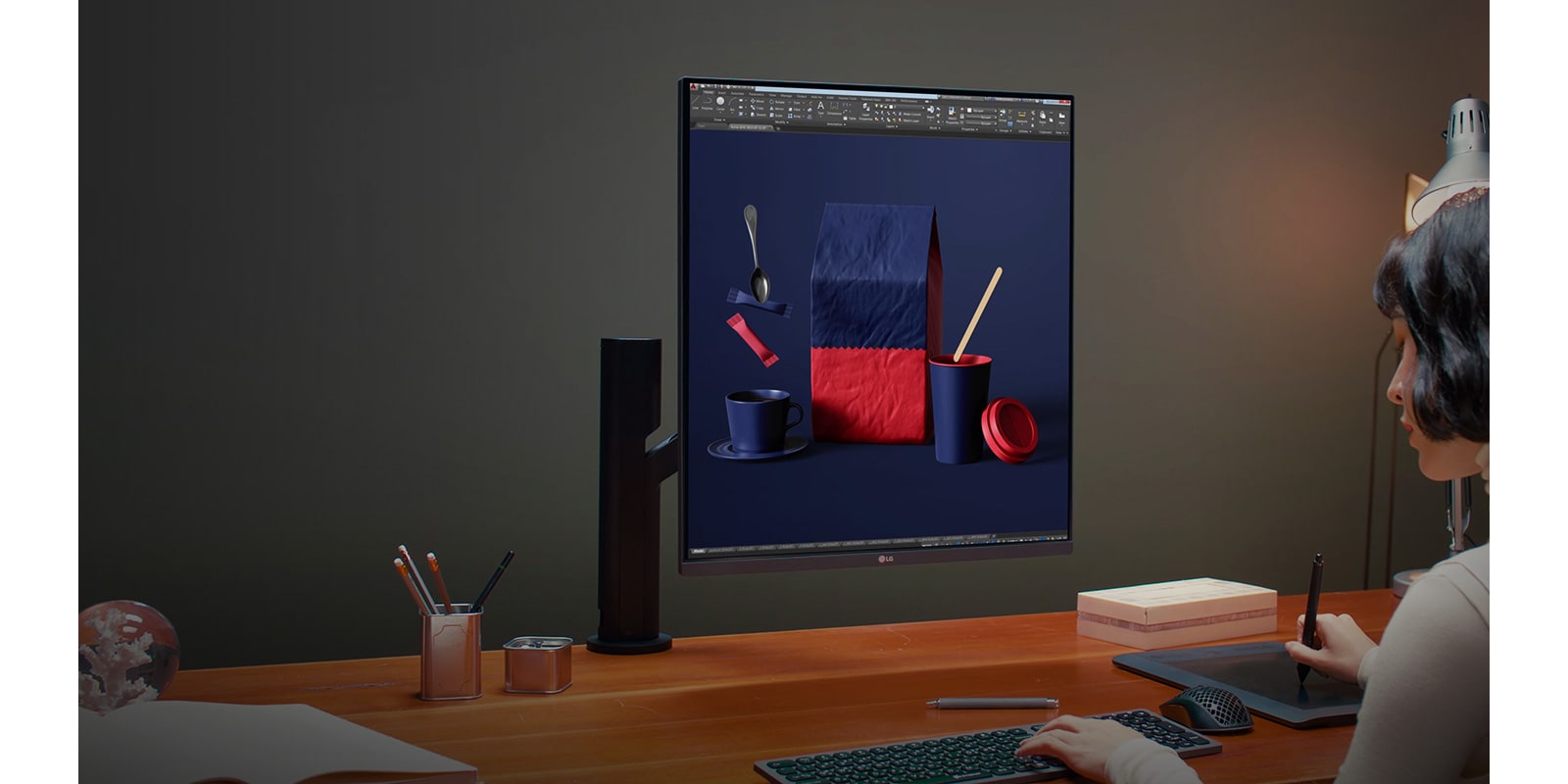
LG 28-inch 16:18 DualUp Monitor(lg.com) |
LG 28-inch 16:18 DualUp Monitor(lg.com) |
Now unfortunately those are still not common in external monitors - probably because they require 5k resolution for todays display sizes. But even the 160 dpi of a 4K @ 27“ screen is such a massive step forward in picture quality and readability that I couldn’t ever see myself going back to 110dpi or less. This should especially apply if a display is marketed as ergonomic
But what I'm curious about is if this acts as one monitor or two? None of the images show windows that overlap the middle of the screen. So is it one or two "virtual" screens?
If it is one virtual screen, I might think of it as more useful to me in the 18:16 orientation.
https://docs.microsoft.com/en-us/windows/powertoys/fancyzone...
https://www.lg.com/us/images/features/mnt-dualup-ergo-28mq78...
I suppose if it were curved it'd solve that problem but then it would come with assumptions about how far away you sit and create new problems like glare streaks.
The down side of this LG is that it's about the price I paid for the two 30" 4K displays... The curse of irregular displays, losing economies of scale.
To answer the first question I'm likely to get: The blue painters tape is a "cat napping on the laptop keyboard when I'm away prevention device".
At least now we have a Linux laptop with a usable display though, the soon to be released ThinkPad T14s Gen 3 will have the option of a 16:10, 2880x1800, 242ppi display, usable in Linux with 2x scaling.
Of course that laptop has other problems, but at least we have the first alternative to a MacBook in over a decade for people who care about Linux and displays.
Care to explain? I found some articles from 2017 claiming AMD cards can display 8k60fps.
Larger avoid having to stretch your neck as much, but I have to admit this 16:18 would save a lot of desk space.
The category I ended up targeting is portable monitors aimed at the business laptop market. These are slim, have a kickstand for support, and can receive data & power over a single usb-c. Not sure about product marketing restrictions on HN so I won't say the brand. But it's a 14" portable monitor from a long-running business laptop brand.
If you want this for a non-laptop scenario, my advice would be to pay very close attention to the types & versions of connectors on the devices you're trying to connect. My gaming desktop didn't have the exact right usb-c port. That sent me into the world of 'weird' cables and lots of debugging to finally get it set up the way I want.
If you're going to use an affiliate link, it is common courtesy to disclose that.
I'm interested in having a USB-C powered screen as a second monitor for my MacBook Pro, but would want it to more closely match the same resolution. 1080 just won't cut it.
It's 16:18, nearly square. Flipping a 16:9 is 9:16, tall and skinny. Not very similar at all.
Yes, it's the ratio.
- had 1440p + 1080p monitors on stands side by side before. Now just this one on an arm (which is excellent), that I can adjust to keep my position from being static.
- not having to hold my neck angled while reading my side monitor is helpful.
- realistically there are a few "modes" of working on here. While coding it's pulled a bit closer, while in CAD or similar creative I might push it back a bit and get more of the monitor in view.
- I recline slightly so the monitor is tilted a bit which gives me a solid view of the bottom 60-70% of the monitor. The top is a bit out of range at close distance.
- For coding so far I have the middle-ish of the monitor as a 1440p code-only view. Below that are a few windows for manpages/reference/interactive debugging/repl/etc. On the top end which is normally slightly out of view I have compilation and long running test output which I glance at by moving my eyes.
I like not having to page between desktops while coding when possible. The bottom view is also large enough to hold a browser window or simulator window. Need to also try pushing it back a bit with slightly larger text and see if that's any better.
I don't intend to game on it, maybe windowed mode in the middle or something.
edit: well, also it has this mode where you can split it into two 1440p monitors on different inputs (which you can hook up to the same computer), so depending on the game I might do that as well.
Similarly, I can keep a browser open at a normal (or even extended!) height, plus keep the developer console open at the bottom. It's made web development more pleasant, just the feeling of not being so cramped vertically.
1:1... it's not for everyone, but it is for me for the following purposes:
* Best LOC on-screen possible - balanced horizontal/vertical space in my IDE means I can fit WAY more readable code on screen vs. my horizontal monitors
* Vertical aspect ratio media - editing a vertical photo is outstanding (color profiles on this monitor are meh but not a huge deal for me)
* 4-corner tiling - I find I only tile to the left/right or top/bottom on normal horizontal/vertical monitors... on this one I can fit 4x windows in reasonable aspect ratios in the corners
* Full-height web browsing/document reading - not exclusive to 1:1; viewing a whole "page" of data is much more natural vs horizontal aspect ratios
---
Downsides:
* Gaming - Some games can be configured to work with it. Outside of Factorio I really don't use it _at all_ for gaming. I have 2x 16:9 1440p's on each side that I typically game on.
* Price/obscurity - This EIZO was way too expensive... the LG is way better but I'm afraid in 1-2 years you won't be able to find them at a reasonable price.
---
TLDR: I'm legit considering picking one of these LG's up for when my EIZO dies - I am so happy there's another option.
The only issue is that I needed to install BetterDisplay (former BetterDummy) to get retina scaling from my macbook pro M1 . Dunno why macOS doesn't support it natively since it has the same PPI as a 32" 4k screen.
This monitor is quite interesting especially for text editing and playing Factorio, would love to try it one day!
I don't think it's great to mock people for losing their life savings, but that's where it's coming from I think.
But it doesn’t have VESA? I’m all for the “save desk space” mantra that’s plastered all over their marketing materials, but my solution was a wall/stud-mounted gas spring fully-articulated VESA mount that I’ve used across several monitors. I definitely don’t want a desk-clamped alternative that will flatter and shake as I type vigorously on my mechanical keyboard (on anything that isn’t a solid, handcrafted wood desk that takes four people to move).
I have a fixed standing desk with a tall bar-stool type chair I use for resting at times. I'm 50, but even with glasses I use just for editing (they are optimized for bringing into focus things at arms distance) I have the monitor relatively close to use it at the resolution and font-sizes I like. This means if I'm working on editing something toward the bottom or top of the monitor I'll often have to adjust its height so that I'm not tilting my head too far down or up. The monitor arm just makes that so easy.
After a couple tries, I found a knock-off of the Fully Jarvis arm that works well, the WALI GSM001XL:
https://www.amazon.com/gp/product/B07NLMLLT6/
Anyway, this LG is neat, but my 32" is already at the height limit I'd want for a monitor. I feel like this LG dual setup I'd need to have too far way to see the full view comfortably, which would mean running everything at larger font sizes, so I'm not sure it makes sense.
The front of the monitor is 24" from my nose.
1. https://www.eizoglobal.com/support/compatibility/dpi_scaling...
There was an 1920*1920 monitor (https://www.inputmag.com/reviews/square-monitor-eizo-flexsca...) but that's over 1k USD :(
There are other nice displays like Huawei's Mateview at 3000*2000 but nothing costs less than ~550-600$/€. It's a bit of a pity because you can get a decent 1080p or even 1440p monitor for much less.
Fyi I had written a comment some time back on how to make your own monitor, using Panelook but that also isn't very cheap (edit here - https://news.ycombinator.com/item?id=30422163)
Unfortunately, LG is letting the supply chain dictate panel size for their product team, instead of the other way around. This is no doubt a byproduct of their decision to stop building their own panels in 2020.
It feels so natural to my eyes, I definitely don't want vertical panel but 16:9 is pretty crap for any kind of work.
You can clearly say that the vast majority of the product pictures instead present it as a 2x16:9. Most of the text is also selling it as a replacement for a double monitor setup.
No one had panel quality like LG... :(
- The aspect ratio is great when rotated 90 degrees. I really liked having more vertical room for coding and documents.
- Screen scaling with Mac OS does not work well. I’ve been using BetterDisplay to address this but it still suffers from lag, banding and pixelation.
As a result I’m returning and getting a BenQ 32” 4K. If the scaling issues on mac are addressed later on I may revisit it.
I wonder how well it works in practice. I typically have multiple tabs open so I don’t mind going wide over long. But it is easier to look down rather than sideways.
I used to have a terrible back pain that magically disappeared when I elevated my laptop so that the screen is at my eye level.
I still have a lighter version of this pain whenever I have to work for an extended period from a coffee shop or wherever I can't elevate the laptop.
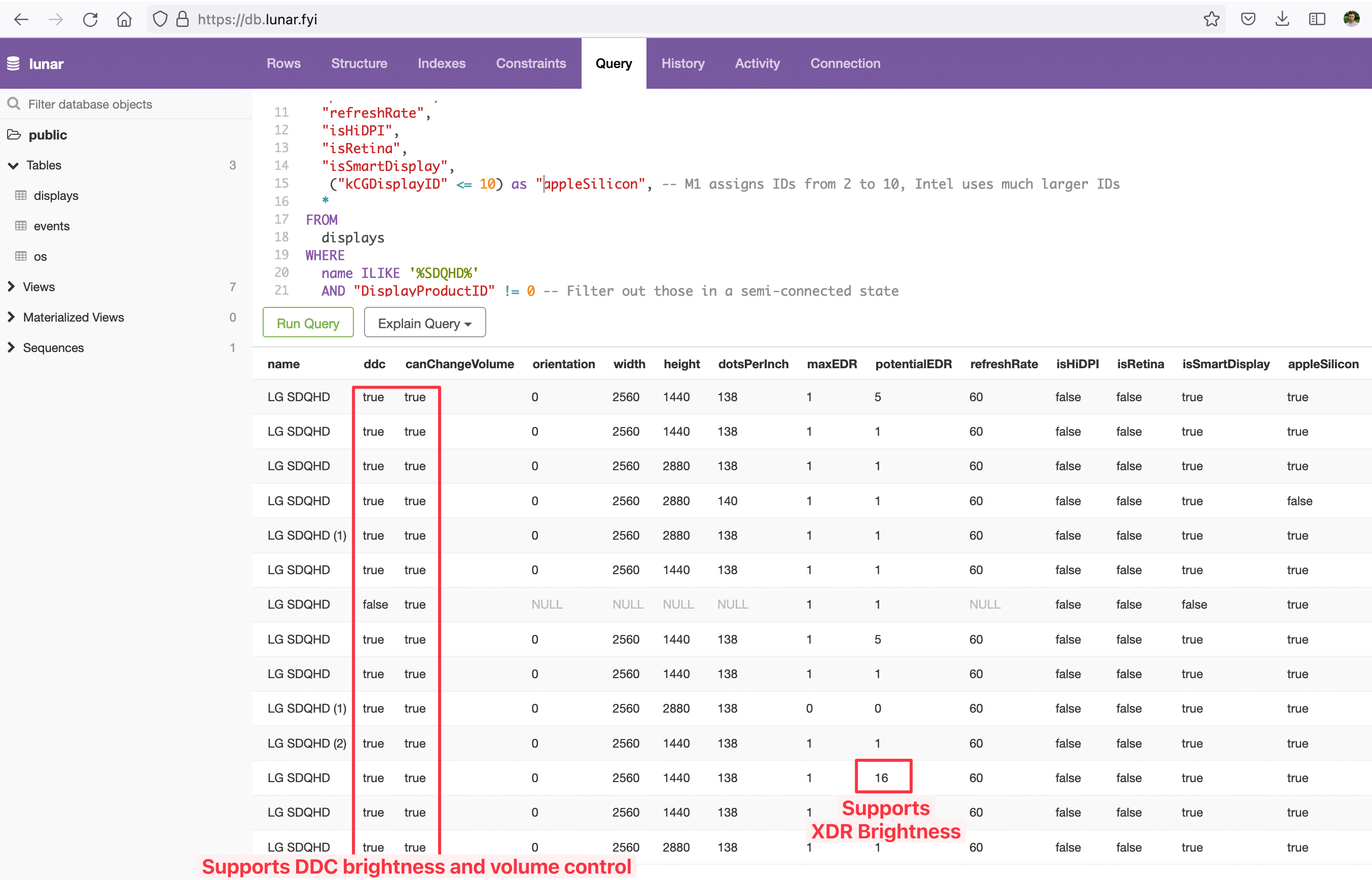
Some notable data points:
    - supports DDC brightness control (controlling the real brightness of the monitor using Lunar on Mac, TwinkleTray on Windows or ddcutil on Linux)
    - supports DDC volume control
    - supports Lunar's XDR Brightness feature (https://lunar.fyi/#xdr) which means that in HDR mode the full brightness of the display can be unlocked and used for SDR content
        - although the specs page reports a typical brightness of 300nits so not sure if this has any effect
    - it isn't recognized as HiDPI by macOS (this used to cause blurry text, not sure if this is the case here but BetterDisplay is a thing these days so not an issue)
And here's the query I used:
    SELECT
        name,
        ddc,
        "canChangeVolume",
        orientation,
        width,
        height,
        "dotsPerInch",
        "maxEDR",
        "potentialEDR",
        "refreshRate",
        "isHiDPI",
        "isRetina",
        "isSmartDisplay",
         ("kCGDisplayID" <= 10) as "appleSilicon", -- M1 assigns IDs from 2 to 10, Intel uses much larger IDs
        *
    FROM
        displays
    WHERE
        name ILIKE '%SDQHD%'
AND "DisplayProductID" != 0 -- Filter out those in a semi-connected stateI would install extra eyes.
[0] https://old.reddit.com/r/battlestations/comments/vv2tca/app_...
Because if you allow a gap, there are plenty of VESA-compatible mounting kits that solve the problem.
Like this?
HDMI: https://www.amazon.com/VCE-Supported-Degree-Female-Adapter/d...
DisplayPort: https://www.amazon.com/Displayport-Converter-BolAAzuL-Connec...
My only complaint is it’s not as wide as a 27” monitor despite having the same resolution as Thunderbolt Displays / 27” iMacs. So the pixels are smaller. The width is closer to a 24” 16:9.
But I love the stand, and everything else about it.
It should also be obvious given that it is not 2 monitors but a single 16:18 monitor...
A 2x(16:9) configuration where the monitors could be brought really close together would be neat though...
My 27" display is almost 25" wide.
if your display had a 27'' diagonal, and was 25'' wide, it would be 10'' tall. (Which makes little sense: it would be a 5:2 proportion.) So it would have an area of 250 sqi.
Versus the ~350 sqi of the LG. (It is quite a jump: the rounded √2 jump, 5:7, Ax proportion, "do it twice to double".)
The steeper (or flatter) the proportion, the less the area per diagonal size.
But I guess the display for comparison is more likely a 24''x13'' scarce, ~300 sqi.
10" tall? I think your math is off.
My monitor is P2175Q. Dimension with bezel 25.2 x 16.7. LCD alone is 23.5 x 13.25".
I know I wouldn’t be losing any horizontal resolution, but I think 27” is the perfect width for a primary monitor and I wouldn’t really want to go smaller.
I love that site for comparing displays across aspect ratios.
4 x 1440p@60Hz is ± 26.6 Gbps which is really pushing it for displayport 1.3
I found stacking 27"-32" sized displays in a 3x1 or 3x2 to be much more effective. This allows you to adjust the angles horizontally and vertically to where you sit so it's less of a flat plane and allows you to pick 1440p or 2160p panels for each (depending on size you went with and money you want to spend) giving you the option to build to the size and resolution you want instead of the size and resolution you can fit using a single tv. For less than $2k you can get 6x 1440p@165hz displays and 3 dual height monitor stands so it also gives more bang for the buck. Well getting the same peak HDR brightness might cost you more, especially if you want that on all displays.
Not to mention 8k TVs try to do everything I their power to make the experience of just turning on and displaying the content directly and correctly impossible to do fully.
This monitor offers 88% of the pixels the LG C2 does but compresses them into half the surface area. It also costs half the price.
For the same amount of money you can have 14.8 megapixels at higher PPI in a much more flexible format. 4K seems like a lot of real estate but at standard->lower PPI (large screen few pixels) realistically you don't get that much more real estate, especially compared to the 2560x1440 (and multiples thereof) displays.
I used to use a 55" LG OLED as a monitor but in practice, coming from dual 27" 2560x1440 monitors, I rarely did deep work in quadrants of 1920x1080. I tended to use a 2560 main slice and then the leftovers for reference and my terminals. I found 55" 4K as a monitor to be overly large and lacking in usable detail and I'm not sure I trust 42" to be small enough to make up for that.
42.7" 16:9, very close to the common 42".
That reading most had stopped 95% of my eye strain attacks.
For people who work in Windows: you will want to use https://github.com/mgth/LittleBigMouse and you'll need to modify the registry to work around this issue https://github.com/mgth/LittleBigMouse/issues/80 if you don't want your mouse cursor to jump vertically during screen transitions.
Seems that there's no problem for this method of attachment in bigger connectors (HDMI or DisplayPort) but the soldered attachment of USB-C is not strong. It needs additional support to the chassis. The minimal movement of the included stiff usb-c cable when moving the ERGO mount will tear the connector off the PCB.
My monitor is broken and technical service didn't take responsibility. Money lost, never again LG.
Unfortunately, this LG is the first and only thing that I've seen that comes close with a <$1k price tag... I'm considering picking this up to have as a backup when my EIZO finally dies.
My specs are 1:1 or as-close as I can get.
I wouldn't want it on my actual workstation ...
It's reasonably easy to buy it in EU, and price is not too far from usual suspects like Dell UltraSharp or cheap Eizo/Nec models.
So I'd be prepared to do some repairs / get spares if you can+want.
I guess a decent solution in my case would be to actually get a proper job (I'm still studying) and save up for a decent display, until which I'll just do some window shopping heh ;)
https://th.nec.com/en_TH/product/display/multisync/lcd2090ux...
Manufactured as late as 2010, especially the MedView series.
I do have to wonder though, you're saying 'Screen scaling with Mac OS' and 'scaling issues on mac' but this is just a monitor, Isn't that "MacOS screen scaling does not work well" and "mac scaling issues" rather than any defect with the device itself?
I've tried absolutely every utility that allegedly makes higher DPI monitors work: BetterDisplay, SwitchResX, EasyRes, and a few other little ones. BetterDisplay makes it sound like they support full resolution with any arbitrary scaling factor. But all of them, at least the ones that did ANYTHING, they only offered the exact same behavior that Mac's built-in display settings offered. They only let me run at a lower resolution. I'm on a 2020 Intel MBP.
Running it at 1920x2160 (just via Mac's built-in settings) is annoying, but it displays things at the correct size and lets me move on with my life. It's still slightly crisper than my old 96 DPI monitor, and the screen real estate + aspect ratio is absolutely amazing for coding.
It's a real shame that neither Mac nor LG has a solution similar to what Windows offers. Hooking the Dualup to my Windows 10 PC, it immediately just worked. Full resolution, 150% scaling, it was the perfect size. Text looks so much crisper on Windows than Mac with this monitor. I've been considering installing some Linux distro for my daily work just to enjoy proper scaling (I figure Ubuntu would offer something similar to Windows).
While Mac OS has never had an issue with other monitors and scaling replies in my experience, it does for the DualUp. I’m not knowledgeable enough about the various protocols to know if this is Apple or LG’s responsibility, but the end result is not pleasant.
At home I've got 2 x 27" 9:16 monitors, one in front and one to my right (total display width ~68 cm), then my little laptop on the left (~30 cm wide) - and that's about far left or right as I can be bothered to look.
At work I've got 1 x 27" 9:16 monitor in front, and 1 x 27" 16:9 monitor on my left. The left hand side of the desktop feels very, very far away!
Another tip: In my setup I created dummy screens to fake multiple monitors in RDP.
https://apps.apple.com/us/app/divvy-window-manager/id4138575...
https://www.dell.com/support/kbdoc/en-us/000060112/what-is-d...
This has puzzled me for a long time as to why ppl use multiple monitors at all. Is the idea that your peripheral vision is monitoring terminal window ?
I used to run two 30"s vertically, but after upgrading to high-res 32" didn't get back to such setup (would be too narrow and too tall). Two of these 27"s can be great for side-by-side again.
Can you elaborate on this? Sounds like it might be a way to limit back strain? Do you have a desk at all?
The crypto jerks aren't necessarily the ones who quietly used blockchain investments as an attempt to invest. Can't say they made a wise decision, but it's just bad form to strike someone when they're down. They still came out better than taking $40K in consumer debt!
https://docs.microsoft.com/en-us/windows/powertoys/fancyzone...
True binocular FOV is 120° horizontal, which makes it close to a square actually.
It’s not like that remaining 70° is completely useless for monitor viewing, you will still peripherally notice any major display changes in that area, and should you need to turn your head, the partial view makes it easier to quickly find and lock onto the new target.
When I'm traveling + using a traditional setup I really miss it.
How? Have you verified it? √(625+100) = ~26.9
You brought the measurements of your 16:9 : yes, one of the points was that a 27'' diagonal with a 25'' side cannot be 16:9, and is in fact more like 5:2, as written. Going from 25'' to 23.5'' makes a lot of difference in proportions.
I don't want to use different spaces on the same screen, to me it's like context switching, and I don't like that. I prefer to have everything open in front of me, so I just turn my head slightly to see what I need to see. It's like having a large work table where I can fit all my tools and materials.
If you have never had your terminal highlight something that it detects (log line, compile error, stacktrace, test report, etc.) as a reference to a file/line/column and give you a clicky to bring that file to the front and focus it... I highly recommend you try it.
I'm not monitoring the terminal window with my peripheral vision, but when I am using the terminal I don't want to have to rearrange where my code appears.
I also have a third, vertical monitor, that typically has documentation (documentation is splendid when you can see lots of rows of text). Why that has to be "in another monitor" should be a reasonable corrollary from that.
(I could probably work around all of that, and indeed when I work at home I just suck it up and/or have things stretch across two screens. But the other part is that the monitor stand I have at work is a bit limited, so if I have both monitors in portrait orientation and move them so they're adjacent, they end up too close to me.)
The articulation to look up/down is maybe +/- 15 degrees, and being dynamic it should be a positive movement that strengthens your neck.
That you have reduced neck flexibility decades later could easily just be age…
Ethereum network is a nice exercise in distributed computing, but its usefulness is questionable, while harm is undeniable.
Everything else crypto are either scam (I estimate this at 90%) or solutions in search of problems.
For me, this totally eliminates back strain from working. I've also got a friend who uses a La-Z-Boy in his home office, with his laptop connected to the TV. He can't say enough good things about that setup.
Isn't that a bit too close? Can you see all of it at once, and is there anything but it in your field of view? I'm asking because i had a 60cm (24'' is 61cm) desk with a 24'' screen and i found that too close and too straining on my eyes.
I don't really have any issues with eye strain though.
I did need to get dedicated glasses that I use when using the monitor or when I'm on my laptop. I'm a bit near-sighted, even after Lasik a decade ago, and now I'm also dealing with presbyopia the last few years. I've worn glasses all my life, but they never bothered me at all till I started dealing with the presbyopia and needing task-specific glasses. :-(
I tried progressive glasses (modern versions of bifocals) but found them extremely annoying with their fishbowl effect and only providing enough magnification at the bottom and gave up on them after two weeks. So I now have my regular glasses that are adjusted for normal activities and I just take them off or read below them for near work. My near-sightedness here is providing me some temporary respite from the presbyopia. But at arm's length distances, it's uncomfortable to read text through them because my eyes can't focus that close with them on, yet if I take them off it's just a bit too blurry.
So I basically have my work glasses that make things from ~ 18" - 36" comfortable for viewing.
Presbyopia really sucks and it's the only thing so far about aging that's a constant irritation in my day. :-(
p.s. typing this on an iPad 12.9" that's about 16" from my face, w/o wearing my glasses. Further away and it's too blurry and I'd need my middle-distance glasses. With my regular glasses, there's no distance at which I can read it.
Lord you aren't kidding about that - I tried these after a doctor recommended, and it was so jarring and disorienting I thought something had to be wrong. Apparently that's just how they are.
You will need to do a little configuration, but it does the snap zones thing perfectly.
My memory is hazy but I feel this is close to some now-elided window management feature in MacOS...
Thanks for the tip!
Cyclists learn that the proper position is to hold the head at roughly the same angle of the spine and to peer upwards at an angle. So you are basically looking UP, but since the top 2/3rds of the spine is tilted forward at 45 degrees, you end up looking forward. However, as the neck muscles tire from holding a 15 pound head this odd position, riders end up like you described.
> could easily just be age…
I'm pretty sure that's the case. :)
[1] https://www.statista.com/statistics/299609/gold-demand-by-in...
Drying machines makes life of a lots and lots of people more comfortable. Hundreds of millions is my lower estimation, maybe even billions (if we include industrial dryers used in textile and clothes-making). Useful segment (eg except speculation and illegal activities) of Bitcoin operation is consumed by millions of people tops, two or three orders of magnitude less. And I never heard about using dryers for drug trade.
I have it next to my studio display and it honestly does not even compare in terms of clarity. I’m sure it’ll run better on windows.
Could you clarify a bit by what you mean? The studio display has a higher resolution if I'm not mistaken (4500*3000), do you mean the display is more vivid or has a better color space (DCI P3 etc) coverage? Thanks!
I’m referring to the scaling of the display. The reason that I say that macOS looks better is because it uses integer scaling on the studio display. While even after setting a custom resolution, (the defaults macOS chose for the Mateview were either really small or really large for my taste) the Mateview still has a bit of a blur to it in small fonts it is most noticeable. Whereas the studio display shows well because it was made with integer scaling in mind
I find it an absolute joy to use. When I am at my desk I spend a lot of time in front of the screen and compared to the Samsung 4k I was using previously I find far less eye strain, much crisper image, and just generally more pleasant. I feel the investment was very worthwhile.
It’s also very beautifully designed which was definitely a consideration for me, as my office has a very cheaper defined aesthetic.
Happy to answer specific questions but understand that I’m not a monitor expert :)