Or maybe FPGA's onboard for custom per use case. I hope that's why AMD merg d with Xilinx.
It might be nice to have more information than that, but it honestly doesn’t seem like a huge problem. Your fridge probably costs you more over a year than even a 4090. See also air conditioning.
See Texas.
I'd guess if excessive stress on the PCIe slot was a problem, it'd be solved by combining a good 2-3 slot mount on the back side and enough aluminium+plastic to hold the rest.
Seriously though, I imagine it's only a matter of time before these engineering decisions are themselves handed off to machines.
2. The real problem, in my opinion, is out of control power consumption. Get these cards back down to 200 W. That's already twice the power delivery of a mainstream CPU socket.
That is the design spec for laptops, but not many people game on laptops because although they are more efficient, people would rather go 2x or faster and use more power
I was also thinking of a case where it can handle the cooling of a deshrouded GPU. Perhaps we should delegate the cooling options to the user without having to void warranty.
Hopefully the energy prices in Europe will force chip makers to work on that. I mean, only if they want to sell something over here.
I really like the Mini ITX form factor and have multiple PCs that fit on IKEA shelves.
I prefer shorter/smaller GPUs. Better airflow. Easier at build time too.
My EVGA RTX 3050 is about the right balance.
or provide a dedicated gpu slot with a riser-like mount that allows for gpu to be mounted separately from the actual board ( something what laptop owners do with external gpus) ?
this way gpu could be any size and might have cooling on either side - or an external solution.
It's a PC case orthodoxy issue, really. People want plugs at the back of the box, which dictates how the GPU must sit in the case, and disagreement on GPU sizing means no brackets. Solve these two issues and life gets a lot better.
Or, solve it like SFF case guys solved this problem, by using a PCIE extender cable to allow the GPU to be mounted wherever you like.
With these power hungry beasts my custom loop, outside of a tiny case (the radiators make the pc look silly small and are connected to it with quick couplings) suddenly makes practical sense instead of just being a "let's see what I can do" project.
Great article!
People could also move to a rack mountable chassis.
Less sarcastically, I would quite like to go back to putting my monitor on top of a desktop - sure beats a stack of books.
1. the cases(even the cheap ones) are better built and have better airflow than most tower cases, as a bonus, no rgb or windows.
It does feel like GPUs are getting rather ridiculous and pushing the limits. PCIe SIG seems to keep having to specify editions of the PCIe add-in-card electromechanical spec authorising higher power draws, and sometimes it seems like these limits imposed by the standard are just ignored.
Indeed, PCI standards were for adding interfaces to personal desktop computers after all. It does seem ill suited to host 450W cooperative sub-computers.
A more common approach to heavy expansion card is VME style chassis design. Off top of my head, NeXTcube, NEC C Bus, Eurocard uses this arrangement in consumer space, and many blade servers enclosures, carrier grade routers, and military digital equipments employ similar designs as well.
They're simply getting too big, power hungry and hot to keep in colocated in the case.
Sounds reasonable, we already used to have separate CPU and FPU sockets in the distant past.
However, isn't it nice every extension card incl. GPU cards uses the same unified connector standard and can by replaced with anything very different in place? Wouldn't switching to the an MXM form-factor, introducing an extra kind of slot, be a step back? Haven't we once ditched a dedicated GPU card slot (AGP) in favour of unification already?
https://c1.neweggimages.com/NeweggImage/ProductImage/14-135-...
> Anything weaker than that is getting beaten by AGUs.
Is AGU the GPU on the CPU thing? Is it not possible (or maybe not profitable) to put something a little more performant than an AGU but doesn't need such a massive fan on a full size multiple slot card?
I have long thought the bitcoin miners were onto something, with pcie risers galore. In my head I know pcb is cheap and connectors - cables arent but it always seemed so tempting anyways; very small boards, cpu & memory (or onchip memory) & vrm, and then just pipes to peripherals & network (and with specs like CXL 3.0, we kind of could be getting both at once).
Nobody agrees on anything anymore. We need standards like those created 30 years ago. But everyone wants to do their own thing without realizing the reason for the inter compatibility is because people got over themselves and worked together.
What we could do is have AIO cooling like CPUs, more affordable than the current solutions or the "water block" designs from the brands.
Or, have more sandwich designs like Sliger which have a mini itx and a PCIe card parallel and connected via a ribbon. I don't think there is any claimed performance loss due to the cable.
Edit: Perhaps I use the term incorrectly, I mean they take up two case slots even if only a single pcie slot.
Those aren't even the same market segment.
The type of person buying a flagship card would not even be considering a basic card and vice-versa.
Also, a part of me used to get frustrated at the existence of the "basic" cards, like the GT 1030. I've seen more than one person wanting to build a gaming PC and see a budget card like that and think they're getting a current-gen card without knowing that the budget cards are horrendously underpowered. For example, the GT 1030 is about the speed of a GTX 470, a mid-grade card from 7 years before it.
Maybe some people are fine getting that weak of a card, but if that's all you need, I'd question if you even need a discrete GPU.
https://www.powercolor.com/product?id=1640245090
Barely longer than the PCI-E slot and only needs a single slot.
The Radeon RX 6400 is basically AMD's high end integrated GPU on a card being very similar to the Radeon 680M in Ryzen 6000 chips. But I think the dedicated memory offers an improvement over the APU solution.
They can't put anything bigger because they run into heat, power, and memory limits.
Single slot, half-profile, small fan, shorter than ATX / mATX?
This is a mini-card that'd fit in an ITX case (170mm)...
The main reason I choose it over the others is look at all them 5 1/4 bays, the whole front of it is 5 1/4 bays. 5 1/4 bays for days. do you know how many stupid drive bays, fan controllers, sd slots, switches etc you can fit in this case... By my count all of them.
https://www.newegg.com/rosewill-rsv-l4500u-black/p/N82E16811...
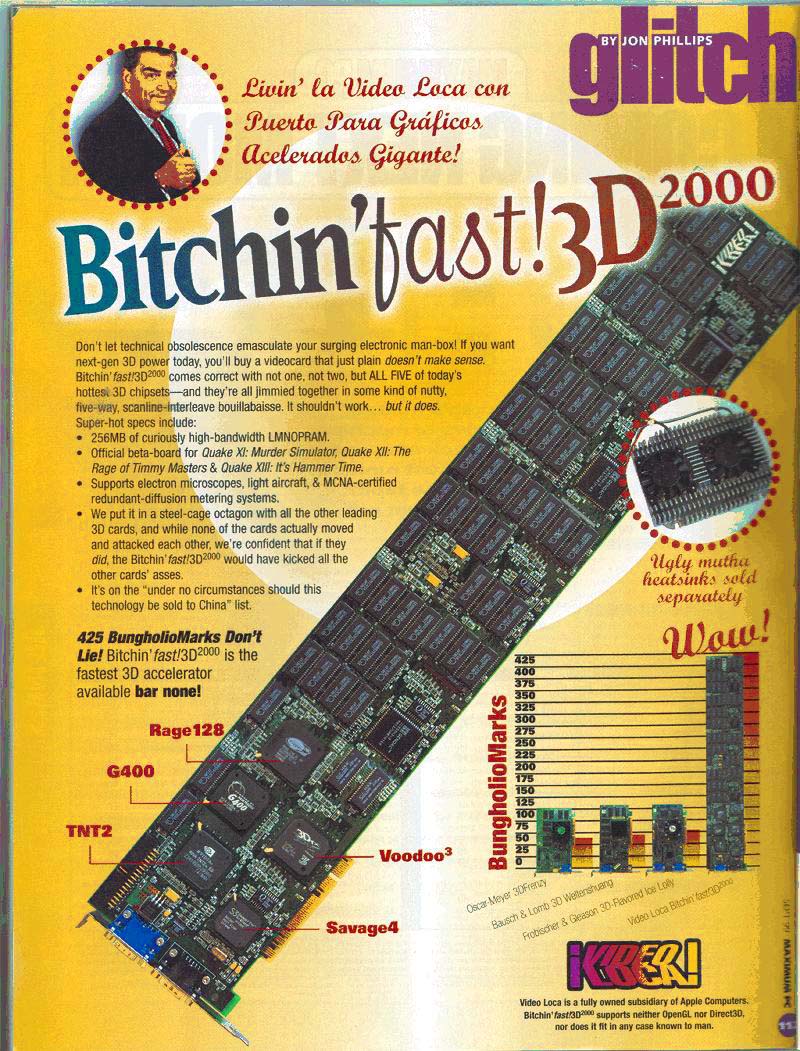
Our first was just an existing card with a small daughter card with pals an sram on it, it was so easy that we got our own logos put on many of the chips to put the competition off the scent, we designed that one in days and got it to market in weeks.
We immediately started on 2 more designs. The next was all FPGA, it was as big a nubus card as one could build, it pulled too much power, and tilted under it's own weight out of the bus socket (Mac's didn't use screws to hold cards in place, that happened when you closed the chassis). We got it out the door about the point that the competition beat the first board's performance.
The final card was built with custom silicon, designed backwards from "how fast can we possibly make the vrams go if we use all the tricks?", In this case we essentially bet the company on whether a new ~200 pin plastic packaging technology was viable. This design really soaked the competition.
In those days big monitors didn't work on just any card so if you owned the high end graphics card biz you owned the high end monitor biz too ... The 3 card play above was worth more than $120m
I built the accelerator on the last project (that 200 pin chip - look for a chip SQD-01 aka 'SQuiD') that was the basis of a whole family of subsequent cards (starting with the Thunder cards)
I love Retrocomputing and it sounds like an awesome thing to look at.
The VRAM array was 2 sets of 96 bits wide - the accelerator was in part a 1:4 24:96 mux that drove the VRAM array - that's how the dumb frame buffer worked.
I'd spent a year before all this writing code to grab stats figure out where the mac graphics code spent it's time, initially we'd expected to optimise drawing vectors (ie lines - autocad was driving the parallel PC graphics market at the time) - my big discovery was that for the sorts of workloads that our customers were using 99% consisted of just 4 operations:
- solid fills (>90%) - patterned fills - copying within the FB (ie scrolling) - writing text (quite low by important for the DTP market)
I wrote the spec for the first 2 cards (to do the first 3 operations) and the went off to design the 3rd chip (modelled in C, turned into an inch thick spec describing the state machines and data paths and then passed to someone else to make gates)
I added a hack on top of the copy primitive to accelerate text hiliting.
So that accelerator chip also contained a state machine did 4 simple things as fast as it possibly could (solid fills used magic modes in the VRAMS, it could fill at 1.5Gbytes/sec - faster than the high end 3D hardware at the time)
In the end the text fill was useful, but not that much faster (it turned 1-bit font images into 24-bit pixels on the fly), all that cool hardware was pissed away by the way the underlying apps used the font rendering subsystem (page maker invalidated the font cache every line, quark did an N-squared thing, etc)
Yes, the cable will add approximately ~0.3ns of additional latency due to the added 10cm of distance.
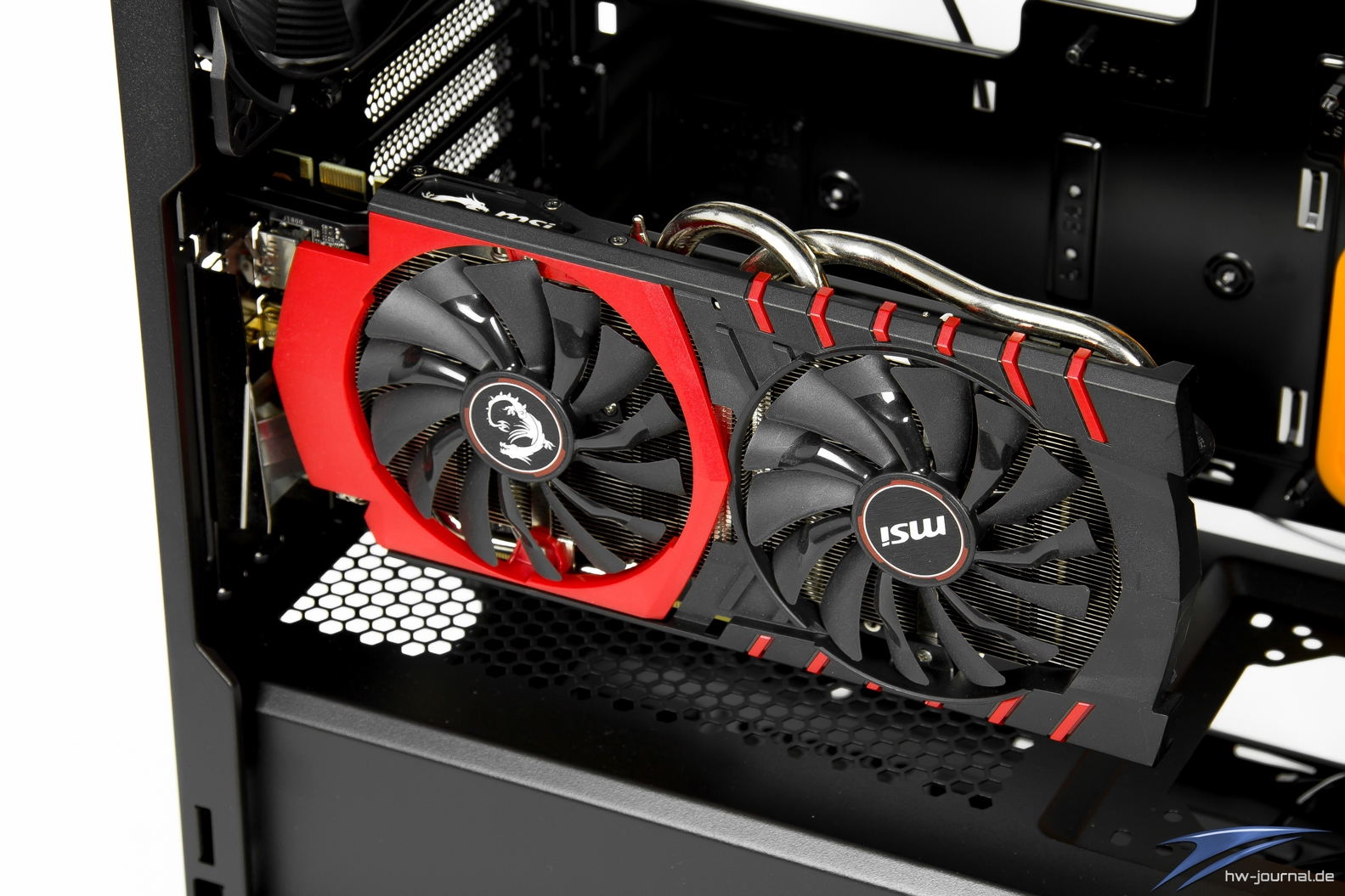
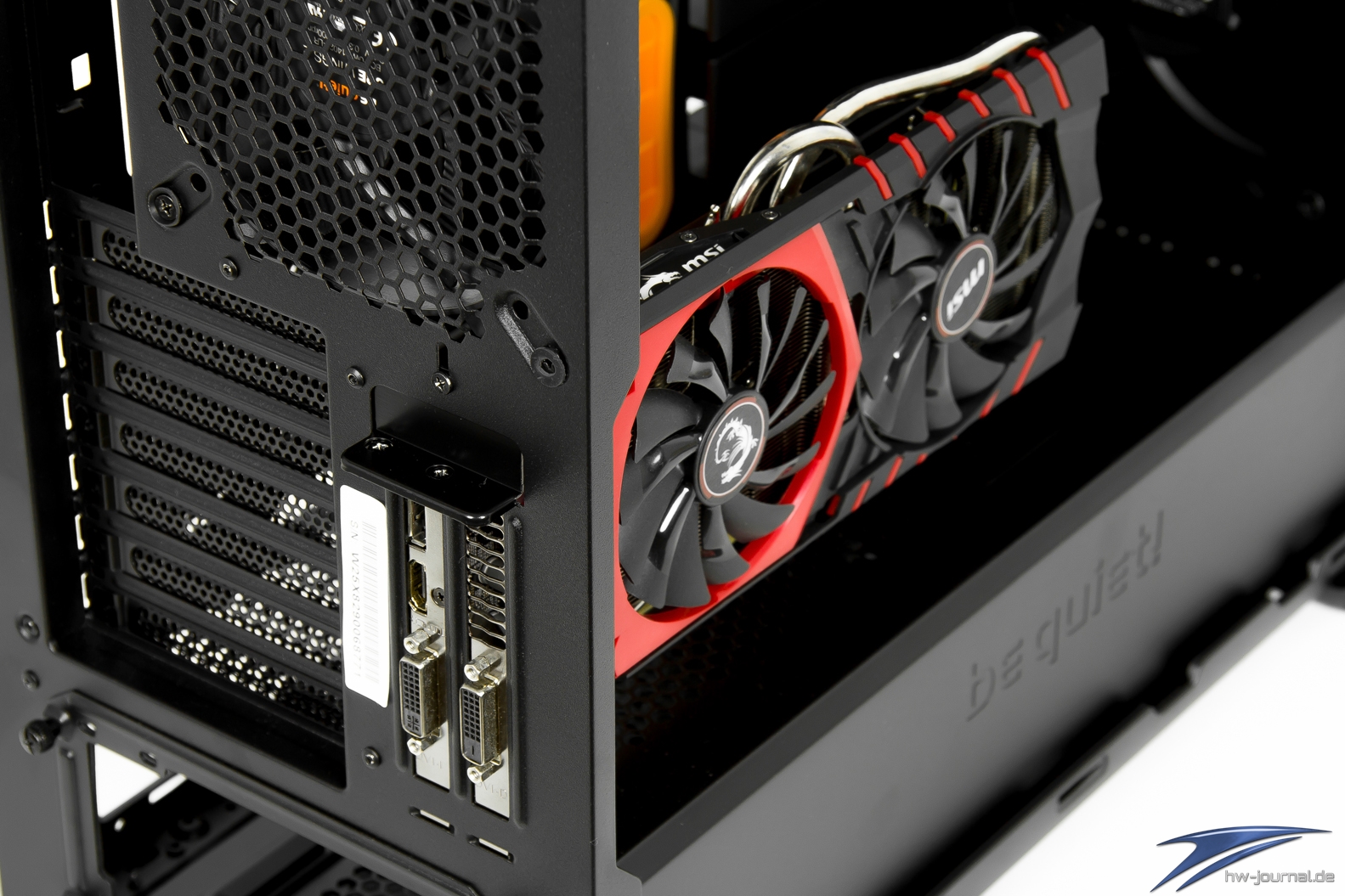
This is how it looks like:
https://www.hardware-journal.de/images/Bilder/2018/test/be-q...
https://www.hardware-journal.de/images/Bilder/2018/test/be-q...
https://vgamuseum.ru/wp-content/gallery/bitching-fast/bitchi...
I chuckled a little at this because I used to wonder the same thing until I had to actually bring up a GDDR6 interface. Basically the reason GDDR6 is able to run so much faster is because we assume that everything is soldered down, and not socketed/slotted.
Back when I worked for a GPU company, I occasionally had conversations with co-workers about how ridiculous it was that we put a giant heavy heatsink CPU, and a low profile cooler on the GPU, which in today's day and age produces way more heat! I'm of the opinion that we make mini ATX shaped graphics cards so that you bolt them behind your motherboard (though you would need a different case that had standoffs in both directions.)
By the way, what actually dissatisfies me is the majority of mainboards having too few PCIex slots. Whenever I buy a PC I want a great extensible future-proof mainboard + very basic everything incl. a cheap graphics card so I can upgrade different parts the moments I feel like . Unfortunately such many-slot maininboards seem to all target the luxury gamer/miner segment and be many times more expensive than ordinary ones. I don't understand why some extra slots have to raise the cost up 10 times.
Bring back proper desktop cases!
2. Are there any GPUs that actually have performed physical damage on a motherboard slot?
3. GPUs are already 2-wide by default, and some are 3-wide. 4-wide GPUs will have more support from the chassis. This seems like the simpler solution, especially since most people rarely have a 2nd add in card at all in their computers these days.
4. Perhaps the real issue is that PCIe extenders need to become a thing again, and GPUs can be placed in an anchored point elsewhere on the chassis. However, extending up to 4-wide GPUs seems more likely (because PCIe needs to get faster-and-faster. GPU-to-CPU communications is growing more and more important, so the PCIe 5 and PCIe 6 lanes are going to be harder and harder to extend out).
For now, its probably just an absurd look, but I'm not 100% convinced we have a real problem yet. For years, GPUs have drawn more power than the CPU/Motherboard combined, because GPUs perform most of the work in video games (ie: Matrix multiplication to move the list of vertices to the right location, and pixel-shaders to calculate the angle of light/shadows).
But these aren’t just long cards. They have huge heavy chunks of metal and fans on them in the name of cooling.
Are those brackets strong enough for the job? I remember them being basically shallow plastic slots.
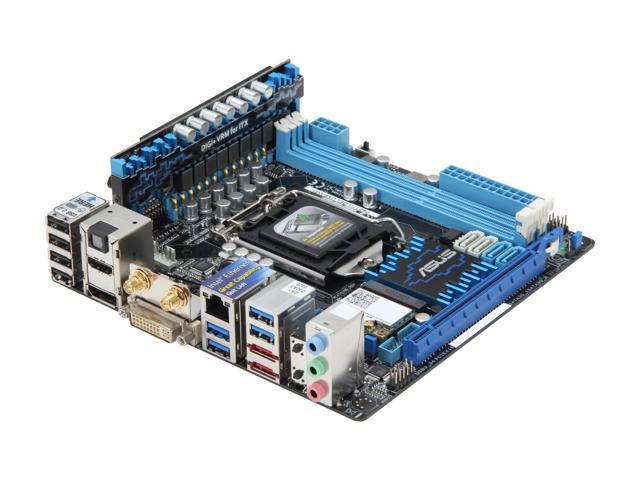
This is the ASUS RTX 4090 ROG STRIX. Air cooled, no waterblock. That is a mini-ITX form factor motherboard, hence why it looks so comically large by comparison.
This is one of the physically smallest 4090s launching. Its confirmed weight is 2325g, or 5 ⅛ lbs. Just the card, not the card in its packaging.
And if we are to reform our computer chassis anyways, we could move the PSU to straddle the motherboard and the video card and even have the VRM inside. High amperage "comb" connectors exist and VRM daughtercard motherboards existed https://c1.neweggimages.com/NeweggImage/productimage/13-131-... Change the form factor so two 120mm fans fit, one in front, one in the back.
So you would have three 120mm front-to-back tunnels: one for the video card, one for the PSU, one for the CPU.
I'm using a pretty heavy modern GPU (ASRock OC Formula 6900XT) in a Cooler Master HAF XB with that layout, and sagging and torquing is not much of a concern. The worst part is just fitting it in, since there's like 2mm between the front plate and the board-- you have to remove the fans so you can angle the card enough to fit.
I also suspect that if we went to the 80's style "a full length card is XXX millimetres long, and we'll provide little rails at the far end of the case to capture the far end of a card that length" design, it would help too, but that would be hard to ensure with today's exotic heatsink designs and power plug clearances.
The GPU is the main part of the machine by cost, weight, complexity, power consumption. And it's not even close.
New NVIDIA cards will draw 450W, and, even if you lower that in settings, the all package will still need to be manufactured to support those 450W at various levels.
I wonder what are games doing that require that extra power, seriously. I, personally, would much prefer to slightly have to lower settings (or expect devs to take at least some basic steps to optimize their games) than have a 450W behemoth living inside my computer.
Meaning, 40xx series will be an obvious pass for me. My 1080 Ti is actually still great in almost all aspects.
Think of it like VMEexpress.
I use PCIe over VPX every day.
https://en.wikipedia.org/wiki/VPX
Please, lord, somebody else outside of aerospace use it so more vendors get involved and availability and basically everything about the entire supply chain gets better through competition.
There's no reason you can't get benefits from a fabric over point-to-point today, it's just big and expensive.
Weren't those systems a bus architecture? Like the backplane wires all shared the same wires so it was possible to keep stringing them along?
Modern PCIe, and even USB3, are star networks. Everything directly connects to the northbridge like an Ethernet cable star network connects to a switch.
-------
PCIe slots communicate the idea well. There are only so many dedicated wires the northbridge exposes to USB3 or PCIe.
This, it makes sense to have those limited wires in the form of PCIe slots or USB3 connectors.
Having bought both... it is definitely costs they don't want to pay, but not the cost of those features. It's more like industrial grade PSUs and redundancy that get mandated by various specifications and end up reducing the market size which further racks up costs.
The 4090 Ti looks fantastic too. Totally worth the risk of fire.
No, that was just a rumour that was floating around. The 4080 16GB model is 340W TGP, the 12 GB is 285W TGP out of the box. The 3080 (10 GB) was 320W TGP, as a comparison point.
But yea, I have to say peak power consumption has to be regulated so companies compete in efficiency, not raw power.
For continuous draw you’re limited to 80% of the line’s rating (in the US). People who have looked into EV charging have certainly run into this fact.
So the computer (and sound/monitor/etc) have to stay under ~1400 watts if it’s on a dedicated circuit.
1/3rd of that for just the GPU I’d pretty crazy. I honestly wouldn’t have thought GPUs could get this high.
Also, I remember my computers being hot in a small room long ago. A lot of the space heaters on Amazon are rated either 750 or 1500 W.
I don’t think I wanna be near a computer that hot.
Show me an example of a “non-crazy” build that’s over 1,200W, let alone over 1,500W. I’m genuinely curious.
but with things like stable-diffusion, such a card might have other uses other than games. For example, live paint-ins for photoshop, and other tidbits that are currently not realistically possible for the consumer.
The length of the 3090 with air cooling is what makes it so heavy on the PCIE connector - localized coldplate weight is not an issue.
and once you have liquid cooling, maybe you can go to 800w...
> Are there other consumer markets where high-performance is so accepted and common place?
Anything measurable will be compared, and people want (more) performance.
Basically we need to move away from slots!
But seriously, 450 Watts on this day and age of increasing energy prices? Crazy.
Example: Silver Stone Fortress case https://bjorn3d.com/2010/05/silverstone-fortress-series-ft02...
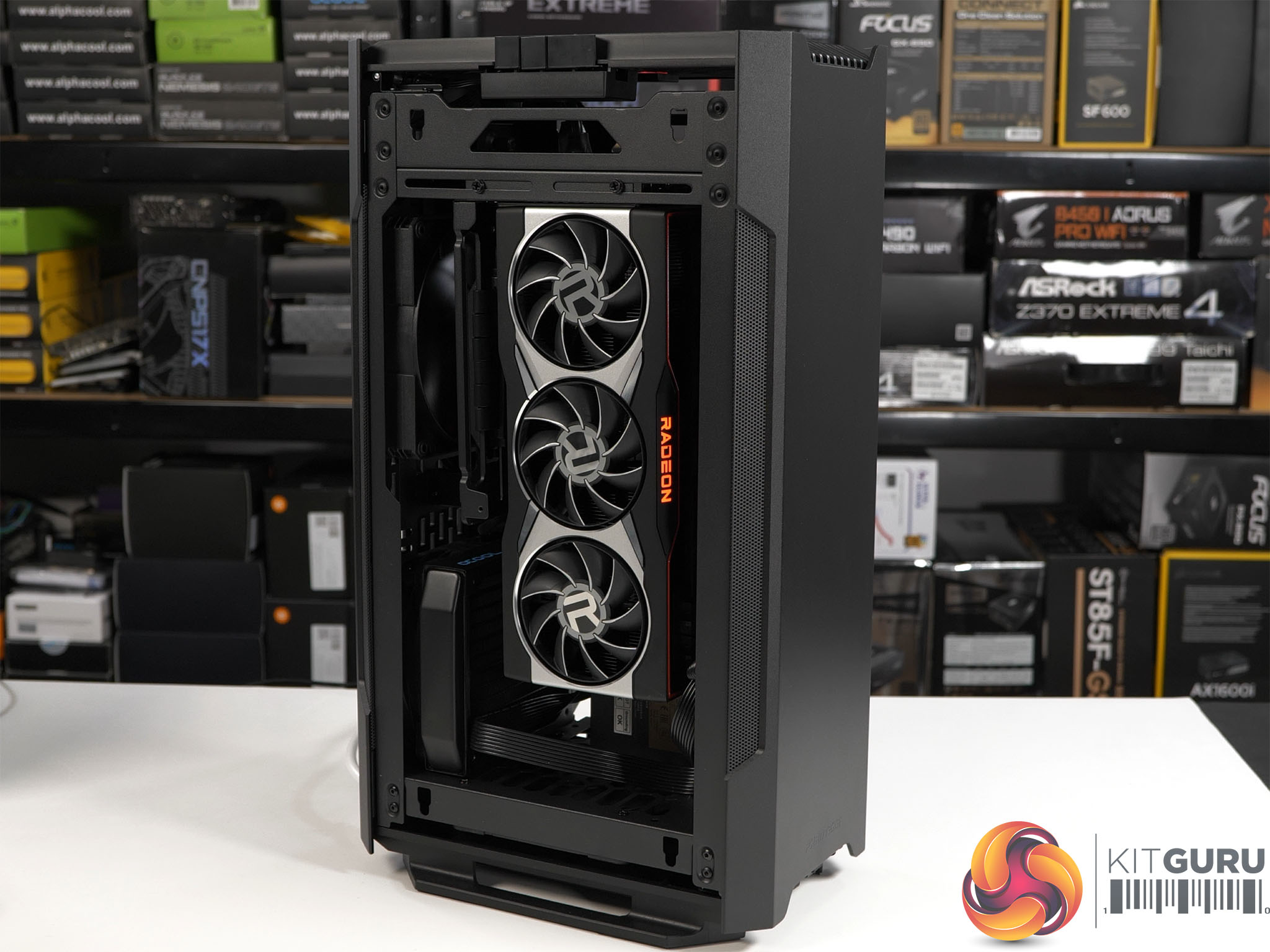
https://www.kitguru.net/wp-content/uploads/2020/12/2-Still-8...
It's a fantastic case.
Whilst this example is a bit on the extreme side:
https://uk.thermaltake.com/the-tower-900.html
It does have some nice properties, no GFX card sag, any water cooling leaks can't drop on expensive components, power supply is back and away too.
Most important point is the cables out the top are covered by a shield so you don't have the ugliness.
Almost like some giant graphics cards...
> has a total length of 2704mm and a surface area of 905637mm²
We're going to need a bigger case.
That card is huge, but I bet it's a fair bit lighter than most of the gaming sector cards now.
Memory and nvme storage are dense enough to make anything larger obsolete for the practical needs of most users. Emphasis on ‘practical’, not strictly ‘affordable’.
The only advantages of larger form factors are the ability to add cheaper storage, additional PCI-e cards, and aftermarket cosmetic changes such as lighting. IMO, each of these needs represent specialist use cases.
Missed that one. I still mourn BTX.
Is there a case like this, but that is not part of a prebuild computer?
That's be a pretty clever solution. I wonder if any case designers are brave enough to try to pitch that solution. Somewhat fits in the rising popularity of putting your tower on your desk.
> I don't understand why some extra slots have to raise the cost up 10 times
Part is market differentiation, but the other part is that you quickly run out of PCIe lanes to the CPU (especially with Intel, thanks to their market differentiation). If the mainboard manages to use no more PCIe lanes than the CPU supports, everything is simple. Once you add more or bigger PCIe slots, more M2 slots or more USB3 ports, the mainboard has to include a fairly expensive PCIe switch to turn few lanes into more.
By the way, about brave horizontal desktop PC designs, note a neighbor comment by c0balt mentions one, to it seems very nice, I would buy one immediately if a traveling salesman would knock my office door offering it without the mental overhead of having to order it and wait.
I would never want a PC on my desk again. The fan noise would be annoying as hell. Also, the form factor for modern multi-monitors would make them awkward to have sitting ontop of a box like that.
The modern designs are using silent systems like those from Apple with passive cooling, so you're not going to be using a GPU like those discussed here.
I have a MSI RTX 3070 2 fan model. It hasn't damaged my PCI-E slot (I think), but it's weight and sag causes some bending that now makes it so that my fan bearing makes a loud noise if spun up high.
My solution has been to turn my PC case so the motherboard is parallel to the ground and the GPU sticks straight up, eliminating the sag. Whisper quiet now.
If this is happening with my GPU, I shudder to imagine what it's like with other GPUs out there which are much bigger and heavier.
After it happened the 3rd time I just cleaned up a little space and put the PC lying on its side. Zero problems since then.
The screw should have plenty of surface area to properly secure the card. You'll still have _some_ sag, but my 3 pin 3090 doesn't sag half as badly as examples I've seen of much smaller cards
Yes. I've seen both a heavy GPU and an HSM card damage a slot. One happened when a machine was shipped by a commercial shipper. The other happened when the machine was moved between residences. It doesn't occur to people that the mass of a card swinging around is a problem when the case is moved.
The HSM one was remarkable in that it was a full length card with a proper case support on both ends.
Also, this isn't just about damaging the PCI-E slot. Heavy cards bend PCBs (both the MB and the dangling card) and bending PCBs is a bad idea: surface mount devices can crack, especially MLCCs, and solder joints aren't flexible either. No telling how many unanalyzed failures happen due to this.
If you have a big GPU don't let it dangle. Support it somehow.
Another area where the conventional layout is struggling is NVME. They keep getting hotter and so the heatsinks keep getting larger. Motherboard designers are squeezing in NVME slots wherever they can, often where there is little to no airflow...
Huh. Good point. I'll be moving soon, and have kept the box my case came in as well as the foam inserts for either end of the case. I might just remove the GPU and put it back in its own box for the move, as well. Thanks for bringing that up.
Or remove it. Takes five minutes to unplug and unscrew a card. Had to do that with my 6900xt recently while moving.
4. Don't forget high end GPUs are also getting longer, not just thicker. So increasing sizes both give and take away weight advantages
PCIe extenders are a thing already. Current PC case fashion trends have already influenced the inclusion of extenders and a place to vertically mount the GPU to the case off the motherboard.
GPU sag is also a bit of a silly problem for the motherboard to handle when $10 universal GPU support brackets already exist.
It does look a little cool, but I always worry a little about the reliability of the cable itself. Does it REALLY meet the signal integrity specifications for PCI-E? Probably not. But, no unexplained crashes or glitches so far and this build is over 2 years old.
Only downside is the case has to be taller. Not sure if that would be considered a problem or not.
This doesn’t really help dual GPU setups, but those have never been common. I don’t have a good solution there. I guess you’re back to some variation of the riser idea.
Not necessarily. A flexible interconnect would allow the GPU to be planar with the MB; just bend it 180 degrees. Now your GPU and CPU can have coolers with good airflow instead of the farcical CPU (125mm+ tall heatsinks...) and GPU cooling designs (three fans blowing into the PCB and exhausting through little holes...) prevailing today.
My idea is to separate the whole CPU complex (the CPU and heatsink, RAM slots, VR, etc.) from everything else and use short, flexible interconnects to attach GPUs, NVMe and backplane slots to the CPU PCB, arranged in whatever scheme you wish.
They are with the people who spend the most money on GPUs
I have to admit I have not seen that front bracket for a long time. some server chassis have a bar across the top to support large cards. this would bet great except gfx card manufacturers like to exceed the pci spec for height. that bar had to be removed on my last two builds. now days I just put my case horizontal and pray.
It's quite common to suffer damage from movement, especially in shipping, to the point where integrated PC manufacturers have to go to great lengths to protect the GPU in transit.
And I’m sure the licensing bros will come out and shout about licensing or something irrelevant. My dudes, I operate 3090s in the data center, it saves boatloads of money for both upfront, licensing, power and therefore TCO, and fuck NVIDIA.
Just star designing motherboards with integrated GPUs of sufficient size.
Case closed.
It's only the cheap components without a wide variety of options that make sense to build in, like WiFi, USB, and Ethernet.
The GPU is also one of the easiest components to swap today. That's not something I want to give up unless I see performance improvements. Cooling doesn't count because I already have an external radiator attached to my open-frame "case".
I went through 3 GPUs before changing motherboards and I'm still bottlenecked on my 3090, not my 5800X3D. After I get a 4090, I expect to upgrade it at least once before getting a new mobo.
Right now you can just switch the graphics card out for another and keep everything else the same.
One of the most prominent examples is the entire Apple Silicon lineup, which has the GPU integrated as part of the SoC, and is powerful enough to drive relatively recent games. (No idea just what its limits are, but I'm quite happy with the games my M1 Max can play.)
Moving the GPU further away from the CPU and storage is going to lead to worse latency and power requirements.
Over the next 10-15 years, we'll probably see CPU+GPU packages become mainstream instead of CPU (with basic integrated graphics) and a separate GPU.
I doubt that. Compare the GPU temperature (a good proxy for power consumption) when playing a game or doing GPGPU stuff vs playing a video (without GPU acceleration, so it's just acting as a framebuffer). The former involves far more computation, and gets the GPU much hotter.
its already the case with arm socs.
[1] https://www.planetanalog.com/signal-integrity-challenges-set...
But it still comes back to the fact i shouldn’t need to make a mini metalworking shop in order to affordably mount hardware horizontally in my rack. Rack mount should be the ultimate in “big computer enclosure” but instead of cool things like having a 2/3/4U massive rack mount water cooling radiator with big quiet fans to silence everything in a computer, it’s getting harder and harder to buy any parts for a non-OEM computer that aren’t festooned in RGB and designed for transparent towers with all the structural issues highlighted in the original article.
Those are the same operations that most if not all of even the very cheapest "2D-only" integrated graphics are capable of, starting from the early 90s up to today.
I'd really like to find a way to daisy-chain them, but I know that's not how multi-gigabit interfaces work.
Raspberry Pi hats are cool. Why not big mini ITX hats? Yes, I just want to go back to the time of the Famicom Disk System, the Sega CD or the Satellaview.
I guess the main problem with that we have this cycle where most people have a single graphics card with one or two monitors plugged in, and the power users have two of them to drive four screens, or to have 2 cards drive one monitor by daisy chaining them together.
But in the case of the latter two, it's usually a problem of a bottleneck between the card and the main bus, which of course if you were making the motherboard, you'd have a lot more say in how that is constructed.
Thinking about it though isn’t that where a lot of motherboards put a lot of their power regulation circuitry? I’m sure something would have to move.
But excellent point. That could easily bet a much bigger sticking point that I didn’t really consider too much.
I've also had the vertical clearance issue since I try to rack mount all my gear now I've got a soundproof rack, its very annoying to need more than 4U of space just to fit a video card in a stable vertical orientation.
there's also the method of external GPUs via Thunderbolt (which carries PCIe) that is more practical for putting a GPU in an entirely separate enclosure
I'm a fan of your work! I'd love to chat sometime.
I never owned one of those cards but worked on a Mac that did on a summer job as a teen.
I think by the late 2000’s, though, their discreet gpus on laptops were problematic because they got so hot they detached from the motherboards or fried themselves. In a lot of cases, these systems shipped with these gpus and intel processors with integrated igpus.
This happened to a thinkpad t400 I had a while ago, the nvidia graphics stopped working and I had to disable it/enable the intel gpu in the bios (maybe even blind).
Iirc this snafu was what soured relations between apple and nvidia.
That was indeed around ~2008-2010 - the issue was not that the chips fried themselves or got too hot. The issue was the switch to lead-free solder [1]... thermal cycling led to the BGA balls cracking apart as the lead-free solder formulation could not keep up with the mechanical stress. It hit the entire NVIDIA lineup at the time, it was just orders of magnitude more apparent in laptops, as these typically underwent a lot more and a lot more rapid thermal cycles than desktop GPUs.
> Iirc this snafu was what soured relations between apple and nvidia.
There have been multiple issues [2]. The above-mentioned "bumpgate", patent fights regarding the iPhone, and then finally that Apple likes to do a lot of the driver and firmware development for their stuff themselves - without that deep, holistic understanding on everything Apple would stand no chance at having the kind of power efficiency and freedom from nasty bugs that they have compared to most of the Windows laptops.
[1] https://semiaccurate.com/2009/08/21/nvidia-finally-understan...
[2] https://www.pcbuildersclub.com/2019/01/zwischen-apple-und-nv...
Seems with the last GPU generation most enthusiast websites recommend to go for a bigger card instead of going SLI.
Previously graphics cards were essentially designed with a single area of the card handling computation, and another area holding memory. Data would need to be moved from the memory, to the computation area, then back again if there were changes that needed to be stored.
As the computation and the memory demands became larger, those areas had to handle more, but so did the bus between those two areas. What was a negligible overhead for the bus became more pronounced as it had to handle more data.
Eventually the energy overhead of transporting that much data across that distance started constraining what was possible with graphics cards.
That is why graphics card architectures have shifted over time to place memory cache units next to computation units. The less distance the data needs to travel, the smaller the power requirements. It's also led to the investment and adoption of stacked memory dies (why grab data from 5cm away in the x-y plane when we can stack memory and grab data 5mm away in the z-direction).
In fact, the 4000 series still has PCIe 4.
Moving data around for a GPU is about feeding the shader cores by the memory system. PCIe is way too slow to make that happen. That’s why a GPU has gigabytes of local RAM.
Early ISA backplanes were passive and you basically just had a PC on an ISA card plugged into the ISA bus, with maybe some extra connectors for power and peripherals. Then PCI backplanes started out this way but quickly gathered enhancements that resulted in the "System Host Board" interface and a special connector for more power and IO to/from the "CPU card" in order to do things like support ISA, PCI, peripherals, and later PCI-X slots. Rather than having the extra complexity of the connectors, the high volume PC market folded all of this "onto the backplane" creating the modern motherboard. It might not be clear unless you know a bit about early computer backplanes like S-50/S-100, STD bus, STEbus, VME bus and the equivalent Passive ISA backplanes... by the 90s this is well underway and we already have motherboards that you could recognise as "a motherboard" and "backplanes" that are noticeably different, having evolutionarily diverged during the 80s under differing economic pressures.
Plus other things on the circuit. Fancy ultra bright HDR monitors use a decent chunk of power, and anything else.
I have an i9-9900K and an RTX 3080. My computer is also plugged into a Kill-a-watt to measure its power usage.
I ran Prime95's CPU torture test using the max power option while also crypto-mining on the GPU. I peaked at 650 watts for a couple seconds until the CPU began thermal throttling.
If I can't hit 700 watts while trying to use as much energy as possible, I can't imagine what monster system would even touch 1000 watts, assuming we're still talking consumer-grade.
So yeah, there's plenty of head space but I have also hit circuit breaker issues recently on a proper (non consumer) workstation so the limit is fresh in my mind.
Per NEC in the US, the wire used in a circuit has to be rated to handle a current draw of up to 80% continuously at the specified temperature max for the type of installation.
80% of 15 is 12, the average home in the US has split phase incoming power with a nominal voltage of 120V (1440W) with many as high as 125V (1500W). Note that is current draw over long periods of time, which a gaming rig under heavy gaming won’t usually do. Maybe a mining rig back in the day would, but otherwise it’s just not true you’re continuously drawing anywhere near 1,000+ watts on anything but the most crazy setups.
> I said near, we still have some breathing room.
No, you made a wild ass conjecture not based in fact and when gently questioned on it, you shifted goal posts and made up more conjecture.
Anyways, you can see the photo here: https://www.kitguru.net/components/leo-waldock/phanteks-evol...
Yes, PEAK instantaneous wattage could easily be well over 1kW for a crazy rig like that, but unless you are specifically torture testing the rig over a long duration, it simply isn’t accurate that you are drawing anywhere near the max continuously under gaming conditions.
> Two 3090s plus a 64 core Threadripper pro will get you beyond 1000 watts alone
3090s are 320/350W each and 64 core Threadripper Pro has a TDP of 280W, just as an FYI.
You'd want to somehow monitor the PCIe bus error rate - with a marginal signal and lots of errors -> retries, something that loads the bus harder (loading new textures etc) could suffer way more.
They do briefly show a different PCIe riser made out of generic ribbon cable [1, 3:27], and say that one failed after chaining only two ~200mm lengths. The quality of the riser cable certainly matters.
The 650 Ti is PCIe 3.0. PCIe 4.0 doubles the bandwidth. PCIe 5.0 doubles the bandwidth again. The RTX 40 series GPUs still use PCIe 4.0, which have commonly available conformant riser cables. I suspect the story for PCIe 5.0 will be different.
I said don't ship them. I did not say don't build prebuilt systems.
And how the hell do you not ship them? You're not making any sense here. There's no alternative to not shipping them, not unless you're planning on having system builders show up individually to clients' houses and assemble PCs on the spot. That business model is way less economically efficient than simply assembling PCs centrally and accepting some breakage in shipment.
If you “folded” the GPU over the CPU to save height I would think that would be worse than today for heat.
Maybe I’ve got this backwards. Give up on PCIe, or put it above the rest of the motherboard. The one GPU slot, planar to the motherboard, stays below. Basically my previous idea flipped vertically.
The other PCIe slots don’t need to run as fast and may be able to take the extra signal distance needed. The GPU could secure to the backplane (like my original idea) but would have tons of room for cooling like the CPU.
Why? Cooling would be far better: the CPU and GPU heatsinks would both face outward from the center and receive clean front-to-rear airflow. Thus, looking down from above:
        intake air -->  [cpu heatsink]    exhaust -->
                     [cpu+vrm+ram+chipset]
                    ---------pcb----------
                    | <-- CPU/GPU interconnect
                    ---------pcb----------
                        [gpu+ram+etc]
        intake air --> [gpu  heatsink]    exhaust -->
Great for demoing things, or looking at while I walk in think circles. Keeps my desk clear, and I don’t need reading glasses to see it
And yes, the bottom is mounted well below my desk’s surface height
Multi-gpu setups for computation could have two SKUs one "motherboard" SKU and one connectorized SKU with the connector NOT being PCIe (after a transition).
They already do multi-form-factor, PCIe and OAM for AMD, PCIe and SXM for Nvidia.
Just drop PCIe, have a large motherboard SKU with a CPU slot and some OAM/SXM connectors in quantities up to what a wall socket can supply in terms of wattage (so, like 1 or 2 lol).
Vestigial PCIe cards can hang off the CPU card, if they're even needed.
High speed networking and storage is already moving to the DPU so these big GPUs, unhindered by the PCIe form-factor, could just integrate some DPU cores like they do RT cores, and integrate high speed networking and storage controllers into the GPU.
Home user? You get 1 or 2 DPU cores for NVMe and 10-gig Ethernet. Datacenter? 64 DPU cores for 100-gig and storage acceleration. Easy-peasy.
So, you expect GPUs to take 1500W of power, each? (230V @ 16A)
The motherboard and then 1 or 2 expansion sockets, for a total of 3.
3 x 450W for GPU (Nvidia says 4090 draws 450W-- I think they're lying and will wait for reviews to see the truth) and 500W for rest of system. Though that might be a bit low, the 11900K has been measured at what, 300W under load? And you'd need a budget for USB-C power, multiple NVMe, fans, and whatnot. Maybe the spec would accommodate high-core-count enterprise processors so 600W+ would be wiser.
Even in euroland 2KW, which is what a maxed out system would be at the wall socket, is a bit much. They don't even allow vacuum cleaners over 900W to be sold.
Multi-GPU is necessary if you need more display output ports: with limited exceptions every GPU I’ve seen is 3xDP+1xHDMI or worse. While a single DP can drive multiple monitors it limits your max-res/refresh-rate/color-depth - so in-practice if you want to drive multiple 5K/6K/8K monitors or game at 120Hz+ you’ll need two or more cards, with-or-without SLI/etc.
Or maybe they could devise some sort of stacking system, with each GPU board separate and stacked.
Yeah, I remember those stackable/modular computer concepts that industrial-design students loved to put in their portfolios from the late-1980s to the mid-1990s; I get the concept: component/modular PCs are kinda like the modular hi-fi systems of the 1980s, except those design students consistently failed to consider how coordinated aesthetics are the first thing to go out the window when the biz-dev people need the hardware folks to save costs or integrate with a third-party, etc.
...it feels like a rare miracle that at least we have 19-inch racks to fall-back on, but those are hardly beautiful (except the datacenter cable-porn, of course):
https://www.reddit.com/r/RetroFuturism/comments/gioqrp/sovie...
https://en.wikipedia.org/wiki/Sphinx_%28home_automation_syst...
I've been refining this. I'm actually learning FreeCAD to knock out a realistic 3D model.
One obvious change: run the CPU/GPU interconnect across the bottom: existing GPU designs could be used unmodified (or enhanced with only a new heatsink) and the 16x PCI-E lanes for the GPU would be easier to route off the CPU PCB.
There are virtually no significant differences between the motherboard layout IBM promulgated with original IBM PC (model 5150) in 1981 and what we have today. That machine had a 63W power supply and no heatsinks or fans outside the power supply. The solution to all existing problems with full featured, high power desktop machines is replacing the obsolescent motherboard design with something that accommodates what people have been building for at least 20 years now (approximately since the Prescott era and the rise of high power GPUs.)
Would probably mostly work for people with quite large monitors though. 40+ inch 4k monitors rock!
... or we just stick with tower cases and some kind of structural reinforcements for the heavy GPU.