TV backlight compensation (2020)(lofibucket.com) |
TV backlight compensation (2020)(lofibucket.com) |
Here is an up to date fork with some example shaders: https://github.com/Hello1024/gse-shader
I use it to make sure a 'sensitive' pixel on my screen never turns on (it's a row of pixels which, if the difference between it and the pixels to the side have more than a certain difference in brightness, the whole screen fails - presumably due to a power supply fault in the column driver circuitry).
I'm pretty sure the problem is the column drivers (which put data onto the column lines). They take in serial data, and my 1920 screen has 4 column drivers, each responsible for 480 columns, so the 481st pixel is the first column that the 2nd column driver deals with.
It uses more power during the row sync pulse (because it has to drive all the column lines to the correct voltages for whatever is being displayed). It uses more power for grey values (because 255 or 0 are solid on or off, while mid values are typically dithered, wasting energy in the column capacitance). I would guess all these worst-case events for power consumption within the column driver, combined with probably 'barely passing qa' silicon, means that in edge cases the power sags, something gets reset, and the whole screen fails.
So my fix is a shader to make sure the worst case conditions can never happen all at once. Visually, it isn't really noticeable. And with more work it could probably be turned into something that could be shipped to customers (within the GPU driver) without any customer complaining (for example if you are a laptop manufacturer who has purchased millions of screens with this fault).
Love the hacker mindset. Once the problem is solved, the underlying issue loses its appeal :)
Glad I caught this post, I hope the solution can contribute to my problem (although I do not have a way to obtain a fixed ground truth — lighting will change for each picture.)
This exact idea has been floating around in my head for ages, and I always wondered how well it actually worked - now I don't need to wonder. I started thinking about it as a potential solution to OLED burn-in. Thankfully, my OLED TV doesn't have any burn-in yet, so I never needed to investigate further.
I didn't know there was a version of MPC with a live shader editor, that is also very cool. This is actually a pretty good use case for such a feature.
If you want a more scientific approach, you can use a tool like Room EQ Wizard, which is free—although it works best if you have some kind of flat response microphone, or calibrated microphone with a known response curve.
(I’ll also add that you’re compensating for crappy acoustics in your room as much as you are compensating for crappy speakers.)
Just looking at the pictures, this does not look like a backlight problem but rather degradation of the liquid crystal layer. Yes, sure, there's interaction between the two. The purple shift, however, is very much something that was happening twenty years ago with some liquid crystal chemistries. Back then you could definitely tell which panels were not using high quality LC fluid.
Apple had this issue with their second generation HD Cinema Display product (the first aluminum enclosure, 24 in, 1920 x 1200 model). Some percentage of them would turn purple. I don't have Apple's stats on this. From my own experience the number fluctuated between 15% to as much of 50% of the panels in a batch going bad after moderate burn-in.
Having said all that, this type of compensation or fix might be OK for a TV at home or the computer monitor on the desk of a doctor or even a coder. Not good --at all-- for someone doing critical color work, such as a graphic artist. The reason is that you introduce spatial nonlinearities and differential errors.
The simplest way to put it is that you no-longer have the full 256 (or 1024) steps per R, G, B channel between 0 and 100%. Hypothetically, you might have 256 for green and, say, 200 for red and 175 for blue. This means that the path from black to white is no longer monotonic. You can have serious color rendering errors through the color space. For example, it might be impossible to make an accurate 50% gray because you just don't have the RGB values needed to accomplish that. Worse yet, everything between 47% and 53% gray might look exactly the same.
You can also introduce serious gamma distortion. If, on top of that, you add a temporal element (video), well, it can be a real mess.
The real solution (for critical workflows) is to replace the panel.
BTW, this can apply to RGB OLED as well.
I was meaning to do something similar to the author[0], but couldn't make time and just used this opportunity to buy an external screen.
I'm glad someone put in the work so that now I may be able to use my original screen again.
[0] My most desperate idea was to run a RDP session locally and process the displayed image. Seemed simpler than trying to modify the content of the screen directly.
now this sounds like something my younger me would be interested in seeing. what kind of special effect look can you get from that by running different colors/patterns through that stripe? obviously, the only way to make it usable would be to record the screen externally, but it would not be the first time someone (ahem,me) pointed a camera at a screen for sfx/vfx. back in the old analog days, i would by crts specifically because of their "issues".
Oh, is THAT what that is. I have an ancient laptop where the screen is failing that way. Was trying to figure out what on Earth could produce perfectly diagonal streaks in an LCD! Though I'm still not quite sure how that connects; is the tape oriented diagonally?
That is at least the explanation I got on some obscure forum where someone else had a similar problem and it was caused by heat.
> is the tape oriented diagonally?
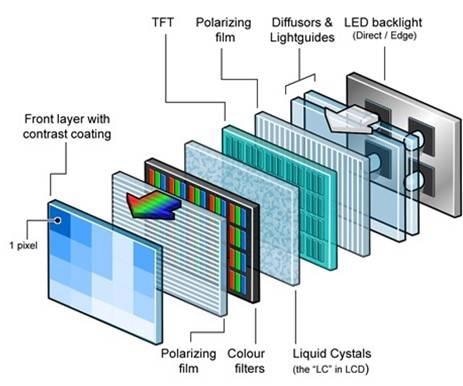
Worse - it's a multi layer sandwich of filters etc. which need to be perfectly aligned for a clear image:
https://www.azom.com/images/Article_Images/ImageForArticle_2...
Funny thing is in my case the hottest part actually remained ok - it's the surroundings that got, for lack of a better word, ruffled.
I've seen videos of Indian repair men disassembling a panel and putting it together to fix such issues, but IIRC only the back light ever came off.
I wonder, when applying a linear transformation like in the shader described, will the total available color space decrease? Simply put, if a one-dimensional color value on the arbitrary scale between 1 and 100 needs to be decreased by 20 for correction, the resulting maximum will be 80. Does that mean the total available color values will be less?
This can easily be verified with a simple thought experiment: imagine an area is almost completely red. This area will have to be complemented with full blast of green and blue to even achieve white, or partial blast of green and blue to achieve gray.
It can not achieve any color without a red component, hence reducing the area of the color triangle for that part of the screen.
Basically, what you are doing is adding a cast to the image. This cast cancels out with the cast that the backlights give. When you add two complementary color casts to each other, you end up with neutral gray.
This results in an image which is darker, but still has the full color range that the TV is designed for.
Sounds like you should be able to do this by just modifying Red Moon to draw a more complex overlay. If the entire screen is affected equally, the stock app may just be all you need!
Would it be possible to create an inverted image that would correct the backlight by burning in the bright areas? It would seem like a more difficult task to accomplish because pixel burn-in time is a variable that’s hard to measure.
How easy would be to place a cheap LCD at the back of the main screen and mirror the same output (in horizontally inverted mode)?
Technically it might require synchronizing the frame latency differences between the two devices, but would such a hack improve the perceived quality?
The constant ramping of brightness is rather distracting.
I don't think Android has an easy to use global shader system, so you'll be stuck with overlay windows and the incompatibility they have with banking apps/DRM crapware that locks you out of your own screen without root access.
But it's a damn shame that you can't throw enough money at manufacturers to make them make monitors without glaring QA problems. No matter how much you spend they sell you shit.
https://stackoverflow.com/questions/63251089/how-to-do-a-loc...
https://stackoverflow.com/questions/65666507/local-contrast-...
One possible preprocessing step could be to do a high pass filter on it, if the shadows vary slowly over the image.
There are also more specialized techniques specifically for removing shadows from documents, like these:
http://civc.ucsb.edu/graphics/Papers/ACCV2016_DocShadow/
https://faculty.iiit.ac.in/~vgandhi/papers/shadow_removal_ca...
I also found this, an image editor based approach if you just want to do a few images manually:
https://janithl.github.io/2021/12/remove-shadows-and-uneven-...
If you want to preserve aliasing and also color generally, I'm sadly not aware of any open source solution for that. Various scanner apps seem to do it with varying degrees of success; I'd be curious if there's a standard algorithm for it. It feels related to the de-curving algorithms that take a book page and make it flat. So you'd be modeling both the page curvature and black/white values simultaneously. Seems possible for general lighting/shadow, but wouldn't work for reflectivity from camera flash.
btw: The iOS Notes app has quite a capable document scanning tool. It's cleverly hidden though.
From the Wikipedia article, "Otsu's method performs badly in case of heavy noise, small objects size, inhomogeneous lighting and larger intra-class than inter-class variance." (Emphasis mine.)
Right now my solution is at the stage of local thresholds with a configurable block size.
Thanks to your pointer, I know now that my next steps will be to review the Niblack or the Bernsen algorithms. (Or just integrate ImageJ.)
They don't have 240 Hz and sub 0.01 ms response times though, so if you're buying your hardware based on bigger numbers in specs they won't do.
They're probably not that great for actual designers either, but they're good enough for me.
I’m using one of these and I’m very happy with it. Reasonable price, 75Hz, supports USB-PD + has its own USB ports so I can one-cable it with my work laptop.
Most importantly they come factory calibrated. I consider reasonable colour reproduction important even though I only use it for programming. I stare at this thing for 8 hours a day, it needs to look good.
In fairness I also have a 165Hz LG UltraGear gaming monitor, and the image quality is almost as good. My only complaint is the black levels and grey uniformity suck, but for someone who wants performance and quality it’s a decent option.
I've had bad experiences with some of Dell's pro-grade monitors too. It feels like modern displays are so complex firmware and hardware wise that it's just very hard to find one that isn't defective in some way. This replacement Benq works for basic uses but its freesync is broken and it's already developed burn-in around the edges after about 1.5 years.
My main gripe is gaming monitors seem to be consistently the worst panels they can get their hands on.
It seems like they realize gamers will put up with a lot of garbage in exchange for raw "power" and take full advantage of the fact. I'm 99% sure that's why we saw brands like Wasabi Mango (who used to take B grade panels and sell them on the cheap) disappeared... the manufacturers just started shipping them as gaming models.
And hey, those wasabis and catleaps got you a 1440p IPS panel that did 90% of what you want for 50% of the price at a time when 1440p and IPS was still kind of rare to own. Most people who got one were upgrading from a typical TN so even a crappy IPS looks good in comparison. I was playing eve online at the time and caused at least 10 people in my corp to buy them when they saw how much screen estate you got at a higher res.
I've yet to find a modern monitor that doesn't have a problem with that basic test, which is pretty disappointing considering accurately representing a single color should be easy and I've had several CRTs that could do it.
Banking apps generally set a flag on their apps to prevent overlays and screenshots to prevent malware from reading the screen and tricking the user.
Depending on your phone, this can have two effects: either the overlay is disabled automatically or the banking app detects the overlay and blocks access (ie to the PIN keypad).
Not all banking apps do this, but the ones I've used do.
Now manufacturers are possibly prioritizing the highest grade panels for non-gaming use and using extremely expensive gaming monitors as a dumping ground for everything else.
For example, the 28" UR55 has few complaints about backlight bleed and in my experience with having bought several is a reliable choice. Meanwhile the oddly similar 28" Odyssey G8 is known as a "buy and return until you get one that's ok" type of monitor, as are many other gaming monitors these days.
Gamers seem conditioned to just accept inferior panel quality as long as the other specs work, while business and casual customers would probably just buy another monitor if they saw weird issues. They might not know the term backlight bleed, so they'll still see it just fine.
When I got my first I wasted 2 hours rewatching a movie I had seen recently. Just because i didn't know it can look that good on a monitor :)
I always use as background a solid grey (#808080) and there is no noticeable non-uniformity.
I have tried now your color (#FF6400) on the U2720Q. Because this color is much brighter, if you look carefully you can see that there are small areas at the corners, especially at the 2 lower corners, with lower brightness. Also the 2 lateral edges have a slightly lower brightness, but the difference from the center is less visible than for the 2 lower corners.
However the areas affected are small (maybe a width of about 1/30 or 1/40 of the screen width) and you really have to look with the intention to find non-uniformities. When looking casually at the screen there is no obvious non-uniformity.
For emissive displays like CRT or OLED it is easier to achieve uniform brightness over the screen.
If I put a solid purple, then if my eyes are directly perpendicular to the very center of the screen, it works fine. As soon as I move up or down, either the top or bottom of the screen becomes very noticeably blue.
But in daily use, I never notice it. If I lean way back in my chair, then yeah, I'll need to adjust my screen to be able to see it.
But this is a 144 hz 1440p monitor I got for $400 brand new in 2015. Pixel response times are great. The monitor works exceptionally well on all the Blur busters tests. It is an amazing monitor for gaming...
...except in dark scenes. It's a TN panel, which by default kind of lacks in contrast and brightness, and so to make it look good, I had to tweak contrast, gamma, and brightness settings, and it results in some clipping. #020202 and #010101 look like they get rounded down to #000000, and #050505 and #040404 look like they're getting rounded down to #030303.
If I draw a pure black-to-white gradient, then there's noticeable banding. Like colors are only being represented in 7 bits per channel, and the darkest colors lose even more.
But again, in daily usage, especially in games (as long as it's not a dark scene) and videos, it's not even noticeable.
But I just recently purchased a Sony A95K QD-OLED television, and holy cow the uniformity is just breathtaking. You start noticing the deficiencies in your own vision.
There's a similar panel available as a computer monitor, but unfortunately only curved and 1440p.
I've probably owned something like 15 monitors in the last 5 years, the XDR may not live up to the 25k reference monitor dreams, but no mere mortal would be able to drive one anyways.
The fact is you can pay for a good enough monitor to truly be flawless, it just costs more than people are envisioning. For example, my late revision 5K Ultrafine nearly as flawless as the XDR. I didn't list it because people who don't know better latch onto the wifi teething issues the first revisions had, but the panel is approaching the limit of little backlight bleed as the technology allows (and the limits are not as poor as people are making out).
-
Honestly I've seen the opposite though, people who don't realize that any piece of screen large enough, photographed with exposure cranked way below normal will show _some_ sort of pattern and confuse _that_ with "terrible backlight bleed".
But that's the panel equivalent of people who only watch Star Wars space sequences with brightness cranked to 11 in a pitch black room to judge HDR bloom...
It will be interesting to rewatch movies with all the faces blanked out - they're eye-magnets that prevent you from noticing other details, for example in body language
Obligatory related XKCD: https://xkcd.com/1425
> The GPS project was started by the U.S. Department of Defense in 1973. The first prototype spacecraft was launched in 1978 and the full constellation of 24 satellites became operational in 1993
If you want to dedicate that time to improving the planet, avoiding the waste of one TV is likely not a better use of your time than e.g. fixing some bug in some popular open source software that causes it to be less efficient.
Let's say you make a change to Firefox that makes it use 0.1 Watt less on average, and let's be conservative and assume the ~350 million Firefox users use it for one hour a day on average. That's 35 MWh per day saved. Assuming 0.1 kg CO2e/kWh, that's a saving of 3.5 tons of CO2e saved each day.
But the knowledge of how to create a custom shader is going to come in handy one day. More and more I am finding, most knowledge comes in handy some time. You just have to remember at the right time what is possible and go refresh your memory on it.
If everyone spent 2 hours a year removing washed up waste from the beaches, it would have made a big difference.
(And who is even to say your bugfix would save power? It's not like Firefox has a power-usage detector in their CI pipeline.)
It is like a black hole. how long does it take to fall into a black hole? the answer is a surprising "just about forever" due to time itself dilating as you approach the center.
* think about it, mankind had been trundling about with effectively the same economy for many thousands of years then at some point about three hundred years ago it went exponential and has not slowed down.
> In the 60s, Marvin Minsky assigned a couple of undergrads to spend the summer programming a computer to use a camera to identify objects in a scene. He figured they'd have the problem solved by the end of the summer. Half a century later, we're still working on it.
https://dspace.mit.edu/bitstream/handle/1721.1/6125/AIM-100....
Build a comprehensive degradation profile of your LEDs. Keep the burn-in accumulation buffer that tracks intensity and usage amount of each subpixel. Use it in your EOTF to correct the picture.
Some color-accurate monitors like Eizo are even profiled for temperature (and have a grid of temperature sensors)
not the greatest picture (some reflections). should have used a gray background, but I used red because this color is the most affected.
The burnin is mostly harmless, but the middle blob is very annoying; yellow parts of the image become greenish when they get to the middle of the screen.
Saving the monitor, releasing the diy reduces a (minor) head end of the problem that is not only leading to long waste in a landfill, but also metals and plastics in water.
My 3 year old Panasonic gets used a lot but we keep the brightness down to the 45–55% range (it’s plenty bright) to avoid burn in. We also don’t display static content on it. And when we do, it’s mostly from Kodi which dims itself after 10 min or so.
All that to say for those who are fearful of OLED because of burn in: don’t be. With some precautions, it’s fine. And having true blacks is absolutely glorious. I enjoy it every time I use the screen.