Framework Laptop 16(frame.work) |
Framework Laptop 16(frame.work) |
Any chance the display can be swapped for a 16:10? Otherwise it's a no go for me.
Intel processors of this generation are just not energy effiecient and run too hot.
> now available with AMD Ryzen 7040
Still only preorder, but you can buy it with AMD now.
I just need to check if it'll work with my Thinkpad Thunderbolt 3 dock (or something similar, I can buy another dock) to output to 2x 4K (actually 3840x2560, so bigger than 4K) monitors. I can currently both power my Thinkpad, and connect all the peripherals, with 1 USB-C cable. It's not something I'm willing to forgo.
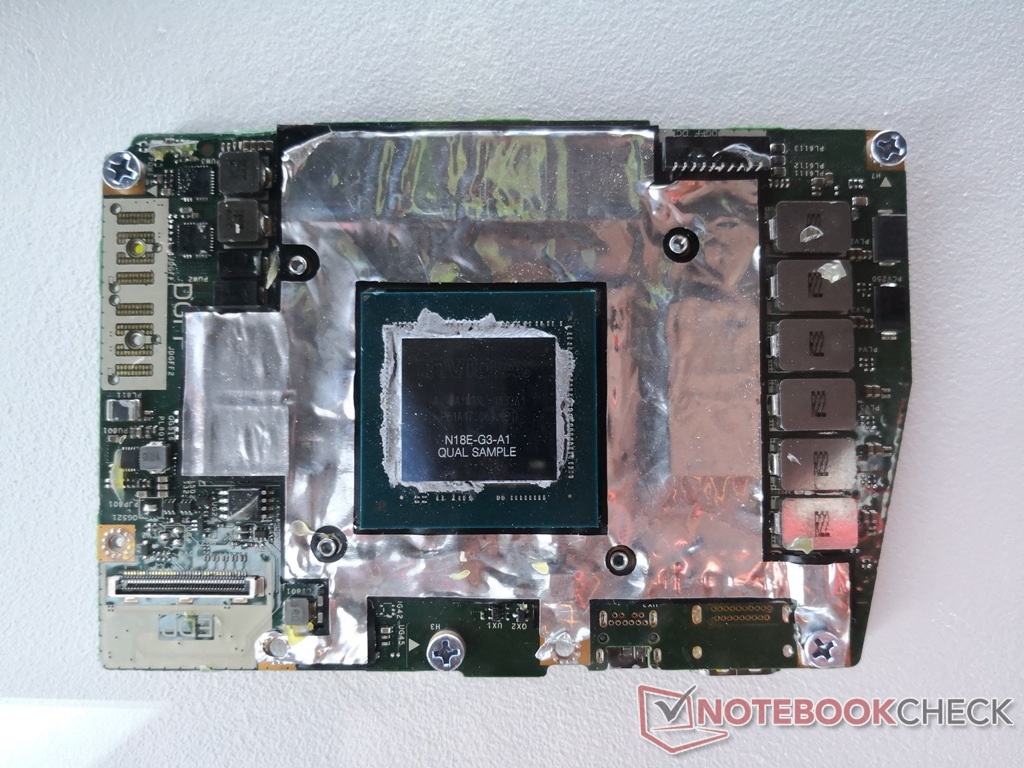
However, Dell changes its notebook layout every two years, so these GPUs are not upgradeable after two generations (so a 7530 could be upgraded to a GPU from a 7540, but not a GPU from a 7550, released in 2020).
It's going to be interesting how Framework adapts the connector for its own use. The Dell cards are fairly high-powered; in the most recent 7770 (17" workstation), the RTX 3080 Ti and Quadro RTX A5000 cards may draw up to 130 W.
Some examples of previous and current DGFF discrete cards (all by Dell, for Dell notebooks) are here[2][3][4][5]. Notice the difference to the previous mobile GPU connection standard, MXM 3[6], which was used by Dell in its Precisions until 2018, when it changed to DGFF, HP in its ZBooks until about 2020 when it changed to a soldered solution. Other notebook ODMs like Clevo and Tongfang still use MXM cards in their desktop replacement notebooks. I'm not sure if Clevo still sells these monsters; they had a 780 W power brick, itself heavier than many slimmer notebooks.
[1]: https://notebooktalk.net/topic/873-precision-7680-precision-...
[2]: https://imgur.com/aMal40L : Quadro P3200 (Pascal), Quadro RTX 3000, Quadro RTX 5000 (latter two Turing)
[3]: https://www.notebookcheck.net/fileadmin/Notebooks/News/_nc3/... : GTX 1080? in Dell Alienware Area-51m
[4]: https://dl.dell.com/content/guides/public/Html/precision_756... : new form factor for 7X50 and 7X60 generations
[5]: https://dl.dell.com/content/guides/public/Html/precision_767... : newer still form factor for 7X70 and now 7X80 generation
[6]: https://i.imgur.com/Exp6w0g.png : MXM GPUs
I’m not certain, but I’m under the impression that the ANSI layout is more common than ISO: that, potentially simplifying a tad, ISO is used in Europe, JIS in Japan, and ANSI everywhere else. (I have experience in Australia, New Zealand, India and the United States, and they all use ANSI.)
I'd like a chinless 16:10 or 3:2 goodness (or 4:3), even if it was at a hefty markup.
UPD: it's a 16:10 display, but the chin is still ugly.
By the way the current trend is to install wide, but low height screens. What's the use of such screens? For coding, reading articles or working with documents height is more important than width, but manufacturers lower the height and extend the width.
Regarding keyboard layout, it is designed poorly: it has small Up/Down keys (easy to hit the wrong key) and it doesn't have Page Up/Down and End/Home keys which are necessary for coding or working with documents (but it has useless CapsLock key). What is the intended use of the keyboard? To post short messages on social network sites. They seem to copy the layout from toy laptops without much thinking about the target audience. They claim that "Whether you’re a gamer, developer, heavy Linux user, creator, or have other performance-demanding work, the Framework Laptop 16 is built to be customized to your needs.". No, your keyboard doesn't match the needs of those audiences (except for gamers and vi users who can program even on a calculator).
Also, many non-Latin based languages have more that 26 letters, but the keyboard doesn't offer additional keys for those letters, and two additional keys to switch to Latin and non-Latin layout. Nobody seems to care about this. Not Apple, not Framework, nor ordinary laptop vendors do not want to adapt keyboards to non-Latin languages and think that 26 keys should be enough for everyone.
That’s news to me, I’ve been doing it for years.
I only look at my laptop's display and use its keyboard for coding under extraordinary circumstances when I need to do some work from somewhere else (meeting room, conference, visiting a client, on a train) and most of those times I just need to quickly fix or review something, so basically any display and keyboard will do....
All the countries you mentioned are English Speaking (Or have a really significant English speaking population), maybe that's why they all use ANSI
Eg, I know some laptop manufacturers offer a choice of a few different display options when configuring builds - so framework choosing the display form-factor of a popular one could be an instant win for modularity.
Do that many people buy these laptops as portable Netflix players?
Until 4k became more popular maybe five years ago, the vast majority of devices were 1920x1080, plus a series of budget 1366x768 devices but that's the same ratio. Upscaling an integer factor to 4k is also convenient and doesn't cause any issues, just makes everything sharper.
It's when you start to mess with the ratio that you need to suddenly account for different people having different things in view. You can't simply scale a hero image (or game scene or so) to 20:9 without everything becoming contorted, you need to start to crop, but then you're hiding information so now you need to add optional parts that don't look out of place when shown and can also be hidden without consequence.
Eh? 16:10 is a pretty standard ratio; all Apple laptops have used it since about 2007, for instance (until very recently, when they've gone a little taller) but also many other vendors (usually on the high end; for whatever reason manufacturers do tend to treat taller than 16:9 as a bit of a premium option). It was also effectively the standard ratio for widescreen desktop monitors for most of the noughties.
16:9 on a small laptop screen really is _very_ tight; honestly I kind of miss 4:3 laptop screens but that ship has definitively sailed.
Is your concern about video? Watching TV is probably not most peoples' major use of laptops, and in any case a lot of content is made at ratios _wider_ than 16:9 these days.
At 10% of the market, I'd not say that's standard.
Manual for the Mac version, but the PC version has this resolution as well: https://www.matrox.com/sites/default/files/en_millennium_ii_...
I think it's pretty great because it means less scrolling. I would really prefer to see 4:3 again.
The only thing that comes to mind is killing time by watching videos on social networks sites.
I split Vim side-by-side.
I use Tree Style Tab in Firefox and hide the horizontal tab bar. (If I’m tiling a browser beside something else, I close the tab sidebar most of the time.)
16:9 is fine, so long as you’re set up to be able to use that width.
On my 13.5″ Surface Book, I appreciated its 3:2 aspect ratio, because it was already too narrow to comfortably tile things horizontally anyway, so why not go even more in the tall direction?
On my current 15.6″ 16:9 laptop, I tile and split frequently because it’s comfortable. 16:10 would still be fine, but I do this enough that I believe I’d honestly very slightly prefer 16:9 for its extra centimetre of width (~5 columns in my terminal), even at the cost of 1.5cm of height (~2 rows).
There are advantages and disadvantages to the different ratios in different scenarios.
(Still, I do think that most people would find 16:10 a happier medium at this size. But me, I can effectively use 16:9, though I don’t think I’d want to go any wider.)
Is it? Gee, I wonder why it's the only screen ratio I've seen people use since we moved away from CRT screens until a few years ago when 4k and friends became popular and there was suddenly no standard resolution to expect anymore. Curious that we're all using this inferior ratio for literally all those things all the time.
Also, on another note, I've read this engadget article about how other companies tried to build an upgradeable laptop and failed but I see Framework as a different kind of beast for one simple reason. This is their only value proposition, they don't have an alternative. In a very "Innovator's Dilemma" kind of. way, Dell and other big manufacturers have their main lines with higher margins and/or volume that really drives their attention and money, so any new innovation that takes more than 1 to 3 years to mature gets cut pretty fast. For Framework is kind a kind of "burn the ships" moment, they don't have anything else to turn to, so they have to keep pushing. I really hope they shine (and don't get acquired)!
(My initial guess would be that it will require at least that the laptop be powered off, or will force it to power off when removed, because from what I understood the cooling fans are in that module).
https://www.reddit.com/r/ErgoMechKeyboards/comments/skf2sx/l...
I use my laptop for my work software engineering but since the pandemic have gotten back into gaming a little. I’m on an old Xbox and it’s showing its age but I don’t game enough to justify buying a whole gaming PC. If I can plug a GPU into my work machine and play some games? Now that’s compelling. The fact that it wouldn’t have all the cringey “gamer” decorations you see on the average gaming laptop would be a bonus too.
(all that said a Steam Deck is probably still the more compelling purchase for me in that regard, I’ve been eyeing one for a while)
Isn't one of the advantages of Framework that you can swap out parts, so it would be much easier for them (theoretically) to build a gaming version of the laptop.
See this HN comment from the founder: https://news.ycombinator.com/item?id=35289229
Yes, there is. We have four in our family, since ~2018, and three of them continue to run without issue. The main weak point for the 4th one has been the hinges and case. It happens to be a later model so I think the company 'value-engineered' it to have a shorter lifespan.
My partner and I both have frameworks, but mine has had a lot of issues with the track pad and theyve never experienced any.
Don’t like something? Fix it!
Specially in cases like this, there is just an empty space there. Why not put 2 more keys?
ThinkPad also makes them full sized keys, that would be even better. But just having empty space? Why?
[1]: https://frame.work/blog/introducing-the-framework-laptop-16
I'll probably pick one up.
Like, the space to the sides is useless here, but if you could split the keyboard and move that space to to the middle - well, know you've moved one step closer towards more ergonomic typing! Or better yet, you could move all those pinky keys there so that instead of moving your right pinky to hit backspace you'd just move your right index finger
The huge space is also a waste
etc., etc.
- I would love an option to have upwards firing speakers where flex/numpad space goes instead (one on each side).
- please improve the bass in the speakers. according to notebookcheck's review, framework speakers have poor/near 0 bass output.
- please offer either a 1080p or 4k screen option on the 16". 1440p-ish screens with DPI scaling hackery is no fun and often leads to blurry UIs.
Under X11 with KDE, or under Windows, that's no problem whatsoever. 144dpi isn't any more hacky than 96dpi or 192dpi.
It's only macOS, Gnome and Wayland that require 1x or 2x scaling (which is absolutely mind-bogglingly ridiculous, and anyone that contributed to that or encouraged that should be banned from ever touching UI code again).
It’s certainly not as painless as fractional scaling on Windows, where only truly ancient/esoteric programs pose issues typically.
Though would like this on a smaller laptop, 14-ish inches seem to be the sweet spot.
I currently use an iPad and Atreus, but having this in clamshell form would be pure utopia.
The dream would be to have 6 expansion cards in the laptop 13. 4 really is a bummer for a work laptop, it's definitely not enough for me… And while you can easily carry other expansion cards and switch at will, it's kinda like carrying adapters, you easily forget them.
I don't like Windows, and am so-so about Mac, so that probably leaves Ubuntu, which I already use outside of my day job.
Are these the kinds of laptops I should buy? Or are there other recommendations?
My biggest issue by far with the Framework 13 is that the battery life is really bad (at least with linux). Less than 2 hours of normal use is not really workable. Will this one do better?
main url should be canonical https://frame.work/blog/introducing-the-framework-laptop-16 which redirects to local urls (which of course also are likely all in english for the blog post) and was shared earlier
not to mention the main product page shared days ago
My assumption is that the I/O modules are compatible and nothing else.
The silver lining here is that Framework keyboards are replaceable in theory. I'll wait until a proper keyboard gets released.
Seems gone. I can't say I've personally ever used it, so that's probably why it's one of the first keys to go, but I know that doesn't help you.
> Where are the Home, PgDn, PgUp, and End keys?
They're available via Fn+Arrow Cluster.
I rely on it heavily and I'm sure many others do to. I wish framework included the key in their study as well. Ether way, no menu key == no buy from me.
Ideally, page up and down will be next to the arrow keys (look at a Thinkpad keyboard), but off to the side is still better than not existing.
But personally, I was really hoping for a 13-inch convertible with touch and pen input from these guys... Maybe next year?
... however, every time I've put my faith in "this technology is modular and you will be able to extend/upgrade it way into the future", I've been disappointed. The worst offenders are CPU manufacturers who assure us that "Socket N" will be their new CPU pin format for, well, a good long time, and then two years later we move to "Socket N+1". The same thing for RAM. My experience that expecting an upgrade path via physical interface re-use with new components buys you at most 3 years, sometimes only 2.
Framework appear to building the actual components into their self-design modules, so that they control the physical interfaces. This seems like a step up but if the company remains small then the chance of not being able to upgrade again in a few years because they're either out of business, or are not packaging the components you want, seem fairly high. The fact that the designs are going to be open sourced is great, but I don't see that as a strong hedge against this problem.
CPU upgradability was never a real selling point except for ONE use case - when. new socket came out, buy the cheapest reasonable CPU early on, and then just when it was about to cease manufacturing, buy the best you could get; would give you a year or two extra.
RAM and disk upgrades USED to be very important; but I haven't really "felt" the need anymore.
I've signed up for the newsletter. My personal laptop is getting pretty old now. Really hoping it's not going to be a Fairphone price–performance+usability ratio, but I'm most definitely going to consider this as my first option!
How do expansion bay modules change the laptop’s thickness and depth?
I too wish they'd answer this more clearly or show more pictures to give a proper impression, but it seems it covers the back and under-side, so if extending thickness presumably they'd cause the keyboard to tilt accordingly, and extending the depth would just mean more of it would hang out the back.
This article seems to show of what I assume is the GPU expansion with a "larger butt" [2]
[1] https://github.com/FrameworkComputer/ExpansionBay
[2] https://www.msn.com/en-us/lifestyle/shopping/framework-annou...
Thinkpads have had extended batteries like this for years, for example:
https://sm.pcmag.com/t/pcmag_uk/photo/l/lenovo-thi/lenovo-th...
That same laptop can take a slim battery, so you can choose your runtime vs form factor. Imagine doing the exact same thing but with small and large GPUs instead of batteries.
Does anyone know what the protocol they use is? I'd assume for the keyboard it might be usb. So maybe all I'd need is to solder a flex-adapter to a usb plug and 3D print a case.
Framework 13 has a resolution of 2256x1504 (3:2)[0]
And more importantly, I love what you are doing for the industry overall. The idea that I can swap out my display from glossy to matte on a laptop that I've already owned for a while for less than $200 is pretty amazing. I wish you a lot of success.
You have been able to configure that behavior (sleep-then-hibernate) on any Linux system that supports S3 for a long time (years and years).
At the same time, Apple now uses a kind of sleep similar to 'Windows Modern Standby'/Intel S0ix: https://macreports.com/why-does-my-mac-get-notifications-whi...
No matter what else they do, the arrow keys tell me they are fools who should not be trusted! (Hyperbole, sure, but only a little.)
Otherwise, could flash programming be unlocked to facilitate flashing third-party firmware?
Is this how the GPU module cooling will work? (a poor mouse drawing of my best guess based on the pictures)
I currently use a TB3 eGPU case and the massive overhead and OEM bugs are slowly making that real PCIe link worth it.
I wish you spent more effort in fixing it at the software level, whatever it takes.
It's the same with mechanical keyboards - I can't use these compact 75% keyboards where arrows/Pg Up/Pg Down/Home/End are flush with other keys; but a bit "exploded" layout, with just a bit of space between arrows and the right column keys is perfectly ok with me
What I really hate is that combination of full size/half size arrows on modern laptops, put there just because some designer hate empty space.
(I have an ASUS ROG Zephyrus G15, 2021 model, GA503QM. It has a larger-than-necessary gap between Esc and F1, slightly-smaller-than-ideal gaps between F4 and F5 and F8 and F9, and sadly no gap between F12 and Delete. It also has another row of four keys higher still: XF86AudioRaiseVolume, XF86AudioLowerVolume, XF86AudioMicMute and XF86Launch1. Kinda funny how XF86AudioMute is relegated to Fn+F1. I’m really not looking forward to whenever I switch to a laptop without a dedicated mic mute button, it’s wonderful. I honestly wish they’d added another couple of buttons on this top row.)
ThinkPads has slightly enlarged arrow and page keys that I think are perfectly usable.
A key can be disabled.
An empty space can't be filled with a key.
Same. After falling in love with this layout, I just refuse to buy a keyboard that doesn't have them. These 2 keys alone are at least 50% of my decision to refuse to even bother with Apple hardware (the lack of OLED being another good 30%)
I fail to understand how people can accidentally hit a Page key instead of a arrow key, if they know touch typing and use the little bump on the Down key (like the F ahd J key) to reposition their finger.
In the worst case, they could disable these keys. Meanwhile, I have to suffer their non existance, or even worse: a ridiculously large left and right key, with a minuscule up and down key.
Thinkpad-style? Sure! Ortholinear? Why not!
This makes it easier to make a "DIY hack on the side", not needing to manufacture a complete keyboard.
This means all of my laptops are usually Lenovos.
I should try the Page Up / Page Down config.
And as keyboards get thinner, trackpoints lose in quality. On linux it seems the software side is also not as good as before with libinput.
So I'd be really surprised if any one new on the market would go about making keyboards with trackpoints now.
Pre-covid I'd made do with whatever garbage keyboard and garbage monitor $job dumped in front of me, but almost by happenstance I ended up with a 16:10 monitor and an IBM M4-1 keyboard, and surprisingly it is an enormous improvement in work environment and I'm actually somewhat more effective at $job. (And I should have known this -- I "grew up" using IBM F / M or Focus fk-2002 keyboards that these days sell for actual money on the used market; spent a decade in front of enormous tubed workstations, etc, but normalization of deviance is a real thing)
Anyhow -- perhaps with framework's more modular approach they'd be able to make a form factor with more depth in the case to allow for a "real keyboard". Or more likely I'm just asking for a manual transmission station wagon. Safety Yellow please.
I'm trying to decide whether my next laptop will be a Framework or a Thinkpad. If the Framework was available with a pointing stick, the decision would be made. If the Thinkpad wasn't, the decision would be made. The other things that have attracted me to Thinkpads are repairability and Linux support, but Framework does those better.
I'm on my sixth Thinkpad, and there are definitely more out there with the same preferences.
https://www.notebookcheck.net/Lenovo-promises-TrackPoint-wil...
They removed it from the ThinkPad X1 Fold and got enough negative feedback that it was reintroduced in the ThinkPad X1 Fold 16.
What wouldn't surprise me is that they fuck up the trackpoint (e.g. by making it thinner). The Z16 laptop has a newer TrackPoint without dedicated keys, for example, and the newer T14s have flat keys.
I always use tables that my elbows rest on the table.
We’re showing a prototype of an LED Matrix that can be used for low res information display, but other things like a row of extra buttons, a narrow LCD, a capacitive slider, and others are possible too.
As a sibling comment noted, it is also possible for a module developer to create a full width keyboard with a different layout.
Perhaps there could be alternate tall hinges and a thicker bezel filling the gap to make room for discrete keyswitches without sacrificing thickness for normal users?
But am very glad to hear there is at least potential for innovation here!
I would have been a lot less critical about the touch bar if it hadn't replaced the function key row though. That one is mandatory for me, and there was more than plenty room on MacBooks to have both at the same time.
This makes sense if you realize that it's a choice between keyboard girth and thin-ness; you can either have the keyboard on top of the ports, or you can squish the keyboard to the side and be potentially ~4mm thinner. Or just don't have ports.
I'm starting to think that the future of laptop keyboards is the old thinkpad butterfly design: https://www.youtube.com/watch?v=nRVJCtREW38
I mean, even with the same width, moving backspace between halves has no impact on the ports, where is that useful innovation for the few of us that make typos?
Or replacing the spacebar with a few thumb keys - that is also port-effect-free
My vision at computer distance isn't great in general, usually on a 32" 1440p display for desktop use. I generally can barely handle the micro size of higher res on laptops.
That clearly won't work, as one could get free computers ... but what is the situation in getting reimbursements of Windows-tax?
Anybody else remember Windows Refund Day? Some OEMs actually did offer a refund of around $30-50, which was the cost of an OEM license at the time. Although many court cases around the world have since then ruled that you don't have a right to claim a refund for unused OEM licenses.
Not really. Windows 11 Pro retail is $199 today which might sound steep but in comparison Windows XP Pro retail was $299 in 2001 which adjusted for inflation would be $500 today. Ouch!
Windows 95 retailed at a whopping $205 in '95 or ~$400 in today's money, while a retail Win 11 Home is $139 now.
So Windows has actually gotten massively cheaper, which is weird considering that OS complexity, update frequency has increased and SW dev salaries and expenses have gone up since then.
Anyway, I'm not sure if anyone really buys Windows at retail prices. Enterprise (subscription) and OEM costs are much lower, and for personal use you can buy OEM keys off eBay or AliExpress for a few bucks.
The opaqueness of Windows licensing for "pro" devices makes us assume that there are heavy discounts, which massively depends on the manufacturer- framework could not be at a size that gives them preferential pricing (even if we assume that licensing is cheaper for other companies).
I can say that it is more ordinary for end users to get discounts rather than OEMs, unless there is a lot of negotiation (including bundling crapware, as we well know) in the tech industry when it comes to bulk licensing.
Is it legal? If it's not, isn't it easier to just use crack? E.g. pirate KMS server.
Demand better of your manufacturers.
I don't personally feel like the framework 13 needs more than 4 expansion bays, but I'd love to see expansion cards that use Thunderbolt to offer (for instance) two USB-C ports, or a USB-C and a USB-A. (There are some experimental unofficial ones attempting this.)
If those were available, my four expansion bays would be one Ethernet, one HDMI, and two 2-USB port cards.
It surprises me especially that MacBooks seem to be targeted at professionals, like creators and creators always have lot of stuff with USB plugs - like MIDI keyboards, MIDI controllers, external audio interfaces, mouse, drawing tablet, external hard drives - but MacBook only has like 3 sockets, despite being super expensive.
I'm not sure more than 4 ports is _extremely_ niche use case especially for a work device, but yeah I get that most people would be okay with it and I understand Framework's choice.
Left side: * barrel jack charging port * HDMI * microSD slot * USB-C (also usable for charging) * Gigabit ethernet
Right side: * USB-A * 3.5mm jack
Even discounting the microSD slot and the barrel jack, this is 5 ports. On a 11" laptop.
Granted, it's not exactly thin, but I really don't care.
1x charging port, 1x Thunderbolt/USB-C, 1x USB-A
And on the right side:
2x USB-A, SD-Card reader HDMI, headphone/microphone jack.
On a 14" laptop.
For a work laptop, I can't wait for a replacement part to arrive from who knows where, I need a technician next day at my place.
After decades of sticking exclusively to ThinkPads, these new Frameworks look very appealing. I'm not expecting Apple-like build quality, but the customization and repairability is unparalleled in the market. I'm willing to give up the TrackPoint and nice keyboard for that (pretty much the only reasons I stuck with ThinkPads for so long), and I'm almost certain there will be a TrackPoint module somewhere down the line.
Speaking personally, I would love a 60% keyboard option with a key layout similar to mechanical ones. Considering this doesn't really exist on the laptop market, I'd be willing to pay a premium for a framework keyboard like this.
Android btw uses the same type of scaling – you'll just get slightly blurry edges, but that's not much of an issue.
It's much better to have slight blurring around the few rare edges where legacy bitmaps are used.
The alternatives are
1) full-screen blurring, broken gamma correction and wasted performance (e.g. rendering at 2x to display at 1x) of full-screen scaling
2) content that's not the correct scale, making it too small or too large to work with.
I'd much rather have a situation where the 1% of content that uses legacy bitmaps is blurry vs EVERYTHING being blurry.
On your trackpad, could you reach out to our support team? We definitely want to resolve that for you.
- sometimes the article / product is only available in 1 language and the redirection leads nowhere (I’ve seen it many times)
- the language of my phone/computer does not match the one where I live, and even maybe not the language I used to search for that thing in the first place.
So yeah, I never like it, especially when you live near the border of multiple countries and websites want to select the language based on location….
It would be nice if language selection was standardised and browsers would just offer a button and a default choice that websites would follow: no need to hunt for the language box on websites.
Location based is and can be a pain. I live in a border state and often get spanish versions of sites... I also follow a couple prominent youtubers who post english and foreign language content, so sometimes get results in those languages, that I don't read.
That said, using the default for the browser, and allowing override isn't a bad thing... I usually look for something that looks like a flag in the upper right, for language selection. And the few times I've written multi-language sites/apps that's the UX I prefer to use. I would default to browser/header, I would respond to the change event, and if the user selects a preference, set a cookie and use that first.
Again, I do wish it were easier to switch for the browser itself.
1. https://developer.mozilla.org/en-US/docs/Web/HTTP/Headers/Ac...
2. https://github.com/i18next/i18next-browser-languageDetector/...
3. https://github.com/i18next/i18next-browser-languageDetector
4. https://developer.mozilla.org/en-US/docs/Web/API/Window/lang...
I cannot possibly convey how much I hate this setup, I find it very uncomfortable. And even though there is a separate row of Home-PgUp-PgDn-End to the right, I can never find the correct key.
Compared to this, the Thinkpad's six-block cursor setup is vastly superior in my opinion. The down arrow has a notch, so it is easy to find as an origo, and the cursor keys are lower / slanted slightly compared to PgUp/PgDn, so it is virtually impossible to not know which is which! This is on a Thinkpad X1C.
All this goes to show that everyone has different preferences, so good luck if you are a laptop maker - you will inevitably make someone very unhappy with your keyboard. Possible solution - replaceable keyboard?...
I'd switch to a Framework laptop for the hardware configurability, but not if it means losing Coreboot.
This sounds like a really attractive idea until you realize that a 1.25x 1080p screen means you’re now rendering everything at 3K resolution, including any and all games.
Additionally compositors often scale directly in sRGB, which means you’re introducing lots of gamma errors.
But there's no reason for it to be so freaking huge! On the two keyboards I have on my desk (HP EliteBook laptop and a "normal layout" desktop keyboard) the right shift is the second-biggest key after the space bar!
My favorite layout, by far, has to be the "75%" some mechanical keyboards have, like this: https://cdn.shopify.com/s/files/1/0059/0630/1017/t/5/assets/...
Sure, this particular one is not perfect (useless dedicated light button on the top right...) by the idea is there.
Not sure why 99% of laptops see a numpad as a higher priority than matching a desktop keyboard layout.
I have no idea how they get the keys (probably OEM) and whether this is actually kosher (and I don't wanna know) but I did this with Win 10 some years ago as well and it has worked out thus far.
Just pay with e.g. PP and they'll send you the key via e-mail.
I saw someone blind using an iPhone one and it utterly blew me away - I also had no idea what they were doing, as they were hitting buttons before text yo speech had finished.
It takes some work, but it's possible to get to less than 0.5%/battery/hour, a fair benchmark as a battery reduced by >=5% after 10h of sleep is generally acceptable
Do you have links to useful resources??
First please read my windows guide on csdvrx.github.io: it's very generic and should get you a baseline in Windows
Then get at least a week worth of measurements over long periods of sleep (like at night, reboot on windows) as a baseline
Then tell me how it compares to what you get on Linux after enabling everythig with powertop tunables and we'll work from there, as it'll be more precise than powertop.
Just send that by email at my outlook address. Includes the discharge line plot from Windows sleepstudy you find the more relevant, and a dmesg from linux
FYI, without wifi, on my thinkpad recently installed to Arch I measure 3.6W in powertop but I think it needs a recalibration as I measure 2W on a USBC power meter when idling with wifi enabled and a full wayland desktop (edge, etc)
However, because I know how to type, I use the right shift key constantly. Of all the keys to fuss about...
I mean... objectively speaking here: yes.
They eat up a ridiculously large amount of physical space. Ports are cheap when space is cheap. Space is at a very high premium for laptops.
The port doesn't just magically disappear into the machine, it eats up that entire chunk of the laptop. Space which could be going to mainboard / speakers / hid / battery.
So modern laptops give you a very high bandwidth and low physical size bus (thunderbolt/usb-c) and a duplicate so you can charge at the same time and that's really all you need. Now I get the best laptop for the space the case takes up and the option to plug all that other stuff in is still there. The bus is plenty fast, you just need an adapter or dock.
I have a 4 usb-c port machine. I've never had all 4 ports in use at the same time. I have (just counting plugs on my hub) 9 usb devices and 2 4k monitors plugged into my machine. Switching them over from work to personal laptop is as simple as unplugging and replugging a usb-c cable. Feels fine to me.
Maybe you mean QA testers.
I'm honestly kind of curious how you use it. In my experience, almost anything on the menu it opens has a common shortcut
And I might not be, hence my call for actual metrics.
Sure, but laptops back then were also massively thicker and heavier so engineers had more freedom and less restrictions from the design/marketing team.
Nobody would buy a laptop with that bulk and heft today unless we're talking about these mobile workstation laptops with Xeon CPUs and Quadro GPUs.
I've had lots of experiences of a laptop festooned with nubs getting caught / smashed in such a way (from normal in/out of the bag or being put down hard on an end) that the plastic shells or cables get destroyed and I have to fish bits of usb jack out of the laptop.
After a decade (it feels like, anyhow) the USB-C promise seems real.
(edited to add power supply to list of things on the "home" usb hub)
Maybe the Framework could have squeezed in some more ports if they weren’t customizable, but I prefer the flexibility.
I weight train regularly. Lots of forearm tension. I noticed one day that it always hurt more when I was scrolling (using an original Apple Magic Mouse). Brutal repetitive strain injury. However, when I went for periods of time only using the trackpad in my MacBook, my arm would feel
Upon realization, pretty much immediately switched to a trackpad at my desktop as well, and problems went away.
It took about 18 months to get from "my arm really fucking hurts" to "yeah, it was the mouse". People always ask why I use a trackpad at a desktop, I tell this story. I don't remember the last time I used a mouse on my computer.
Many people, developers included, use the mouse to point and click when they need to change the caret position while editing text. If you do enough of that, the amount of precisely controlled movement involved quickly add up to repetitive strain injury on your hand/wrist. I've seen colleagues in their 20s/30s suffering from this problem, to a point that they needed to use the mouse with their other hand.
I'd recommend using the keyboard to navigate within a document. It's going to take some getting used to, but it'll be best for your hand health in the long run. Meanwhile, switching to a trackball (remember those?), a trackpad, or a trackpoint mouse, will definitely alleviate the symptoms.
With that in mind I'd also prefer that there be a way to flip off the dGPU in BIOS to guarantee that it can't unexpectedly become a power vampire.
`asusctl` (the CLI), and `rog-control-center` (the GUI) lets you configure fan curves, "ultimate mode" (mux switch), LED lights, effects, panel overdrive, battery charge limit and more
And then `supergfxctl`, when "ultimate mode" is disabled, allows you to configure "Hybrid" or "Integrated"(-only) graphics modes.
For completeness/disclosure, flipping the mux switch aka Ultimate mode on/off) requires reboot, though it seems this may become unnecessary with new/future hybrid graphics tech in laptops.
ASUS should shower the developer in money, this G14 2022, all AMD is the most satisfying, best, complete out of box Linux experience I've ever had. And I've owned a lot of Lenovos, Dells, etc.
(this was my problem back when I built desktops - it was almost never worth upgrading anything but RAM or disk, instead build a whole new one and repurpose/sell the old one)
As a desktop builder myself, I like the flexibility to upgrade (or easily replace for broken components) within the socket family (AMD in particular had a pretty wide run of compatibility recently with AM4), and even when doing a more "total" replacement down to the motherboard I could keep a good case, power supply, GPU, peripherals, etc. Just the fact that I have similar decisions open to me is interesting in the laptop space. The direction of the laptop market has otherwise been away from allowing even RAM or SSD upgrades, or making them tedious and onerous even if possible.
Alphanumeric shortcuts and Key Sequences should be used instead.
For this reason I also use the big old 100% keyboards with numpads, and I remap the entire numpad to other functions such as a 3x3 desktop switcher. For me there can't be enough dedicated keys.
By the way the link you are quoting actually advocates using single keys as the ideal option :) It literally says the following:
> of these, in terms of efficiency and hand health (Repetitive Strain Injury), the single key is the best. Key sequence of single keys is second best. Key chord is the worst.
I suffer from RSI also which is another reason to prefer this.
However it is really a matter of preference of course. Some people love their 60% keyboards and that's ok too. Just won't work for me.
But what I disagree with is the "should be used" part. Nobody should tell me what to prefer :) This is one of the reasons I switched away from Apple. They are very strong in their opinions (to the point of actually building opinionated software).
And it's not like mouses and keyboards need a 4Gbps connection to the host. Plug them into a tiny hub. You're already lugging a keyboard and mouse around, why not a hub too?
But I agree regarding ports - at home my mouse and keyboard are plugged into a cheap KVM switch, so I still need only one USB port on the laptop; If I needed to lug them with me I'd certainly just bring a hub too.
Is there truly no equivalent to apples automatic graphic switching for PC laptops? If so that’s WILD.
On the latest NVidia/AMD hardware, no configuration should be required, unless you try to use Wayland on NVidia.
Unfortunately on NVidia you really need the latest hardware, both on the GPU and CPU side. If you do, it should generally "just work". Of course Linux is Linux and it might not.
Frequent used functions like copy/paste should always have had dedicated keys for example.
And the home row thing is not something I care about. I don't type so much that it really matters.
But anyway like I said these things are really about preference.
- USB 2/3
- Power delivery
- DisplayPort[0]
- PCI Express
- Analog audio
- USB4
You need some kind of chip that can negotiate two ports' worth of that nonsense and appropriately multiplex them into the correct set of altmodes on the interior port. Some of them have readily available and widely implemented hub silicon. Some of them require cursed nonsense like DisplayPort MST[1]. Some of them don't even have a hub mechanism - what do you do if someone plugs in two analog audio dongles? Mix the signals together?
Furthermore, as far as I'm aware such a "miracle dongle" chip does not exist. If it did, it very much would not fit inside the tiny footprint that a Framework expansion card does. One key thing to note is that because USB-C is reversible, all the high-speed data modes need a mux chip per port. So even a simple USB3 hub card with no power delivery or altmode support is going to need either several support chips or hideously expensive-to-design Framework silicon.
As it currently stands the state of multi-port USB-C dongles is absolutely terrible. Just... go to your local Best Buy, and look at the terrible compatibility of the multi-port dongles in the Apple section.
[0] There used to be an HDMI altmode, nobody uses it. All HDMI-to-USB-C dongles on the market are actually HDMI-to-DisplayPort-to-USB-C dongles.
I'm not mentioning the really cursed altmodes like MyDP (Nintendo Switch dock) or VirtualLink (VR headsets). That last one violates spec by reusing the USB 2 pins, necessitating the existence of bespoke 2-to-3 silicon that only people who hate USB 2 audio noise bother with.
[1] I didn't understand why Apple banned MST until I had to use it:
I have a triple monitor setup that needs to go over two optical cables to my computer in another room. The first MST hub I tried would hang Windows for so long I triggered some kind of display detection failsafe that bluescreens the kernel. The second one (an older standard) worked decently, except it wouldn't pass through EDID for one of my monitors. I worked around that with custom resolutions, which stopped working last September in a really weird way. If I connect all three monitors through the MST hub, the GPU cursor overlay refuses to move onto any monitor behind the hub. And that's only with the combination of MST + custom resolutions: if I only have one monitor on it's fine, if I give the other monitor a third cable it's fine.
In the meantime, we have seen a community member start developing a Dual USB-C Expansion Card that offers only USB 3.2 functionality without USB-PD. That’s not a card we will build at Framework, so it is awesome to see it coming from the community.
USB 2 is possible, for some really dumb reasons. USB-IF actually prohibits repurposing the USB 2 pins for other purposes in USB 3.x capable connectors; effectively making it a separate bus from everything else. So you can route the USB2 pins on both C connectors to a hub chip and route everything else from the "privileged" port to the inner port. You will still need some kind of power mux so that the USB 2 port still gets power regardless of what port holds the power role.
This technically breaks the USB-IF rules[1] because you aren't supposed to disassociate the USB2 and 3.x pins like that. In practice as long as every device sees either just 2.0 or both 2.0 and 3.x pins, it's fine.
USB 3 onwards is a problem because of altmodes. The 3.x pins are officially referred to as "high-speed lanes" in the USB-C spec, because there's two of them and they don't have to carry USB 3.x. Every altmode[0] exclusively repurposes the high-speed lanes for some other kind of traffic. So USB 3 is effectively an altmode in and of itself. If you put a USB3 hub on those pins, then you lose altmodes, unless you have that magic hub silicon that doesn't exist that I mentioned in the parent comment.
[0] The USB2 lanes are forbidden to be reused by altmodes. Which is why VirtualLink is incredibly cursed.
[1] Yes I actually have mentioned this sort of thing in the Framework forums, no they won't actually sell a card like that. Consider it an EE exercise for curious Framework users.
You may get your license revoked it the seller get caught and as a result, you may need to get a new one. As an individual, you are extremely unlikely to get into more trouble (same thing as with cracked software), but I wouldn't use these licenses as a business.
Microsoft of course knows it, they are silent about the issue, preferring fear and doubt, just like you demonstrated.
A lot of people in fact point to this ruling as a reason why more and more companies switched from perpetual licenses to subscription licenses. Without a full licenses there is nothing to resell and this ECJ ruling doesn't apply
MSDN subscribers can generate an unlimited number of keys at no cost, but they are for use by the subscriber only. Selling these keys is an abuse of the program. There is no resale here and you don't really get a license, you get a key.
But just like buying counterfeit goods, it is not clear to me, I mean if you buy your key from AliExpress, isn't it like importing counterfeits from China? That's something one should ask a lawyer. Anyways, these keys can be revoked any moment (and it has happened to me, with an Office key). If I had a business, I would avoid them for that reason alone.
But I am not a lawyer, perhaps on this case that doesn’t matter.
I think station wagons just mostly went out of style. I think it's dumb but the American public has always gravitated towards physically bigger and bigger cars, to the point where it's considered totally normal to commute to an office job in a 12 mpg super duty pickup with extended crew cab and duallies in the back.
If you live some place where the SUV's just not going to fit and energy's more expensive, you get the smaller vehicle and everyone else does too.
There are tax rules around huge vehicles in the USA -- you can fully depreciate an enormous work vehicle so there's a surprising number of vehicles that fit just barely into that enormous category.
The only way to get a "manual" these days is to get an electric car. Not exactly a manual, but more like a manual than a slush box.
Wow, that's exactly what I own. Manual, diesel, brown, station wagon. 10 years old. Bought new though, still going strong. =)
I can't think of a single vehicle available in the US that fits that description since the 90's.
My specific model is a Renault Megane Estate.
There's nothing like the feel, and my RSI issues that I was starting to get improved greatly not bottoming out on a sponge for every key tap.
Unfortunately, switched keyboards for laptops are limited and don't have much travel... they do exist and are definitely superior though. Would be a cool option for framework, but not sure how well they fit for clearance, or what kind of switches framework's kb uses... I've been using an M1 air that I had bought before hearing about framework for personal use, but don't use it much... in a few years, will likely buy from framework and hope they're still around.
One can imagine a double thickness framework with either somewhat bigger battery and mechanical keys or super huge battery and the smaller keys; and of course more (or at least larger) expansion cards.
But of course the idea for something is worthless - it's the execution that matters. I hope they succeed enough to be able to expand their portfolio to more niche markets.
while the company certainly seems interested in providing options, i would strongly suspect that this level of variability would be a step (much) too far.
You'd definitely need a smart hub chip, yeah. But I don't think you need all the altmodes. No analog audio, for instance. Primarily Thunderbolt, and power.
I'm interested in the volume question; what makes USB-A and USB-C unable to both physically fit in the space no matter how creative you get?
Analog audio was just me being exhaustive, I'm pretty sure none of Intel's chips support that altmode natively. Hell, only like half of the market of USB-C phones support it, which makes it mildly cursed.
To what degree is it impossible, and to what degree is it challenging? I've seen the internal side of a USB-A port, and while it's slightly larger, it doesn't seem excessively so.
(Also, as an aside, I do wish that Framework had made the two expansion slots on each side adjacent and allowed for double cards that take up both slots. Two USB-A and one USB-C in one double-bay, for instance.)
> Analog audio was just me being exhaustive, I'm pretty sure none of Intel's chips support that altmode natively. Hell, only like half of the market of USB-C phones support it, which makes it mildly cursed.
Yeah, it's cursed that there exist USB-C-to-headphone-jack cables that physically plug into a laptop but will never work.
So while some might come from MSDN subscribers, they often come from unused enterprise ones. The MSDN sellers are creating a big risk to themselves.
I would look whether they are located in EU (due to the ECJ ruling) and whether they also sell something other than what is available over MSDN.