AMD Unveils Ryzen 9000 CPUs for Desktop, Zen 5(anandtech.com) |
AMD Unveils Ryzen 9000 CPUs for Desktop, Zen 5(anandtech.com) |
I expect that this will remain true for Zen 5 and the next Intel CPUs.
The only important differences in throughput between Intel and AMD were for the 512-bit load and store instructions from the L1 cache and for the 512-bit fused multiply-add instructions, where Intel had double throughput in its more expensive models of server CPUs.
I interpret AMD's announcement that now Zen 5 has a double transfer throughput between the 512-bit registers and the L1 cache and also a double 512-bit FP multiplier, so now it matches the Intel AVX-512 throughput per clock cycle in all important instructions.
Except for the fact that Intel hasn't had any AVX-512 for years already in consumer CPUs, so there's nothing to compare against really in this target market
Not exactly related, but AMD also has a much better track record when it comes to speculative execution attacks.
Having all 512-bit pipes would still be a massive throughput improvement over Zen 4 (as long as pipe count is less than halved), if that is what Zen 5 actually does; things don't stop at 1 op/cycle. Though a rather important question with that would be where that leaves AVX2 code.
A 50% speed boost would probably make the CPU option a lot more viable for home chatbot, just due to how easy it is to make a system with 128gb RAM vs 128gb VRAM.
I personally am going to experiment with the 48gb modules in the not too distant future.
The thing discussed is that Zen 4 does 512-bit SIMD ops via splitting them into two 256-bit ones, whereas Zen 5 supposedly will have hardware doing all 512 bits at a time.
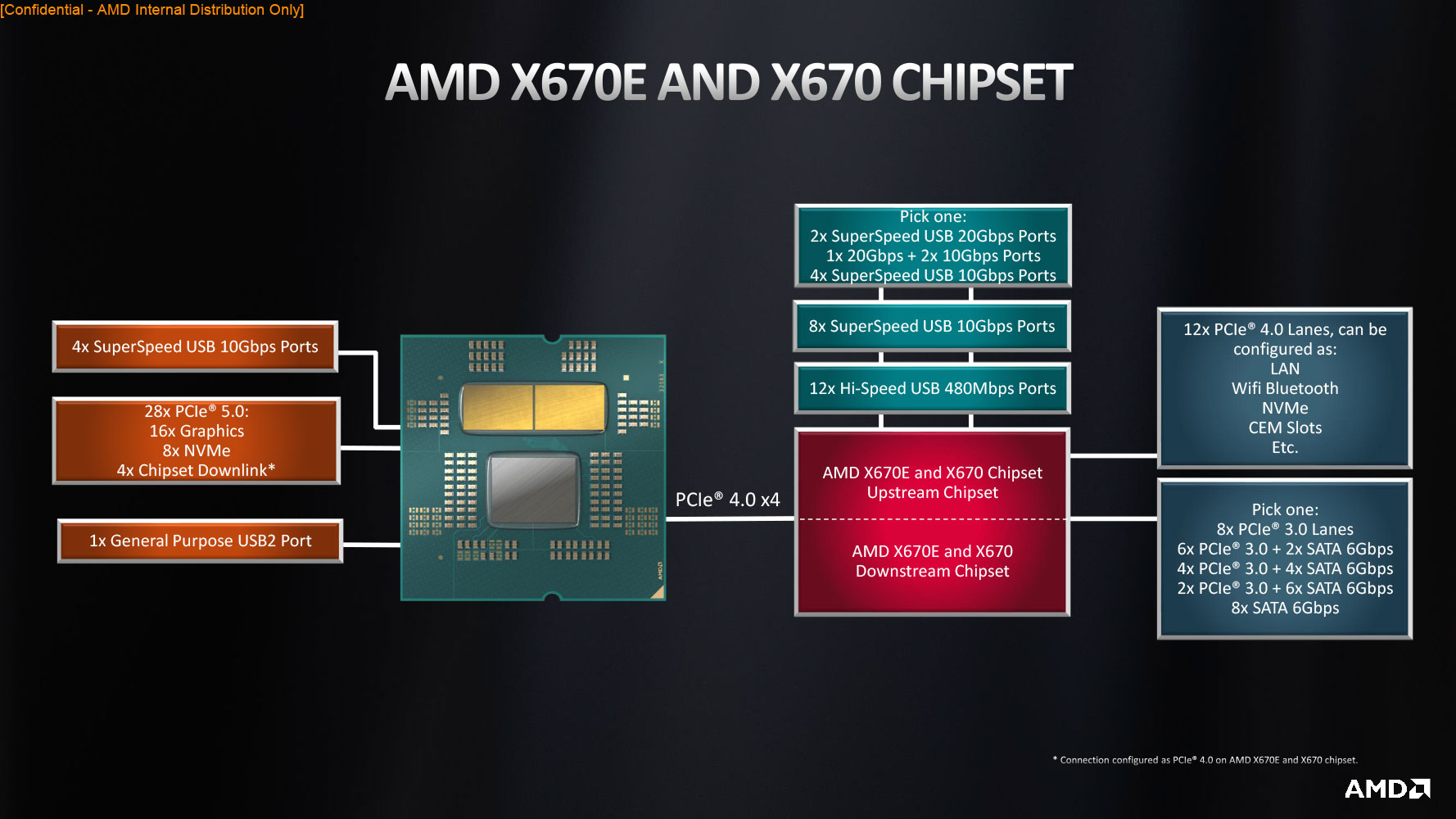
The article makes it appear as:
* 16x PCIe 5.0 lanes for "graphics use" connected directly to the 9950X (~63GB/s).
* 1x PCIe 5.0 lane for an M.2 port connected directly to the 9950X (~4GB/s). Motherboard manufacturers seemingly could repurpose "graphics use" PCIe 5.0 lanes for additional M.2 ports.
* 7x PCIe 5.0 lanes connected to the X870E chipset (~28GB/s). Used as follows:
  * 4x USB 4.0 ports connected to the X870E chipset (~8GB/s).

  * 4x PCIe 4.0 ports connected to the X870E chipset (~8GB/s).

  * 4x PCIe 3.0 ports connected to the X870E chipset (~4GB/s).

  * 8x SATA 3.0 ports connected to the X870E chipset (some >~2.4GB/s part of ~8GB/s shared with WiFi 7).

* WiFi 7 connected to the X870E chipset (some >~1GB/s part of ~8GB/s shared with 8x SATA 3.0 ports).But now I'm seeing lots of things I'm locked out. Faster ethernet standards, the fun that brings with tons of GPU memory (no USB4, can't add 10Gbe either), faster and larger memory options, AV1 encoding. It's just sad that I bought a laptop right before those things were released.
Should had go with a proper PC. Not doing this mistake anymore.
Yea closest I see to being better about it is Frame.work laptops, and even then it's not as good a story as desktops, just the best story for upgrading a laptop right now. Other than that buying one and making sure you have at least two thunderbolt (or compatible) ports on separate busses is probably the best you can do since that'd mean two 40Gb/s links for expansion even if it's not portable, but would let you get things like 10GbE adapters or fast external storage and such without compromising too much on capability.
https://x.com/msigaming/status/1793628162334621754
Hopefully won't be too long now.
The mobile APUs are way more interesting.
Interestingly though the 9700X seems to be rated at 65W TDP (compared to a 105 TDP for the 7700X). I run my 7700X in "eco mode" where I lowered the TDP to max 95 W (IIRC, maybe it was 85 W: I should check in the BIOS).
So it looks like it's 15% overall more power with less power consumption.
If so, is this unique - that a whole industry of relies on one company?
Nvidia 30-series was fabbed by Samsung.
So there is some competition in the high-end space, but not much. All of these companies rely on buying lithography machines from ASML, though.
Isn't Lunar Lake made by TSMC? Supposedly they have comparable efficiency to AMD/Apple/Qualcomm at the cost of making their fab business even less profitable
Because the US will defend Taiwan.
In light of the "very good but not incredible" generation-over-generation improvement, I guess we can now play the "can you get more performance for less dollars buying used last-gen HEDT or Epyc hardware or with the newest Zen 5 releases?" game (NB: not "value for your dollar" but "actually better performance").
That's why undervolting has become a thing to do (unless you're an Intel CPU marketer) - give up a few percent of your all-core max clock rate and cut your wattage used by a lot.
But I am more interested in the cleanup of the GPU hardware interface (it should be astonishingly simple to program the GPU with its various ring buffers, like as it is rumored to be the case on nvidia side) AND in the squishing of all hardware shader bugs: look at valve ACO compiler erratas in mesa, AMD hardware shader is a bug minefield. Hopefully, the GFX12 did fix ALL KNOWN SHADER HARDWARE BUGS (sorry, ACO is written with that horrible c++, I dunno what went thru the head of valve and no, rust syntax is a complex as c++, then this is toxic too).
128GB isn't exactly a lot, so that would surprise me if it wasnt supported.
Which website is that?
It's as if our planet wasn't being destroyed at a frightening speed. We're headed towards a cliff, but instead if braking, we're accelerating.
A 7950X in Eco mode is ridiculously capable for the power it pulls but that's less of a selling point.
Sooner or later, AI will need to run on the edge, and that'll require RAM bandwidths measured in multiple terabytes per second, as well as "tensor" compute integrated closely with CPUs.
Sure, a lot of people see LLMs as "useless toys" or "overhyped" now, but people said that about the Internet too. What it took to make everything revolve around the Internet instead of it being just a fad is broadband. When everyone had fast always-on Internet at home and in their mobile devices, then nobody could argue that the Internet wasn't useful. Build it, and the products will come!
If every gaming PC had the same spec as a GB200 or MI300, then games could do real-time voice interaction with "intelligent" NPCs with low latency. You could talk to characters, and they could talk back. Not just talk, but argue, haggle, and debate!
"No, no, no, the dragon is too powerful! ... I don't care if your sword is a unique artefact, your arm is weak!"
I feel like this is the same kind of step-change as floppy drives to hard drives, or dialup or fibre. It'll take time. People will argue that "you don't need it" or "it's for enterprise use, not for consumers", but I have faster Internet going to my apartment than my entire continent had 30 years ago.
Question: Am I understanding this correctly that AMD will be using a node size from TSMC that’s 2-years old, but in a way it’s kind of older.
Because N4 was like a “N5+” (and the current gen is “N3+”).
EDIT: why the downvotes for a question?
I am personally very curious how it compares vs Intel's 15th gen, which is rumored to be on Intel 20 process.
It will be significantly slower in ST than M4, and even more so against the M4 Pro/Max.
AMD claims +35% IPC improvements in that specific benchmark, due to improvement in the AVX512 pipeline.
Overall GB6 improvement is likely around 10-15% only because that's how much IPC improved while clock speed remains the same.
The real issue is that most code people run doesn't use very much SIMD and even less uses AVX-512.
It's disappointing because M4 is significantly ahead. I would expect Zen to make a bigger leap to catch up.
Also, this small leap opens up for Intel's Arrow Lake to take the lead.
anything else will require newer SOCKET, MB AND RAM
Typical use cases and motherboards give an x16 slot for graphics, x4 each to at least one or two M.2 slots for SSDs, and x4 to the chipset. Last generation and this generation, AMD's high-end chipset is actually two chipsets daisy-chained, since they're really not much more than PCIe fan-out switches plus USB and SATA HBAs.
Nobody allocates a single PCIe lane to an SSD slot, and the link between the CPU and chipset must have a lane width that is a power of two; a seven-lane link is not possible with standard PCIe.
Also, keep in mind that PCIe is packet-switched, so even though on paper the chipset is over-subscribed with downstream ports that add up to more bandwidth than the uplink to the CPU provides, it won't be a bottleneck unless you have an unusual hardware configuration and workload that actually tries to use too much IO bandwidth with the wrong set of peripherals simultaneously.
Block diagram for AM5 (X670E/X670): https://www.techpowerup.com/review/amd-ryzen-9-7950x/images/...
Block diagram for AM4 (X570): https://www.reddit.com/r/Amd/comments/bus60i/amd_x570_detail...
However you are right that such a choice is very unlikely for computers using AMD CPUs or Intel Core CPUs.
https://www.anandtech.com/show/20057/amd-releases-epyc-8004-...
2011/2011-3/2066 were actually a reasonable size. Like LGA3678 or whatever as a hobbyist thing doesn't seem practical (the W-3175X stuff) and that was also 6ch, and Epyc/TR are pretty big too etc. There used to exist this size-class of socket that really no longer gets used, there aren't tons of commercial 3-4-6 channel products made anymore, and enthusiast form-factors are stuck in 1980 and don't permit the larger sockets to work that well.
The C266 being able to tap off IOs as SAS3/12gbps or pcie 4.0 slimsas is actually brilliant imo, you can run SAS drives in your homelab without a controller card etc. The Asrock Rack ones look sick, EC266D4U2-2L2Q/E810 lets you basically pull all of the chipset IO off as 4x pcie 4.0x4 slimsas if you want. And actually you can technically use MCIO retimers to pull the pcie slots off, they had a weird topology where you got a physical slot off the m.2 lanes, to allow 4x bifurcated pcie 5.0x4 from the cpu. 8x nvme in a consumer board, half in a fast pcie 5.0 tier and half shared off the chipset.
https://www.asrockrack.com/general/productdetail.asp?Model=E...
Wish they'd do something similar with AMD and mcio preferably, like they did with the GENOAD8X. But beyond the adapter "it speaks SAS" part is super useful for homelab stuff imo. AMD also really doesn't make that much use of the chipset, like, where are the x670E boards that use 2 chipsets and just sling it all off as oculink or w/e. Or mining-style board weird shit. Or forced-bifurcation lanes slung off the chipset into a x4x4x4x4 etc.
https://www.asrockrack.com/general/productdetail.asp?Model=G...
All-flash is here, all-nvme is here, you just frustratingly can't address that much of it per system, without stepping up to server class products etc. And that's supposed to be the whole point of the E series chipset, very frustrating. I can't think of many boards that feel like they justify the second chipset, and the ones that "try" feel like they're just there to say they're there. Oh wow you put 14 usb 3.0 10gbps ports on it, ok. How about some thunderbolt instead etc (it's because that's actually expensive). Like tap those ports off in some way that's useful to people in 2024 and not just "16 sata" or "14 usb 3.0" or whatever. M.2 NVMe is "the consumer interface" and it's unfortunately just about the most inconvenient choice for bulk storage etc.
Give me the AMD version of that board where it's just "oops all mcio" with x670e (we don't need usb4 on a server if it drives up cost). Or a miner-style board with infinite x4 slots linked to actual x4s. Or the supercarrier m.2 board with a ton of M.2 sticks standing vertically etc. Nobody does weird shit with what is, on paper, a shit ton of pcie lanes coming off the pair of chipsets. C'mon.
Super glad USB4 is a requirement for X870/X870E, thunderbolt shit is expensive but it'll come down with volume/multisourcing/etc, and it truly is like living in the future. I have done thunderbolt networking and moved data ssd to ssd at 1.5 GB/s. Enclosures are super useful for tinkering too now that bifurcation support on PEG lanes has gotten shitty and gpus keep getting bigger etc. An enclosure is also great for janitoring M.2 cards with a simple $8 adapter off amazon etc (they all work, it's simple physical adapater).
Staying on an older node might ensure AMD the production capacity they need/want/expect. If they had aimed for the latest 3nm then they'd have get in line behind Apple and Nvidia. That would be my guess, why aim for 3nm, if you can't get fab time and you're still gaining a 15% speed increase.
It's the GPUs that are just getting increasing inaccessible, price wise.
A decade ago, Steam's hardware survey said 8GB was the most popular amount of RAM [1] and today, the latest $1600 Macbook Pro comes with.... 8GB of RAM.
In some ways that's been a good thing - it used to be that software got more and more featureful/bloated and you needed a new computer every 3-5 years just to keep up.
[1] https://web.archive.org/web/20140228170316/http://store.stea...
I guess you _can_ game on those 2 CU GPUs, but it really doesn't seem to be intended for that.
Not sure that I actually CAN. 56 GHz is already a lot.
Faster GPU is reserved for APUs. These graphics are just here for basic support.
https://www.anandtech.com/show/21419/amd-announces-the-ryzen...
The GPU on these parts is there mostly for being able to boot into BIOS or OS for debugging. Basically when things go wrong and you want to debug what is broken (remove GPU from machine and see if things work)
This could be a thing if you're running native Linux but some games only work on Windows which you run in a VM instead of dual booting.
That's wildly not true. Transcoding, gaming, multiple displays, etc. They are often used as any other GPU would be used.
Not at all. I drive a 38" monitor with the iGPU of the 7700X. If you don't game and don't run local AI models it's totally fine.
And... No additional GPU fans.
My 7700X build is so quiet it's nearly silent. I can barely hear it's Noctua NH-12S cooler/fan ramping up when under full load and that's how it should be.
You're misguided.
Apple has excellent Notebook CPUs. Apple has great IPC. But AMD and Intel have easily faster CPUs.
https://opendata.blender.org/benchmarks/query/?compute_type=...
Blender Benchmark
      AMD Ryzen 9 7950X (16 core)         560.8
      Apple M2 Ultra (24 cores)           501.82
      Apple M3 Max (12 cores)             408.27
      Apple M3 Pro                        226.46
      Apple M3                            160.58
I'm a software developer using a compiler that 100%s all cores. I like fast multicore.
      Apple Mac Pro, 64gb, M2 Ultra, $7000
      Apple Mac mini, 32gb, M2 Pro, 2TB SSD, $2600
[Edit] Made a c&p mistake, the mini has no ultra.
I know that there's some work happening about UEFI+ARM (https://developer.arm.com/Architectures/Unified%20Extensible...), but its support is very rare. The only example I can recall is Ampere Altra: https://www.jeffgeerling.com/blog/2023/ampere-altra-max-wind...
9700x runs 100MHz higher on the same process as the 7700x. If they are actually running at full speed, I don't see how 9700x could possibly be using less power with more transistors at a higher frequency. They could get lower power for the same performance level though if they were being more aggressive about ramping down the frequency (but it's a desktop chip, so why would they?).
Strix Halo appears to be AMD's competitor to Apple SoCs which will feature a much bigger iGP and much greater memory bandwidth. When we hear more about that, comparisons will be apt.
For me as a developer Geekbench Clang benchmarks:
    M2 Ultra   233.9 Klines/sec
    7950x      230.3 Klines/sec
    14900K     215.3 Klines/sec
M3 Max 196.5 Klines/secNot a fair comparison. If we're on about Geekbench as per the announcement, it's +35%. The 15% is a geomean. It might not be better but definitely not far off Apple.
In a similar manner, except Geekbench the geomean of M3 vs M4 isn't that great either.
With LLMs, I feel like the line between consumer and professional is getting blurred.
Not that CPU is really reasonable for LLMs that big...
"AI will need to run..."
Let's wait and see what actually happens to AI before being too eager to change the design of computers. I'm also pretty sure there will be a better solution than what you described.
While I’m totally one of those people, aren’t we some rather small minority, nowadays? I mean, obviously still big enough for companies to produce parts we want, but I always keep reading how more and more people are using laptops instead of desktops.
I want plot/character driven games like RPGs to be a curated & carefully designed, plotted, and paced experience.
I want speech & narrative to be scripted! It means someone sat down and thought about the experience it produces for the player. It means a real voice actor has performed it, putting the right emotion and pacing into the line.
I don't want AI generated stilted dialogue, uncanny valley speech, etc.
And I also don't want an extra few hundred watts of power draw on gaming PCs - they're already high and in modern games the CPU is under pretty substantial load, the GPU is maxed out, and the GPU's AI/NPU style cores are being used for things like DLSS too.
Bringing in more compute resource for running speech to text, LLMs, text to speech, etc fast enough to not feel horrible is going to come at substantial power and financial cost.
I've seen this line pulled out before and it always seems like an assumption than actual reality.
Anyone know if the 'strix' apu thing is expected to be a ddr-on-package or still using with separate sticks? Search engine is not going well for me.
Sure, you can always find naysayers about any tech, but we've also seen plenty of useless toys, so that internet fact doesn't help your argument that AI will come to the edge in any way (and no, email was not a fad even at dial-up speeds, so you don't even have the internet fact)
If you thought prices were high during pandemic shortages, strap in.
It's probably not a coincidence that as soon as the US starts spending billions to onshore semiconductor production, China begins a fresh round of more concrete saber-rattling. (Yes, there's likely other factors too.)
Before, we had so little but it was all available to utilize to the fullest extent. Now we live in a world of excess but it’s almost a walled garden.
As you say, Intel has abandoned the use of the full AVX-512 instruction set in their laptop/desktop products and in some of their server products.
At the end of 2025, Intel is expected to introduce laptop/desktop CPUs that will implement a 256-bit subset of the AVX-512 instruction set.
While that will bring many advantages of AVX-512 that are not related to register and instruction widths, it will lose the simplification of the high-performance programs that is possible in 512-bit AVX-512 due to the equality between register size and cache line size, so the consumer Intel CPUs will remain a worse target for the implementation of high-performance algorithms.
Can you elaborate here? I love full-width AVX-512 as much as the next SIMD nerd, but I rarely considered the alignment of the cache line and vector width one of the particularly useful features. If anything, it was a sign that AVX-512 was probably the end of the road for full-throughput full-width loads and stores at full AVX register width, since double-cache line memory operations are likely to be half-throughput at best and a doubling of the cache line width seems unlikely.
But an increase in cacheline size would be nice if it can get us larger vectors, or otherwise significantly improve memory bandwidth.
But, for the desktop parts I don't see that being worthwhile unless it's used as something like with the 'X3D' chips, a large cache layer to the expandable memory.
I feel like this is nicely indicated by how AMD's desktop APUs get a lot less interest, they were fine without it for several generations, and even now it's just an afterthought.
However the early generations of Intel CPUs that have implemented AVX-512 had bad clock management, which was not agile enough to lower quickly the clock frequency, i.e. the power consumption, when the temperature was too high due to higher power consumption, in order to protect the CPU. Because of that and because there are no instructions that the programmers could use to announce their intentions of using intensively wide SIMD instructions in a sequence of code, the Intel CPUs lowered the clock frequency preemptively and a lot, whenever they feared that the future instruction stream might contain 512-bit instructions that could lead to an overtemperature. The clock frequency was restored only after delays not much lower than a second. When AVX-512 instructions were executed sporadically, that could slow down any application very much.
The AMD CPUs and the newer Intel CPUs have better clock management, which reacts more quickly, so the low clock frequency during AVX-512 instruction execution is no longer a problem. A few AVX-512 instructions will not lower measurably the clock frequency, while the low clock frequency when AVX-512 instructions are executed frequently is compensated by the greater work done per clock cycle.
This difference in efficiency cannot be explained by node advantage alone as N3E vs N4 is probably around only 15-20% more efficient.
So yeah next time I build a machine I'll appreciate having this built in.
So I was curious if there was anything else that RDNA 3/3.5 would offer over RDNA 2 in such a low end configuration.
Marketing seems a more likely reason (and I don't believe it would be the first time either).
But yeah, Desktop Ryzen's are all Dual Channel.
Both Zen 3 and Zen 4 have four 256-bit execution units.
Two 512-bit instructions can be initiated per clock cycle. It is likely that the four corresponding 256-bit micro-operations are executed simultaneously in all the 4 execution units, because otherwise there would be an increased likelihood that the dispatcher would not be able to find enough micro-operations ready for execution so that no execution unit remains idle, resulting in reduced performance.
The main limitation of the Zen 4 execution units is that only 2 of them include FP multipliers, so the maximum 512-bit throughput is one fused multiply-add plus one FP addition per clock cycle, while the Intel CPUs have an extra 512-bit FMA unit, which stays idle and useless when AVX-512 instructions are not used, but which allows two 512-bit FMA per cycle.
Without also doubling the transfer path between the L1 cache and the registers, a double FMA throughput would not have been beneficial for Zen 4, because many algorithms would have become limited by the memory transfer throughput.
Zen 5 doubles the width of the transfer path to the L1 and L2 cache memories and it presumably now includes FP multipliers in all the 4 execution units, thus matching the performance of Intel for 512-bit FMA operations, while also doubling the throughput of the 256-bit FMA operations, where in Intel CPUs the second FMA unit stays unused, halving the throughput.
No well-designed CPU has a FP addition or multiplication latency of 1. All modern CPUs are designed for the maximum clock frequency which ensures that the latency of operations similar in complexity with 64-bit integer additions between registers is 1. (CPUs with a higher clock frequency than this are called "superpipelined", but they have went out of fashion a few decades ago.)
For such a clock frequency, the latency of floating-point execution units of acceptable complexity is between 3 and 5, while the latency of loads from the L1 cache memory is about the same.
The next class of operations with a longer latency includes division, square root and loads from the L2 cache memory, which usually have latencies between 10 and 20. The longest latencies are for loads from the L3 cache memory or from the main memory.
But of note is that, at least in uops.info's data[0], there's one perf counter increment per instruction, and all four pipes get non-zero equally-distributed totals, which seems to me much simpler to achieve with double-pumping (though not impossible with splitting across ports; something like incrementing a random one. I'd expect biased results though).
Then again, Agner says "512-bit vector instructions are executed with a single μop using two 256-bit pipes simultaneously".
[0]: https://uops.info/html-tp/ZEN4/VPADDB_ZMM_ZMM_ZMM-Measuremen...
The Intel consumer processors due out later this year are expected to include the first major update to their efficiency cores since they introduced Alder Lake. Only after that ships without AVX512 will it be plausible to attribute product segmentation as a major cause rather than just engineering factors.
(Intel's AVX10 proposal indicates their long-term plan may be to never support 512-bit SIMD on the efficiency cores, but to eventually make it possible for full 512-bit SIMD to make a return to their consumer processors.)
They made a big todo about how much better than AMD they are with things like AVX512.
Then they play these games for market purposes.
Then they have stupid clock speed pauses, so when you try it your stuff goes slower.
Meanwhile - AMD is putting it on all their chips and it works reasonably there.
So I've just found the whole Intel style here kind of annoying. I really remember them doing bogus comparisons to non AVX-512 AMD parts (and projecting when their chips would be out). Reality is you are writing software that depends on AVX512 - tell clients to buy AMD to run it. Does AVX512 even work on efficiency cores and things like that? It's a mess.
What would be different between doubling tbe pipe width vs number of pipes? (excluding inter lane operations that already had their own 512-bit pipe in Zen4)
Zen3 to Zen4 had an even larger increase in Object Detection score in GB6. From Zen3 to Zen4, Object Detection increased by 2.5x due to AVX512 which is more than M3 to M4's 2x increase.
Source: https://browser.geekbench.com/v6/cpu/compare/6098657?baselin...
376.6 Klines/sec Threadripper 7970X (32 cores)I know the 7970X is more affordable but this is for a benchmark!
(edited to expand)
Unless you need the GPIO theres zero reason to overpay for a Pi 5 for example when you can pick up decent second hand mini pc's on ebay for a lower price.
Case in point, a couple of months ago I was able to nab two brand new still in box Dell Optiplex 3050's (Core i7 6700T 4 Cores, 2.8Ghz, 16GB RAM Win 10 hardware license, 256gb ssd, with mouse & keyboard) for £55 each delivered. The base 4gb model Pi 5 comes in at £80-£100 once you add power, storage and a case.
Sure, its not ARM but you're not likely to be doing anything that _needs_ ARM.
Even then, both usb-to-gpio and mini PCs with gpio exist. Unless you want something really small, then there's still pi zero and Arduino
x86: Microsoft requires that end-users are allowed to disable secure boot and control which keys are used.
arm: Microsoft requires that end-users are not allowed to disable secure boot
This isn't a hardware issue, but simply a policy issue that Microsoft could solve with a stroke of a pen, but since Microsoft is such a behemoth in the laptop space, their policies control the non-apple market.
Allowing accessing separate parts of 512-bit pipes makes sense, but that still then needs separate ports for each half, otherwise there's nothing to schedule the other half to. uops.info data[0] shows that 256-bit shuffle throughput is indeed double that of 512-bit, but seemingly both still increment either the FP1 or FP2 port (these overlap the regular four ALU port numbers!) so the AVX2 shuffles still have two ports to taget.
So the mapping between Zen 4's (perf-counter-indicated) ports is rather unrelated from available execution units (not in any way a new concept, but still interesting). Which would seem to indicate that perhaps like "vaddps zmm; vpermd zmm" can manage 1/cycle, while "vaddps ymm; vaddps ymm; vpermd ymm; vpermd ymm" would fight for FP2 (for reference, vaddps uses either FP2 or FP3)? Fun.
[0]: https://uops.info/table.html?search=%22vpermd%20%22&cb_lat=o...
406.2 Klines/sec 7995WX
Also 32-core threadripper machines seem to be in the price range of M2 Ultra machines.
[Edit] I found a 491.5 klines/sec result for the 7985WX
It might well result in less repetitive background chatter & stock comments from side characters without taking focus away from the primary content. Especially if those background characters could react a bit better to progression in the plot.
For example the 780m you mentioned has 12 cores and newer architecture so is probably something like 10 to 15 times more powerful.
With M4, they're likely to fall even farther behind. M4 Pro/Max is likely to arrive in Fall. AMD's Strix Point doesn't seem to have a release date.
"M4 Pro/Max is likely to arrive in Fall." (no release date)
"AMD's Strix Point doesn't seem to have a release date." (no release date)
M4 is already out. We know Zen5's performance. Therefore, we can conclude that the gap between M4 vs Zen5 is higher than M3 vs Zen4.
You seem to be very sensitive when it comes with AMD.
They could have done what AAPL did ages ago but they have no ability to innovate properly. They've been leaning on their x86 duopoly and if it's now on its last legs, it's their fault.
SoCs are good for the segments they target but they're by no means the be-all-end-all of personal computing. The performance of discrete graphics cards simply can't be beaten, and desktop users want modularity and competitive perf/$. Framing the distinction between a highly integrated SoC-based computer and a traditional motherboard+AIB arrangement as a quantitative rather than a qualitative difference is an error.
Both Intel and AMD have already received Apple's wakeup call and have adjusted their strategies. I also think it's unfair to say that nothing has changed until just now. I consider Ryzen 6000 to be an understated milestone in this competition with a big uplift in iGP performance and a focus on efficiency. There's a wide gap to close, sure, but AMD and Intel have certainly not been standing still.
Apple's vertical integration and volume made them uniquely suited to produce products like the Mx line, so it makes sense that they were able to deliver a product like this first.
What do you mean? AMD has been the market leader in performance SoCs for specialised use cases (like consoles) for many years.
Nvidia or Intel could certainly make a console focused SoC at least as performant as AMD.
They certainly cannot, or they would have. Do you think that Sony and Microsoft stay with AMD because they like them or because AMD can deliver what they want?
> There are only two high performance consoles on the market
I'd throw the Steam Deck on that list too. High performance for its size more than high performance in general, but still. It's no coincidence that all the gaming handheld consoles, full blown consoles, and lots of gaming devices in general all use AMD.
In general, CPU clock speeds stagnated about 20 years ago because we hit a power wall.
In 1985, the state of the art was maybe 15-20MHz; in 1995, that was 300-500MHz; in 2005, we hit about 3GHz and we've made incremental progress from there.
It turns out that you can only switch voltages across transistors so many times a second before you melt down the physical chip; reducing voltage and current helps but at the expense of stability (quantum tunneling is only becoming a more significant source of leakage as we continue shrinking process sizes).
Most of the advancements over the past 20 years have come from pipelining, increased parallelism, and changes further up the memory hierarchy.
> today, the latest $1600 Macbook Pro comes with.... 8GB of RAM.
That's an unfair comparison. Apple has a history of shipping less RAM with its laptops than comparable PC builds (the Air shipped with 2GB in the early 2010s, eventually climbing up to 8GB by the time the M1 launched).
Further, the latest iteration of the Steam hardware survey shows that 80% of its userbase has at least 16GB of RAM, whereas in 2014 8GB was merely the plurality; not even 40% of users had >= 8GB. A closer comparison point would have been the 4GB mark, which 75% of users met or exceeded.
When I visit retailers' websites, the 8GB product category seems to be the one with the most products on offer. Dell, Asus, Acer, HP and Lenovo are also more than happy to sell you a laptop with 8GB of RAM, today. Although I would agree don't charge $1600 and call them "Pro"
So 8GB machines are still around, and not just in the throwaway $200 laptop segment.
I would agree with you that the 2024 Steam hardware survey shows a plurality of users with 16GB, whereas the 2014 survey said 8GB, so progress hasn't entirely stopped. But compared to the glory days of Moore's Law, a doubling over 10 years is not much.
You're not wrong here! I entirely agree that 8GB laptops are still very much a thing, and RAM hasn't been growing at quite the same rate that it had been. But I'd bet most of those models with 8GB of RAM are much closer to the $800 range (if not more like $600).
I maintain that a closer statement is that typical RAM configurations increased by 4x over 10 years (aka doubling every 5 years). That is admittedly still a far cry from Moore's law doubling every 18 months.
And: the Steam hardware survey is obviously biased toward people who play video games on their computers, which in turn is biased toward people who like to play video games on higher-spec machines. Some of that takes the form of better graphics cards with more VRAM, but you certainly can find gaming laptops on the market with 64GB or even 128GB of RAM, whereas 10-15 years ago, that was the size of the SSD.
I remember in 2011 that 16GB was a lot of RAM even in a desktop (I purchased a kit of 4x4GB for about $100); these days, you can buy twice that amount in a single stick for cheaper. Manufacturers can put more RAM in machines if they want, but there isn't really enough demand to justify a different model with a corresponding increase in sticker price.
I'm sorry, "used to be" ? 90% of the last decade of hardware advancement was eaten up by shoddy bloated software, where we now have UI lag on the order of seconds, 8GB+ of memory used all the time by god knows what and a few browser tabs and 1 core always peaking in util (again, doing god knows what).
Taking Steam's hardware survey as an example, from 2004 [1] to 2014 [2] RAM increased from 512 MB to 8 GB.
From 2014 to 2024 [3] RAM increased from 8 GB to 16 GB.
Software has bloated by 2x in a decade. But in the preceding decade, it bloated by 16x so keeping it down to a mere 2x is quite restrained in comparison.
[1] https://web.archive.org/web/20040630214045/http://steampower... [2] https://web.archive.org/web/20140228170316/http://store.stea... [3] https://store.steampowered.com/hwsurvey
The rate of increase of bloat is now reduced, because hardware advancements rate of increase is also now reduced.
The bloat takes up all the hardware advancements, so of course they'll just be in line with each other.
You're also comparing Windows x86 gaming desktops from a decade ago with macOS AppleSilicon base-spec laptops today. Steam's recent hardware survey shows 16GB as the most popular amount of RAM [1]. Not the 5x increase we've seen in vRAM, but still substantial.
[1] https://store.steampowered.com/hwsurvey/Steam-Hardware-Softw...
8-20 GB of VRAM
When the industry moves to lpddr6/ddr6 I wouldn’t be shocked to see an increase to 6gb per module standard although maybe some binned 4gb modules will still be sold.
Nvidia is preparing to SoC-up it's RTX cards with ARM cores and then it's toast for your rig.
That implies to me that you expect an SOC to perform the same as or better than a 5090?
I've used Apple for 20+ years, from Motorola 680X0 CPUs to Motorola PowerPC to Intel CPUs. SGI MIPS, Sun Sparc, DEC Alpha etc.
I don't care what name is written on the CPU I use.
I care how fast my development machine is.
I've used Apple for 20+ years, from Motorola 680X0 CPUs to Motorola PowerPC to Intel CPUs. SGI MIPS, Sun Sparc, DEC Alpha etc.
I care how fast my development machine is.
"You seem to be very sensitive when it comes with AMD."
"But this conversation isn't about your development machine."
It is when your point is
"You seem to be very sensitive when it comes with AMD."
Though Blender may have an optimization for avx512 but not for SME or Neon.
But the vast majority will use GPUs to do rendering for Blender.
Try SPEC or its close consumer counterpart, Geekbench.
As an anecdote, all my Python and Node.js applications run faster on Apple Silicon than Zen4. Even my multithread Go apps seem to run better on Apple Silicon.
On Passmark Apple CPUs are pretty far down the list.
On Geekbench I gave up after scrolling a few pages.
And "run faster on Apple Silicon than Zen4" means nothing. On the low end you have fairly cheap Ryzen 3 laptop chips, and on the high end you have Threadripper behemoths.
I would stick to SPEC and Geekbench.
Even Cinebench 2024 isn't too bad nowadays though R23 was quite poor in correlation.
In general, not only are Apple Silicon CPUs faster than AMD consumer CPUs, but they're 2-4x more power efficient as well.
And the argument is, you can't use Blender to compare CPU performance because of that?
"Even my multithread Go apps seem to run better on Apple Silicon."
As a Go developer, I'd love to hear your story: How much faster does your Apple Silicon compile compare to a Zen4 (e.g. the 7950x?)? For example 100k lines of Go code.
I might switch back to Apple again (used Apple for 20+ years), if it's faster at compilation speed.
In multithreaded workloads, 2 of their current e-cores are roughly equivalent to 1 p-core, so that would represent the equivalent of 4 extra p-cores.
Good ol, compare a $400 piece of equipment with a $3000 piece of equipment. I wonder what will win. (unironically, most of the time, the $3000 piece of equipment doesnt win)
    M2 Ultra   233.9 Klines/sec
    7950x      230.3 Klines/sec
    14900K     215.3 Klines/sec
    M3 Max     196.5 Klines/sec
In any case, M3 Max uses less than 55w of power in CPU-only workloads while a desktop 7950x peaked out at 332w of power according to Guru3D (without an OC).
The fact that M2 Ultra hits so close while peaking out at only around 100w of CPU power is pretty crazy (M2 Ultra doesn't even hit 300w with all CPU and GPU cores maxed out).
Maybe use a benchmark that actually makes sense for CPUs, rather than something that's always much faster on a GPU (eg. M3 Pro as any sane user would use it for Blender is 2.7x the performance of a Ryzen 7950X, not 0.4x).
> Apple Mac mini, 32gb, M2 Ultra, 2TB SSD, $2600
Not a real thing. You meant M2 Pro, because the Max and Ultra chips aren't available in the Mac mini.
(corrected my c&p mistake with the mini, thanks)
https://www.geekbench.com/doc/geekbench6-benchmark-internals... (page 18)
At least on NVIDIA hardware, Blender can use the GPU's raytracing capabilities rather than just the general-purpose GPU compute capabilities. Which means it doesn't take a very expensive GPU at all to outperform high-end CPUs.
(Even phoronix is scares and mostly focuses on laptops - I have no laptop)
"Randomly" picking
    14900K     215.3 Klines/sec
    7950x      230.3 Klines/sec
    M2 Ultra   233.9 Klines/sec
M3 Max 196.5 Klines/secM3 Max: 3898
7950x: 2951
The ST advantage of Apple Silicon is real. 7950x does do better in highly parallel tasks.
To me, Apple Silicon is clearly leading clients over AMD/Intel. Hence, my original reason for why AMD's announcement isn't "exciting". Because Apple Silicon is so far ahead in client.
Of course, AMD can crank up the core via Epyc/Threadripper and Apple has no answer. For that, you'd need to look into ARM chips from Ampere/Amazon for a competitor.
A 7950x system at IDLE uses 50% more power than an M3 Max going all-out on a CPU workload.
https://www.guru3d.com/review/amd-ryzen-9-7950x-review/page-...
What you want to do is look at the benchmarks for the thing you're actually using it for.
> they're 2-4x more power efficient as well.
This is generally untrue, people come to this conclusion by comparing mobile CPUs with desktop CPUs. CPU power consumption is non-linear with performance, so a large power budget lets you eek out a tiny bit more margin. For example, compare the 65W 5700X with the 105W 5800X. The 40 extra watts buys you around 2% more single thread performance, not because the 5700X has a more efficient design -- they're the exact same CPU with a different power cap. It's because turning up the clock speed a tiny bit uses a lot more power, but desktop CPUs do it anyway, because they don't have any such thing as battery life and people want the extra tiny bit more. Or the CPU simply won't clock any higher and doesn't even hit the rated TDP on single-threaded workloads.
The extra power will buy you a lot more on multi-threaded workloads, because then you get linear performance improvement with more power by adding more cores. But that's where the high core count CPUs will mop the floor with everything else -- while achieving higher performance per watt, because the individual cores are clocked lower and use less power.
The problem with Geekbench is it's trying to average the scores from many different benchmarks, but then if some of them are outliers (e.g. one CPU has hardware acceleration or some other unusual aptitude for that specific workload), it gets an outsized score which is then averaged in and skews the result even if it doesn't generalize.
Apple Silicon also has more memory bandwidth the primary purpose of which is to feed the GPU because most CPU workloads don't care about that, but if you average in the occasional ones that does then you get more outliers.
Which is why the thing that matters is how it performs on the thing you actually want to run on it, not how it performs in aggregate on a bunch of other applications you don't use.
It looks though as if AMD/Intel feel threatened by Snapdragon though - we'll see what AMD Strix / Halo brings for the first meaningful x86 mobile processor in years (or Luna Lake).
It's mostly not. Its real purpose is to improve performance on threaded workloads.
Multi-core CPUs work like this: At the max boost a single core might use, say, 50 watts. So if you have 8 cores and wanted to run them all full out, you'd need a 400 watt power budget, which is a little nuts. It's not even worth it. Because you only have to clock them a little lower, say 4GHz instead of 5, to cut the power consumption more than in half, and then you get a TDP of e.g. 100W. Still not nothing but much more reasonable. You can also cut the clock speed even more and get the power consumption all the way down to 15W, but then you're down to 2GHz on threaded workloads and sacrificing quite a bit of multi-thread performance.
So they're not just trying to eek out a couple of percent, even though that's all you get from single thread improvement, because a single core was already near or at its limit. Whereas 8 cores at 4GHz will be legitimately twice as fast as the same cores at 2GHz. But they'll also use more than twice as much power. Which matters in a laptop but not so much in a desktop.
Of course, the thing that works even better is to have 16 cores or more that are clocked a little lower, which improves performance and performance per watt. The performance per watt of the 96-core Threadrippers are astonishingly good -- even though they're 360W. But that also requires more silicon, so those ones are the expensive ones.
If you downclock that AMD chip, it does get more efficient, but also loses by even larger margins.
I will repeat:
"On Geekbench I gave up after scrolling a few pages."
SPEC doesn't seem to have easily browsable results, but we can find the Cinebench 2024 ones easy and guess what? Apple isn't at the top. Not even close: https://www.cgdirector.com/cinebench-2024-scores/
For Apple you need to go to https://browser.geekbench.com/mac-benchmarks
Then compare numbers by hand I assume.
Though what I would love is compile-time vs. $ (as mentioned, I'm a software developer). The 7950x is $500 and a very fast SSD is $400, fast 64gb is $200, very good board is $400 so I get a very fast dev machine for ~$1700.
ASUS ROG Zephyrus G16 (2024)
Processor: Intel Core Ultra 9 185
Memory: 32GB
Cargo Build: 31.85 seconds
Cargo Build --Release: 1 minute 4 seconds
ASUS ROG Zephyrus G14 (2024)
Processor: AMD Ryzen 8945HS / Radeon 780M
Memory: 32GB
Cargo Build: 29.48 seconds
Cargo Build --Release: 34.78 seconds
ASUS ROG Strix Scar 18 (2024)
Processor: Intel Core i9 14900HX
Memory: 64GB
Cargo Build: 21.27 seconds
Cargo Build --Release: 28.69 seconds
Apple MacBook Pro (M3 Pro 11 core)
Processor: M3 Pro 11 core
Cargo Build: 13.70 seconds
Cargo Build --Release: 21.65 seconds
Apple MacBook Pro 16 (M3 Max)
Processor: M3 Max
Cargo Build: 12.70 seconds
Cargo Build --Release: 15.90 seconds
Firefox Mobile build:
M1 Air: 95 seconds AMD 5900hx: 138 seconds Source: https://youtu.be/QSPFx9R99-o?si=oG_nuV4oiMxjv4F-&t=505
Javascript builds
Here, Alex compares the M1 Air running Parallels emulating Linux vs native Linux on AMD Zen2 mobile. The M1 is still significantly faster. https://youtu.be/tgS1P5bP7dA?si=Xz2JQmgoYp3IQGCX&t=183
Docker builds
Here, Alex runs Docker ARM64 vs AMD x86 images and the M1 Air built the image 2x faster than an AMD Zen2 mobile. https://youtu.be/sWav0WuNMNs?si=IgxeMoJqpQaZv2nc&t=366
Anyways, Alex has a ton more videos on coding performance between Apple, Intel and AMD.
Lastly, this is not M1 vs Zen2 but it's M2 vs Zen4.
LLVM build test
M2 Max: 377 seconds Ryzen 9 7940S: 826 seconds
Speed vs. $ is of course a different story than pure speed; kinda hard to capture in a number I guess.
Most Go projects compile more than fast enough even on my 7 year old i5, although there are exceptions (mostly crummy hyper-overengineered projects).
Note: M3 Max is a 40w CPU maximum, while 7950x is a 230w CPU maximum. The stated 170w max is usually deceptive from AMD.
Source for 7950x power consumption: https://www.anandtech.com/show/17641/lighter-touch-cpu-power....
Note that the M3 Max leads in ST in Cinebench 2024 and 2-3x better in perf/watt. It does lose in MT in Cinebench 2024 but wins in GB6 MT.
Cinebench is usually x86 favored as it favors AVX over NEON as well as having extremely long dependency chains, bottlenecked by caches and partly memory. This is why you get a huge SMT yield from it and why it scales very highly if you throw lots of "weak" cores at it.
This is why Cinebench is a poor CPU benchmark in general as the vast majority of applications do not behave like Cinebench.
Geekbench and SPEC are more predictive of CPU speed.
Here's a content creation benchmark (note that for some tasks a GPU is also used):
https://www.pugetsystems.com/labs/articles/mac-vs-pc-for-con...
Would love to see a 7950x/64gb/SSD5 comparison, perhaps (see https://www.octobench.com/ for SSD impact on Go compilation) he will create one in the future (channel bookmarked). But would I still need to use a laptop, I would probably switch back to Apple (have an iMac Pro as decoration standing in the shelf, was my last Apple dev machine).
The $5000 16 Pro looks great as a machine. When still working at eBay, the nice thing was one always got the max specced machine as a developer back in the days - so that would probably be it. Real nice one.
[Edit]
Someone suggested looking at Geekbench Clang, which brought some insights for my desktop usage:
(it looks like top CPUs are more or less the same, ~15% difference)
"Randomly" picking
    M2 Ultra   233.9 Klines/sec
    7950x      230.3 Klines/sec
    14900K     215.3 Klines/sec
M3 Max 196.5 Klines/secBut you can't really expect an older CPU on a previous generation process node with lower power consumption to be faster.
Meanwhile, Geekbench does run real world workloads using real world libraries. You can look at subtest scores to to see "real world" results.
Pugetsystem benchmarks are pretty good. It shows how Apple SoCs punch above their weight in real world applications over benchmarks.
Regardless, they are comparing desktop machines using as much as 1500 watts vs a laptop that maxes out at 80 watts and Apple is still competing well. The wins in the PC world are usually due to beefy Nvidia GPUs that are applications have historically optimized for.
That's why I originally said ARM is leading AMD - specifically Apple ARM chips.
- Dijkstra's algorithm: not used by vast majority of applications.
- Google Gumbo: unmaintained since 2016.
- litehtml: not used by any major browser.
- Clang: common on HN, but niche for general population.
- 3D texture encoding: very niche.
- Ray Tracer: a custom ray tracer using Intel Embree lib. That's worse than Cinebench.
- Structure from Motion: generates 3D geometry from multiple 2D images.
It also uses some more commonly used libraries, but there's enough niche stuff in Geekbench that I can't say it's a good representation of a real world workloads.
> Regardless, they are comparing desktop machines using as much as 1500 watts vs a laptop that maxes out at 80 watts and Apple is still competing well. The wins in the PC world are usually due to beefy Nvidia GPUs that are applications have historically optimized for.
They included a laptop, which is also competing rather well with Apple offerings. And it's not PC's fault you can't add a custom GPU to Apple offerings.
You can cherry pick libraries that Geekbench 6 uses that are old or niche but do they do a good job as proxies?
The point of a general CPU benchmark is to predict CPU performance. For that, Geekbench does an outstanding job. [0]
[0]https://medium.com/silicon-reimagined/performance-delivered-...
Yes, and the renderer is the same as in Cinema 4D which is used by many, while custom ray tracer build for Geekbench is not used outside benchmarking.
The blog post you linked just shows that one synthetic benchmark correlates with another synthetic benchmark. Where do SPEC CPU2006/2017 benchmarks guarantee or specify correlation with real-world performance workloads?
Cinebench fits characteristics of a good benchmark defined by SPEC [1]. It's not a general benchmark, but biased benchmark. It's floating-point intensive. It should do a perfect job of evaluating Cinema 4D rendering performance, a good job as proxy for other floating-point heavy workloads, but a poor job as proxy for other non-floating-point heavy workloads. The thing is, most real world workloads are biased. So, no single-score benchmark result can do an outstanding job of predicting CPU performance for everyone (which is what a general CPU benchmark with a single final score aims to do). They are useful, but limited in their prediction abilities.
SPEC is the industry standard for CPU benchmarking.