Dissecting the gzip format (2011)(infinitepartitions.com) |
Dissecting the gzip format (2011)(infinitepartitions.com) |
This hasn't ever been practically useful, but it means you can trivially create a 19-layer gzip file containing more prayer strips than there are atoms in the universe, providing a theological superweapon. All you need to do is write it to a USB-stick, then drop the USB-stick in a river, and you will instantly cause a heavenly crisis of hyperinflation.
Sadly, the authors hard coded the expected headers so it’s not fully gzip compatible (you can’t add your own arbitrary headers). For example, I wanted to add a chunk hash and optional encryption by adding my own header elements. But as the original tooling all expects a fixed header, it can’t be done in the existing format.
But overall it is easily indexed and makes reading compressed data pretty easy.
So, there you go - a practical use for a gzip party trick!
[0] https://numpy.org/doc/stable/reference/generated/numpy.savez...
I don't think many people use that last property or are even aware of it, which is a shame. I wrote a tool (bamrescue) to easily recover data from uncorrupted blocks of corrupted BAM files while dropping the corrupted blocks and it works great, but I'd be surprised if such tools were frequently used.
Considering the big thing with TAR is that you can also concatenate it together (the format is quite literally just file header + content ad infinitum; it was designed for tape storage - it's also the best concatenation format if you need to send an absolute truckloads of files to a different computer/drive since the tar utility doesn't need to index anything beforehand), making gzip also capable of doing the same logic but with compression seems like a logical followthrough.
I used it a couple times to merge chunks of gzipped CSV together, you know, like "cat 2024-Jan.csv.gz 2024-Feb.csv.gz 2024-Mar.csv.gz > 2024-Q1.csv.gz". Of course, it only works when there is no column headers.
Note that real-world GZIP decoders (such as the GNU GZIP program) skip this step and opt to create a much more efficient lookup table structure. However, representing the Huffman tree literally as shown in listing 10 makes the subsequent decoding code much easier to understand.
Is it? I found the classic tree-based approach to become much clearer and simpler when expressed as a table lookup --- along with the realisation that the canonical Huffman codes are nothing more than binary numbers.
In what other areas (there must be many) do we use trees in principle but sequences in practice?
(eg code: we think of it as a tree, yet we store source as a string and run executables which —at least when statically linked— are also stored as strings)
Heapsort comes to mind first.
The biggest problem was software-patent stuff nobody wanted to risk before they expired.
Formatted version: https://infinitepartitions.com/cgi-bin/showarticle.cgi?artic...
(If that still doesn't make sense, see the sibling comment to yours.)
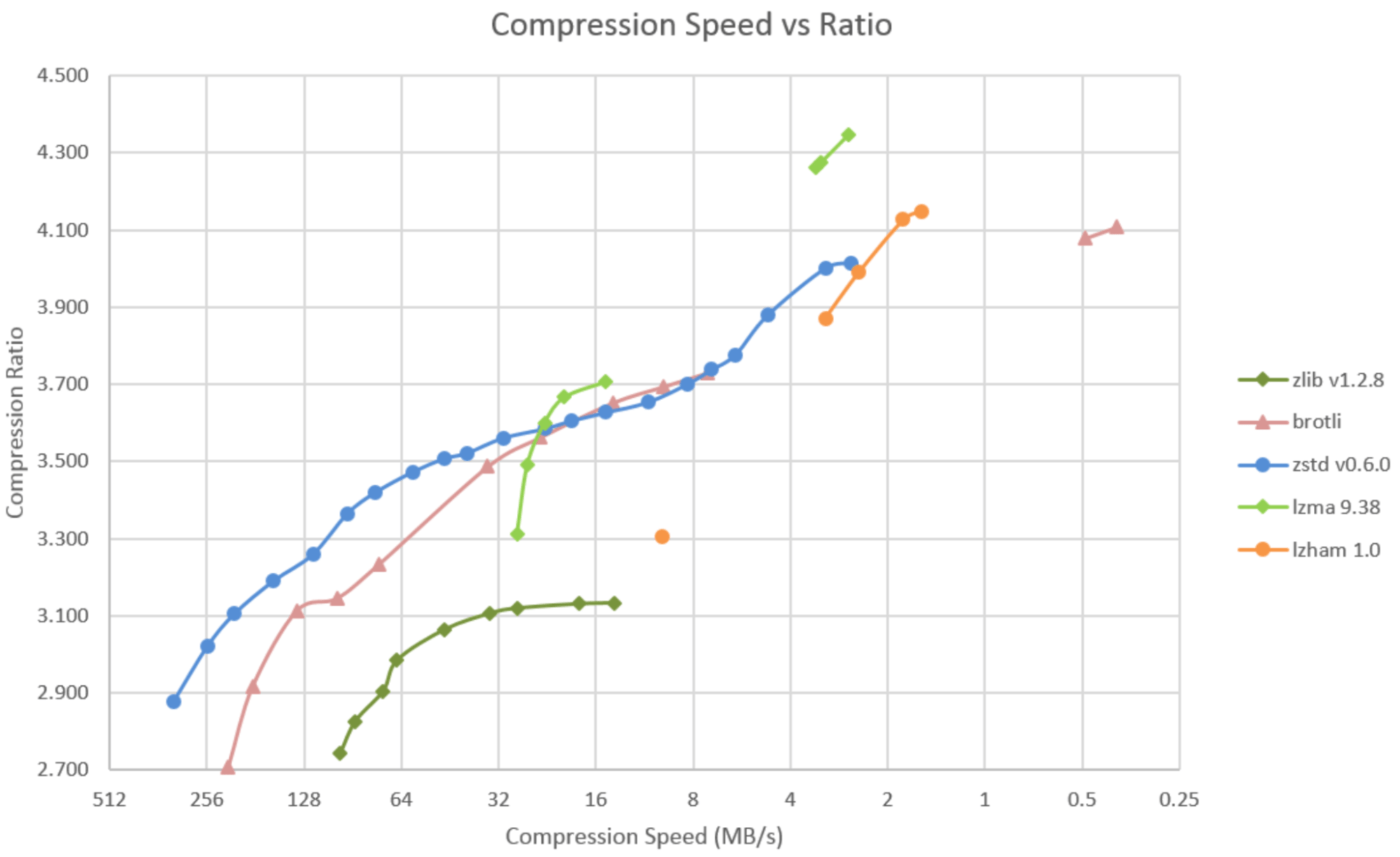
What it comes down to is, if you care about compression time, gzip is the winner; if you care about compression ratio, then go with xz; if you care about tuning compression time/compression ratio, go with zstd. bzip2 just isn't compelling in either metric anymore.
In my experience zstd is considerably faster than gzip for compression and decompression, especially considering zstd can utilize all cores.
gzip is inferior to zstd in practically every way, no contest.
Not at all. Lots of benchmarks show zstd being almost one order of magnitude faster, before even touching the tuning.
Different machines and different content will change the results, as will the optimization work that's gone into these libraries since someone made that chart in 2021.
We use xz/lzma when we need a compressed format that you can seek through the compressed data.
It does achieve higher compression ratios on many inputs than gzip, but xz and zstd are even better, and run faster.
Bzip is pretty completely obsolete though. Especially because of how ungodly slow it is to decompress.
bzip2 is too slow.
xz is too complex (see https://bugs.debian.org/cgi-bin/bugreport.cgi?bug=1068024 ), designed to compress .exe files.
lzip is good, but less popular.
zstd is good and fast, but less popular.
Zstd is awesome, but has only been around for a decade, but seems to be growing.
I’ve had to do similar things in the past and it’s a great side-feature of the format. It’s a horrible feeling when you find a corrupted FASTQ file that was compressed with normal gzip. At least with bgzip corrupted files, you can find and start recovery from the next block.
I was motivated some years ago to try recovering from these errors [1] when I was handling a DEFLATE compressed JSON file, where there seemed to be a single corrupted byte every dozen or so bytes in the stream. It looked like something you could recover from. If you output decompressed bytes as the stream was parsed, you could clearly see a prefix of the original JSON being recovered up to the first corruption.
In that case the decompressed payload was plaintext, but even with a binary format, something like kaitai-struct might give you an invalid offset to work from.
For these localized corruptions, it's possible to just bruteforce one or two bytes along this range, and reliably fix the DEFLATE stream. Not really doable once we are talking about a sequence of four or more corrupted bytes.
Yep. But bzip2 is much less flexible; reducing its block size from the default of 900 kB just reduces its compression ratio. It doesn't make it substantially faster; the algorithm it uses is always slow (both to compress and decompress). There's no reason to use it when zstd is available.
I was mostly saying zstd is not just comparable to xz (as a slow but high-compression ratio format), it’s also more than competitive with gzip, if it’s available the default configuration (level 3) will very likely compress faster and use less CPU and yield a smaller file size than gzip, though I’m pretty sure it uses more memory to do that (because of the larger window if nothing else).
But in many cases, we unfortunately can't (gzip/Deflate is baked into tons of non-updateable hardware devices for example).
  * MacOS Sonoma(14.6) has tar --auto-compress and --zstd
  * OpenBSD tar does not appear to have it: https://man.openbsd.org/tar
  * FreeBSD does: https://man.freebsd.org/cgi/man.cgi?query=tar