MTR: 'traceroute' and 'ping' in a single tool(bitwizard.nl) |
MTR: 'traceroute' and 'ping' in a single tool(bitwizard.nl) |
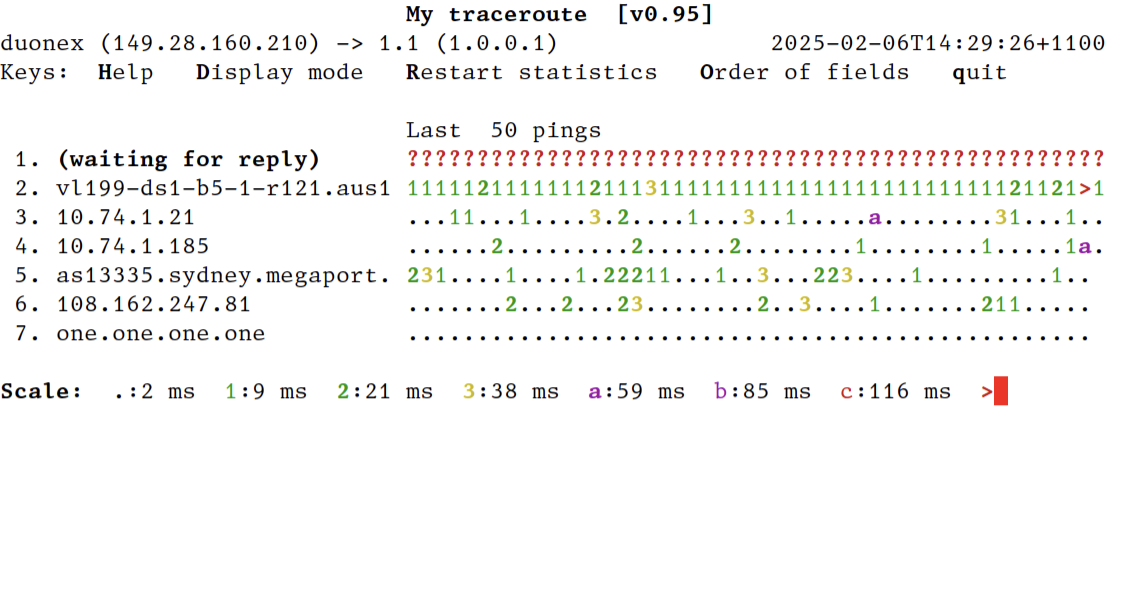
You can make mtr start in this view with --displaymode=2 (direct command line arguments, `mtr --displaymode=2 …`; or shell alias, `alias mtr="mtr --displaymode=2"`; or set environment variable MTR_OPTIONS=--displaymode=2).
Screenshot of this mode: https://temp.chrismorgan.info/2025-02-06-hn-42924182-mtr-dis...
—⁂—
¹ 1.1 = 1.0.0.1 = Cloudflare public DNS, a convenient nearby public internet endpoint.
I like the work https://fasterdata.es.net/ does. They provide clear guides and set expectations if you want to get more bandwidth out of a connection.
sudo apt install mtr-tiny
One thing I've not understood is why will some hops have consistently lower ping times than hops farther down the chain in the same trace?
Is it indicating that the router is faster at forwarding packets than responding to ping requests?
https://archive.nanog.org/sites/default/files/traceroute-201...
Exactly this. In most “real” routers, forwarding (usually) happens in the “data plane”. It’s handled by an ASIC that has a routing table accessible to it in RAM. A packet comes in on an interface, a routing decision is made, and it goes out another interface - all of this happens with dedicated hardware. Pings (ICMP Echo requests), however, get forwarded by this ASIC to a local CPU, where they are handled by software (in the “control plane”).
You’re really seeing different response times from the two control planes - one may be more loaded or less powerful than another, regardless of the capacity of their data planes.
Maybe the only thing I've explained more in my career than this is why it's ok that your Linux box has no "free" memory.
Beyond that technicality, your guess is often right... Routers will frequently prioritize forwarding packets over sending the TTL exceeded packets tools like MTR use to measure response times.
Obviously you know, but for anyone else reading, a modern traceroute tool (like mtr) can send icmp, udp or tcp, on generic or specific ports. Indeed the default for mtr on my laptop is to use icmp.
However, it could also be the case that the routing back to you is significantly different, so you can have a much longer path to you from router N than router N+1.
This is more likely to happen on routes that cross oceans. Say you're tracing from the US to Brazil. If router N and N+1 are both in Brazil, but N sends return packets through Europe and N+1 sends through Florida, N+1 returns will arrive significantly sooner.
I believe most of the time this is the reason indeed. Answering an ICMP error to a TTL expiration or to an echo request is very low priority.
This latency in error message generation may even be a better signal of the router load than the latency of the actualy trip through it.
Incidentally, if you suspect you yourself are this, I can't recommend any book more highly than Michael W. Lucas's Networking for Systems Administrators. Don't be fooled by the title - the whole idea is to get you to the level where you can talk to a network engineer without looking totally clueless, and no farther - an excellent stopping point.
I would recommend it handily over, say, my own Intro to Networking class in college. And yes, `mtr` is mentioned by name in it!
I'm 100% sure the only reason so many programmers know how NAT works is because NAT breaks video games.
https://movingpackets.net/2017/10/06/misinterpreting-tracero... (discussion at https://news.ycombinator.com/item?id=15474043 )
The other issue with packet loss is the tool doesn’t handle ICMP properly in the first place. A ping flood to an end to end host like 1.1.1.1 shows 0% loss, but when I use mtr to do flood like pinging it shows my wifi router with 100% loss. If I ping flood my router I get 0%.
It’s genuinely a bad tool and you should really just be keeping ping and traceroute separate as they do completely different things.
Yeh. There is a very achievable level of knowledge about networking that's enough to make a lot of practical problems solvable.
Like, my practically acquired patchwork of knowledge about subnets, routing, some DNS, some VPN tech, maybe some ideas of masquerading and NAT'ing is easily enough to run a multi-site production environment across a number of networking stacks. And I wouldn't really call these things hard. I don't like people who are like "I don't know networking" once you say "routing table". The hardest part there is to understand how things are often a very large amount of very local decisions and a bunch of crossed fingers to get a packet from A to B. Oh an no one thinks about return paths until they run a site to site VPN.
But just a few steps beyond that is a cliff dropping into a terrifying abyss of complexity. LIke I know acronyms like BGP, CGNAT, ideas like Anycast DNS and kinda what they do, but it turns into very dark and different magik rather quickly. I say if we need that, we need a networker.
... and filesharing, from the days when bittorrent was huuuuge.
I will go for the tool because it is the only one that warns about such a problem.
If you run it in TCP or UDP mode you can even nail down the physical interface that's erroring in a LAG/LACP bundle due to being able to manipulate the 5 tuples very well.
I'm also curious about the flags you used for ping and mtr that showed you this discrapancy.
An argument could be made for a device configured as such to show loss on ping but not on mtr if you configure the rate limits so that the icmp reply rate is lower than ttl expired rates. Which tool would be wrong than? Would you blame ping for producing misleading results?
The running counters and the ability to pick out the obvious rate limiting when the loss doesn't cascade into the hops to me is akin to traceroutes * * * output. It doesn't always mean that the packets are blackholed, connectivity is broken, it just means the tool is producing an artifact due to network configuration or network characteristics. Further investigation is needed to figure out what's going on.
MTR imho is giving you much more insight into the network than traceroute or ping separately. It doesn't resolve the usual firewall/rate limiting artifacts, but gives you way more information about paths if you know how to interpret them.
"Great tool for misleading results." -> the results the tool provides are either mostly misleading (many are misleading), or are in large part misleading (a large part of each is misleading), potentially both
"Traceroute is easy to be misinterpreted" -> the results the tool provides are easy to misinterpret
"They are only misleading if you allow yourself to be misled by them" -> the results the tool provides require expertise to interpret, implying that otherwise they're (largely) misleading - the same thing the person said right above you
This is turning into a "well I like it and it has its place". Cool, it's just not what was being argued.
MPLS don't have to hide routers though, up to the operator, even if they do it will give you idea of where things went wrong and you can contact the correct people. Load balancing links is either lacp or ecmp, first case doesn't really matter and in the second you'll just see multiple responses on a hop. Neither really had any impact on how useful traceroute is and doesn't really mislead.
That said, in practice for the majority of end users, they will not be directly impacted by asymmetric routing, if only because so many services are now cloud-based and the major cloud devices are direct peered with all of the major ISPs at regional meeting points in most countries. As an example, on my connection in Denver on Comcast, going to most applications in AWS will enter the AWS network /in Denver/ and without traversing any transit provider, meaning effectively my traffic never goes across "the Internet", it goes from Comcast (my provider) directly to AWS (the provider for the application).
While it's always good to be mindful of the complexities of real-world routing, for the vast majority of common use cases now, entry-points to the target application are so widely distributed that the most impactful routing is inside the private network of the cloud provider, not across the larger Internet.
Disclaimer: Opinions are my own.
Packet traces do not lie, per se, but they represent only a certain perspective. More perspectives are needed for problems to come into focus.
Recently my mother felt misled by a car commercial. Her position was that saying things like "under this many years or that many miles" is misleading, because it suggests that it's a set of options she can pick from (which of course ended up not being the case).
Unfortunately for her, this is a natural language construct - whether she understands it correctly or not depends on how aligned her common sense regarding it is with people at large. She understood it differently and thus felt misled. But you may notice that ultimately it was her own mistaken understanding of the common parlance that misled her. So when she said this was misleading the only thing I could reasonably say was exactly this. That I did not find the phrasing misleading, and I'm sorry she'd been misled by it (irrespective of whether that was on her or on the world, as that doesn't really matter).
It's completely on people how they want to handle this. You can find people being misled by stuff like this to be unreasonable and just tell them so, or you can put out a disclaimer regardless. Depends completely per case. This goes all the way to having multiple mechanical interlocks at places with heavy duty xray sources, or preferring machine checked memory management.
I'm not sure I understand what you're saying, but in this case control-plane packet rates are different for generating TTL exceeded vs Echo Response, where one is giving 80% loss and the other is giving 0% loss at similar rates. Gripe #1 why are we even testing control plane in the first place, it's a useless metric that doesn't have utility at measuring end to end latency/loss.
> An argument could be made for a device configured as such to show loss on ping but not on mtr if you configure the rate limits so that the icmp reply rate is lower than ttl expired rates. Which tool would be wrong than? Would you blame ping for producing misleading results?
Sure that would be a problem, but any combination could be misleading if the data path is yielding 0% loss for high rates of ICMP end to end. This is why it's not a very particularly helpful metric and can be downright misleading (usually not to me, but I've seen plenty people make incorrect inferences from bunk MTR results because the tool isn't intuitive).
> The running counters and the ability to pick out the obvious rate limiting when the loss doesn't cascade into the hops to me is akin to traceroutes * * * output. It doesn't always mean that the packets are blackholed, connectivity is broken, it just means the tool is producing an artifact due to network configuration or network characteristics. Further investigation is needed to figure out what's going on.
Sure that's great, not particularly helpful to the masses who misunderstand the tool. I worked as a network engineer for a decade receiving bunk MTR reports where people freak out because they're seeing "packet loss" which was inexistent on the data forwarding plane (you know the one that actually matters).
> MTR imho is giving you much more insight into the network than traceroute or ping separately. It doesn't resolve the usual firewall/rate limiting artifacts, but gives you way more information about paths if you know how to interpret them.
Time shouldn't be wasted measuring the control path and then investigating to confirm it is the control path and not data path. You cannot make these mistakes using traceroute and ping separately because traceroute doesn't have a notion of a "per-hop" loss indicator and ping doesn't involve intermediate hops (unless an intermediate hop generates an ICMP diagnostic for an echo request).
Understanding can be improved. Bunk MTRs are easy to spot. You tell them this is not an issue because .... . Than they will learn and usually that customer will stop sending you bunk MTRs.
I'm pretty sure that the people that are opening tickets with providers/network teams because they have nothing better to do is nearing 0. The fact that they ran an MTR shows that they were doing some troubleshooting and at the end of the day a problem needs to be solved. It may not be on your end but that needs to be investigated but the same would apply for a crappy iperf throughput test. IMHO Any clue/information into where that problem is, is helpful. You may need to filter relevant from irrelevant.
But if I get to pick one out of 2 problems, one has a crappy iperf results, the other has an MTR that has a loss that carries over, I would probably pick the second because that at least gives me indication on whereabouts should I start looking.
> Time shouldn't be wasted measuring the control path and then investigating to confirm it is the control path and not data path. You cannot make these mistakes using traceroute and ping separately because traceroute doesn't have a notion of a "per-hop" loss indicator.
traceroute does have per-hop indicator, it's the * in the output, it's just so often off that nobody pays much attention. You can't really catch issues that are related to route-flaps or reroutes with traceroute. with MTRs it becomes pretty clear if a reroute happens in the middle of your test. I guess you can keep running traceroute but I will leave it to you to sift through the output of that nightmare and than it effectively became MTR, with worse output.
There are also many options available in MTR that is not there in traceroute (to trigger these packets by tcp or udp packets), fix local or remote port etc. Even if you just run it with 3 packets per hop, you will have way more options. You don't have to use it as a continuous monitor to indicate packetloss but can give you the traceroute level information in a much cleaner format and you have more options to choose from.
> ping doesn't involve intermediate hops (unless an intermediate hop generates an ICMP diagnostic for an echo request).
ICMP echo requests and replys can be subject to different QoS treatment as TCP/UDP traffic, so that also doesn't necessarily gives you the right idea when testing for end to end connectivity issue. Iperf imho is the best bet, and if you want to be really accurate you pick the src/dst port for client/server just to be sure you get into the same Class as your problematic traffic.
As a sidenote MTR packets are also ride the data-plane until they reach the TTL=1.