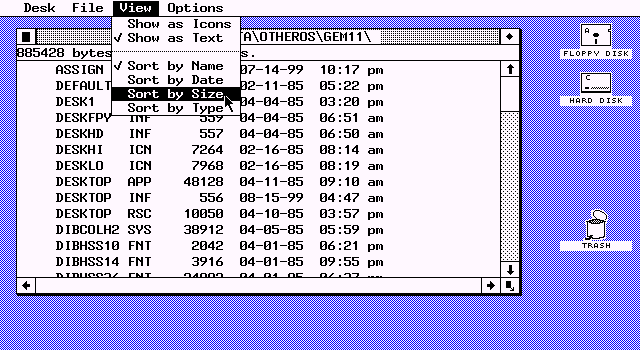
X to close(medium.com) |
X to close(medium.com) |
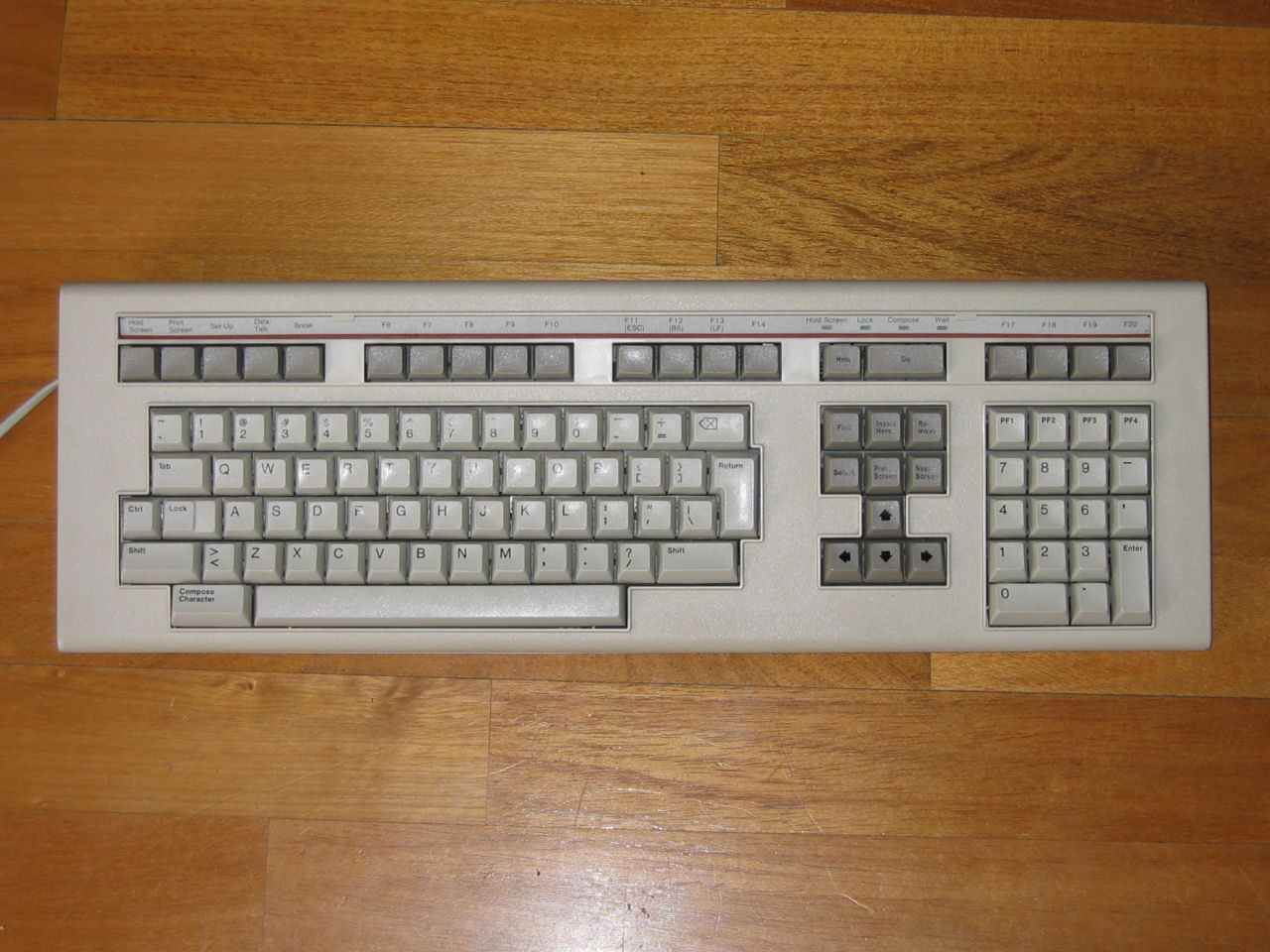
No [x] to close these 1980's text editors either. X was commonly used to delete characters in-line, but not to close the program."
Hmm... I've used :x to write+quit in Vim for years. And, :X is to encrypt+quit. Don't have a year when that was added though. Could be fun to try and dig that up.
:x (short for :xit) was in the original ex written by Bill Joy in 1976. According to Joy[1], ex pulled together ideas from a few different places:
1. em from QMC, written by George Coulouris[2]
2. a modified version of ed from UCLA
3. An early version of ex written by Charles Haley based on the em source in 1976
4. Bill Joy himself
em uses 'x' for its interactive find-and-replace mode ("exchange"), so it didn't originate there. That leaves 2, 3, and 4 as possible origins. I can't find anything on the UCLA ed. If the origins are in 3 or 4, :x is from 1976.
[1] http://roguelife.org/~fujita/COOKIES/HISTORY/1BSD/exrefm.pdf
It would be fascinating if there was a text mode [x] somewhere, especially if it was in common software.
EDIT: It's not in Norton Commander.
One quick thing, IIR Windows 2.0 and 3.0, the '-' button in the upper left wasn't "close". It was a small menu that happened to have close as an option.
http://en.wikipedia.org/wiki/OS/2#mediaviewer/File:Os2W4.png
I clearly remember that for closing windows one could do alt+f4 (which was itself a shortcut to Close) or open the file menu (Alt+F) and select eXit.
I can't check but I believe it was the same for Write and notepad as well and any other programs that had the Exit option.
So maybe that's where the windows 95 developer took inspiration for the X icon
The [X] icon in graphic windows software (not in WordStar, Vim, etc), and not thinking as a letter of the alphabet (remember that maximize and minimize don't are also) but just as picture, it remembers me something collapsing. Like something bigger in a normal state with the borders collapsing to a center till disappear. As when you turn off and old CRT television (or an Android powered cell phone).
I conclude these three icons are really good and well designed.
That said, since the "X" in this case is white on a black background, I always interpreted the icon as four arrows pointing inward to indicate a shrinking/disappearing motion. In fact, when you closed a window, GEM would play an (inelegant) animation akin to the Macintosh of the time, composed of a sequence of boxes first shrinking from the size of the window to a small box and then shuffling that off to the top left of the screen.
As bemmu points out, the maximize button (at the top right in a GEM/TOS window) is four arrows pointing outward. Incidentally, GEM did not have a notion of "minimize."
Put another way, although I find the Japanese inspiration argument interesting, I don't think there's a whole lot to it. I think it's a fun coincidence.
In any event, thank you for the trip down memory lane and for the fun screen grabs!
As for "X being a true icon", I don't know. For me, it could stand as well as an abbreviation for "eXit" -> X.
The AmigaOS Workbench used (and still uses) a dot instead of a X. It's just a matter of conventions.
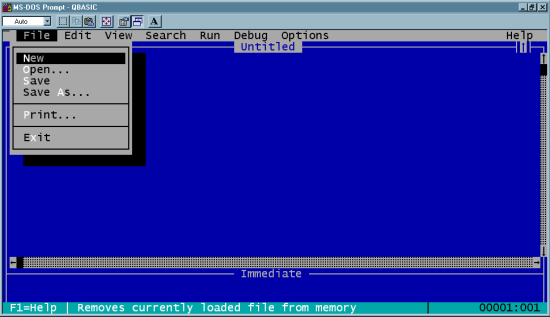
Open the File menu and 'x' is highlighted in red in the word 'Exit'.
In other words, prior to Windows 95's release, DOS programs had already set firmly in Microsoft's customers' minds that 'x' was for exit.
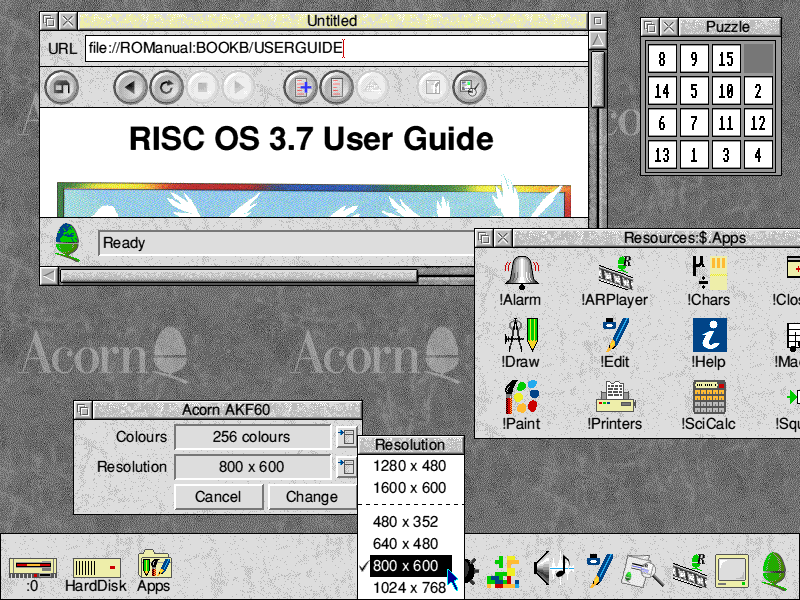
RISC OS (1987), used on Acorn computers in schools in the UK also used an 'X' close button on the windows. And look at what word is prominent in the bottom right of the desktop... exit
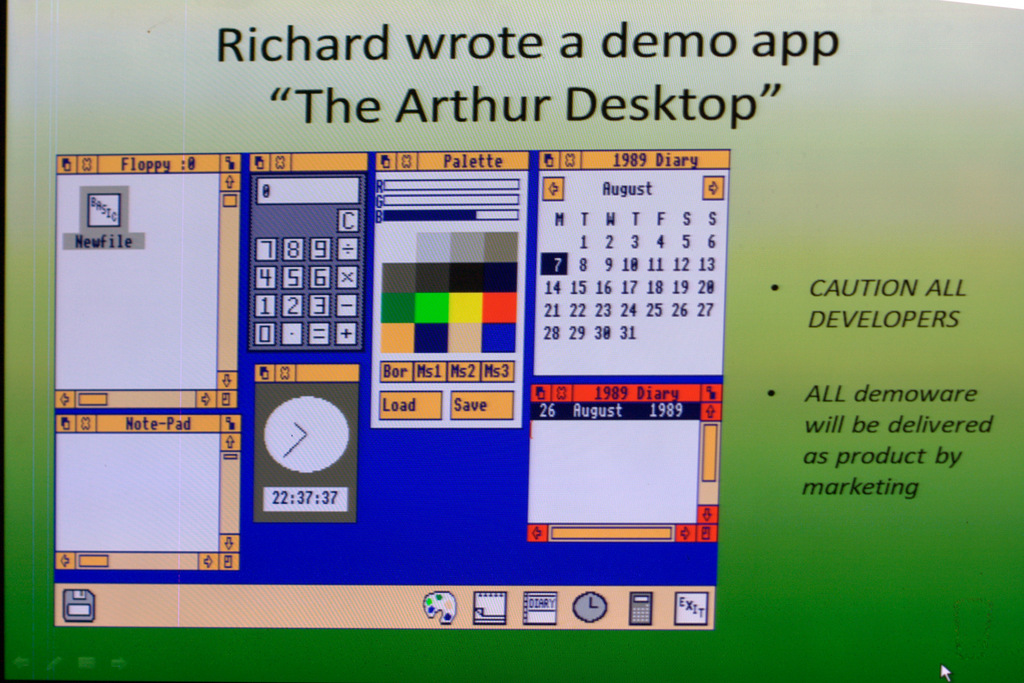
http://www.dasmirnov.net/media/blogs/blog/bigarthur.gif
It seems that as soon as the word "exit" is prominent in your UI, 'x' is going to become associated with exit.
An enormous amount of Microsoft's target market were already using Word Perfect every day and seeing red 'x's for exit. So when they decided to put a button on the window bar, what else were they likely to pick?
I wouldn't discount it; one instance where I'm pretty sure it was taken into account is the design of checkboxes (HTML and otherwise). At least in Germany a checkbox on paper would be marked with an x to represent true - but that would be utterly confusing to a Japanese person.
So the Japanese 'connection' may not be valid, but the notion that someone saw the GEMTOS symbol as an X and then influenced Windows 95 is not that far-fetched...
I was also really surprised (and glad) that the ST even got a look-in though =)
WordStar: Used "X" to Exit to system in its main menu (https://www.flickr.com/photos/markgregory/6946218793/?rb=1) - I do not know the revision shown in the screen shot.
According to Wikipedia (http://en.wikipedia.org/wiki/WordStar) WordStar was released in 1978. Which moves the date back to at least 1978 to use X for exit.
However, there is possibly a very simple explanation that the blog posting overlooked. In text menu's, such as WordStar's, which were quite common for a lot of software from that era, using the word "Exit" to mean "leave this program/application" was also common. When one goes looking for a single character memonic for "Exit" to build in as a keystroke to activate the "Exit" command from the menu, one has four choices: [e] [x] [i] [t]
Since [x] is an uncommon letter, while e, i, t, are more common, and therefore more likely to be used for triggering other commands in the menu(s), choosing [x] to mean exit meant that the same character could likely be used as a universal "leave this menu" command key across all the menus.
Which would then lead to the common _F_ile->E_x_it command accelerators in drop down style menus (whether in a GUI or in a text menuing system). [x] was unlikely to have been used for the keyboard accelerator for other entries in the "file" menu, so picking e[x]it was a safe choice.
It is not a far reach from _F_ile->E_x_it using [x] as its accelerator key to labeling the title bar button that performs the same function with an X as well, to take advantage of whatever familiarity users might have with the drop down menu accelerators
NextStep 0.8, '88 vintage.
Those were fun times!
Edit: According to etymonline.com, crossing things out dates to at lease mid 15th century: http://www.etymonline.com/index.php?search=Cross
Everyone remembers being told at school from a very early age to "cross out" things you dont want any more (such as writing the wrong word/spelling, getting the sum wrong etc). At least in western cultures anyway, this seems fairly universal.
Seems to me to be a very easy semantic jump to go from "disregard this mistake" on paper to "disregard this thing I am looking at" on computer screens.
"X marks the spot"
Checking a box to indictate your selection on a form or ballot.
I can't think of any more off the top of my head.
If ex is not your favorite editor, use EX<ESC><ESC> (at least, that is what I think Wikipedia claims. I'm sure any decent TECO user never exits their editor, browsing the web in a browser macro)
[I also checked ed and edlin. They had two commands for exiting: w writes and exits, q quits]
Probably because I'm pretty aware of the close-doors button actually looking like >|< on typical elevators. The vertical line, I guess, represents the opening.
See for instance https://www.google.com/search?q=elevator+close+button&tbm=is....
I'm sure the GUI design of RiscOS 3 helped to inspire Windows 95.
I remember there was nearly endless debate about where the [X] should go so people wouldn't accidentally. I think the desire to make it visually distinct was a big factor.
edit - Here's Arthur, the precursor to RiscOS in ~ 1986 - http://www.rougol.jellybaby.net/meetings/2012/PaulFellows/10... - It has nice x icons.
Until the NewLook sprite set, it looks more like a weird flower shape than an X.
Here it is with NewLook: http://www.guidebookgallery.org/pics/gui/desktop/full/riscos...
Clearly now an X.
As far as I know, Acorn's RISC OS also pioneered the icon bar and the context menu.
I wonder where the author got the idea that the [-] button at the top-left was a close icon. It was the "Control Box", a menu icon. AFAIK it's still there, just invisible -- hit alt+space to open it.
Disclaimer: I'm currently unable to test that.
Still there in Windows 7. It's visible in some applications (e.g., PowerShell) but not others; ALT+SPACE seems to open it consistently whether it's visible or not.
My hazy memory is that the control box was retained for accessibility and for the many users trained to use it on Windows 3.1.
I can categorically state that there wasn't any Japanese influence on that "X".
If anything, it was programmer art. We Atari folks were mostly video-game programmers, with some sense of design, and a lot of the stuff that was coming out of DRI was pretty ugly. So it probably got tweaked late a night until it "looked pretty" and wasn't revisited (the ST was started and shipped in about 10 months, so we were in kind of a hurry).
So typewriters use this symbol when they automate the overstrike or they moved to correction tape.
Edit: seems Wordstar used X too, probably starting in 1978.
To answer your question, "x" (short for eXit) was available in vi from the beginning:
ZZ Exits the editor. (Same as :xCR)
Source: Bill Joy's "An Introduction to Display Editing with Vi" http://www.verticalsysadmin.com/vi/vi_editor__bill_joy.pdf
Edit: and thanks for the vi ref.
http://cache1.asset-cache.net/gc/88203236-calendar-with-date...
Or crossing-out an item to "delete" it on the page?
Maybe it's because I was used to Windows 3.11, where you had to actually double-click the [-] button to exit an application.
First thing I do whenever I do a new Linux install is put the close button on its own on the left where it belongs.
I really wish I could do the same on Mac.
Plus, you can maximise/restore by double-clicking the titlebar which is a larger target and I expect most users learn that and almost never touch the actual button.
If the icons in upper left and right are also like that, then the upper left icon is actually four little triangles pointing inwards and not an X. The one on the right is four little triangles pointing outwards.
(Or it could be an X)
So this little article has travelled pretty far! There were a lot of good tips, comments and insights into the origin of [x] but none as good as this email that I received from Windows 95 team member Daniel Oran.
“Hi Lauren,
A friend forwarded me your Medium piece, “X to Close.” He remembered that I had worked on Windows 95 at Microsoft — I created the Start Button and Taskbar — and thought I’d be amused. I was! :-)
It’s fun to see how history gets written when you actually lived those long-ago events. I joined Microsoft in 1992 as a program manager for the user interface of “Chicago,” which was the code name for what eventually became Windows 95.
So, who was responsible for this last minute change? As far as I can tell, this person is responsible for the proliferation and widespread use of [x] in UI design today.
It wasn’t a last-minute change. During 1993, we considered many variations of the close-button design. And the source wasn’t Atari. It was NeXT, which had an X close button in the upper right, along with the grayscale faux-3D look that we borrowed for Windows 95.
I wanted to put the Windows X close button in the upper left, but that conflicted with the existing Windows Alt-spacebar menu and also a new program icon, which we borrowed fromOS/2, on which Microsoft had originally partnered with IBM.
Attached is the earliest Chicago bitmap I could find that includes an X close button. It’s dated 9/22/1993. (In attaching the file to this email, I just realized that it’s so old that it has only an eight-character name. Before Windows 95, that was the limit.)
Thanks for your very entertaining essay!
Best,
Danny”
I guess you could say case [x]ed.
Thanks again to everyone who helped track down earlier examples of GUIs and early text editors that used [x] to close as well. Fascinating!
I'm trying to think of any cases where this is true. Stop signs aren't crosses, they have a special shape.
A behavior still present in modern versions.
There is no reason to suppose that the GUI usage was inspired in any way by exotic Japan. The X as "cancel symbol" has been quite common in the west and indeed worldwide for millenia.
First, it's properly ^K X, as the ^K prefix subcommands block/file actions, as written by Rob Barnaby into all the WordStar versions starting with CP/M.
Second, ^KX as 'exit' means to save the latest revisions out to file before quitting, while ^KQ, 'quit', means to abandon the revisions. You might get a confirmation dialog and a chance to change your mind before you're dumped back to the commandline.
Current-convention iconic close-window behavior more closely emulates the latter.
On WordStar 7.0a for dos, the main start screen menu selection is "X exit WordStar".
I read an awesome piece a while back (and for the life of me I can't remember where) that said if you want to design for the future, estimate what computing power will be available in 10-15 years then buy that for your developers.
In that project I think they spent 186,000 per machine per user on average but they where designing software light years ahead of its time.
I'd be curious to know what caused that convention to change in the west.
The XBox controller has a swapped A/B pair and uses A confirm B cancel.
The Genesis' button layout was A,B,C arranged in a diagonal from bottom-left to top-right. A was usually 'accept'. The Dreamcast had a diamond with A at the bottom and B to the right.
Nintendo's Famicom buttons read A,B from right-to-left, and that trend continued with the Super Famicom's diamond, which had A to the right and B at te bottom. The N64 had a weird layout, but again B was to the left of A.
Sony probably focus tested the pad in the US and found that players were more used to Sega's layout.
[edited]
example : final fantasy 7 control bindings. http://www.cavesofnarshe.com/ff7/buttons.php
There's frequently a setting to configure if it truly closes or not, but it's not usually there for more mass-market targeted apps (death by settings and configuration options to support being the likely cause).
It does mess with everybody's expectations of closing the last window freeing space on the taskbar though.
It's still true today, for instance dark souls on the ps3 uses O to accept on the japanese version and X on the western.
I'm still not sure why Sony did that by the way. While I'm willing to believe that X strongly means "bad/false" in japanese, I don't feel like it really means "accept" in western cultures as far as I know. When the playstation came out I don't think I would have had a lot of trouble accepting O for accept and X for cancel.
http://en.wikipedia.org/wiki/Atari_TOS#mediaviewer/File:ST_D...
Looks pretty X-like. It seems GEM itself was licensed from Digital Research but their GEM didn't use X.
Edit: Fixed DEC to DR, as pointed out by reply comment below.
The other project wasn't trying to create a product they where trying to capture a sense of what hardware would be on every desk in 10 years and design for that, in effect skating to where the puck will be rather than where it is.
I wish I could remember where I read it :|.
When the Playstation 1 was released, the two consoles consumers could have been familiar with in the west were Super Nintendo and Sega Megadrive. SNES had the familiar ABXY, but mirrored with AX on the right. It used A for yes and B for no. The Megadrive had the aforementioned ABCxyz and also used A for yes and B for no. Meaning, one console used the bottom button for yes and the one on its right for no (Megadrive), while the other had the bottom button for no and the one on the right for yes (SNES).
So I doubt SONY copied the competition for their decision to swap the yes/no buttons.
Those of us that grew up with Nintendo consoles would say that B on the left of A is the natural order of things ;)
>Meaning, one console used the bottom button for yes and the one on its right for no (Megadrive)
Actually, almost every Megadrive game I've played lets you use both A and C for accept in menus, so you could use whichever orientation you were more comfortable with.
> I doubt SONY copied the competition
IIRC this wasn't decided by SONY, each game used its own variation until a standard was created organically.
Used many times.
That was one of the old differences between Windows and OS X behavior (or app-centric vs window-centric).
If you're reffering to Windows, then X usually closed the app too.
I think his point is the X closes the window, and many, but not all, Windows applications also choose to quit when their (last) window is closed.
My guess is that Sony thought that X and O wouldn't have as obvious connotations outside of Japan, and figured that people would assume the button closest to the player (X) would be the OK button. In practice, I have found that people with very little exposure to Japanese culture still have the same association with X and O in their heads and get confused when using Playstations ("you press X to accept???"), so I'll curse Sony forever for this stupid regional change.
That's not to say that those expectations weren't due to cultural differences.
On top of that, the DOS market in that era always preferred to make the tradeoff in favor of higher color depths rather than higher resolutions. At 640x480, a VGA display contemporary to NeXTStep could display 16 colors, and at 320x200, 256 colors.
I think I'd characterize it a little differently: I remember games favoring 256-color modes (320x200, ModeX, etc.) and productivity applications favoring higher resolution. At the time, having both high bit depths and high resolution at the same time was asking too much of the hardware.
To put it in perspective, for a while, my desktop PC was an older generation 486/33. When I say 'older generation', what I mainly mean is that it was one of the last machines that lacked a local bus of any kind. This put the video board behind an ISA-bus, which was lucky to sustain 8MB/sec shared across all peripherals. Just looking at the bus, it couldn't update a full 1024x768 desktop at more than 10Hz. (320x200 was well over 100Hz).
But when it came to productivity applications, they were probably more conservative than anything else on the PC platform. Even though I had this great video card and could run Windows 3.1 at high resolutions, I still exited to DOS to run WordPerfect in 80x25 text mode.
I actually recently came across a box of floppies that I used in middle school. Schoolwork that I did in 7th grade, in 1992, was all saved in WordPerfect 5.1 format. Stuff from 8th grade, 1993, was in Ami Pro format. So I'm fairly certain that I didn't start using any productivity software in Windows until about 1993.
The only graphical productivity application I remember using prior to that, under DOS, was Ventura Publisher, which, IIRC, actually used a custom version of the GEM GUI. But I ran that on my 8088 XT-clone in EGA mode.
Regarding software, my family and I went straight over to Windows productivity software with the release of Windows 3.0. The back story behind that was that our first printer (ca. 1986-7) was a Toshiba P321. This was a relatively new, 24-pin printer that was almost completely unsupported by the DOS software that we had. Windows 3.0 solved the support problem by giving us a single, good printer driver that worked for anything that could print through the Windows API. Between that, the protected mode memory manager, and support for 16 color 800x600, Windows was a compelling enough package that we immediately switched over almost entirely in 1990.